Maria Rodriguez stared at her phone in disbelief. The Instagram account used her headshot—a professional photo from her LinkedIn—but everything else was fake. The bio claimed she ran cryptocurrency trading courses. Dozens of messages filled the comment section from people who’d lost money. She had never posted about crypto. She didn’t even own any. Someone had stolen her face to build trust, then vanished with other people’s savings. Maria needed answers fast: where else was her photo being used, and who was behind it?
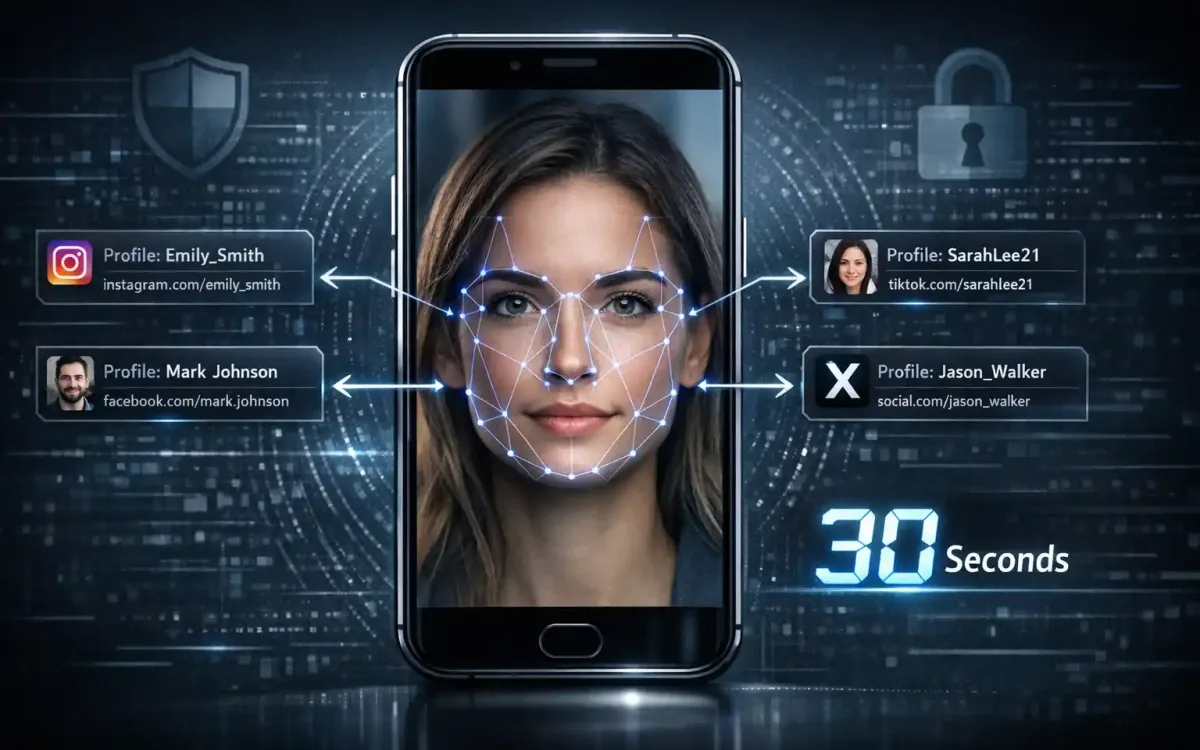
That’s where social media facial recognition technology steps in. Upload one photo, and within seconds you can scan Instagram, Facebook, TikTok, and X simultaneously to uncover every public profile using that face. No software downloads. No technical expertise. Just fast, accurate results that help everyday users reclaim control, verify identities, and stop impersonation before it spirals.
Social Media Facial Recognition and Why People Search for It
Social media facial recognition means using an uploaded photo to identify and locate profiles across multiple platforms. Traditional reverse image searches find visually similar pictures—same background, same outfit. But facial recognition isolates the face itself, matching bone structure, eye spacing, and unique facial geometry even when lighting, angles, or accessories change. That precision matters when someone crops your photo, applies a filter, or combines your face with a different background.
According to a 2023 Federal Trade Commission report, impersonation scams cost Americans over $1.1 billion in losses, with social media serving as the top contact method for fraudsters. Identity theft affects roughly 15 million U.S. residents annually, per Javelin Strategy & Research data. Many victims discover the fraud only after brands, employers, or friends alert them to fake accounts using their images.
What “Facial Recognition Online” Means for Social Platforms
Facial recognition online analyzes geometric patterns in a face—distance between pupils, nose width, jawline contour—and converts them into a numerical signature. When you upload a photo, the system compares that signature against millions of public social media profiles. Within about 30 seconds, it flags matches across Instagram, Facebook, TikTok, and X. The technology works even if the original photo has been resized, cropped, or color-corrected, because the underlying facial geometry remains constant.
The Problems It Solves for Everyday Users and Teams
Everyday users hunt for fake profiles that hijack their photos to catfish strangers or run scams. Parents search for teens who create hidden accounts under pseudonyms. HR teams verify job applicants’ online presence to spot embellished résumés. Brand managers track influencers who misuse company imagery. Law enforcement and fraud investigators trace impersonation networks. A 2022 Pew Research Center survey found that 41% of Americans have personally experienced online harassment, and image-based abuse—revenge porn, deepfakes, fake profiles—accounts for a growing share of reported incidents.
How an AI-Powered Face Search Engine Works Across Instagram, Facebook, TikTok, and X
Modern face search engines combine computer vision, machine learning, and large-scale database indexing. First, an AI model detects faces in the uploaded photo and extracts feature vectors—mathematical representations of unique facial landmarks. Next, the system queries indexed public profiles on Instagram, Facebook, TikTok, and X, comparing your feature vector against stored profile pictures. Finally, it ranks results by confidence score, flagging high-probability matches and filtering out false positives using secondary checks like username patterns and account metadata.
Face2social illustrates this workflow. Users drag and drop a photo onto the platform’s web interface. The system processes the image in approximately 30 seconds, scanning its extensive database of public social media user pictures. Because the engine searches multiple platforms simultaneously, you receive a consolidated report instead of running separate lookups on each network. That efficiency saves time and reduces the risk of missed accounts.
Simultaneous “Search Instagram by Face” and Other Platforms from One Upload
Cross-platform search eliminates guesswork. Scammers often replicate a stolen photo across Instagram, Facebook, TikTok, and X to maximize reach and credibility. A single-platform search might catch one fake account while missing three others. By querying all four networks at once, the engine exposes the full scope of impersonation. Face2social’s database aggregates public profile pictures from these platforms, so one upload yields comprehensive coverage without requiring you to log into each service individually.
Fast Results in About 30 Seconds with No Software Install; Beginner-Friendly Flow
Speed and simplicity lower the barrier to entry. Traditional reverse image searches demand multiple browser tabs, manual filtering, and interpretation of ambiguous results. Face2social’s web-based interface requires no downloads, no app installs, and no technical training. You upload, wait half a minute, and receive a preview of potential matches. The beginner-friendly flow means anyone—parents, small business owners, non-technical professionals—can run a search without needing IT support.
Free Results Preview; Pay Only to Unlock Full Names and Profile Links if Matches Are Found
Transparent pricing builds trust. Face2social offers a free results preview that shows you how many matches were found and their confidence levels before you pay. If the system finds no results, you owe nothing. Only when you want to reveal full names and clickable profile links do you complete a transaction. This “no results, no payment” guarantee reduces financial risk and ensures you invest only in actionable intelligence.
Reverse Image Lookup Support to Track the Source of Social Media Images
Reverse image lookup extends beyond profile photos. Content creators track stolen artwork or photography. Journalists verify the origin of viral images. Parents investigate suspicious accounts messaging their children. By indexing not just profile pictures but also user-uploaded content, advanced engines help trace an image back to its earliest known public posting, revealing whether someone reposted without credit or fabricated a narrative around a stolen photo.
Practical Use Cases: Why People “Find Social Media by Photo”
Real-world demand for facial recognition spans personal safety, professional vetting, and creative rights enforcement. A 2021 Norton Cyber Safety Insights Report found that 37% of adults worldwide have experienced identity theft, and social media account takeovers rose 1,000% between 2017 and 2020, per Sift’s Q4 2020 Digital Trust & Safety Index. Understanding common use cases clarifies when and why this technology delivers value.
Verify Identities and Detect Fake Social Media Accounts or Impersonation Profiles
Impersonation erodes trust and causes tangible harm. Romance scammers build fake profiles using stolen photos to manipulate victims emotionally and financially. The FBI’s Internet Crime Complaint Center reported that romance scams alone caused $956 million in losses in 2022. Business email compromise and phishing attacks often rely on hijacked executive headshots to deceive employees. By running a facial recognition search, individuals and organizations quickly identify whether a profile photo appears on multiple accounts under different names—a red flag for fraud.
Parents use the technology to monitor teens’ online activity. A teenager might create a secondary Instagram account to evade parental oversight, using a cropped or filtered version of a family photo. A quick face search reveals the hidden profile, enabling intervention before risky behavior escalates. Employers vet candidates by confirming that the LinkedIn headshot matches other social media profiles, catching resume fabricators who borrow professional photos from unrelated individuals.
Reconnect and “Find Someone by Picture” When Names Are Unclear or Missing
Memory fades, but faces endure. You meet someone at a conference, snap a group photo, then forget their name. Traditional social media searches require at least a partial name or username. Facial recognition lets you upload the photo and discover their profiles directly. Adoptees search for biological relatives using decades-old photographs. Genealogists match historical family portraits to living descendants’ social media accounts. Journalists identify witnesses or sources who declined to provide contact details but appeared in public event photography.
Reconnection also supports mental health. A 2020 study in the Journal of Social and Personal Relationships found that reestablishing contact with lost friends correlates with improved well-being and reduced loneliness. When someone changes their name after marriage, transition, or relocation, facial recognition bridges the gap, transforming a forgotten face into a renewed connection.
Attribution, Credit, and Safety: Social Media Image Lookup for Creators, Brands, and Families
Photographers and graphic designers combat image theft daily. A wedding photographer discovers their portfolio images on a competitor’s website. A digital artist finds their fan art reposted without credit, generating ad revenue for the thief. Facial recognition helps trace stolen content back to the original creator, providing evidence for DMCA takedown requests or copyright litigation. The U.S. Copyright Office processed over 443,000 copyright registrations in 2022, and image theft disputes represent a significant portion of enforcement actions.
Brands monitor influencer partnerships. An influencer might claim exclusive representation of a product but secretly license their likeness to competing campaigns. A face search reveals overlapping endorsements, protecting brand integrity. Families enhance safety by checking whether children’s photos—posted innocently on a parent’s public account—have been scraped and reused by strangers. The National Center for Missing & Exploited Children reports that online predators frequently harvest children’s images from social media to create fake profiles or exploit them in other contexts.
Step-by-Step: Run a Profile Picture Search and Interpret Results
Effective searches require preparation, platform selection, and critical evaluation. Rushing through the process yields false positives or missed matches. Following a structured workflow maximizes accuracy and actionable insights.
Prepare the Right Photo: Quality, Framing, and Ethical Considerations
Image quality directly impacts match rates. Use high-resolution photos where the face occupies at least 25% of the frame. Avoid heavy filters, sunglasses, or obstructions that obscure facial features. Front-facing or slight three-quarter angles work best; extreme side profiles reduce recognition accuracy. Ethical considerations matter too. Only search for faces when you have a legitimate reason—verifying your own identity, protecting a minor in your care, or conducting authorized workplace due diligence. Avoid searches intended to stalk, harass, or discriminate.
Upload the Image and Choose Platforms; Refine “Search Instagram by Face” and More
Drag and drop your prepared photo into the search interface. If the platform offers platform-specific filters, select Instagram, Facebook, TikTok, and X to ensure comprehensive coverage. Some engines allow geographic or demographic filters—useful if you know the target likely resides in a specific region. Hit “search” and wait approximately 30 seconds. The system processes the image, extracts facial features, and queries indexed profiles across your selected networks.
Read Your Preview, Evaluate Confidence, and Decide When to Unlock Links
The free preview displays the number of potential matches and confidence scores—typically expressed as percentages. A 95% match indicates strong geometric similarity; a 60% match suggests possible resemblance but warrants closer inspection. Review profile thumbnails and usernames. If the preview shows zero results, no payment is required. If high-confidence matches appear, unlock full names and clickable profile links to investigate further. Cross-reference account activity, mutual connections, and post history to confirm identity before taking action.
Accuracy, Coverage, and Limitations of a Face Recognition Search Tool
No facial recognition system is infallible. Understanding factors that influence accuracy helps set realistic expectations and reduces over-reliance on technology.
What Influences Match Quality: Lighting, Angles, Occlusions, and Time Gaps
Poor lighting creates shadows that distort facial geometry. Harsh overhead light flattens features; backlighting obscures details. Extreme angles—looking sharply up or down—alter perceived proportions. Occlusions like masks, hands, or hair covering the face reduce the number of extractable landmarks. Time gaps introduce natural aging: a search using a 10-year-old photo may miss current profiles if facial structure has changed due to weight fluctuations, cosmetic procedures, or aging. A 2020 National Institute of Standards and Technology evaluation found that top-tier algorithms achieve over 99% accuracy under ideal conditions, but performance drops to 70–85% with poor lighting or significant aging.
Platform Coverage, Public Availability, Lookalikes, and Handling False Positives
Platform coverage depends on the engine’s indexing scope. Face2social scans Instagram, Facebook, TikTok, and X, but does not cover LinkedIn, Snapchat, or regional platforms like VKontakte or WeChat. Public availability matters: private or locked accounts may not be indexed. Lookalikes—individuals with similar facial geometry—generate false positives. Identical twins, siblings, or unrelated doppelgängers can confuse algorithms. Always corroborate matches with secondary information: username, bio, post content, mutual connections. Treat facial recognition as a lead generation tool, not definitive proof.
Privacy-Aware, Ethical, and Legal Use: What to Know Before You Search
Facial recognition intersects privacy rights, ethical norms, and evolving legal frameworks. Responsible use protects both searchers and subjects from harm.
Responsible Use Guidelines: Consent, Context, and Avoiding Harassment or Discrimination
Obtain consent when feasible. Searching for your own face or a minor in your custody is straightforward. Searching for an adult requires justification: verifying a business partner, investigating suspected fraud, or fulfilling a legal obligation. Context matters. Using facial recognition to identify a whistleblower, stalk an ex-partner, or discriminate based on appearance violates ethical norms and may breach laws. The American Civil Liberties Union warns that misuse of facial recognition enables surveillance, harassment, and chilling effects on free expression. Avoid searches motivated by curiosity about strangers, personal vendettas, or discriminatory intent.
Data Handling and Transparency: Storage, Deletion, and Opt-Out Options
Understand how the service handles uploaded photos and search results. Reputable platforms delete uploaded images after processing or store them temporarily with encryption. Face2social’s privacy policy outlines data retention periods and offers opt-out mechanisms for individuals who wish to remove their profiles from the database. Review these policies before uploading sensitive photos. Request deletion if you change your mind. Transparent data handling builds trust and aligns with privacy regulations like the EU’s General Data Protection Regulation and California’s Consumer Privacy Act.
Laws Vary by Region: Public Interest, Workplace Rules, and Platform Policies
Legal frameworks differ globally. The EU’s GDPR restricts biometric data processing without explicit consent. Illinois’ Biometric Information Privacy Act imposes strict notice and consent requirements. China regulates facial recognition under its Personal Information Protection Law. In the U.S., no comprehensive federal biometric privacy law exists, but individual states enact patchwork regulations. Workplace use often requires notice to employees and candidates. Platform terms of service may prohibit scraping profile data. Before deploying facial recognition, consult local laws, review platform policies, and seek legal counsel if uncertain.
Alternatives Compared: Reverse Image Search for Social Media vs Facial Recognition
Multiple tools address overlapping needs. Comparing them clarifies when facial recognition offers superior results and when simpler methods suffice.
Google Lens/TinEye and Social Media Image Lookup vs “Facial Recognition Online”
Google Lens and TinEye perform pixel-based reverse image searches. They match entire images—background, clothing, objects—rather than isolating faces. If someone crops, filters, or reframes your photo, pixel-based searches may fail. Facial recognition focuses exclusively on facial geometry, delivering matches even when context changes. Google Lens excels at identifying products, landmarks, or text within images. TinEye tracks web-wide image propagation, including news sites and blogs. For social media profile hunting, facial recognition offers higher precision.
Manual OSINT and Native Platform Tools vs AI-Powered, End-to-End Automation
Open-source intelligence (OSINT) practitioners manually cross-reference usernames, email addresses, phone numbers, and metadata across platforms. Native tools—Instagram’s “Find Contacts,” Facebook’s “Search by Name”—require partial identifying information. Manual OSINT is labor-intensive and time-consuming. Native tools demand existing knowledge of the target’s name or contact details. AI-powered facial recognition automates the entire process, requiring only a photo and delivering results in 30 seconds. For users lacking technical skills or investigative experience, automation lowers barriers and accelerates outcomes.
Pricing, Access, and How to Get Started Today
Understanding cost structures and access requirements helps users budget and plan.
What You Get Free vs Paid: Preview, Confidence Hints, Names and Profile Links
Face2social provides a free results preview showing the number of matches and confidence scores. You pay nothing if no matches appear. To unlock full names, profile links, and clickable URLs, complete a one-time payment. This model ensures you invest only when actionable results exist. Pricing tiers may vary based on search volume or premium features like batch uploads or API access for enterprise users. Check the platform’s pricing page for current rates.
Start Now: Upload a Photo, Review Results in ~30 Seconds, and Scale Searches
Getting started is simple. Visit the platform, drag and drop a photo, and wait approximately 30 seconds. Review the free preview. If matches appear, decide whether to unlock details. For organizations running multiple searches—HR departments, security teams, brand managers—inquire about bulk pricing or API integrations that streamline workflows and scale operations efficiently.
FAQs About Social Media Facial Recognition and Profile Picture Search
Is this legal to use for finding profiles by photo?
Legality depends on jurisdiction and intent. Searching for your own face or conducting authorized workplace vetting is generally permissible. Stalking or harassment violates laws.
Is it really free, and when would I pay?
Yes. Preview results cost nothing. You pay only to unlock full names and profile links when matches are found.
How accurate is it, and how fast are results?
Top engines exceed 95% accuracy under ideal conditions. Results typically appear in about 30 seconds, depending on database size and server load.
Which platforms are supported today, and how often is coverage updated?
Face2social covers Instagram, Facebook, TikTok, and X. Coverage updates occur regularly as public profiles change and new accounts emerge.
Do I need to install anything or create an account?
No. The web-based interface requires no downloads or mandatory account creation for basic searches.
Will the person I’m searching for be notified?
No. Searches are passive; the platform does not alert targets or interact with their accounts.
Can it find private, deleted, or restricted accounts?
No. Only public profiles appear in results. Private or deleted accounts are not indexed.
What kind of images work best for a match?
High-resolution, front-facing photos with clear lighting and minimal obstructions yield the highest accuracy and match rates.