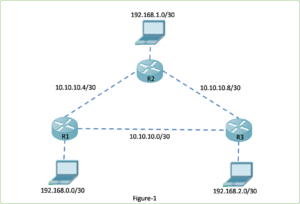
The “router” command in global configuration mode is an important command for start configuration of any dynamic routing protocol. The topology displayed in Figure 1 is used to configure and demonstrate the EIGRP routing protocol. Figure 2 (marked with a red triangle) illustrates the “router ?” with question marks to demonstrate the list of dynamic routing protocol supported by the current IOS.
To configure the routing protocol EIGRP, enter the command as shown below in the global configuration mode.
Router(config)# router eigrp <autonomous-system>
Theautonomous-systemargument is a 16-bit value between the number 1 and 65,535 as shown in figure 2 marked with a yellow triangle. All routers within the EIGRP routing domain must use the same autonomous system number. The configuration of the autonomous system and enable EIGRP routing protocol for the topology shown in figure 1 is the following:
Router R1
R1>enable
R1#configure terminal
R1(config)#router eigrp 1
R1(config-router)#
Router R2
R2>enable
R2#configure terminal
R2(config)#router eigrp 1
R2(config-router)#
Router R3
R3>enable
R3#configure terminal
R3(config)#router eigrp 1
R3(config-router)#
Notice that the prompt has been changed from a global configuration mode prompt to router configuration mode. We have configured the autonomous system number same on all router because it is must be same on all routers to establish neighbour adjacencies. EIGRP can support multiple instances of the routing protocol, though multiple routing protocol implementation is not usually needed or recommended.
Therouter eigrp<autonomous-system> command is not enough for starting the EIGRP process. The command only enables the EIGRP and provides access to configure the EIGRP settings.
We can remove the EIGRP routing process from a device, using the“no router eigrp<autonomous-system>” command in global configuration mode. The command will stop the EIGRP process and removes all existing EIGRP router configurations.
About This Content
Author Expertise: 15 years of experience in NetworkUstad's lead networking architect with CCIE certification. Specializes in CCNA exam preparation and enterprise network…. Certified in: BSC, CCNA, CCNP
Asad Ijaz
NetworkUstad's lead networking architect with CCIE certification. Specializes in CCNA exam preparation and enterprise network design. Authored 2,800+ technical guides on Cisco systems, BGP routing, and network security protocols since 2018.
Picture this: I'm not just someone who writes about tech; I'm a certified expert in the field. I proudly hold the titles of Cisco Certified Network Professional (CCNP) and Cisco Certified Network Associate (CCNA). So, when I talk about networking, I'm not just whistling in the dark; I know my stuff!
My website is like a treasure trove of knowledge. You'll find a plethora of articles and tutorials covering a wide range of topics related to networking and cybersecurity. It's not just a website; it's a learning hub for anyone who's eager to dive into the world of bits, bytes, and secure connections.
And here's a fun fact: I'm not a lone wolf in this journey. I'm a proud member and Editor of Team NetworkUstad. Together, we're on a mission to empower people with the knowledge they need to navigate the digital landscape safely and effectively.
So, if you're ready to embark on a tech-savvy adventure, stick around with me, Asad Ijaz Khattak. We're going to unravel the mysteries of technology, one article at a time!"
•2 min read
Stay Updated! 📬
Subscribe to our newsletter and get the latest networking tips, cybersecurity insights, and tech tutorials delivered straight to your inbox.