Imagine you are in a room filled with people speaking different languages. For any meaningful conversation to happen, everyone must first agree on a common language. In the world of networking, this is the role of protocols. However, before a web browser can speak HTTP (the language of the web) or an email client can speak SMTP, a more fundamental conversation needs to take place.
This initial conversation establishes how to speak. It negotiates the technical parameters—the volume, the speed, the size of the data chunks—that allow two devices to understand each other at the most basic level.
This is the domain of the Network Control Protocol (NCP) .
While the term is often historically associated with the early ARPANET, the concept of a Network Control Protocol is fundamental to how modern networks, especially those using the Point-to-Point Protocol (PPP), operate. This guide will decode NCPs, exploring their function, architecture, and why they remain a critical, albeit invisible, component of your daily internet connection.
1. What is a Network Control Protocol? (The Modern Definition)
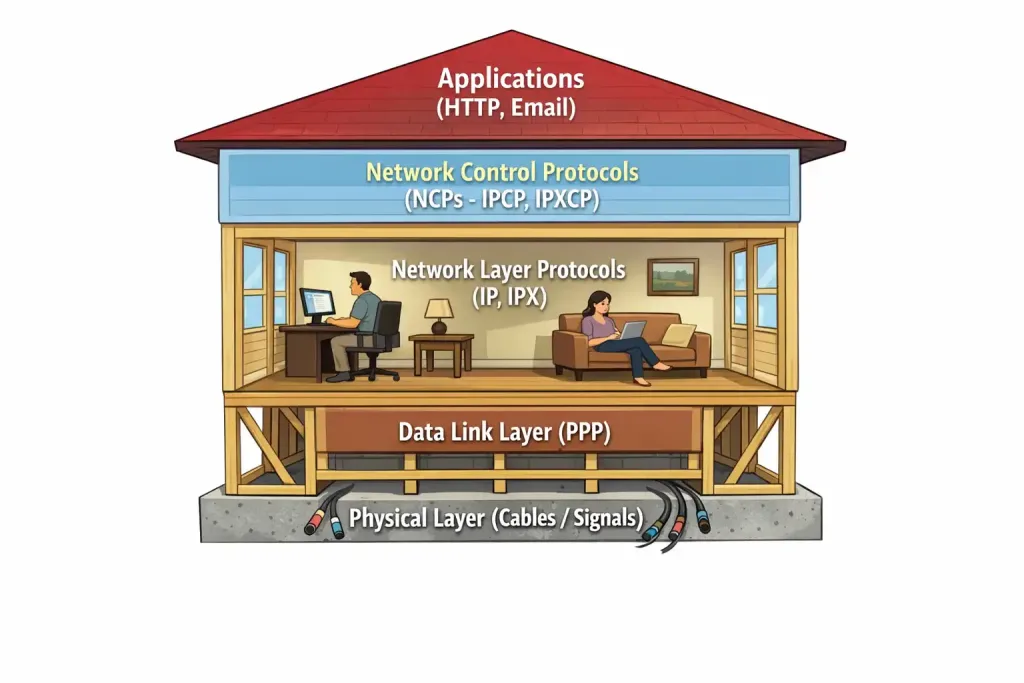
In modern networking, the term Network Control Protocol (NCP) refers to a specific type of protocol used to establish and configure different network-layer protocols over a data link layer connection. The most common environment for NCPs is within the Point-to-Point Protocol (PPP) .
Think of PPP as a universal container for data. It can carry many different types of network traffic, such as Internet Protocol (IP), Internetwork Packet Exchange (IPX), or AppleTalk. But simply putting the data in the container isn’t enough. The two devices on either end of the link need to agree on how to handle that specific type of traffic.
That specific agreement is the job of an NCP.
For every network-layer protocol that PPP supports, there is a corresponding NCP responsible for:
- Enabling the protocol: Turning it on for that link.
- Configuring the protocol: Negotiating crucial parameters like IP addresses or compression settings.
- Bringing it down: Gracefully deactivating the protocol when the connection ends.
The Most Famous NCP: IPCP
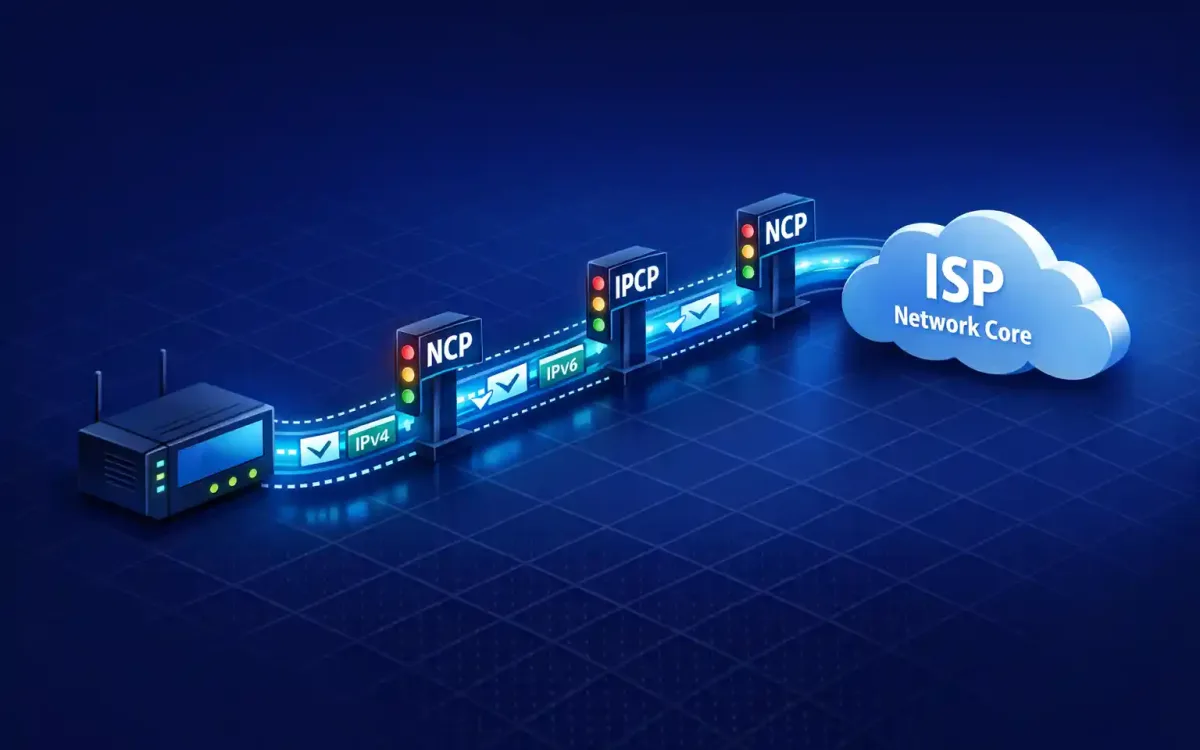
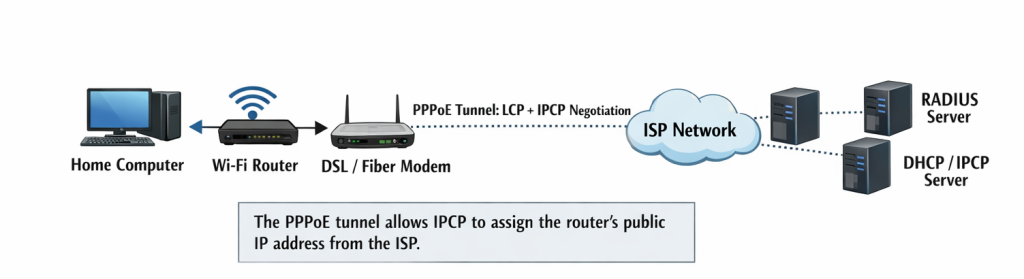
The Internet Protocol Control Protocol (IPCP) is the NCP responsible for configuring IP over PPP. Every time your home router connects to your Internet Service Provider (ISP) via PPPoE (PPP over Ethernet), IPCP is the mechanism that typically assigns your public IP address.
2. Historical Context: The Original NCP
To fully appreciate the elegance of modern NCPs, we must look back to the dawn of the internet.
Before the modern internet, there was the ARPANET. In 1970, the first host-to-host protocol for the ARPANET was introduced, and it was simply called the Network Control Protocol.
This original NCP was different. It wasn’t just a part of the connection; it was the connection. Functioning as a symmetric protocol, it acted as both the transport layer (handling end-to-end reliability, like modern TCP) and the network layer (handling routing and addressing).
Why it was revolutionary: It allowed the first “nodes” (Interface Message Processors, or IMPs) to communicate, giving birth to packet-switching networks.
Why it was replaced: The original NCP was too rigid. It was designed for the specific host types and configurations of the early ARPANET. It had no concept of flow control or graceful error recovery for the connections themselves. Most importantly, it could not handle the growth and interconnection of multiple, disparate networks—a problem that the TCP/IP suite was designed to solve.
When ARPANET transitioned to TCP/IP on January 1, 1983 (often called the “flag day”), the original NCP was permanently switched off. While the name lived on, its meaning evolved into the more modular, service-oriented model we use today within PPP.
3. The Architecture: How NCPs Fit into PPP
The Point-to-Point Protocol (PPP) is the backbone of countless dial-up, DSL, and modern fiber connections. Its architecture is intentionally modular, consisting of three main components:
- HDLC-like Framing: A method for encapsulating datagrams over a point-to-point link.
- Link Control Protocol (LCP): The “master negotiator.” LCP establishes, configures, and tests the data-link connection. It agrees on things like Maximum Receive Unit (MRU), authentication protocols (PAP/CHAP), and whether to use compression or error detection. LCP opens the pipe.
- Network Control Protocols (NCPs): A family of protocols, one for each network-layer protocol. NCPs configure the payload that will flow through the pipe.
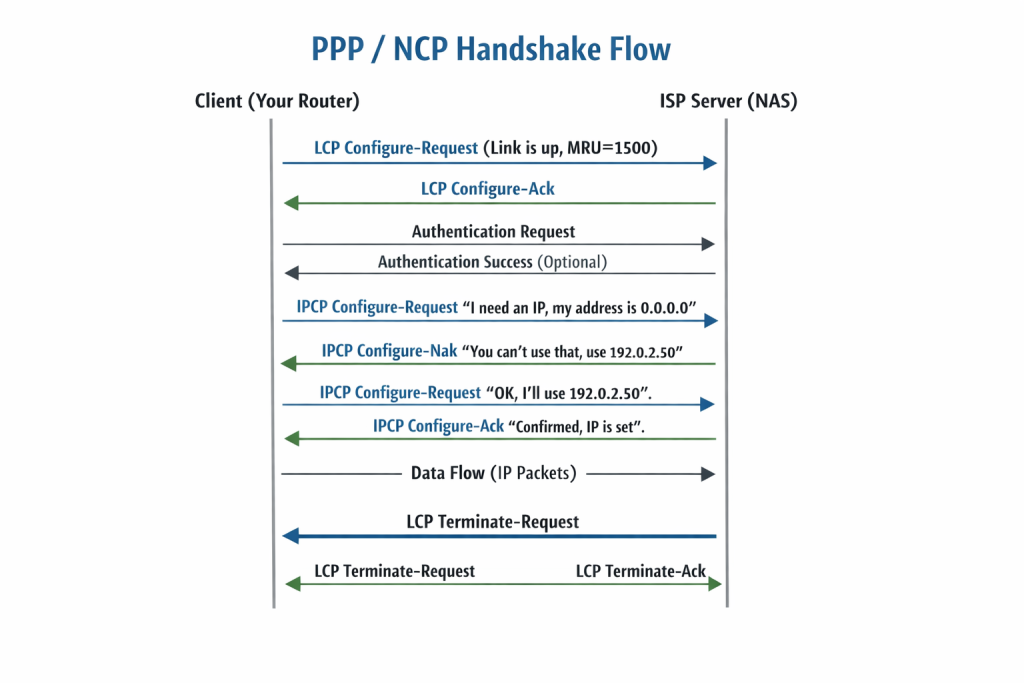
The Handshake Process in Detail:
- Link Establishment (LCP Phase): Device A and Device B (e.g., your laptop and a ISP server) exchange LCP packets to agree on basic link parameters.
- Authentication (Optional): LCP may facilitate an authentication phase to verify the identity of the devices.
- Network-Layer Configuration (NCP Phase): This is where the specific NCPs come into play.
- If the devices want to send IPv4 traffic, they initiate IPCP.
- During IPCP, the devices exchange packets to negotiate:
- IP Addresses: The ISP’s server (often called the Network Access Server) will assign an IP address to your device. This is the most common function.
- TCP/IP Header Compression: They can negotiate to use Van Jacobson TCP/IP header compression to reduce overhead on slow links.
- Data Transmission: Once the NCP has reached an “opened” state, the network protocol (like IP) is fully configured and ready to send data packets across the link.
- Link Termination: When the connection ends, LCP tears down the link, and it sends a signal to the NCPs to shut down the network protocols.
4. Common NCPs in the Wild
While IPCP is the star of the show, the NCP family includes several other protocols that were (and in legacy systems, still are) crucial for multi-protocol networking.
- IPCP (Internet Protocol Control Protocol):
- Protocol: RFC 1332
- Function: Configures IPv4 over PPP. Dynamically assigns IP addresses and negotiates Van Jacobson TCP/IP header compression.
- Visual Cue: (Icon of an IPv4 address badge)
- IPv6CP (Internet Protocol Version 6 Control Protocol):
- Protocol: RFC 5072
- Function: The modern counterpart to IPCP. It configures IPv6 over PPP. However, unlike IPCP, it does not assign IPv6 addresses. It negotiates the Interface-Identifier (which forms the last 64 bits of the IPv6 address) and an option for performing IPv6 stateless address autoconfiguration (SLAAC) over the link. The actual address configuration is done via ICMPv6 afterwards.
- Visual Cue: (Icon of an IPv6 address badge)
- IPXCP (Internetwork Packet Exchange Control Protocol):
- Protocol: RFC 1552
- Function: Configured Novell’s IPX protocol over PPP. It was vital for networks running NetWare in the 90s. It negotiated the IPX network number and the node number. Largely obsolete today.
- ATCP (AppleTalk Control Protocol):
- Protocol: RFC 1378
- Function: Configured AppleTalk over PPP. It managed AppleTalk addresses and zones for Macintosh connectivity. Also largely a relic of the past.
- BCP (Bridging Control Protocol):
- Protocol: RFC 1638
- Function: This is a special one. Instead of configuring a network-layer protocol, BCP configures transparent bridging over a PPP link. This allows the link to act as if it were a simple network segment, forwarding frames based on MAC addresses. This is useful for connecting two remote network segments to appear as if they are on the same physical LAN.
- MPPCE (Microsoft Point-to-Point Compression Protocol) and ECP (Encryption Control Protocol):
- While technically separate or extensions of LCP/NCP, these protocols handle the negotiation of compression and encryption methods for the data being sent over the link.
5. Deep Dive: IPCP in Action (The IP Address Dance)
The most common interaction a user will have with an NCP is the dynamic assignment of an IP address via IPCP. This process is a perfect example of negotiation.
- The Request (Configure-Request): The client sends an IPCP Configure-Request packet. In this packet, it includes its desired configuration options. Most importantly, for the IP address option, it usually sets the address field to
0.0.0.0. This is a way of saying, “I don’t have an address; please give me one.” - The Negotiation (Configure-Nak): The server (NAS) receives the request. It sees the client asking for
0.0.0.0and knows this is not valid. It sends back a Configure-Nak (Negative Acknowledgment) packet. In this packet, it replaces0.0.0.0with a specific, available IP address from its pool (e.g.,203.0.113.45). It also Naks any other options it doesn’t support. - The Acceptance (Configure-Request – Take 2): The client receives the Nak. It extracts the offered IP address and creates a new Configure-Request packet. This time, the IP address option field contains the offered address
203.0.113.45. It also removes or modifies any other options the server rejected. - The Confirmation (Configure-Ack): The server sees the new request with the correct parameters. It sends back a Configure-Ack (Acknowledgment) packet, confirming the configuration. The link for IPv4 is now open.
This “Request-Nak-Ack” dance ensures that both ends of the link agree on the exact parameters before any data flows, preventing addressing conflicts and configuration mismatches.
6. NCPs vs. Other Protocols: A Quick Comparison
It’s easy to confuse NCPs with the protocols they work alongside. Here’s a simple breakdown:
| Protocol | Layer | Function | Analogy |
|---|---|---|---|
| LCP (Link Control Protocol) | Data Link | Establishes, configures, and tests the connection itself. | The phone call – “Hello? Can you hear me? Let’s talk for 10 minutes.” |
| NCP (e.g., IPCP) | Data Link/Network Boundary | Configures a specific network-layer protocol to run over that connection. | The language choice – “Let’s speak English, and my name (IP address) is Bob.” |
| DHCP (Dynamic Host Configuration Protocol) | Network/Application | Dynamically assigns IP addresses and other config parameters on a multi-access network (like Ethernet). | A conference coordinator in a large office, handing out name tags to everyone in the room. |
| IP (Internet Protocol) | Network | The actual data delivery service, using the addresses provided by NCP/DHCP. | The actual conversation using the agreed-upon language. |
Key Difference: NCPs are strictly for point-to-point links managed by PPP. DHCP is for broadcast-based networks (LANs). NCPs negotiate the existence of the protocol on the link; DHCP provides the configuration details once a connection exists.
7. Modern Relevance: Where You Use NCPs Today
You might think that with the dominance of Ethernet and Wi-Fi, NCPs have faded into obscurity. Not true. They are working behind the scenes in several key technologies you use every day.
- DSL and Fiber-to-the-Home (FTTH): Many ISPs use PPPoE (PPP over Ethernet) to manage subscriber connections. PPPoE encapsulates PPP frames inside Ethernet frames. This allows the ISP to use the familiar authentication (username/password) and addressing (IPCP) model of PPP over a modern Ethernet network. When your fiber modem syncs up, PPPoE establishes a tunnel, and IPCP assigns your public IP.
- Mobile Networks (3G/4G/5G): While modern LTE uses a different core network architecture, its radio link protocols still utilize PPP-style negotiation for establishing packet data sessions. The principles of establishing a link and then configuring a specific network protocol (IPv4 or IPv6) are directly descended from the PPP NCP model.
- VPN Connections (Legacy): Older VPN protocols like PPTP (Point-to-Point Tunneling Protocol) were essentially a way to run PPP (with its LCP and NCPs) over the internet, creating a virtual point-to-point link. This allowed remote users to get an IP address on the corporate network via IPCP.
- Serial Connections: In industrial networking, satellite communication, and critical infrastructure, direct serial links are still common. PPP with its NCPs remains the standard for running IP over these legacy physical connections.
Conclusion: The Unsung Hero of Connectivity
Network Control Protocols are the ultimate example of “setting the stage.” They don’t carry your cat videos or your email; they create the conditions necessary for those things to happen. They are the diplomatic envoys that arrive before the king, ensuring that when the main entourage (your data) shows up, everything is ready and waiting.
From the historical NCP that birthed the ARPANET to the modern IPCP that assigns the IP address to your router every time you reset your modem, these protocols embody the core principle of networking: agreement before communication.
So, the next time your internet connection drops and re-establishes, remember the invisible handshake happening in the background. The quiet negotiation of the Network Control Protocol is working hard to get you back online.