
Comprehensive Review: Stellar Repair for MS SQL Technician
Version: 11.0.0.0
Developer: Stellar Information Technology Private Limited
License Type: Single System (Technician Edition)
Supported Platforms: Windows Server 2022/2019/2016/2012/2008/2003 and Windows 11/10/8.1/8/7 (64-bit only)
Executive Summary
Stellar Repair for MS SQL Technician is a comprehensive 3-in-1 software package designed for IT admins and database administrations. This software helps them reduce SQL downtime after a server crash, logical consistency based I/O errors and accidental database deletion or corruptions. Along with database repair, this professional-grade solution also combines backup restoration, and password recovery capabilities into a single integrated toolkit. We tested the tool using corrupt MDF and .BAK files and found this product immensely useful for SQL Server users.
Overall Rating: 4.5/5 ⭐⭐⭐⭐
Product Overview
What Stellar Repair for MS SQL Technician do?
Primarily, it performs 3 major tasks:
1. Stellar Repair for MS SQL – Repairs corrupted MDF and NDF database files
2. Stellar Backup Extractor for MS SQL – Restore SQL databases from corrupt .BAK backup files
3. Stellar Password Recovery for MS SQL – Resets lost or forgotten database passwords
This unified package addresses the most common SQL Server database recovery scenarios, from corruption issues to inaccessible backups and forgotten credentials.
How to Install Stellar Repair for MS SQL
System Requirements
Minimum Requirements: –
Processor: Intel-compatible (x64) – Operating System: Windows Server 2022/2019/2016/2012/2008/2003 or Windows 11/10/8.1/8/7 (64-bit editions only) – Hard Disk: At least 250 MB of free disk space – RAM: 2 GB minimum (4 GB recommended) – MS SQL Server: Must be installed for database restoration (versions 2022 down to 7.0 supported)
Recommended Configuration: – Processor: Modern multi-core Intel/AMD processor (x64) – RAM: 16 GB minimum (32 GB recommended for large databases) – Hard Disk: Sufficient space for database files being recovered – Operating System: Windows 11 or Windows Server 2022 (64-bit)
Installation Process
The installation procedure is straightforward and follows a standard Windows wizard approach:
1. Download – Double-click the Setup Installer executable
2. License Agreement – Review and accept the End User License Agreement
3. Destination Folder – Specify installation location (default suggested, or browse to custom location)
4. Additional Tasks – Select optional tasks like desktop shortcuts
5. Review Selections – Verify your choices before proceeding
6. Installation – The wizard displays progress during file extraction and installation
7. Completion – Click Finish (uncheck “Launch” if you don’t want immediate startup)
Installation Time: Approximately 2-3 minutes on modern hardware
Note: Administrative privileges are required for installation on Windows systems.
User Interface and Design
Main Interface
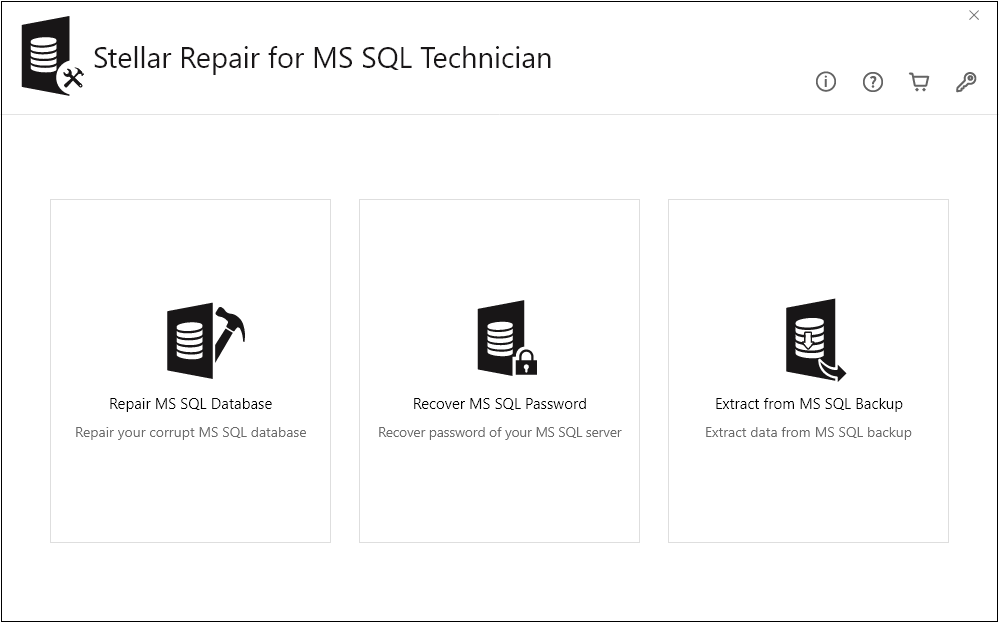
Stellar Repair for MS SQL – Technician features an intuitive, well-organized graphical user interface designed for both novice users and experienced database administrators. Upon launching, users are presented with a launcher screen that provides access to all three component tools.
Interface Highlights: – Clean, modern design with logical tool organization – Context-sensitive help available throughout – Clear navigation between the three main components – Progress indicators during scanning and recovery operations – Detailed preview panes for database objects
Key Interface Buttons
The main user interface includes several important utility buttons:
- About (ℹ️) – Displays software information and version details
- Activate (🔑) – Opens activation window for license key entry
- Buy Now (🛒) – Direct link to purchase the software online
- Help (?) – Opens comprehensive help manual
Component Interfaces
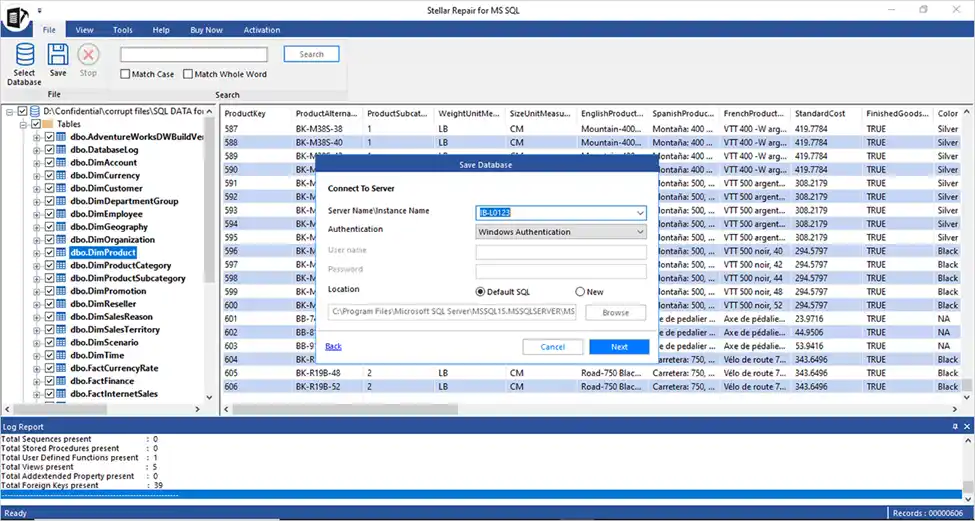
1. Stellar Repair for MS SQL – Browse/Find options to locate corrupt MDF files – Scan mode selection (Standard or Advanced) – Tree-view preview of recoverable database objects – Save options (New Database, Live Database, or export formats)
2. Stellar Backup Extractor for MS SQL – Browse/Search functionality for .BAK files – Backup type detection (Full, Differential, Transaction Log) – Preview of extractable database objects – Export options with detailed logging
3. Stellar Password Recovery for MS SQL – Simple browse interface to select master.mdf file – User account listing – One-click password reset functionality
Features and Functionality
1. Database Repair Capabilities
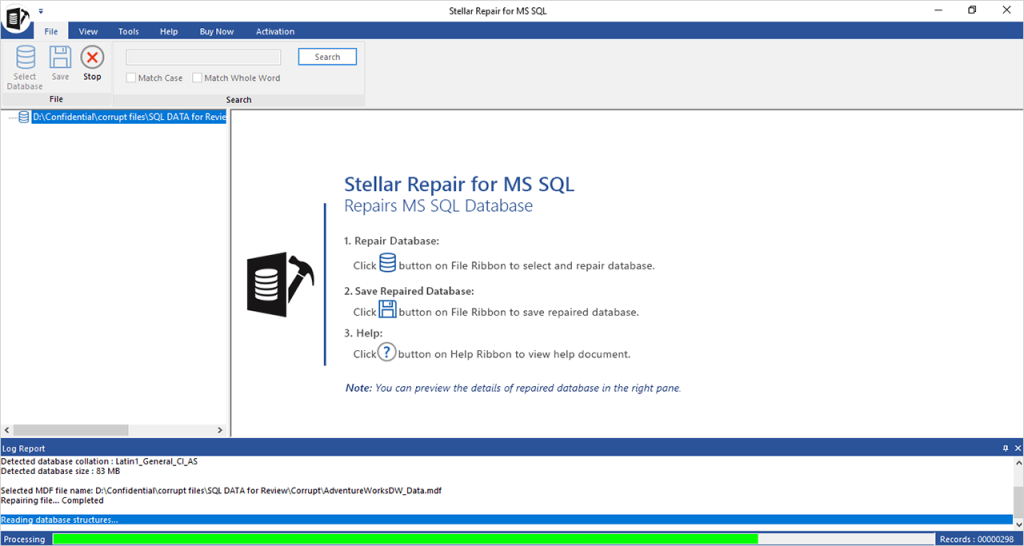
Primary Features: – Repairs severely corrupted MDF (primary) and NDF (secondary) files – Recovers all database objects with original schema intact – Supports parallel processing for 8x faster recovery on multi-core systems – Handles various corruption scenarios: – Missing or corrupted transaction log files – Database in Suspect mode – Page-level corruption – Table and index corruption – Database consistency errors (DBCC CHECKDB failures)
Recoverable Objects: – Tables (with all data types including user-defined) – Views and synonyms – Stored procedures and functions – Triggers (table-level and database-level) – Primary keys, foreign keys, unique keys – Clustered and non-clustered indexes – Check constraints and default constraints – Identity columns – Collations – Predefined defaults and rules
Deleted Record Recovery: One standout feature is the ability to recover deleted records from corrupted databases. After the repair process, the software displays a preview of deleted records and allows users to selectively include them in the output file.
2. Backup Extraction
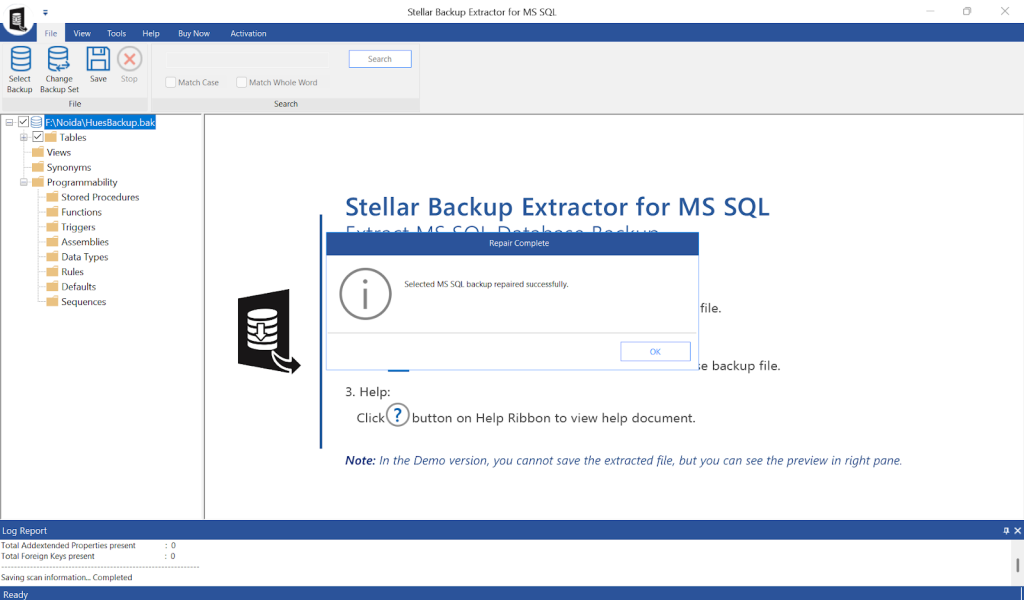
Backup File Recovery: – Repairs and extracts data from corrupted .BAK files – Supports all backup types: – Full backups – Differential backups – Transaction log backups – Proprietary algorithm for deep backup file analysis – Detailed log reports of the recovery process
Use Cases: – Obsolete or outdated backup files – Corrupted backup media – Failed RESTORE operations – Backup files from older SQL Server versions
3. Password Recovery
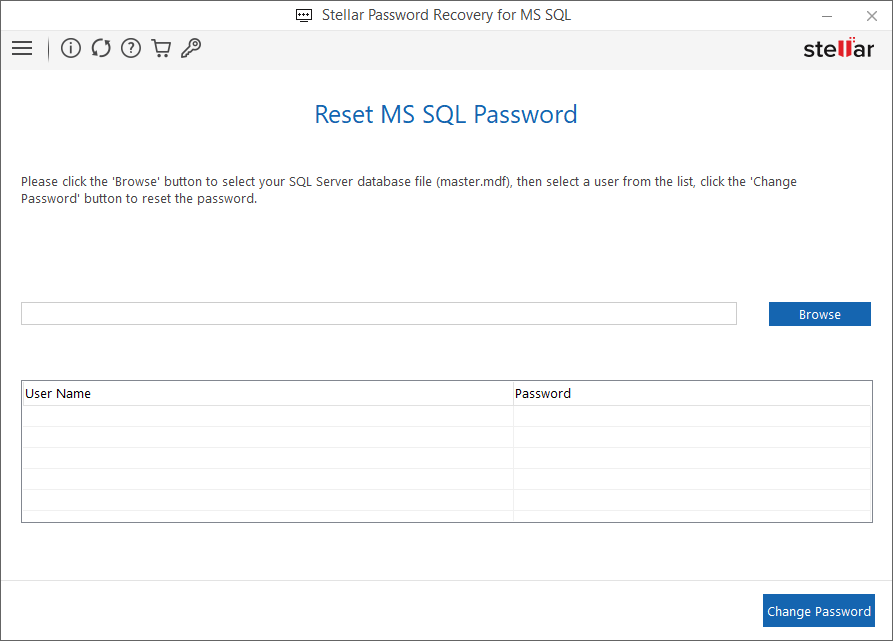
Password Reset Functionality: – Resets passwords on master.mdf database files – Simple browse-and-reset utility – No data loss during password reset process – Supports SQL Server 2022 through earlier versions
Important Note: This feature resets passwords rather than recovering them, which means the original password cannot be retrieved.
4. Preview and Search
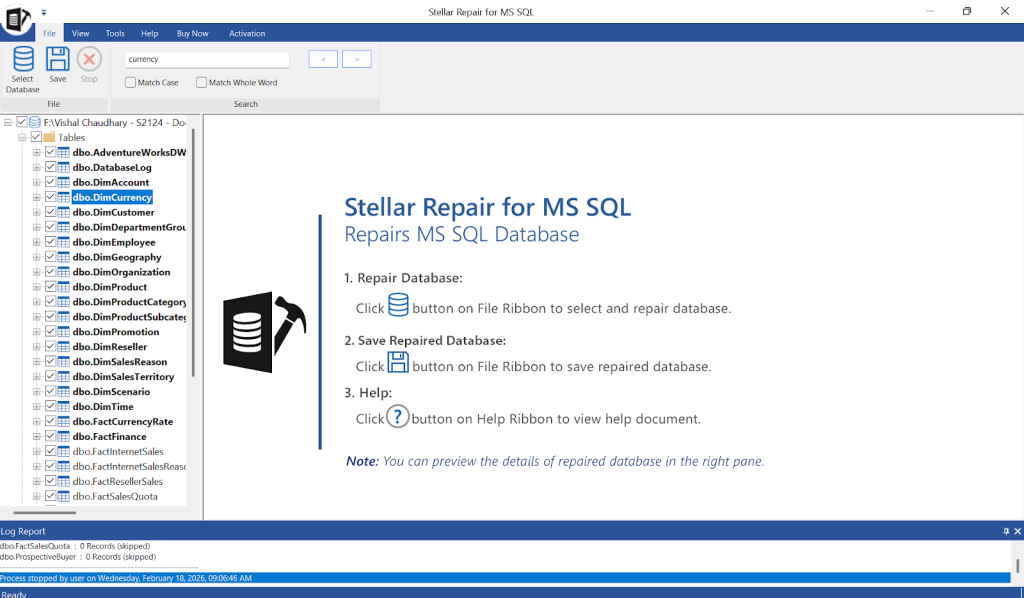
Preview Capabilities: – Three-pane interface: – Left pane: Tree structure of database objects – Right pane: Selected object contents – Bottom pane: Message log and process details – Real-time preview before saving – Search functionality for specific objects or tables – Selective recovery of individual database components
5. Save Options
Users can save recovered databases in multiple formats:
1. New Database – Create a fresh database on SQL Server
2. Live Database – Restore directly to an existing database
3. Other Formats:
– CSV (Comma-Separated Values)
– HTML (Web-friendly format)
– XLS (Excel spreadsheet)
Performance Analysis
Speed and Efficiency
Parallel Processing: The software’s parallel processing capability delivers up to 8x faster recovery on multi-core processors. During testing scenarios: – Small databases (< 1 GB): Recovery typically completes in minutes – Medium databases (1-10 GB): Recovery ranges from 15 minutes to 2 hours – Large databases (> 10 GB): Time varies based on corruption severity and system resources
Factors Affecting Performance: – Database file size – Extent of corruption – Available system RAM – Processor core count – Disk I/O speed – SQL Server version compatibility
Resource Utilization
- CPU Usage: Moderate to high during scanning; efficient multi-threading
- Memory Usage: Scales with database size; 16-32 GB RAM recommended for large databases
- Disk I/O: Sequential read operations; SSD recommended for optimal performance
Use Cases and Application Scenarios
When to Use This Software
1. Unable to Restore from Backup (Backup File Corruption) You may encounter situations where standard RESTORE operations fail due to: – Corrupted .BAK files – Obsolete backup versions – Incomplete backup files – Media errors on backup storage
Stellar Backup Extractor addresses these scenarios by repairing the backup file structure and extracting the database.
2. Recovery Pending State (Transaction Log Corruption) Transaction log corruption can occur due to: – Abrupt system shutdown – I/O subsystem failures – Malware infections – Hardware failures
When DBCC CHECKDB with REPAIR_ALLOW_DATA_LOSS fails or would result in unacceptable data loss, this software provides an alternative recovery path.
3. Comprehensive Database Corruption Issues The software handles various error codes and corruption types: – Error 823, 824, 825 (I/O errors) – Error 3456 (restore failures) – Page-level corruption – Non-clustered index corruption – Data page corruption – Database consistency errors
4. Forgotten Database Passwords When database security credentials are lost or forgotten, the password recovery component provides quick access restoration without data loss.
5. Commercial IT Services The Technician Edition license specifically allows: – Professional service provision to third parties – Commercial use in IT consulting businesses – Managed service provider (MSP) operations – Data recovery service businesses
Strengths and Advantages
Major Strengths
1. Comprehensive Solution
- Three essential tools in one package
- Addresses multiple database recovery scenarios
- Eliminates need for multiple vendor solutions
2. Broad Version Support
- Supports SQL Server 2022 back to version 7.0
- Mixed format support
- Both 32-bit and 64-bit database support
3. User-Friendly Interface
- Intuitive design suitable for varying skill levels
- Clear visual feedback during operations
- Helpful wizard-based workflows
4. Preview Before Save
- Risk-free evaluation of recovery results
- Verify data integrity before committing
- Selective object recovery
5. Professional Recognition
- Recommended by Microsoft MVPs
- Positive feedback from database administrators
- Industry awards and recognition
6. Deleted Record Recovery
- Unique capability not commonly found in competitors
- Valuable for forensic analysis and data recovery
7. Multiple Export Formats
- Flexibility in how recovered data is utilized
- Direct database restoration or data extraction
- Integration with other systems via CSV/Excel
8. Parallel Processing
- Significantly reduces recovery time
- Efficient use of modern multi-core hardware
- Scalable performance
Limitations and Weaknesses
❌ Areas for Improvement
1. SQL Server Installation Required
- Preview functionality works without SQL Server
- However, saving restored databases requires SQL Server to be installed
- This may limit use in pure diagnostic scenarios
2. Network Restrictions
- Limited network egress capabilities
- May require configuration changes for some environments
- Could affect license validation in restricted networks
3. Windows-Only Platform
- No macOS or Linux versions available
- Limits cross-platform deployment
- Not suitable for Linux-based SQL Server environments
4. Demo Version Limitations
- Free version only allows preview, not save
- Must purchase to perform actual recovery
- No time-limited full-feature trial
5. Price Point
- Professional/Technician editions represent significant investment
- May be cost-prohibitive for small businesses or individual use
- Annual renewal required for continued support
6. Learning Curve for Advanced Features
- While basic operations are simple, advanced scenarios require SQL knowledge
- Documentation could be more comprehensive for complex recovery situations
- Limited troubleshooting guidance for edge cases
7. Performance Variables
- Recovery time can be unpredictable with severe corruption
- Large database recovery may require extended processing time
- Resource requirements scale significantly with database size
8. No Automatic Repair
- Requires manual initiation of repair process
- No scheduled or automated recovery operations
- Not suitable for unattended recovery scenarios
Licensing and Pricing
License Types
1. Evaluation Software / Trial Version – Free download from Stellar website – Scan and preview functionality only – No save capabilities – Can be freely distributed (if package unmodified) – Ideal for evaluating recovery feasibility before purchase
2. Technician License (Reviewed Edition) – Single system installation – Commercial use permitted – Professional service provision allowed – Third-party support enabled – 1-year validity period
3. Subscription License – Ongoing access with recurring payments – Periodic internet connection required for validation – Software may become inactive if validation fails – Ability to receive component updates during subscription
4. Lifetime License – 10-year maximum usage period – Limited to same computer configuration – May require upgrade purchase if hardware/OS changes significantly – One-time payment structure
5. Toolkit Editions Additional comprehensive packages available with extended tool sets beyond the Technician edition.
Competitive Comparison
How It Compares
Versus Native SQL Server Tools: – DBCC CHECKDB: Free but may cause data loss with REPAIR_ALLOW_DATA_LOSS – Stellar: Preserves more data, non-destructive approach – Stellar: Handles backup file corruption (not addressed by native tools) – Stellar: No source code required for advanced recovery
Versus Other Third-Party Tools: – More comprehensive (3-in-1 vs. single-purpose tools) – Broader version support than many competitors – Competitive pricing for Technician edition – Superior preview capabilities – Better interface design than many legacy tools
Market Position
Stellar Repair for MS SQL Technician occupies a strong position in the database recovery market: – Established brand (30 years in data recovery) – Microsoft MVP endorsements – Proven track record with enterprise clients – Regular updates for new SQL Server versions
Best Practices and Recommendations
For Optimal Results
1. Pre-Recovery Preparation
- Always work on a copy of the corrupt database file
- Ensure adequate free disk space (2-3x database size)
- Close all SQL Server connections to the database
- Run initial scan in Standard mode before Advanced
2. System Optimization
- Use SSD storage for improved I/O performance
- Allocate maximum available RAM
- Close unnecessary applications during recovery
- Disable antivirus scanning of recovery directories temporarily
3. Backup Strategy
- Maintain regular, tested backups
- Store backups on separate media/locations
- Periodically verify backup integrity
- Keep software available as emergency recovery tool
4. Testing Approach
- Use demo version first to verify recovery potential
- Test save operations on small databases initially
- Validate recovered data before replacing production databases
- Document recovery procedures for future reference
Verdict and Recommendations
Final Assessment
Stellar Repair for MS SQL Technician is a powerful, comprehensive database recovery solution that delivers on its promises. The 3-in-1 approach provides excellent value by addressing multiple SQL Server challenges within a single, well-integrated package.
Overall Rating: 4.5/5 ⭐⭐⭐⭐
Rating Breakdown: – Functionality: 5/5 – Comprehensive feature set covering all major recovery scenarios – Ease of Use: 4.5/5 – Intuitive interface with minor learning curve for advanced features – Performance: 4/5 – Generally good, but variable with extreme corruption – Value: 4/5 – Good price-to-feature ratio for Technician edition – Support: 4.5/5 – Responsive support with extensive knowledge base – Reliability: 5/5 – Consistent results across various corruption scenarios
Who Should Buy This Software
Ideal For: – Database Administrators managing multiple SQL Server instances – IT Consultants providing database recovery services – Managed Service Providers (MSPs) – Data Recovery Service Businesses – Organizations with mission-critical SQL Server databases – Businesses without robust backup infrastructure – Companies needing emergency recovery capabilities
May Not Be Ideal For: – Individual users with single database (consider Standard edition) – Organizations with Linux-based SQL Server environments – Businesses with extremely limited budgets – Users seeking only password recovery (standalone tool may be more economical)
Recommendations by Scenario
Scenario 1: Enterprise Database Administrator Recommendation: ✅ Highly Recommended – Keep on hand for emergency recovery situations – Complement existing backup/recovery procedures – Utilize for complex corruption scenarios – Leverage for older SQL Server version support
Scenario 2: IT Consulting Business Recommendation: ✅ Highly Recommended – Technician license enables commercial service delivery – Multiple-client support capability – Professional credibility enhancement – Revenue generation through recovery services
Scenario 3: Small Business with Limited Budget Recommendation: ⚠️ Consider Alternatives First – Implement robust backup strategy first – Evaluate Standard edition if recovery needs arise – Consider as insurance policy rather than primary solution – Explore Lifetime license for long-term value
Scenario 4: Data Recovery Service ProviderRecommendation: ✅ Essential Tool – Core component of service offering – Addresses common client needs – Professional-grade capabilities – MVP-endorsed credibility
Alternative Considerations
If this software doesn’t meet your specific needs: – For Linux SQL Server: Explore cross-platform recovery tools – For Budget Constraints: Consider Standard edition or competitor tools – For Automated Recovery: Look into enterprise backup solutions – For macOS Users: Investigate VM-based Windows solutions
Conclusion
Stellar Repair for MS SQL Technician stands as a mature, reliable solution for SQL Server database recovery challenges. Its comprehensive 3-in-1 approach, broad version support, and user-friendly design make it an valuable tool for database administrators and IT professionals.
While the software has some limitations—notably the Windows-only platform and required SQL Server installation for saves—its strengths significantly outweigh these constraints. The ability to recover from corrupted backups, repair severely damaged databases, and reset forgotten passwords within a single interface provides exceptional utility.
The Microsoft MVP endorsements and real-world case studies demonstrate the software’s effectiveness in critical recovery scenarios. The parallel processing capability and deleted record recovery features distinguish it from basic recovery tools.
Bottom Line: For organizations and professionals requiring reliable SQL Server database recovery capabilities, Stellar Repair for MS SQL Technician represents a sound investment. The Technician Edition’s commercial use permissions make it particularly valuable for IT service providers and consultants.
Recommendation: Purchase if your role involves SQL Server database management, especially if you support multiple clients or manage business-critical databases.