Tag: search engine optimization (seo) poisoning

Illustration of browser security threats featuring a globe icon, a masked hacker, and ad symbols on a blue background.
Cyber Security September 14, 2019

Browser Plugins and Poisoning: Risks, Exploits, and Defenses in Cybersecurity

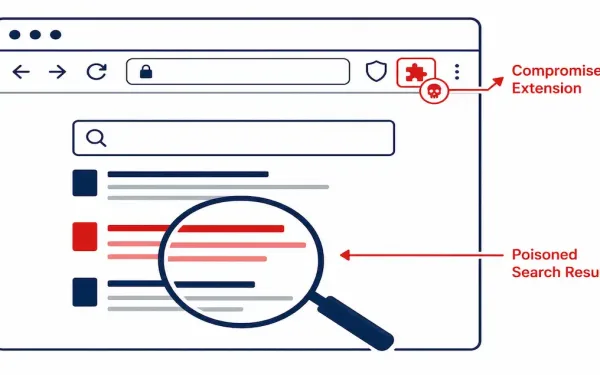
Security backdoors and vulnerabilities can severely impact web browsers, leading to unwanted pop-up ads, collection of personal data, or installation of adware, viruses, or spyware. Cybercriminals often target a browser’s executable files, core components, and browser plugins to gain unauthorized access. Browser Plugins A browser plugin (now often called an extension or add-on in modern browsers like Chrome, Firefox, and Edge) is software that enhances a browser’s functionality by adding features not available by default. For instance, legacy plugins like Adobe Flash Player (deprecated since 2020) and Shockwave allowed rendering of multimedia content. These plugins enabled display of rich graphics, animations, and interactive elements, enhancing web page aesthetics and supporting content from specific software ecosystems. Popular examples include QuickTime Player (largely obsolete) and Adobe Acrobat Reader for PDF viewing. Most plugins are free and downloadable from official sites. Installation involves visiting the developer’s website, downloading the installer, running it, and restarting the browser. However, with the rise of HTML5, plugins like Flash have been phased out due to security risks. Cybercriminals exploited vulnerabilities in Flash (e.g., CVE-2018-4878, used in real-world attacks), leading to system crashes, remote code execution, or data exfiltration. Attackers continue to target popular extensions, such as those in the Chrome Web Store, via supply chain compromises or malicious updates. SEO Poisoning Search engines like Google assign page rankings based on relevance to user queries, displaying results in order of perceived value. Search Engine Optimization (SEO) techniques legitimately improve a site’s visibility. Legitimate SEO involves content optimization, backlinks, and user experience enhancements. However, SEO poisoning (also known as Black Hat SEO or search poisoning) is a cybercriminal tactic to artificially inflate malicious sites’ rankings. The objective is to drive traffic to harmful domains hosting malware, phishing pages, or scams. Techniques include keyword stuffing, cloaking (showing different content to bots vs. users), and link farms. For example, during high-profile events like elections, attackers poison searches for “election results” to lead users to fake news sites laced with malware. Browser Hijacker A browser hijacker is malware that alters browser settings without consent, such as changing the homepage, default search engine, or adding unwanted toolbars. It redirects users to attacker-controlled sites for ad revenue or data theft. Often delivered via drive-by downloads or bundled with freeware, hijackers exploit unpatched browsers. Prevention: Scrutinize EULAs during installs and use ad blockers. Examples include CoolWebSearch (historical) or modern variants like Search Marquis on macOS. Symptoms: Slow performance, excessive pop-ups, and unauthorized redirects. Modern Browser Plugin Threats In 2025, threats have evolved beyond Flash. Attackers use extension hijacking, where malicious code is injected via updates (e.g., the 2023 Chrome extension supply chain attack affecting millions). Key risks: Mitigation: Use tools like CRXcavator for extension auditing. Defending Against Email and Browser Attacks To counter browser and email threats, educate users on recognizing suspicious emails and enable server-side filters. Organizations should train employees on risks from attachments carrying viruses or worms. Never assume attachments are safe, even from known senders—spoofing is common. Always scan with antivirus before opening. Mitigating spam: Leverage ISP filters, email clients like Outlook’s junk mail features, and tools like SpamAssassin. Keep browsers and plugins updated to patch vulnerabilities (e.g., via auto-updates in Chrome). The Anti-Phishing Working Group (APWG), established in 2003, combats phishing through global collaboration. Additionally, use browser extensions like HTTPS Everywhere and enable sandboxing. Advanced Prevention Strategies for Enthusiasts Threat Detection Tool Mitigation Plugin Poisoning VirusTotal Disable unused extensions SEO Poisoning Google Alerts Verify site certificates Conclusion In an ever-evolving digital landscape, browser security threats like plugins, SEO poisoning, and hijackers pose significant risks. By understanding these vulnerabilities and adopting proactive measures—such as cautious downloading, regular updates, and email vigilance—users can safeguard their systems. Staying informed and leveraging antivirus tools are crucial steps toward a secure browsing experience. FAQs
Asad Ijaz Read More
Forum