Thermal Master P4 Review: Sharp Imaging for Professionals
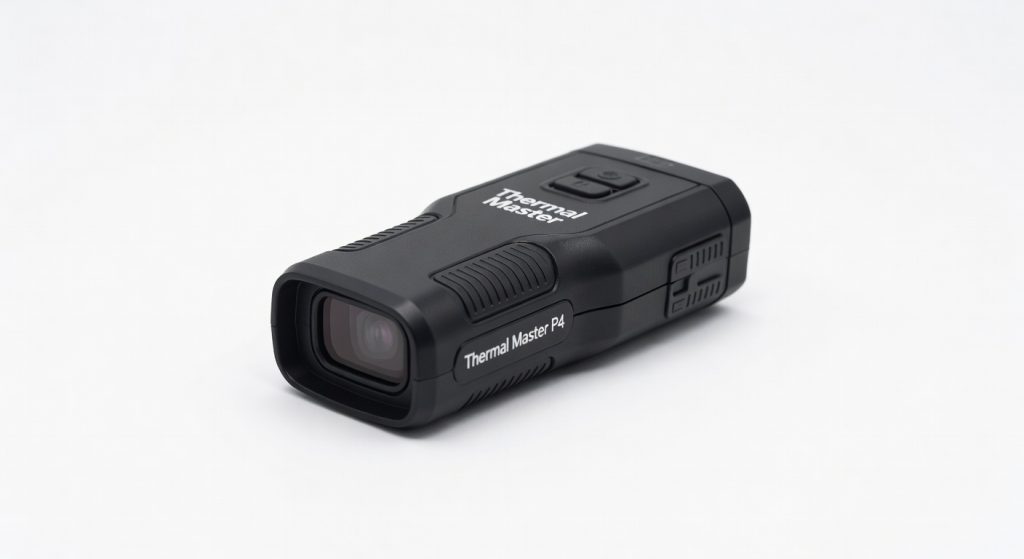
The Thermal Master P4 is a compact, Android-only thermal imaging camera that punches well above its price class for IT infrastructure diagnostics — from network rack hot spot identification to server room airflow analysis. Its fixed-focus wide field of view makes it ideal for scanning full rack panels in a single pass, though the lack of iOS support and Android-only limitation will exclude some field engineers. For IT teams looking to integrate thermal imaging into their preventive maintenance workflow, the P4 delivers professional-grade imaging at a fraction of the cost of dedicated industrial units.
Thermal Master P4 for IT Infrastructure: What It Is and Why It Matters
The Thermal Master P4 is a USB-C connected smartphone thermal imaging camera designed for rapid, field-ready diagnostics. Measuring 53×29×11mm and weighing approximately 18–26g depending on configuration, it attaches directly to any Android 6.0+ device and transforms the host smartphone into a professional-grade thermal scanner. While Thermal Master markets the P4 toward HVAC technicians and electrical engineers, its combination of wide field of view, 35mK sensitivity, and dual-lens visual context mapping makes it directly relevant to IT infrastructure teams responsible for server rooms, data centers, and network equipment maintenance.
For IT professionals, thermal imaging is a first-line diagnostic tool for preventive maintenance. Overheating CPUs, clogged airflow paths, failing power supply units, and imbalanced load distribution across rack units all produce detectable thermal signatures before they escalate into unplanned downtime. Tools like the P4 — which connect to an existing Android device rather than requiring a standalone ruggedized unit costing several thousand dollars — lower the barrier for thermal inspections to become a standard part of the IT maintenance calendar rather than a specialist outsourced task.
Hot Spot Detection in Network Racks and Server Rooms
The P4’s defining advantage for IT use is its wide 56°(H) × 42°(V) field of view, roughly equivalent to a 33mm full-frame lens. This allows a data center technician to scan an entire 42U rack in a single frame from standard aisle distance, immediately identifying hot zones without repositioning repeatedly. Competitor models with narrower FOVs — such as the Thermal Master P3’s 40°×30° — require multiple overlapping passes to cover the same area, slowing walkthrough time significantly in large colocation environments.
With NETD ≤35mK sensitivity, the P4 reliably resolves temperature differentials as small as 0.035°C. In a server rack context, this means it will flag a marginal 3–5°C deviation on a failing fan or a partially blocked hot-aisle containment curtain before the server’s onboard thermal management escalates to throttling or shutdown. The 15× digital zoom extends this capability to equipment in locked cages or elevated rack positions, allowing inspection without opening enclosures or disturbing cable management.
IR-Fuse and Pro-Mix: Contextual Fault Identification for IT Hardware
Raw thermal images are notoriously difficult to interpret in dense rack environments — every metal chassis reflects ambient heat, and thermal gradients can be misleading without visual reference. The P4’s dual-lens system addresses this directly. The IR-Fuse mode blends the 1280×960 visible-light camera output with the thermal layer at an adjustable ratio, so a technician can simultaneously see both the heat signature and the physical layout of equipment. Pro-Mix mode overlays thermal hotspots with edge-enhanced visible outlines, making it immediately clear whether an elevated temperature reading is coming from a specific switch port, a particular drive bay, or the power supply backplane.
The IR Eraser function adds a further layer of usability: in thermal imaging mode, swiping a finger across the display temporarily reveals the visible-light view of that area, confirming equipment identity without switching modes. For IT infrastructure engineers working with unlabeled legacy equipment or densely cabled racks, this reduces misidentification errors during fault logging.
Preventive Maintenance Documentation and Workflow Integration
Thermal imaging delivers its highest ROI in IT environments when it is used systematically rather than reactively. The Thermal Master app supports one-tap inspection report export, which generates a structured document containing thermal images, temperature readings, and annotated hotspot data. These reports can be integrated directly into a CMDB or ITSM platform as evidence-based maintenance records, supporting compliance with uptime SLAs and data center standards such as ASHRAE A1/A2 thermal guidelines (inlet temperatures of 15–32°C) and EN 50600 for data center infrastructure.
For IT teams operating under budget constraints, the P4’s standard retail pricing around $349–399 — substantially below the $429 FLIR One Pro, with periodic sale pricing seen as low as $299 — makes it viable to equip multiple technicians rather than sharing a single unit across a team. Combined with the plug-and-play Android setup and the absence of licensing or subscription fees, the total cost of ownership over a standard 3-year IT hardware lifecycle is minimal relative to the unplanned downtime costs it can prevent. A single avoided server failure event in a production environment typically justifies the hardware cost many times over.
Reducing Unplanned Downtime: The Business Case for Thermal Imaging in IT
Unplanned data center downtime carries significant operational and financial consequences. According to Uptime Institute research, the average cost of a significant outage has climbed steadily, with thermal management failures consistently ranking among the leading causes of preventable hardware incidents alongside power issues and human error. The Thermal Master P4 enables IT teams to conduct regular thermal baseline sweeps — establishing normal operating temperature profiles for each rack — against which future deviations can be compared and escalated before they become service-affecting events.
The P4’s 25Hz refresh rate makes it practical for live scanning while equipment is under full production load, which is when thermal anomalies are most detectable. A server exhibiting marginal cooling degradation under low load may not yet produce an identifiable thermal signature, but under full CPU utilization the delta becomes visually obvious in the P4’s thermal view. For network infrastructure specifically, switches and routers under peak traffic load are prime candidates for this type of load-condition thermal inspection, particularly in environments where airflow management has been compromised by ad-hoc cable additions or rack density increases over time.
Verdict
The Thermal Master P4 is the most practical thermal imaging camera available at its price point for IT infrastructure and data center applications. Its wide field of view, 35mK sensitivity, dual-lens visual context modes, and clean app workflow make it a genuinely useful tool for hot spot detection, preventive maintenance scheduling, and downtime reduction. The Android-only limitation is a real constraint for mixed-device IT teams, and power draw requires some operational planning on extended walkthrough sessions, but neither issue undermines the core value proposition. For IT managers looking to bring thermal inspection in-house without a capital equipment budget, the P4 is the correct tool.
Rating: 4.4 / 5 — The best smartphone thermal camera for IT infrastructure diagnostics at its price class, let down only by Android exclusivity.
Reviewed based on Thermal Master official product page, TechRadar P4 review, Notebookcheck P4 review, Amazon product listing — July 2026.
Frequently Asked Questions
Can the Thermal Master P4 be used for data center hot aisle/cold aisle thermal inspection?
Does the P4 meet ASHRAE thermal standards for data center monitoring?
What Android devices are compatible with the Thermal Master P4?
Is the Thermal Master P4 compatible with iOS or iPhone?
How does the P4 compare to the FLIR One Pro for IT infrastructure use?
Can the P4 generate inspection reports for ITSM or CMDB integration?
What is the minimum detectable temperature difference the P4 can identify?
Does the Thermal Master P4 support emissivity adjustment for accurate readings on server hardware?
Is the P4 suitable for inspecting UPS systems and PDUs in server rooms?
+Pros
- Exceptional thermal clarity for sub-$300 price: 35mK sensitivity catches server-grade heat differentials invisible to cheaper sensors
- Wide 56°×42° FOV enables full-rack panel scanning without repositioning — critical for efficient data center walkthroughs
- IR-Fuse and Pro-Mix modes provide immediate visual context, pinpointing exactly which component is overheating within a dense rack
- Truly plug-and-play: no drivers, no APK sideloading — app launches automatically on USB-C connection with Android
- One-tap inspection report export creates audit-ready documentation for preventive maintenance records
−Cons
- Android-only: no iOS version exists or is planned, excluding IT engineers on iPhones from the full feature set
- Fixed focus means it is not suited for macro inspection of individual PCB components or fine cable terminations — the P3 is the correct tool for that use case
- 0.58W power draw is non-trivial on extended data center walkthroughs; bring a power bank or charge your Android device beforehand
- Mid-range Android smartphones may struggle with the dual-stream 25Hz processing — a flagship device is recommended for smooth real-time overlay modes