
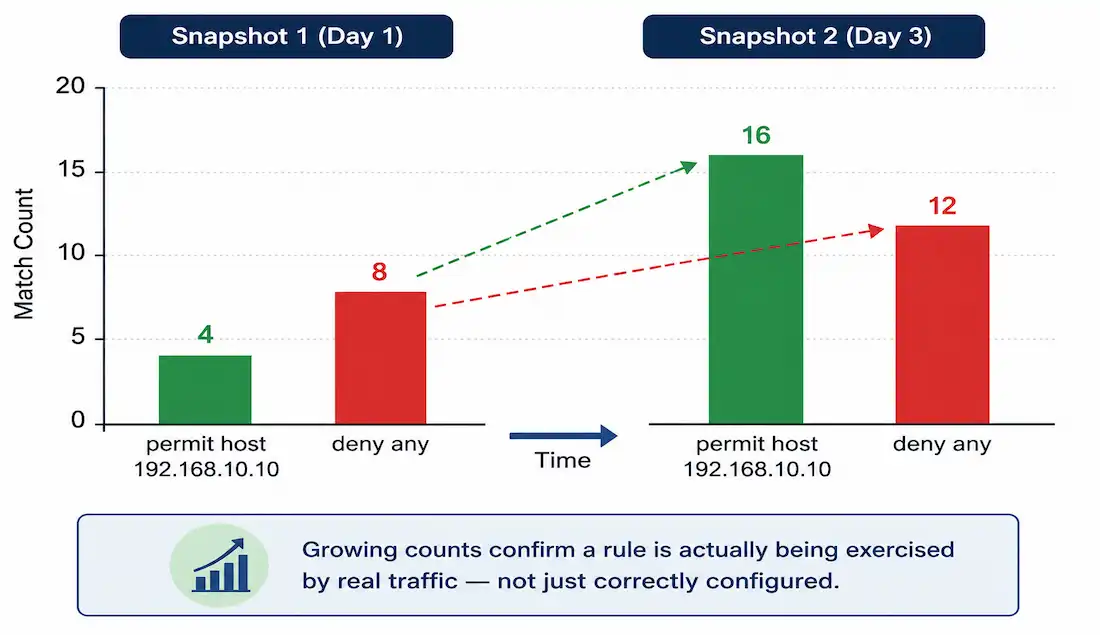
Access Control Lists are essential for filtering traffic in Cisco networks. For CCNA students, understanding ACL statistics is what turns “I configured a rule” into “I can prove the rule is actually doing something.” CCNP candidates should note how these stats aid in troubleshooting more complex, multi-interface ACL deployments where a rule might be working perfectly on one interface and silently doing nothing on another.
After a standard ACL has been configured and applied to an interface, show access-lists displays statistics for every statement that’s been matched. Matches increment each time a packet hits a specific rule, giving you a direct way to confirm permits and denials are actually happening — not just configured, but firing. Low permit matches on a rule that should be seeing regular traffic often points to a misconfiguration; unexpectedly high deny matches can reveal unauthorized access attempts worth investigating further.
Applying ACLs to Interfaces
ACLs must be linked to an interface with ip access-group <number> <in|out> before any traffic is filtered — and before any statistics have anything to count. Once applied, show access-lists shows the running totals:
R3# show access-lists
Standard IP access list 1
    10 permit host 192.168.10.10 (4 match(es))
    20 deny any (8 match(es))
R3#
Each number in parentheses is a running count: how many packets have matched that specific statement since the counter was last cleared. The count increases every time traffic hits that rule — permit or deny — which is exactly what makes this command useful for verification rather than just configuration review.
Suppose ACL 1 is applied inbound on the interface leading toward network 192.168.30.0/24, and 192.168.10.10 is PC1. If any host other than PC1 pings that network, the packet matches statement 20 (deny any) and the deny count climbs. If PC1 itself pings the network, the packet matches statement 10 and the permit count climbs instead. Standard ACLs never reference a destination directly in their own syntax — the “network 192.168.30.0/24” context here comes entirely from where the ACL is applied, not from anything written into the ACL statements themselves.
Watching Counts Grow
Checking the same ACL again later, after more traffic has passed:
R3# show access-lists
Standard IP access list 1
    10 permit host 192.168.10.10 (16 match(es))
    20 deny any (12 match(es))
R3#
Both counters climbed — the permit count from 4 to 16, the deny count from 8 to 12 — confirming both statements are actively being hit by real traffic, not just sitting configured and untested. This is the pattern to look for during verification: counts that grow over time as expected traffic flows, rather than staying frozen at zero.
Here’s the second snapshot broken down for clarity:
| Statement | Action | Matches | Explanation |
|---|---|---|---|
| 10 permit host 192.168.10.10 | Allow specific host | 16 | Increments on every successful ping (or other permitted traffic) from this IP |
| 20 deny any | Block all else | 12 | Catches unauthorized traffic; a rising count here is worth investigating |
Examining ACL Configurations for Hidden Statistics
Now consider this configuration:
R1(config)#access-list 2 permit 192.168.11.10
R1(config)#access-list 2 deny 192.168.11.0 0.0.0.255
Both explicit statements track match counts normally. But every ACL also carries an implicit deny any as its final, unwritten statement — and that implicit statement never appears in show access-lists output at all, with no match count visible for it, no matter how much denied traffic actually hits it.
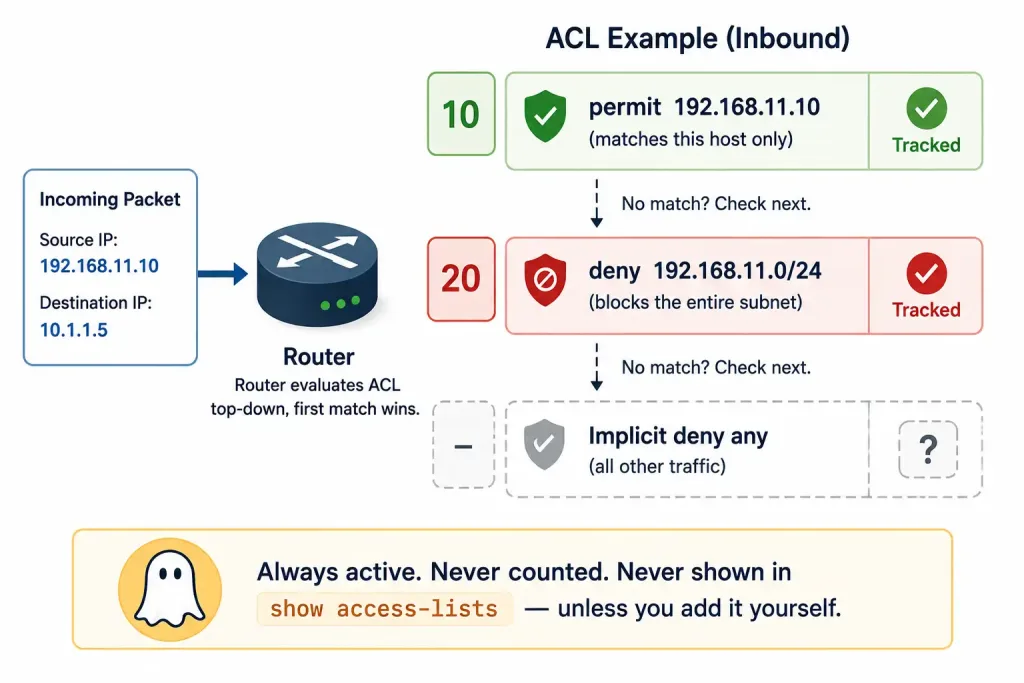
To make that traffic visible, add deny any explicitly as the ACL’s actual last statement. This doesn’t change filtering behavior in any way — traffic that would have hit the implicit deny still gets denied identically — it only makes the count visible in show access-lists, since an explicit statement gets its own tracked entry while the implicit one never does.
One precision worth being careful about: this is specifically about statement position, not just presence. Adding deny any explicitly is only safe as the genuinely last line. Placing a broad deny statement earlier than intended causes exactly the shadowing problem covered in the Editing Standard ACLs guide — any statement below it that overlaps in scope becomes silently unreachable, with its match count staying frozen at zero forever, not because the rule is wrong but because the router never reaches it.
Clearing ACL Counters
Reset match counters with clear access-list counters, either for every ACL or a specific one:
R3# clear access-list counters 1
R3# show access-lists
Standard IP access list 1
    10 permit host 192.168.10.10 (0 match(es))
    20 deny any (0 match(es))
Clearing counters is especially useful before a deliberate test — send a specific ping or traffic pattern, then check show access-lists immediately after, so the resulting counts reflect only that test rather than being buried in whatever traffic accumulated since the last reload.
Best Practices for ACL Statistics
- Always add explicit
deny any logas the genuinely last statement, to make hidden denials both visible in match counts and logged with detail viashow logging— thelogkeyword adds console/syslog logging on top of the countingdeny anyalready provides on its own. - Monitor with
show loggingspecifically for denied traffic patterns, since a single spike in denies is often the first visible sign of a misconfigured source device or a genuine access attempt worth investigating. - Use named ACLs for better long-term management —
ip access-list standard MYACL— since a descriptive name makes it far easier to know at a glance which statistics belong to which policy once a router has more than a couple of ACLs configured.
Troubleshooting Tips
If match counts aren’t incrementing at all, work through these in order:
- Check interface application. Confirm with
show ip interfacethat the ACL is actually linked to the interface you expect — an ACL that’s configured but never applied has nothing to count, ever. - Check traffic direction. An ACL applied
innever sees traffic that only flowsout, and vice versa. A count stuck at zero is often just the wrong direction, not a broken rule. - Check ACL order. A broader statement earlier in the list can shadow a more specific one further down, exactly as in the implicit-deny example above — the shadowed statement’s count stays at zero even though it’s configured correctly, simply because the router never reaches it.
- Generate deliberate test traffic. Use
pingortraceroutematching the exact source or destination you expect a specific statement to catch, then checkshow access-listsimmediately after — this isolates whether a specific rule is being hit, rather than waiting for ambient traffic and hoping.
For deeper troubleshooting of ACLs that appear correctly configured but still don’t behave as expected, the broader ACL troubleshooting guide and inbound/outbound ACL logic guide cover the direction and ordering pitfalls in more depth than statistics alone can diagnose.
Illustrative Scenario: A Rule That Looked Broken but Wasn’t
Here’s a common scenario, meant to show the troubleshooting logic in action rather than describe a specific real event.
An administrator configures an ACL intended to log unauthorized access attempts toward a sensitive subnet, adding an explicit deny any log as instructed. After a week, show access-lists still shows zero matches on that statement — despite genuine unauthorized traffic having reached the network by other means, confirmed through a separate monitoring system.
Reviewing the full ACL reveals the actual cause: a second, broader deny statement was added above the logging statement during an earlier unrelated change, matching the same source ranges the logging rule was meant to catch. Every packet that should have hit the logging deny any was being caught by the earlier, silent deny statement first — the logging rule was correctly configured and would have worked perfectly, but it was never actually reached.
Reordering the ACL so the logging statement sits ahead of the broader silent deny resolves it immediately; match counts on the logging statement begin climbing within minutes. The lesson generalizes beyond this specific case: a statement showing zero matches over a meaningful stretch of time isn’t necessarily wrong on its own — checking what’s positioned above it in the list is often faster than re-verifying the statement itself.
Worked Example: Reading Match Counts to Diagnose a Misapplied Direction
Suppose an ACL is meant to restrict which hosts can reach a subnet, applied on the interface connecting to it. After a day of expected traffic, checking show access-lists shows this:
R2# show access-lists 10
Standard IP access list 10
    10 permit host 192.168.5.10 (0 match(es))
    20 deny any (0 match(es))
Both counters sit at zero, despite confirmed traffic from both the permitted host and other hosts on that segment throughout the day. Zero matches on every statement, rather than just one, is a meaningfully different signal than a single shadowed statement showing zero while others climb normally — it points toward the ACL not actually processing any traffic at all, rather than a statement-ordering problem within an ACL that’s otherwise working.
Checking show ip interface on the relevant interface confirms the ACL is applied — but in the in direction, while all the traffic in question is actually outbound through that interface toward the destination. The ACL was never wrong; it was simply filtering traffic in a direction nothing was flowing. Reapplying it with ip access-group 10 out instead resolves it immediately, and both counters begin climbing within the next few pings.
This pattern — every statement in an ACL showing zero matches, not just one — is worth recognizing on sight, since it points toward a direction or application problem rather than anything wrong with the ACL’s internal logic or statement order.
FAQs
What does the show access-lists command reveal about ACLs?
It displays every configured ACL along with a running match count for each statement, showing how many times traffic has actually hit each permit or deny rule. This turns ACL verification from “I trust the configuration is correct” into “I can see the rule firing on real traffic,” with counts that climb as matching traffic passes through the interface. A statement with growing counts is confirmed working; one stuck at zero needs investigation.
How can I track statistics for the implied deny any in an ACL?
The implicit deny any at the end of every ACL never appears in show access-lists output and never shows a match count, no matter how much traffic it’s actually denying. Add deny any explicitly as the genuinely last statement in the ACL to make that traffic visible, which doesn’t change filtering behavior at all — it only exposes a match count for traffic that was always being denied anyway.
What is the clear access-list counters command used for?
It resets match counters to zero, either for every configured ACL or for one specific ACL when a number or name is provided, such as clear access-list counters 1. This is most useful immediately before a deliberate test — clearing first means the counts you check afterward reflect only that specific test traffic, rather than being mixed in with whatever traffic accumulated since the last reload or manual clear.
Why should I use explicit deny any log in ACLs?
An explicit deny any log, placed as the genuinely last statement, makes previously invisible denied traffic both countable in show access-lists and logged with detail through show logging. This is valuable for spotting unauthorized access attempts that would otherwise leave no trace at all, since the implicit deny provides neither a count nor a log entry on its own. In extended ACLs, this same pattern pairs naturally with port-specific rules for more granular enterprise visibility.
How do ACL match counts help in troubleshooting?
Match counts reveal whether a rule is actually being exercised by real traffic, not just correctly configured on paper — low or zero permits often mean a misapplied interface or the wrong direction, while unexpectedly high denies can signal a genuine access problem worth investigating. Testing deliberately with ping or traceroute and checking counts immediately afterward isolates a specific rule’s behavior. Checking statement order matters too, since a shadowed statement will show zero matches indefinitely even when it’s configured perfectly correctly.



