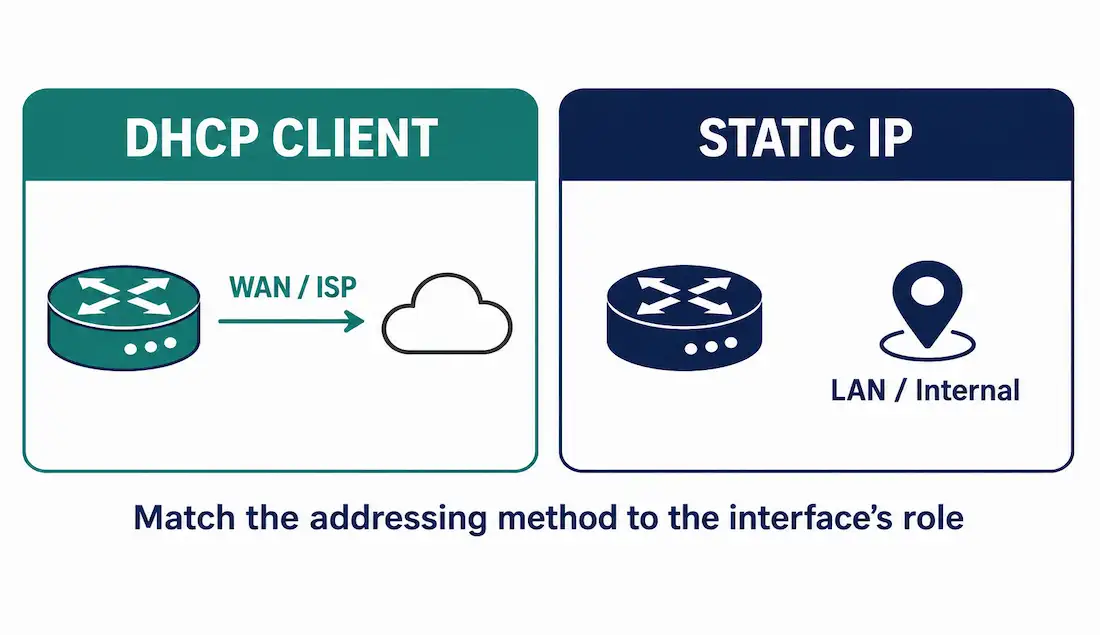
A router can learn its own IP address the same way an ordinary client computer does — by asking a DHCP server for one, instead of having an address typed in manually on the device itself. This isn’t the normal setup for a router’s internal, LAN-facing interfaces, where a stable, known address matters. But it’s exactly the right approach for a router’s WAN-facing interface connecting to an ISP, where the provider assigns the address dynamically and there’s no practical reason to demand a static one.
This guide covers the ip address dhcp command, a full working configuration between a DHCP server and a router client, every verification command worth knowing, and troubleshooting for when the client doesn’t get an address the way it should.
What a Router Learns as a DHCP Client
Configuring an Ethernet interface with ip address dhcp does more than just fetch an IP address and subnet mask. Depending on what the DHCP server is configured to hand out, the router can also learn its default gateway, DNS servers, domain name, a TFTP server address, a NetBIOS name server, static routes, and vendor-specific options — the same range of parameters an ordinary DHCP client computer can receive.
Configuration
This example uses a DHCP server (DHCPSERVER) leasing addresses from 192.168.1.2–192.168.1.254, and a router (Client) configured to receive its Fa0/0 address dynamically from that pool.
DHCP Server Configuration
DHCPSERVER> enable
DHCPSERVER# configure terminal
DHCPSERVER(config)# ip dhcp excluded-address 192.168.1.1
DHCPSERVER(config)# ip dhcp pool MY-POOL
DHCPSERVER(dhcp-config)# network 192.168.1.0 255.255.255.0
DHCPSERVER(dhcp-config)# default-router 192.168.1.1
DHCPSERVER(dhcp-config)# dns-server 8.8.8.8 8.8.4.4
DHCPSERVER(dhcp-config)# domain-name networkustad.com
DHCPSERVER(dhcp-config)# lease 0 12
DHCPSERVER(dhcp-config)# exit
DHCPSERVER(config)# interface fastEthernet 0/0
DHCPSERVER(config-if)# ip address 192.168.1.1 255.255.255.0
DHCPSERVER(config-if)# no shutdown
DHCPSERVER(config-if)# exit
DHCPSERVER(config)# exit
DHCPSERVER# write memory| Command | Purpose |
|---|---|
ip dhcp excluded-address 192.168.1.1 | Reserves the server’s own gateway address so it is never accidentally handed out to a client |
network 192.168.1.0 255.255.255.0 | Defines the pool of addresses available to lease |
default-router | Sets the gateway address clients receive |
dns-server | Sets the DNS servers clients receive |
domain-name | Appended to unqualified hostnames the client resolves |
lease 0 12 | Sets a 12-hour lease (0 days, 12 hours) — short leases like this are common in labs to observe renewal behavior quickly |
DHCP Client Configuration
Client> enable
Client# configure terminal
Client(config)# interface fastEthernet 0/0
Client(config-if)# ip address dhcp
Client(config-if)# no shutdown
Client(config-if)# end
Client# write memory
That’s the entire client-side configuration — one command on the interface. Behind the scenes, the router runs through the same Discover → Offer → Request → Acknowledge exchange any DHCP client uses.
Scenario: A Branch Router on a Cable ISP Connection
This is the case the ip address dhcp command is genuinely built for — a branch office router whose WAN interface plugs into an ISP’s cable or DSL modem, with the ISP’s own DHCP server handing out the public-facing (or ISP-facing) address.
Branch-Router(config)# interface gigabitEthernet 0/0
Branch-Router(config-if)# description WAN - ISP Uplink
Branch-Router(config-if)# ip address dhcp
Branch-Router(config-if)# no shutdown
There’s no pool to configure here, no exclusions to define — the ISP owns and manages that side entirely. The router’s job is just to ask for an address and use whatever it’s given, including the ISP’s gateway and DNS servers unless the branch network is configured to override DNS locally.
This is also the interface where NAT typically gets configured immediately after — ip nat outside on this same WAN interface, paired with ip nat inside on the LAN-facing interfaces — since a dynamically assigned, ISP-owned address is exactly the kind of address a branch network needs to translate behind, not expose LAN devices directly onto. The DHCP-learned address becomes the NAT overload address for the entire site, and if the ISP reassigns a new address on lease renewal, NAT automatically picks up the change without any manual reconfiguration.
Contrast this with the LAN-facing interfaces on the same router, which should almost always stay static — the branch’s internal default gateway address is exactly the kind of thing that shouldn’t shift if a DHCP renewal ever behaves unexpectedly, since every device and static route on the internal network is built around that address staying constant.
Watching the Exchange Happen
Turning on client-side DHCP debugging before applying ip address dhcp makes the whole process visible instead of just trusting it happened:
Client# debug ip dhcp client events
Client(config)# interface fastEthernet 0/0
Client(config-if)# ip address dhcp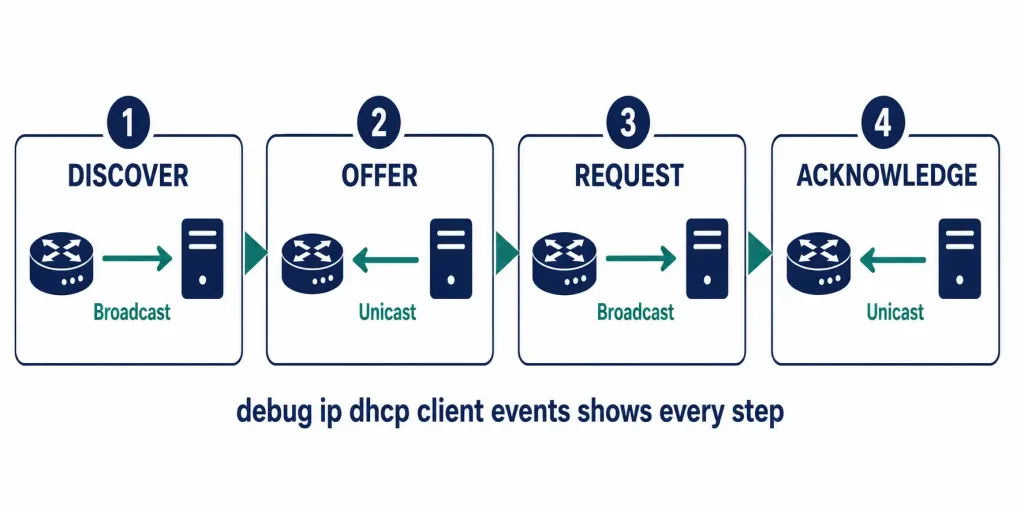
The debug output shows the same four-message exchange used by any DHCP client — a broadcast DHCPDISCOVER goes out, the server unicasts back a DHCPOFFER, the router broadcasts a DHCPREQUEST accepting it, and the server confirms with a unicast DHCPACK. The router logs each step, which is genuinely useful when an interface seems to hang without an address: the debug output shows exactly which message never arrived, rather than leaving you to guess whether the problem is the physical link, the DHCP server’s reachability, or something in the pool configuration itself on the server side.
Turn debugging off once you’re done — no debug ip dhcp client events or undebug all — since leaving debug output running on a production device adds unnecessary CPU overhead for ongoing traffic.
Verifying the Client Configuration
Client# show ip interface fastEthernet 0/0
FastEthernet0/0 is up, line protocol is up (connected)
  Internet address is 192.168.1.3/24
  Broadcast address is 255.255.255.255
  Address determined by DHCP
  MTU is 1500 bytes
  ...
The two lines that matter most: “Internet address is 192.168.1.3/24” confirms an address was actually assigned, and “Address determined by DHCP” confirms it came from DHCP rather than a static configuration.
Viewing Lease Details
Client# show dhcp lease
Temp IP addr: 192.168.1.3 for peer on interface: FastEthernet0/0
Temp sub net mask: 255.255.255.0
DHCP Lease server: 192.168.1.1
DHCP remaining lease time: 11:59:23
Renewal (T1) time: 6:00:00, Rebind (T2) time: 10:30:00
The renewal timers here aren’t arbitrary. For a 12-hour lease, T1 (renewal) fires at 50% of the lease duration — 6 hours — when the client first tries to renew directly with the server that issued the lease. T2 (rebind) fires at 87.5% — 10 hours 30 minutes — if that direct renewal never got a response, and the client broadcasts to try renewing with any available DHCP server instead. Both numbers here match that standard ratio exactly, which is a useful sanity check when reading real lease output.
Confirming the Learned Default Gateway
Client# show ip route | include Gateway
Gateway of last resort is 192.168.1.1 to network 0.0.0.0
When a router learns its address via ip address dhcp, IOS installs the DHCP-provided gateway as the default route automatically — no separate static route configuration needed.
Troubleshooting DHCPv4 Client Issues
| Symptom | Command | What to Check |
|---|---|---|
| No IP assigned | debug ip dhcp client (packet/events) | Confirm physical link is up and the DHCP server is actually reachable from this interface |
| Interface administratively down | show ip interface brief | Run no shutdown if the interface shows administratively down |
| Address from wrong subnet | show dhcp lease | Confirm the DHCP server’s pool actually matches the network this interface is on |
| Lease expiring soon / already expired | show dhcp lease | Compare remaining lease time against current time; force a renewal if needed |
| Client never completes the exchange | debug ip dhcp client events | Watch for where the Discover/Offer/Request/Ack sequence actually stalls |
A note on address conflicts: conflict detection (show ip dhcp conflict, clear ip dhcp conflict *) is a DHCP server-side feature — it shows addresses the server itself detected as already in use via a ping or ARP check before leasing them out. A router acting only as a DHCP client doesn’t have this conflict table to check; if a client-assigned address turns out to be a duplicate, that’s a server-side problem to investigate on the DHCP server itself, not something visible from the client’s own CLI.
Forcing a Release and Renew
Client# release dhcp fastEthernet 0/0
Client# renew dhcp fastEthernet 0/0
Useful when testing lease behavior in a lab, or when a client needs to pick up a configuration change made on the server (a new DNS server, a changed default gateway, a shortened lease time for testing) without waiting for the natural renewal cycle to happen on its own.
DHCPv4 Client vs. Static IP on a Router
ip address dhcp | Static IP | |
|---|---|---|
| Configuration effort | Minimal — one command | Manual, but explicit |
| Best fit | WAN interface facing an ISP | Internal LAN-facing interfaces |
| DNS / gateway | Learned automatically | Configured manually |
| Reliability | Depends on the DHCP server staying available | Always the same, regardless of any server |
| CCNA relevance | Covered under the IP Services domain in CCNA 200-301 | Core foundational skill |
Typical use cases for a DHCP client router interface: a branch office WAN interface, a SOHO router plugged into a cable or DSL modem, lab testing in Packet Tracer or GNS3, or a temporary migration scenario where addressing isn’t finalized yet.
Not recommended for internal, LAN-facing interfaces — a router’s own gateway address is exactly the kind of thing that should stay fixed and predictable, which is what static IPs (or the router itself acting as the DHCP server for that LAN) are for.
FAQs
What command configures a router interface as a DHCPv4 client?
ip address dhcp, entered in interface configuration mode. Once applied, the router runs through the standard Discover, Offer, Request, Acknowledge exchange and receives its address, subnet mask, and any other parameters the server is configured to provide.
How do you verify a router actually received an IP via DHCP?
Run show ip interface <interface> and look for two things: an assigned address on the “Internet address is…” line, and “Address determined by DHCP” confirming it came from the DHCP exchange rather than a manual configuration.
Can a Cisco router learn more than just an IP address from DHCP?
Yes — default gateway, DNS servers, domain name, a TFTP server address, a NetBIOS name server, vendor-specific options, and even static routes can all be delivered through the same DHCP exchange, depending on what the server is configured to hand out.
When should you configure a router interface as a DHCP client?
Mainly on WAN-facing interfaces connecting to an ISP that assigns addresses dynamically. It’s not recommended for internal LAN-facing interfaces, where a stable, predictable gateway address matters more than the convenience of automatic configuration.
What does the DHCP server need to exclude from its pool?
Its own interface address at minimum — ip dhcp excluded-address <address> — so the server never accidentally offers its own gateway address to a client. Any other statically-assigned addresses on that subnet should be excluded the same way.
Is show ip dhcp conflict useful for troubleshooting a client router?
Not directly — it’s a DHCP server-side command showing addresses the server detected as already in use. A router configured only as a DHCP client doesn’t maintain that conflict table itself; a suspected address conflict needs to be investigated from the DHCP server’s own CLI instead.
Does the DHCP-learned address change if the router reboots?
It can. On reboot, the client restarts the full Discover/Offer/Request/Ack exchange rather than assuming its previous lease is still valid — if the DHCP server has since reassigned that address to another device, or the lease genuinely expired while the router was down, the router will receive a different address on the new lease. This is one more reason static addressing is preferred for interfaces where a consistent, predictable address actually matters, since a DHCP-assigned address always carries at least some possibility of changing between reboots.