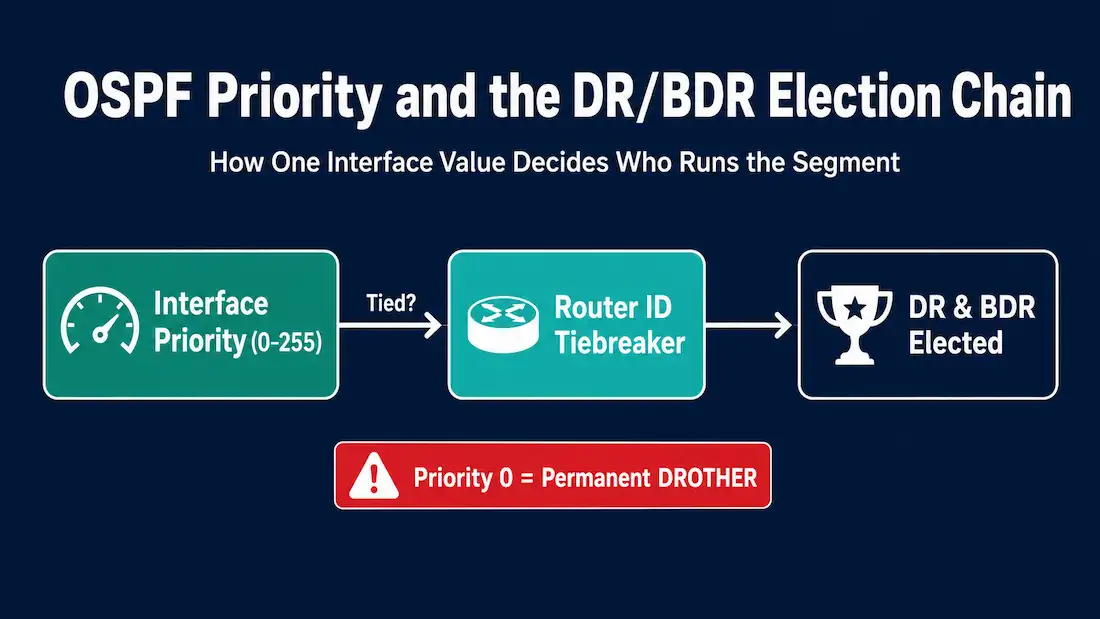
Each broadcast and Non-Broadcast Multi-Access (NBMA) network has a designated router. This router is the central point for collecting and distributing LSAs (Link-State Advertisements), so it must have enough CPU and memory capability to handle the workload. The OSPF priority value is the primary mechanism for controlling which router wins the DR/BDR election on these segments.
This guide covers how OSPF priority works, the complete election rules, how to configure priority in OSPFv2 and OSPFv3, how to verify the result, and what CCNA candidates need to know about the exam’s most commonly tested OSPF election scenarios.
Why OSPF Needs a Designated Router
On a point-to-point link between two routers, OSPF forms a single adjacency. On a broadcast segment (like Ethernet) or NBMA segment with multiple routers, forming a full mesh of adjacencies becomes expensive. With n routers on a segment, a full mesh requires n(n-1)/2 adjacencies — the same scaling problem covered in Challenges in Multiaccess OSPF Networks.
The designated router solves this by acting as the central exchange point. All routers on the segment form adjacencies with the DR and BDR only — reducing the number of required adjacencies significantly. All LSAs are sent to the DR, which then distributes them to the rest of the segment. The BDR (Backup Designated Router) monitors the DR and takes over immediately if it fails.
Multiple routers connected to a multi-access network compete to become the designated router, and OSPF priority is what decides — deliberately or by default — which one wins.
The Three OSPF Router Roles on a Broadcast Segment
Every router on a broadcast OSPF segment takes one of three roles:
DR (Designated Router) — the central LSA collection and distribution point. All routers form a FULL adjacency with the DR.
BDR (Backup Designated Router) — monitors the DR and takes over if it fails. All routers form a FULL adjacency with the BDR.
DROTHER — any router that is neither DR nor BDR. DROTHERs form FULL adjacencies only with the DR and BDR. DROTHERs remain in the 2-WAY state with each other — they exchange hello packets but do not exchange LSAs directly. This is normal and expected behavior on a correctly functioning broadcast segment.
Understanding the DROTHER role is critical: a router with priority 0 is permanently a DROTHER. It forms adjacencies with the DR and BDR, participates in OSPF routing, but is ineligible for DR or BDR election.
OSPF DR/BDR Election Rules
The election follows a strict sequence of tiebreakers:
Rule 1 — Highest OSPF priority wins DR. The router with the highest configured OSPF priority on the interface becomes the DR. The router with the second-highest priority becomes the BDR.
Rule 2 — Highest Router ID breaks ties. If all interface priorities are equal (the default), the router with the highest Router ID is elected DR, and the second-highest Router ID becomes BDR. We can manually configure the Router ID to manipulate the DR/BDR election.
Rule 3 — Priority 0 disqualifies entirely. A router interface with a priority value of 0 cannot become DR or BDR. It remains a DROTHER permanently on that segment regardless of its Router ID.
Rule 4 — The election is non-preemptive. This is the most important and most commonly misunderstood rule. Once the DR and BDR are elected and OSPF is running, a new router joining the segment with a higher priority does not automatically take over as DR. The existing DR remains DR until it fails or its OSPF process is specifically cleared. This is by design — frequent DR changes would disrupt the network.
| Tiebreaker | Value | Result |
|---|---|---|
| 1st | Highest OSPF interface priority | Wins DR election |
| 2nd (tie) | Highest Router ID | Wins DR election |
| Special | Priority = 0 | Permanently DROTHER, ineligible for DR/BDR |
| Behavior | Non-preemptive | Existing DR stays until failure or manual clear |
OSPF Priority Values
OSPF priority is an interface-specific value — not a global router value. The same physical router can be the DR on one segment and a DROTHER on another, depending on the priority configured per interface.
Priority range: 0 to 255 Default value: 1 (all interfaces start with priority 1 unless changed) Special value 0: permanently ineligible for DR/BDR Highest effective value: 255 (guarantees DR election unless another router also has 255, in which case Router ID breaks the tie)
Configuring interface priority is the standard way to deliberately control DR/BDR election on a multiaccess network, rather than leaving the outcome to whatever Router ID happens to be highest by coincidence. This also allows a router to be the DR in one network and a DROTHER in others, since the value is set per interface.
OSPFv2 and OSPFv3 Priority Commands
To manipulate the default priorities, use the following commands:
- ip ospf priority <value> — OSPFv2 Command (IPv4)
- ipv6 ospf priority <value> — OSPFv3 command (IPv6)
OSPFv2 Priority Configuration
Router(config)# interface GigabitEthernet0/0
Router(config-if)# ip ospf priority <value>
Values: 0–255. Default is 1.
OSPFv3 Priority Configuration
OSPFv3 (the IPv6 implementation of OSPF) uses the same DR/BDR election logic and the same priority range (0–255) with an identical default of 1. The only difference is the command syntax:
Router(config)# interface GigabitEthernet0/0
Router(config-if)# ipv6 ospf priority <value>
In both OSPFv2 and OSPFv3, the election is non-preemptive. After changing the priority, the OSPF process on the current DR (and typically the BDR) must be cleared to force a new election.
OSPFv3 Router ID — important distinction from OSPFv2: Per RFC 5340, the OSPFv3 Router ID is a 32-bit value formatted like an IPv4 address — but it does not need to match an actual IPv4 address configured on the router. On Cisco IOS, OSPFv3 selects its Router ID using this sequence:
- A manually configured
router-idvalue (recommended) - The highest IPv4 address on a loopback interface (if IPv4 addresses exist)
- The highest IPv4 address on any active interface (if no loopback exists)
In a pure IPv6-only environment (no IPv4 addresses configured anywhere on the router), OSPFv3 cannot automatically select a Router ID — the process will not start until a Router ID is manually configured:
Router(config)# router ospfv3 1
Router(config-router)# router-id 1.1.1.1
The value 1.1.1.1 here is a 32-bit identifier in dotted-decimal notation — it does not need to correspond to any real IPv4 address on the router. The same tie-breaking logic applies in OSPFv3: if priorities are equal, the router with the highest 32-bit Router ID wins the DR election.
Topology Example: Four Routers on a Broadcast Segment
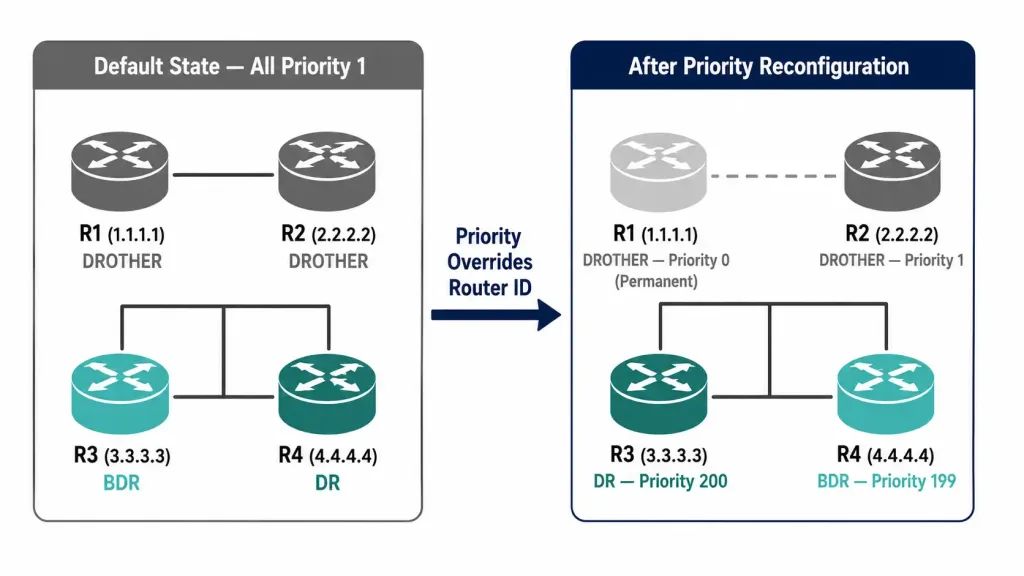
Consider four routers — R1, R2, R3, and R4 — all connected to the same Ethernet broadcast segment through their GigabitEthernet0/0 interfaces. Their Router IDs are:
- R1: 1.1.1.1
- R2: 2.2.2.2
- R3: 3.3.3.3
- R4: 4.4.4.4
Default state (all priorities = 1): All four routers have the default OSPF priority of 1. Since priorities are equal, the Router ID decides the election. R4 (highest Router ID, 4.4.4.4) becomes DR. R3 (second-highest, 3.3.3.3) becomes BDR. R1 and R2 are DROTHERs.
After priority reconfiguration: It has been decided that:
- R1 should never be a DR or BDR — configured with priority 0
- R2 remains at the default priority value of 1
- R3 should be the DR — configured with priority 200
- R4 should be the BDR — configured with priority 199
After clearing the OSPF process on the affected routers, R3 becomes DR and R4 becomes BDR — even though their Router IDs (3.3.3.3 and 4.4.4.4) are lower than R4’s default-state Router ID would suggest. Priority takes precedence over Router ID whenever a fresh election occurs. R1 becomes a permanent DROTHER, and R2 becomes a DROTHER since its priority of 1 is lower than both R3 and R4.
Configuration: Changing OSPF Priority
Configuration on R1 (Priority 0 — Permanently DROTHER)
R1> enable
R1# configure terminal
R1(config)# interface GigabitEthernet0/0
R1(config-if)# ip ospf priority 0
R1(config-if)# exit
R1(config)# exit
R1# clear ip ospf process
Configuration on R3 (Priority 200 — Intended DR)
R3> enable
R3# configure terminal
R3(config)# interface GigabitEthernet0/0
R3(config-if)# ip ospf priority 200
R3(config-if)# exit
R3(config)# exit
R3# clear ip ospf process
Configuration on R4 (Priority 199 — Intended BDR)
R4> enable
R4# configure terminal
R4(config)# interface GigabitEthernet0/0
R4(config-if)# ip ospf priority 199
R4(config-if)# exit
R4(config)# exit
R4# clear ip ospf process
What actually forces the new election: Because the election is non-preemptive, simply changing priority values doesn’t move anything by itself — the current DR has to actually relinquish its role for a new election to happen. In this scenario, that means clearing the OSPF process specifically on R4 (the current DR in the default state) so it drops out and a fresh election runs with the newly configured priorities in effect.
Clearing the process on R1 and R3 as well ensures their new priority values are recognized immediately rather than waiting for the next scheduled update, but it’s R4’s process being cleared that actually triggers the re-election. In practice, many engineers clear the process on every router on the segment as a simple, reliable habit — it always works, even if strictly speaking only the current DR’s clear is what forces the vote to happen again.
Verifying OSPF Priority and DR/BDR Election
Two commands confirm the result of the election:
show ip ospf interface
The show ip ospf interface [interface-id] command displays the DR/BDR state for a specific interface. Key fields in the output:
R3# show ip ospf interface GigabitEthernet0/0
GigabitEthernet0/0 is up, line protocol is up
  Internet Address 192.168.1.3/24, Area 0, Attached via Network Statement
  Process ID 1, Router ID 3.3.3.3, Network Type BROADCAST, Cost: 1
  Transmit Delay is 1 sec, State DR, Priority 200
  Designated Router (ID) 3.3.3.3, Interface address 192.168.1.3
  Backup Designated router (ID) 4.4.4.4, Interface address 192.168.1.4
  Timer intervals configured, Hello 10, Dead 40, Wait 40, Retransmit 5
  Neighbor Count is 3, Adjacent neighbor count is 3
The key fields to check: State DR (confirms this router is the DR), Priority 200 (confirms the configured priority), Designated Router ID (DR’s Router ID and IP), Backup Designated router ID (BDR’s Router ID and IP).
For R1 (priority 0, DROTHER), the output shows:
R1# show ip ospf interface GigabitEthernet0/0
  State DROTHER, Priority 0
  Designated Router (ID) 3.3.3.3, Interface address 192.168.1.3
  Backup Designated router (ID) 4.4.4.4, Interface address 192.168.1.4
  Neighbor Count is 3, Adjacent neighbor count is 2
Adjacent neighbor count is 2 — R1 (as a DROTHER) forms FULL adjacencies with the DR and BDR only. Its relationship with R2 (the other DROTHER) remains in 2-WAY state. This is correct behavior.
show ip ospf neighbor
The show ip ospf neighbor command confirms neighbor states from each router’s perspective. For a correctly configured segment:
R3# show ip ospf neighbor
Neighbor ID     Pri   State           Dead Time   Address         Interface
4.4.4.4         199   FULL/BDR        00:00:35    192.168.1.4     Gig0/0
2.2.2.2           1   FULL/DROTHER    00:00:32    192.168.1.2     Gig0/0
1.1.1.1           0   FULL/DROTHER    00:00:38    192.168.1.1     Gig0/0
From R3 (DR), all three neighbors show FULL state — correct, because the DR forms FULL adjacencies with every other router on the segment.
R1# show ip ospf neighbor
Neighbor ID     Pri   State           Dead Time   Address         Interface
3.3.3.3         200   FULL/DR         00:00:31    192.168.1.3     Gig0/0
4.4.4.4         199   FULL/BDR        00:00:37    192.168.1.4     Gig0/0
2.2.2.2           1   2WAY/DROTHER    00:00:33    192.168.1.2     Gig0/0
From R1 (DROTHER): FULL adjacency with DR and BDR, but 2WAY with R2 (the other DROTHER). This is expected and correct.
Common Mistakes and Troubleshooting
Mistake 1 — Clearing OSPF process on the wrong router. The most common configuration error is running clear ip ospf process on a DROTHER whose priority was changed, then wondering why the DR did not change. Because the election is non-preemptive, it’s the current DR whose process must be cleared to force it to relinquish the role and trigger a new election — clearing a router that was never DR or BDR doesn’t accomplish anything on its own.
Mistake 2 — Expecting priority 255 to guarantee DR immediately. Priority 255 makes a router the winning candidate in any fresh election, but if another router on the segment already holds the DR role and its process has not been cleared, the existing DR retains its role regardless of any other router’s priority. Priority 255 only guarantees the outcome of the next election, not an immediate takeover.
Mistake 3 — Misreading 2WAY state as a problem. DROTHER-to-DROTHER relationships show as 2WAY in show ip ospf neighbor. This is not a fault — it is the correct, expected state. A DROTHER only forms FULL adjacencies with the DR and BDR.
Mistake 4 — Forgetting OSPF priority is interface-specific. ip ospf priority is configured under a specific interface, not globally. Changing it on one interface does not affect the router’s priority on other interfaces.
OSPF Priority Quick Reference
| Priority Value | Effect |
|---|---|
| 0 | Permanently ineligible for DR or BDR; always a DROTHER |
| 1 | Default; participates in election; Router ID breaks ties |
| 2–254 | Higher than default; preferred over priority-1 routers |
| 255 | Highest possible; wins the next election unless another router also has 255 |
CCNA Exam Pointers
- Default OSPF priority is 1 on all interfaces
- Priority range is 0 to 255
- Priority 0 = permanently DROTHER, cannot become DR or BDR
- Highest priority wins DR; second-highest wins BDR
- If all priorities are equal, highest Router ID wins
- OSPF DR/BDR election is non-preemptive — existing DR keeps the role even if a higher-priority router joins
- To force a new election: clear the OSPF process on the current DR (clearing all routers on the segment is a safe, common practice)
- A DROTHER forms FULL adjacency with DR and BDR; 2WAY with other DROTHERs
show ip ospf interface— confirms DR/BDR state and configured priority per interfaceshow ip ospf neighbor— confirms neighbor state (FULL/DR, FULL/BDR, FULL/DROTHER, 2WAY/DROTHER)- OSPFv2:
ip ospf priority <value>; OSPFv3:ipv6 ospf priority <value>
Conclusion
OSPF priority is the cleanest way to control DR/BDR election on broadcast and NBMA segments. Setting priority to 0 permanently excludes a router from election. Setting it to 200 or 255 makes a specific router the predictable winner of the next election. The non-preemptive nature of the election means that priority changes only take effect once the current DR’s OSPF process is actually cleared, forcing a fresh vote — understanding why that specific step is required, rather than just memorizing “clear ip ospf process,” is what separates a confident CCNA candidate from one who’s only memorized commands.
Verify every priority change with show ip ospf interface to confirm State DR, State BDR, or State DROTHER, and show ip ospf neighbor to confirm that all adjacencies are in the correct state for their role.
Frequently Asked Questions
What is OSPF priority and what does it control?
OSPF priority is an interface-level value between 0 and 255 that controls which router wins the Designated Router (DR) and Backup Designated Router (BDR) election on a broadcast or NBMA segment. The router with the highest priority on the segment becomes the DR; the second-highest becomes the BDR. If all priorities are equal (the default is 1), the router with the highest Router ID wins. Priority 0 permanently excludes a router from election — it remains a DROTHER regardless of its Router ID. Priority is configured per interface, so the same router can be the DR on one segment and a DROTHER on another.
Why is OSPF DR/BDR election non-preemptive?
Once elected, the DR retains its role until it fails or its OSPF process is manually cleared. This is by design — frequent DR changes would cause repeated OSPF reconvergence events, disrupting routing across the segment. If a router with a higher priority later joins the segment, it does not automatically take over as DR. To force a new election when a priority change has been made, clear the OSPF process specifically on the current DR (clearing every router on the segment is a common, safe way to ensure this happens without needing to track exactly which router currently holds the role).
What is a DROTHER in OSPF?
A DROTHER is any OSPF router on a broadcast segment that is neither the DR nor the BDR. DROTHERs form FULL adjacencies only with the DR and BDR — they exchange LSAs through those two routers rather than directly with each other. Between two DROTHERs, the OSPF neighbor relationship stays in the 2WAY state, which is correct and expected behavior. A router configured with priority 0 is permanently a DROTHER on that interface. Seeing 2WAY in show ip ospf neighbor between two routers both in DROTHER state is not a fault — it is how OSPF is designed to work on broadcast segments.
How do I force a new DR/BDR election after changing OSPF priority?
Clear the OSPF process specifically on the current DR — that’s the router whose process actually needs to restart to relinquish the role and trigger a fresh election. Clearing the process on other routers on the segment as well doesn’t hurt and is a common practical habit, since it guarantees their new priority values are recognized immediately, but it’s the current DR’s clear that does the real work. After the election completes, verify the result with show ip ospf interface (check the State field) and show ip ospf neighbor (confirm FULL/DR, FULL/BDR, and FULL/DROTHER or 2WAY/DROTHER states as expected).
What is the difference between Router ID and OSPF priority in DR election?
OSPF priority is the primary decision factor for DR/BDR election — the interface with the highest priority wins regardless of Router ID. The Router ID is only used as a tiebreaker when two or more interfaces have equal priority values. Since the default priority is 1 for all interfaces, Router ID determines the election on networks where no one has manually configured priority. Configuring a priority of 200 on R3 and 199 on R4 guarantees they win the next election over all other routers with the default priority of 1, regardless of whether those other routers have higher Router IDs.