
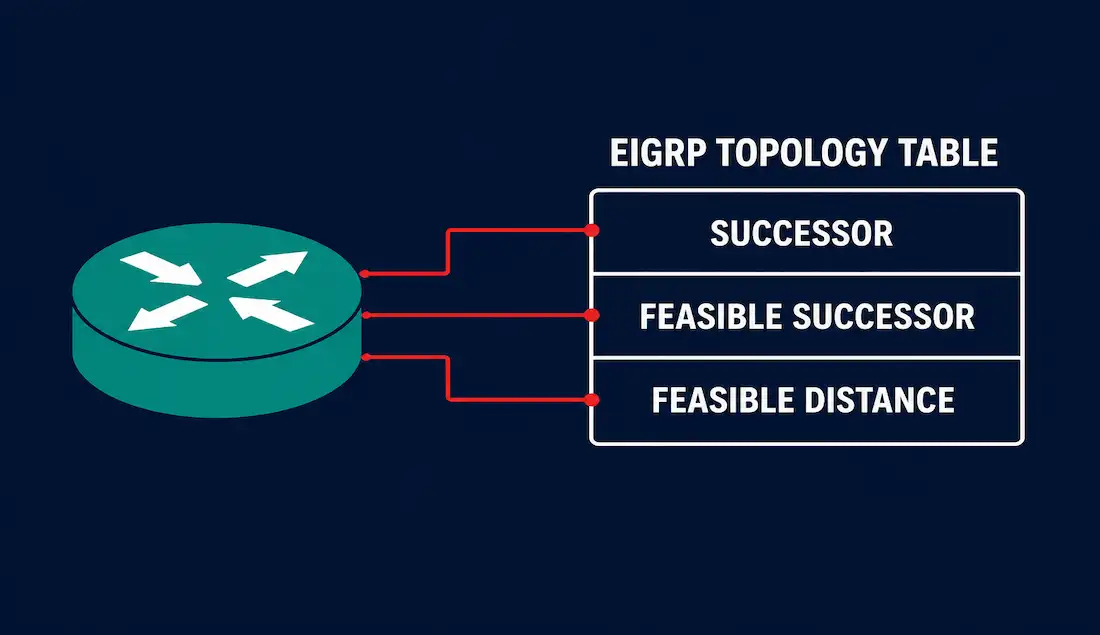
The EIGRP topology table is the database that separates EIGRP from every distance-vector protocol that came before it. It holds every loop-free route an EIGRP router learns from its neighbors, not just the one it currently uses. That single design choice is why EIGRP can recover from a link failure in milliseconds instead of waiting through a full recalculation.
This guide breaks down exactly what lives inside the topology table, how the Diffusing Update Algorithm (DUAL) builds it, and how to read show ip eigrp topology output line by line — including a fully worked metric calculation.
What the EIGRP Topology Table Actually Stores
Every EIGRP-enabled router keeps three separate databases:
- Neighbor table — a list of directly connected EIGRP routers it has formed adjacencies with.
- Topology table — every loop-free path to every known destination network, learned from every neighbor.
- Routing table — only the single best path to each destination, copied over from the topology table.
The topology table lives entirely in RAM. It is rebuilt from scratch every time the router boots or the EIGRP process restarts, using updates exchanged with neighbors. Unlike the routing table, it is not limited to the best route. It keeps every mathematically valid backup path too, as long as that path meets the feasibility condition described below.
Because the topology table already contains a validated backup route, EIGRP can install that backup into the routing table the instant the primary path fails, without sending a single packet to a neighbor first. This is what network engineers mean when they say EIGRP converges “instantly” for a stored backup route.
Successor, Feasible Successor, FD, and RD
Four terms drive everything in the topology table. Get comfortable with these before reading raw CLI output.
- Successor — the neighbor that offers the best (lowest-metric) loop-free path to a destination. This is the route that gets copied into the routing table.
- Feasible Successor (FS) — a backup neighbor whose reported distance is mathematically guaranteed to be loop-free, even though its metric is higher than the successor’s. Not every topology entry has one.
- Feasible Distance (FD) — the router’s own best metric to reach a destination, calculated through the successor.
- Reported Distance (RD), sometimes called Advertised Distance (AD) — the metric that a neighbor reports for reaching that same destination, calculated from the neighbor’s own perspective.
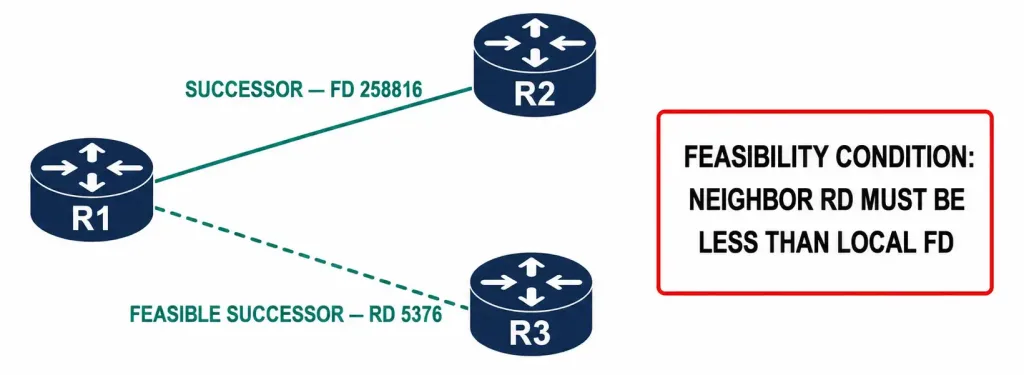
A neighbor qualifies as a Feasible Successor only if its Reported Distance is strictly lower than the local router’s Feasible Distance. This is the feasibility condition, and it is the mathematical guarantee that using that neighbor as a backup can never create a routing loop. If no neighbor satisfies the condition, the topology table entry has no Feasible Successor, and a link failure forces the route into an Active state while DUAL queries neighbors for a new path.
Passive vs Active: The Two States of a Topology Entry
Every route in the topology table carries a state flag:
- P (Passive) — the stable state. The router already has a validated successor and, ideally, a feasible successor. No recalculation is happening. A healthy routing domain should show every entry as Passive.
- A (Active) — DUAL has lost the successor (and has no feasible successor to fall back on), so the router is actively querying its neighbors to find a new loop-free path. A route stuck in Active for too long is known as Stuck-In-Active (SIA), a well-known EIGRP failure condition covered in the troubleshooting section below.
Reading show ip eigrp topology Output Line by Line
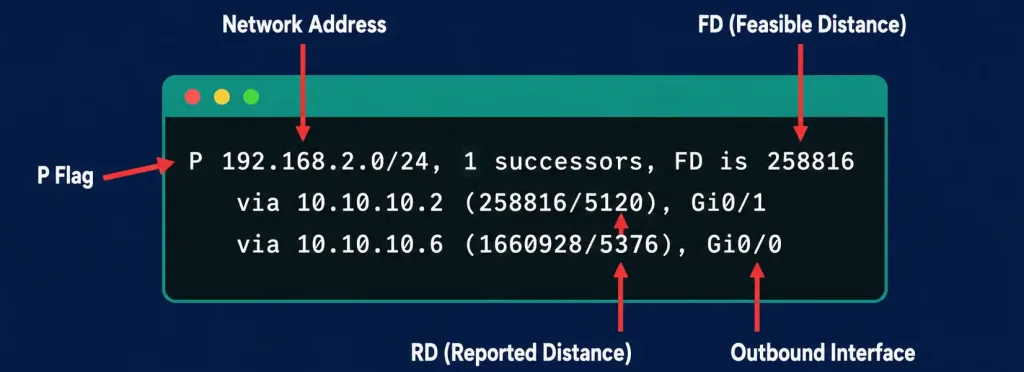
The show ip eigrp topology command displays the full contents of the topology table. Here is a corrected, complete example based on a router with a route to 192.168.2.0/24:
P 192.168.2.0/24, 1 successors, FD is 258816
        via 10.10.10.2 (258816/5120), GigabitEthernet0/1
        via 10.10.10.6 (1660928/5376), GigabitEthernet0/0
First line — the destination summary:
- P — the route is Passive. The topology is stable and no DUAL recalculation is underway. If the router loses its successor and has no feasible successor to fall back on, this flag changes to A for Active.
- 192.168.2.0/24 — the destination network this entry describes. This is the address that will also appear in the routing table once a successor is installed.
- 1 successors — the number of equal-cost best paths to this network. If two or more neighbors report the exact same lowest metric, this number increases and EIGRP load-balances across all of them by default.
- FD is 258816 — the Feasible Distance, the router’s own best metric to reach 192.168.2.0/24. This is the value that gets copied straight into the routing table alongside the route.
Second line — the successor entry:
- via 10.10.10.2 — the next-hop IP address of the successor router. This address also shows up in the routing table entry for this network.
- (258816/5120) — the pair of numbers in parentheses. The first number, 258816, is the FD to reach 192.168.2.0/24 through this neighbor — it matches the FD on line one because this is the successor. The second number, 5120, is the Reported Distance: this neighbor’s own metric to reach the destination, from its perspective.
- GigabitEthernet0/1 — the local outbound interface used to reach the successor. This also appears in the routing table.
Third line — the feasible successor entry:
- via 10.10.10.6 — the next-hop address of the Feasible Successor. If this second
vialine is missing entirely, the topology entry has no feasible successor, which means a failure of the primary path will force the route into Active state. - (1660928/5376) — 1,660,928 is the FD the router would have to reach 192.168.2.0/24 if this neighbor became the new successor. 5,376 is this neighbor’s Reported Distance. Because 5,376 is lower than the current FD of 258,816, the feasibility condition is satisfied and this entry is a valid backup.
- GigabitEthernet0/0 — the outbound interface that would be used to reach the network if this feasible successor is promoted to successor.
Worked Example: Calculating the Feasible Distance by Hand
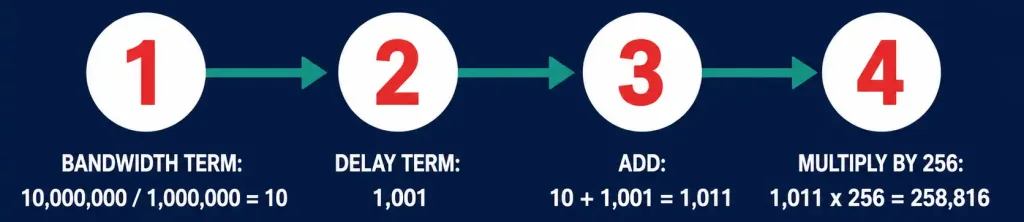
EIGRP’s default composite metric formula, using the default K-values (K1 = K3 = 1, K2 = K4 = K5 = 0), simplifies to:
Metric = 256 × ( 10,000,000 / minimum bandwidth in Kbps + cumulative delay / 10 )Take the successor path above, reached via GigabitEthernet0/1 (1,000,000 Kbps bandwidth):
- Bandwidth term: 10,000,000 ÷ 1,000,000 = 10
- Delay term across the path to 192.168.2.0/24: assume a cumulative delay value of 1,001 (in tens of microseconds), the sum of every outbound interface delay along the path
- Add the two terms: 10 + 1,001 = 1,011
- Multiply by 256: 1,011 × 256 = 258,816
That matches the FD shown in the CLI output exactly. This 256 multiplier is also a quick sanity check when auditing EIGRP output: with default K-values, every valid FD and RD value must be evenly divisible by 256. Both 258,816 ÷ 256 = 1,011 and 1,660,928 ÷ 256 = 6,488 check out cleanly, which confirms the numbers in this example are internally consistent.
Topology Table vs. Routing Table
| Attribute | Topology Table | Routing Table |
|---|---|---|
| Contents | Every loop-free route from every neighbor | Only the single best route (or equal-cost set) |
| Storage | RAM, rebuilt on every EIGRP restart | RAM, rebuilt from topology table entries |
| Backup routes | Stores Feasible Successors for instant failover | No backup routes stored |
| View command | show ip eigrp topology | show ip route |
| Convergence role | Source of pre-validated backup paths | Used for actual packet forwarding decisions |
| Updated by | DUAL, from neighbor advertisements | Copied from the topology table’s best entries |
K-Values: What Actually Feeds the Composite Metric
EIGRP’s metric formula can weigh up to five path attributes, controlled by five K-value constants. By default only K1 and K3 are active, which is why the simplified bandwidth-plus-delay formula above works for almost every real deployment.
| K-Value | Attribute | Default State |
|---|---|---|
| K1 | Bandwidth | Active (weight = 1) |
| K2 | Load | Inactive (weight = 0) |
| K3 | Delay | Active (weight = 1) |
| K4 | Reliability | Inactive (weight = 0) |
| K5 | MTU-based extension | Inactive (weight = 0) |
All EIGRP neighbors must agree on their K-values, or they will not form an adjacency at all. A mismatch shows up immediately in show ip eigrp neighbors as a stuck or missing entry, which makes K-value mismatches one of the first things to rule out when two routers refuse to peer.
Reducing Query Scope to Prevent SIA in Large Networks
Stuck-In-Active problems get worse as an EIGRP domain grows, because a single lost route can trigger a query that has to ripple out to every router in the flat topology before an answer comes back. Two design practices keep that query scope small:
- Summarization at distribution and aggregation layers — a summarized route stops queries at the summarizing router instead of forwarding them further upstream, since the summarizing router already has a definitive answer for everything inside the summary.
- EIGRP stub routers at the network edge — a router configured as a stub tells its neighbors not to query it for routes it did not originate itself, which is exactly why spoke routers in hub-and-spoke WAN designs are almost always configured as EIGRP stubs.
Both techniques reduce how far a DUAL query has to travel before every neighbor replies, which is the single biggest lever for keeping convergence times low in a large EIGRP domain.
Troubleshooting the Topology Table
- Route stuck in Active (SIA) — happens when a neighbor fails to reply to a DUAL query before the SIA timer (three minutes by default) expires. Usually caused by a slow, congested, or flapping link somewhere downstream, or by an oversized query scope in a large flat EIGRP domain. Summarization at aggregation points and route filtering both shrink query scope and reduce SIA risk.
- No Feasible Successor shown — check
show ip eigrp topologyfor the destination; if only onevialine appears, no neighbor currently satisfies the feasibility condition. This is common on hub-and-spoke topologies where the spoke only has one usable path. A link failure here forces an Active recalculation instead of an instant switch. - Successor not installed in the routing table — verify the route isn’t being filtered by a distribute-list or blocked by administrative distance from a competing protocol with a lower AD, since EIGRP’s default AD of 90 loses to a static route or another protocol configured with a lower value.
- Unexpected metric changes — a jump in FD after a topology change usually traces back to a bandwidth or delay change on an interface somewhere in the path, since both feed directly into the composite metric formula.
Frequently Asked Questions
Is the EIGRP topology table the same as the routing table? No. The topology table stores every valid loop-free route and any backup routes; the routing table stores only the single best route that is actually used to forward traffic.
What command shows the EIGRP topology table? show ip eigrp topology on Cisco IOS and IOS-XE devices. Adding the all-links keyword displays every route EIGRP has learned, including ones that fail the feasibility condition and were never considered as feasible successors.
Why does a route show as Active instead of Passive? The route lost its successor and had no feasible successor available, so DUAL is actively sending queries to neighbors to find a replacement loop-free path.
Can a topology table entry have more than one Feasible Successor? Yes. Any neighbor whose Reported Distance is lower than the current Feasible Distance qualifies, so a well-connected topology can list several feasible successors for the same destination.
Does the topology table survive a router reboot? No. It lives in RAM only and is rebuilt from scratch by exchanging updates with neighbors every time the EIGRP process starts.
What does the all-links keyword add to the command? show ip eigrp topology all-links reveals every route a neighbor has advertised, including ones that fail the feasibility condition and were discarded as candidates. Without it, the command only shows successors and valid feasible successors.
Why would two EIGRP routers refuse to form a neighbor relationship even though they’re on the same subnet? A K-value mismatch is one of the most common causes: both routers must agree on which metric components are active before DUAL will build a topology table entry between them at all.
Key Takeaways
The EIGRP topology table is what makes EIGRP’s fast convergence possible: it pre-validates backup routes using the feasibility condition, so a Feasible Successor can be promoted to successor without a single query packet leaving the router. Reading show ip eigrp topology correctly means tracking four numbers — FD, RD, the successor’s next hop, and the feasible successor’s next hop — and remembering that every valid metric under default K-values is a clean multiple of 256.



