
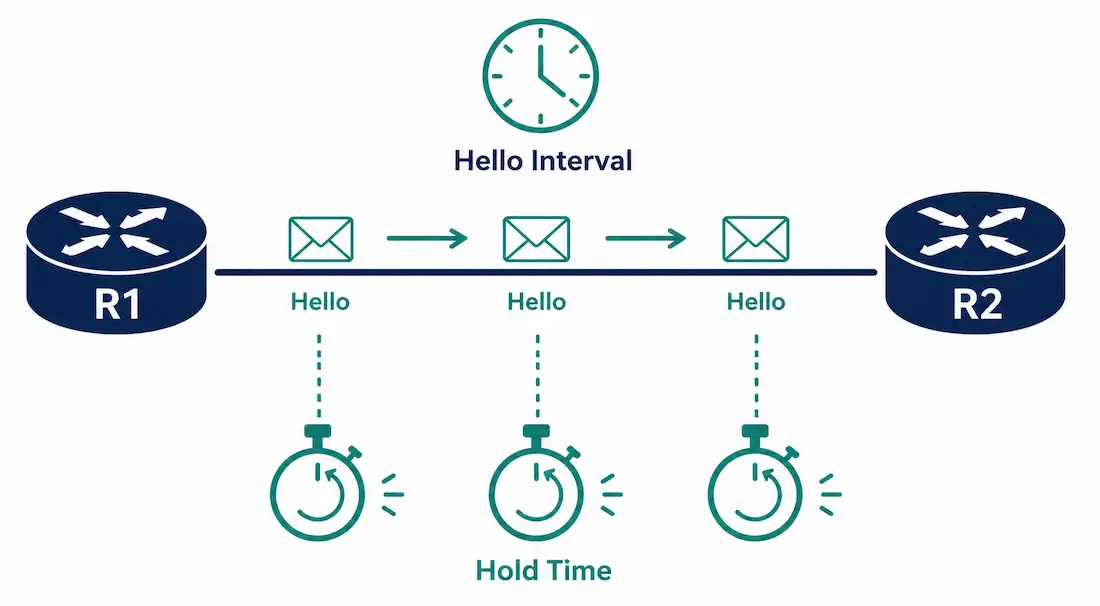
EIGRP neighbors don’t just form a relationship once and assume it stays healthy forever — they actively check in with each other on a regular schedule, using small Hello packets sent at a configurable interval. If those check-ins stop arriving, the neighbor relationship gets torn down, and every route learned through it disappears from the routing table along with it.
This guide covers how the Hello protocol actually works, the correct default timers by link type, how to configure and verify custom values, and what to check when neighbor relationships behave unexpectedly.
How the Hello Protocol Works
EIGRP uses the Hello protocol to establish and maintain relationships with its neighbors, and to actively monitor whether those relationships are still healthy. It sends a small Hello packet periodically to every EIGRP-enabled interface — the rate at which these packets go out is called the Hello interval.
The Hold time works conceptually like OSPF’s dead interval: it’s the maximum amount of time a router will wait without receiving a Hello packet from a neighbor before declaring that neighbor unreachable and tearing down the adjacency, along with every route learned through it.
Both values are configurable on a per-interface basis, each accepting a range from 1 to 65,535 seconds.
Default Timers by Link Type
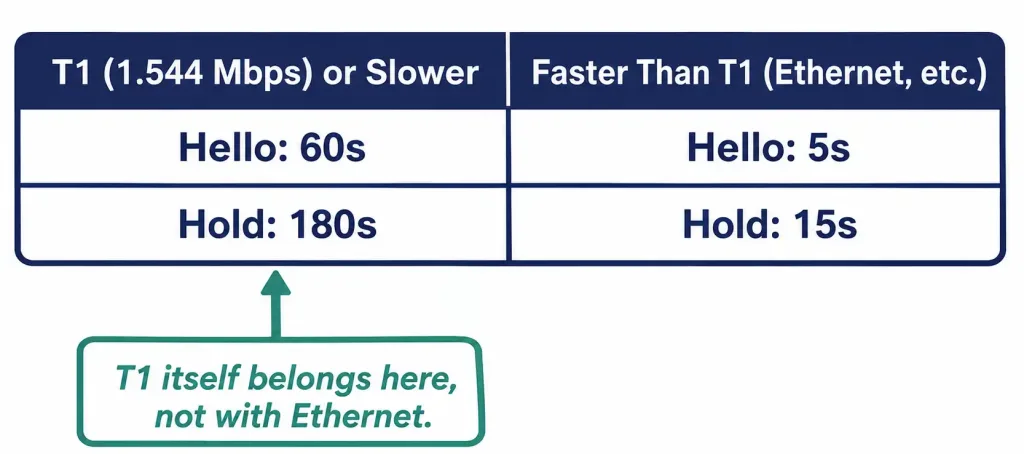
Cisco’s default timers depend on the interface’s bandwidth, split at a specific, well-defined boundary:
| Link Speed | Default Hello Interval | Default Hold Time |
|---|---|---|
| T1 (1.544 Mbps) or slower | 60 seconds | 180 seconds |
| Faster than T1 (Fast Ethernet, Gigabit Ethernet, etc.) | 5 seconds | 15 seconds |
Note that T1 itself — exactly 1.544 Mbps — falls into the slower category, using the 60/180 defaults, not the 5/15 defaults. This is a genuinely easy detail to get backwards, since T1 sounds like it should pair naturally with faster Ethernet links, but Cisco’s actual boundary places T1 with the slower group specifically.
The logic behind the split: on a genuinely slow link, sending Hello packets every 5 seconds represents a meaningfully larger proportion of available bandwidth than it does on a fast link, so slower interfaces default to a longer interval specifically to reduce that overhead.
EIGRP Hello Timers vs. OSPF Dead/Hello Intervals
Since the article already draws a comparison to OSPF’s dead interval, it’s worth making that comparison explicit and complete, since the two protocols handle a genuinely similar problem slightly differently:
| Factor | EIGRP | OSPF |
|---|---|---|
| Check-in packet | Hello | Hello |
| Timeout mechanism | Hold time | Dead interval |
| Default ratio | 3:1 (Hold to Hello) | 4:1 (Dead to Hello) |
| Must match between neighbors? | No — configured independently per router | Yes — mismatched Hello/Dead intervals prevent adjacency formation entirely |
| Default fast-link timers | 5s Hello / 15s Hold | 10s Hello / 40s Dead |
The “must match” difference is the one most worth remembering, since it’s a genuine behavioral difference rather than just a naming difference. EIGRP’s independence between neighbors is convenient — you can tune one router’s timers without needing to touch the other — but it also means a a genuinely broken or overly aggressive timer configuration on just one side can flap that specific direction’s monitoring without immediately being obvious from the other router’s perspective, which is exactly the kind of asymmetry worth keeping in mind while troubleshooting.
Why Hello Timing Affects Convergence Speed
It’s worth connecting Hello timers to something more concrete than an abstract “keep-alive” mechanism: they directly govern how quickly EIGRP notices a failed link or a dead neighbor, which in turn governs how quickly the network can reroute around the failure.
With default 5-second Hello and 15-second Hold timers on a fast link, a genuine failure is detected within 15 seconds in the worst case — the time it takes for three consecutive missed Hellos to accumulate. Lowering the Hello interval further, to 1 second with a 3-second Hold time, detects failures faster still, which matters genuinely for latency-sensitive traffic like VoIP where even a 15-second outage is very noticeable to users. The trade-off is real too: more frequent Hello packets mean more control-plane overhead, consuming a small but nonzero amount of bandwidth and router CPU on every interface running the tighter timers.
This is exactly why the default timers scale with link speed the way they do — a slow link can least afford frequent Hello overhead, while a fast link can absorb it easily, and tuning timers more aggressively than the defaults is a deliberate trade-off between faster failure detection and additional overhead, not a change to make casually across an entire network without a specific reason.
Configuring Custom Hello and Hold Timers
Command syntax:
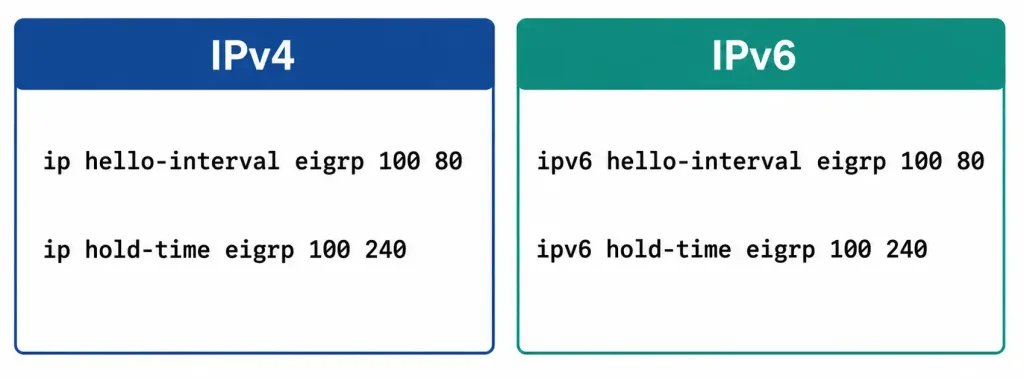
Router(config-if)# ip hello-interval eigrp <as-number> <seconds>
Router(config-if)# ip hold-time eigrp <as-number> <seconds>
A rule worth internalizing before changing these values: the Hold time on a given interface should be equal to or greater than that interface’s own Hello interval. If it’s shorter, the neighbor relationship can time out and drop before the next scheduled Hello packet even has a chance to arrive, tearing down an adjacency that was never actually unhealthy — just poorly timed relative to its own configuration.
Worked example, setting a custom 80-second hello interval and 240-second hold time (maintaining the standard 3:1 hold-to-hello ratio) on the link between R1 and R2:
Router R1:
R1> enable
R1# configure terminal
R1(config)# interface gigabitEthernet 0/0
R1(config-if)# ip hello-interval eigrp 100 80
R1(config-if)# ip hold-time eigrp 100 240
R1(config-if)# exit
Router R2:
R2> enable
R2# configure terminal
R2(config)# interface gigabitEthernet 0/0
R2(config-if)# ip hello-interval eigrp 100 80
R2(config-if)# ip hold-time eigrp 100 240
R2(config-if)# exit
Restore the defaults with the no form of either command:
R1(config-if)# no ip hello-interval eigrp 100
R1(config-if)# no ip hold-time eigrp 100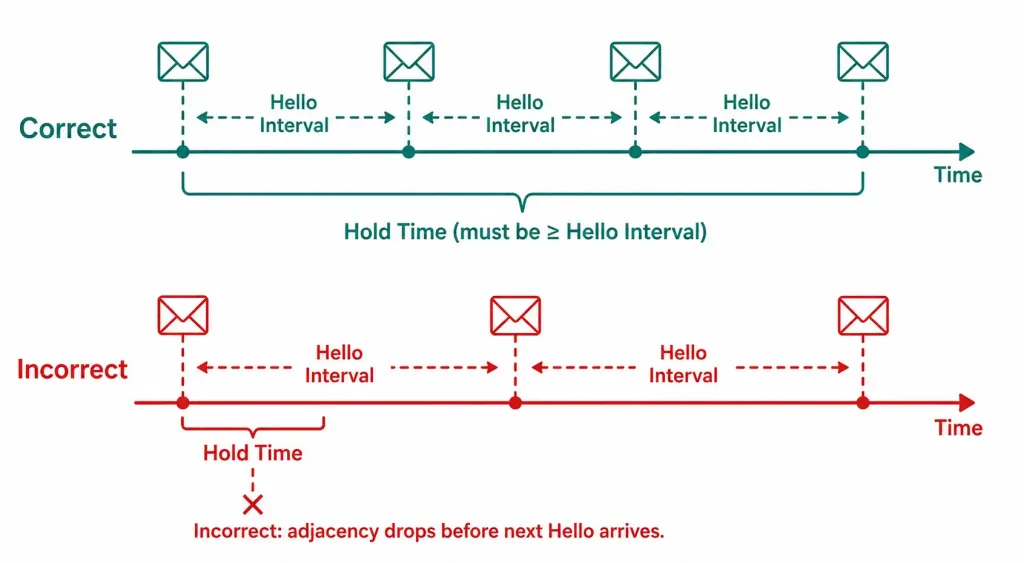
A Genuinely Important Detail: Timers Don’t Need to Match Between Neighbors
Because Hello interval and Hold time are configured per interface, the two routers on either end of a link don’t need identical values to successfully form and maintain an EIGRP adjacency. R1 could run a 5-second hello interval while R2 runs 20 seconds on the same link, and the adjacency would still form normally — each router simply monitors the neighbor according to its own configured Hold time, evaluated against however often that specific neighbor’s Hellos actually arrive.
This is a common point of confusion for anyone coming from protocols with stricter timer-matching requirements. The only genuine internal constraint is the one covered above — a router’s own Hold time relative to its own Hello interval — not agreement between the two neighboring routers.
EIGRP Hello Timers for IPv6
The IPv6 equivalent uses parallel commands, configured the same way:
Router(config-if)# ipv6 hello-interval eigrp <as-number> <seconds>
Router(config-if)# ipv6 hold-time eigrp <as-number> <seconds>
A complete worked example, applying the same custom values to an IPv6-enabled interface:
R1(config)# interface gigabitEthernet 0/0
R1(config-if)# ipv6 hello-interval eigrp 100 80
R1(config-if)# ipv6 hold-time eigrp 100 240
R1(config-if)# exit
The same default timers by link speed, and the same hold-time-vs-hello-interval relationship, apply identically to EIGRP for IPv6 — the only difference is the ipv6 keyword replacing ip in the command itself.
Verifying Hello and Hold Timer Configuration
Check the currently active timers on a specific interface:
R1# show ip eigrp interfaces detail gigabitEthernet 0/0GigabitEthernet0/0 is up, line protocol is up
...
Hello interval is 80, Hold time is 240
...Check overall neighbor status, including how much time remains before a neighbor would be declared dead if no further Hello arrives:
R1# show ip eigrp neighborsH Address Interface Hold Uptime SRTT RTO Q Seq
0 10.10.10.2 Gi0/0 235 00:12:44 12 200 0 15The Hold column here shows the countdown timer in seconds remaining until this specific neighbor would be considered dead if no Hello arrives in that window — a healthy adjacency shows this value cycling back up toward the configured Hold time repeatedly as fresh Hellos keep arriving on schedule.
Troubleshooting Hello Protocol Issues
Neighbor adjacency keeps dropping and reforming (flapping): check whether the Hold time is actually set correctly relative to the Hello interval on the affected interface — a Hold time shorter than 3x the Hello interval, or worse, shorter than the Hello interval itself, is a common self-inflicted cause.
R1# show ip eigrp interfaces detail gigabitEthernet 0/0Neighbor never forms in the first place: mismatched timers alone don’t prevent adjacency formation, so if a neighbor relationship never establishes at all, look elsewhere first — mismatched AS numbers, mismatched K-values, or a basic Layer 2/3 connectivity issue are all far more likely culprits than the Hello timers. This is worth remembering specifically because it’s easy to assume a timer mismatch is the cause when troubleshooting a stubborn EIGRP adjacency, given how much attention this article has given to timer configuration — but as established above, EIGRP timers genuinely don’t need to match to form an adjacency in the first place.
R1# show ip eigrp neighbors
R1# debug eigrp packets hello
Remember to disable debugging once you’ve gathered what you need, since debug eigrp packets hello generates continuous output for every Hello sent and received.
Timers were changed but don’t seem to have taken effect: confirm the correct AS number was used in the command, and that the change was actually applied to the interface currently carrying the EIGRP adjacency, not a different or unused interface.
R1# show running-config interface gigabitEthernet 0/0FAQs
What is the EIGRP Hello protocol used for?
The Hello protocol establishes and actively maintains EIGRP neighbor relationships, using periodic small packets sent at a configurable interval to confirm a neighbor is still reachable and responsive. If Hello packets stop arriving within the configured Hold time, the adjacency is torn down along with every route learned through it.
What are the default EIGRP Hello and Hold timers?
Interfaces at T1 speed (1.544 Mbps) or slower default to a 60-second Hello interval and 180-second Hold time, while interfaces faster than T1 — including standard Ethernet — default to 5 seconds and 15 seconds respectively. T1 itself falls into the slower category, which is a detail worth remembering carefully since it’s easy to assume otherwise.
Do EIGRP neighbors need matching Hello and Hold timers?
No — since these timers are configured per interface, the two routers on either end of a link can use completely different values and still form and maintain a normal EIGRP adjacency. The only real constraint is internal to each router individually: its own Hold time should be equal to or greater than its own Hello interval.
What happens if the Hold time is set shorter than the Hello interval?
The neighbor relationship can time out and drop before the next scheduled Hello packet even arrives, causing an adjacency to flap even though the link and the neighboring router are both genuinely healthy. This is why the Hold time should always be equal to or greater than the Hello interval on the same interface.
How can I verify what Hello and Hold timers are currently active on an interface?
Use show ip eigrp interfaces detail <interface> to see the exact configured values, or show ip eigrp neighbors to see each neighbor’s current countdown toward being declared dead. A healthy adjacency shows that countdown value repeatedly resetting back up as fresh Hello packets keep arriving on schedule.
Is there an IPv6 version of the Hello and Hold timer commands?
Yes — ipv6 hello-interval eigrp and ipv6 hold-time eigrp work identically to their IPv4 counterparts, including the same default timers by link speed and the same requirement that Hold time be at least as long as the Hello interval. The only syntax difference is the ipv6 keyword replacing ip.



