
A Frame Relay router only knows one thing about its neighbor by default: a DLCI. It has no idea what IP address sits at the other end of that virtual circuit. Before a router can forward a single packet across a PVC, something has to tie that local DLCI to a Layer 3 address on the far side. That “something” is Frame Relay address mapping, and getting it wrong is one of the most common reasons a Frame Relay hub-and-spoke network breaks in the real world — and on the CCNA exam.
This article assumes you already know what a DLCI is and how Frame Relay virtual circuits work, and how multiple VCs share a single physical line. If you need that background first, start there. Here, we go one level deeper: how a router actually learns which DLCI belongs to which IP address, dynamically and statically, and why that distinction matters more than most study guides let on.
The Problem Frame Relay Address Mapping Solves
Frame Relay is a Layer 2 technology. A DLCI identifies a virtual circuit, not a device and not a protocol address. When a router needs to send an IPv4 packet across a PVC, it has to know the destination’s IP address and which local DLCI carries traffic to that destination. Without a mapping between the two, the router has a Layer 3 packet and nowhere to put it.
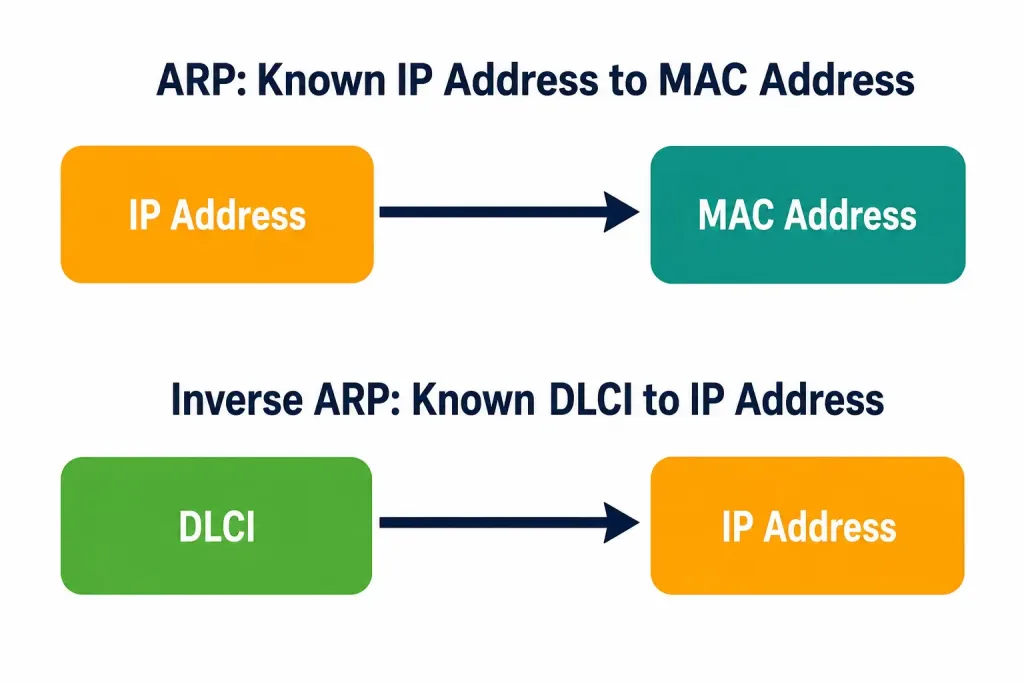
On an Ethernet LAN, this same problem is solved with ARP: a device broadcasts “who has this IP address,” and gets back a MAC address. Frame Relay can’t do that the same way, because it’s a non-broadcast multi-access (NBMA) network — there’s no shared broadcast domain a router can flood a query onto. Instead, Frame Relay flips the direction of the resolution and uses Inverse ARP.
Inverse ARP: The Core Mechanism
The Inverse Address Resolution Protocol (Inverse ARP, or InARP) is defined in RFC 2390 (which obsoleted the earlier RFC 1293). It does the opposite of standard ARP. Regular ARP starts with a known Layer 3 address and asks for the corresponding Layer 2 address. Inverse ARP starts with a known Layer 2 address — the local DLCI — and asks the far end to supply its Layer 3 address.
Here’s why the direction has to flip. On a Frame Relay PVC, a router already knows its local DLCI the moment the circuit comes up; the provider or a static configuration assigns it. What it doesn’t know is which IP address is reachable through that DLCI. So instead of broadcasting a query the way ARP does, the router sends an Inverse ARP request out on the PVC itself, addressed to “whoever is on the other end of DLCI 50,” asking for their protocol address.
RFC 2390 frames this as an extension of the standard ARP packet format, reusing fields like ar$sha (sender hardware address), ar$spa (sender protocol address), ar$tha (target hardware address), and ar$tpa (target protocol address) — except in an Inverse ARP request, the target protocol address (ar$tpa) is the field being asked for, not supplied. The target hardware address is filled in with the DLCI itself, encoded as a Q.922 address, since that’s the one piece of Layer 2 information already available.
Dynamic Frame Relay Address Mapping
Dynamic address mapping is Inverse ARP doing its job automatically, with no configuration required. Here’s the sequence:
- A PVC comes up between two routers, and each side knows its own local DLCI for that circuit.
- Each router sends an Inverse ARP request out on the PVC, essentially saying “I’m DLCI 100 on my end — what’s your IP address?”
- The remote router responds with its Layer 3 address.
- The requesting router stores the DLCI-to-IP pairing in its Frame Relay map table.
On Cisco IOS, Inverse ARP is enabled by default for every protocol that’s active on the physical interface — you don’t need a command to turn it on. It only stays off for protocols that aren’t configured on that interface, since there’s nothing to resolve. The mapping table itself holds every resolved entry, whether it came from Inverse ARP or from a manual static map, and you can inspect it directly:
Router# show frame-relay map
Serial2 (up): IP 131.108.122.2 dlci 20(0x14,0x0440), dynamic
CISCO, BW= 56000, status defined, active
That single line tells you the protocol, the resolved address, the DLCI in both decimal and hex, whether the entry is dynamic or static, the encapsulation type, and the circuit’s committed bandwidth and status. In day-to-day troubleshooting, show frame-relay map is usually the first command to run when a Frame Relay neighbor seems unreachable — an entry that never appears at all tells you Inverse ARP isn’t resolving, which usually means the PVC itself is down or the far end doesn’t support Inverse ARP.
Static Frame Relay Address Mapping
Dynamic mapping is convenient, but it isn’t always appropriate. A network administrator can manually configure a static map that overrides — and in fact replaces — Inverse ARP for that specific DLCI and protocol pair. You cannot run both dynamic Inverse ARP and a static map for the same protocol and DLCI at once; configuring the static entry disables Inverse ARP for that combination.
The command is:
Router(config-if)# frame-relay map ip 172.16.1.1 105 broadcastBreaking that down:
ip— the Layer 3 protocol being mapped.172.16.1.1— the remote router’s protocol address.105— the local DLCI used to reach that address.broadcast— an optional but frequently necessary keyword, covered below.- Optional
ietforciscokeywords set the encapsulation for that specific map entry; if omitted, it inherits whatever the interface’sencapsulation frame-relaycommand set.
The protocol field isn’t limited to IP. Cisco IOS accepts appletalk, decnet, dlsw, ip, ipx, llc2, rsrb, vines, and xns, along with a few bridging and legacy protocols depending on IOS version. There’s no separate IPv6-specific keyword in the classic frame-relay map syntax — IPv6 resolution is handled through Inverse Neighbor Discovery instead, covered below.
You’d reach for a static map in two common situations. First, when the far-end router doesn’t support Inverse ARP — older or non-Cisco equipment sometimes doesn’t — dynamic resolution simply never happens, and a static entry is the only way to complete the mapping. Second, and more commonly on the exam and in real deployments, in a hub-and-spoke topology.
Why Hub-and-Spoke Breaks Dynamic Mapping Between Spokes
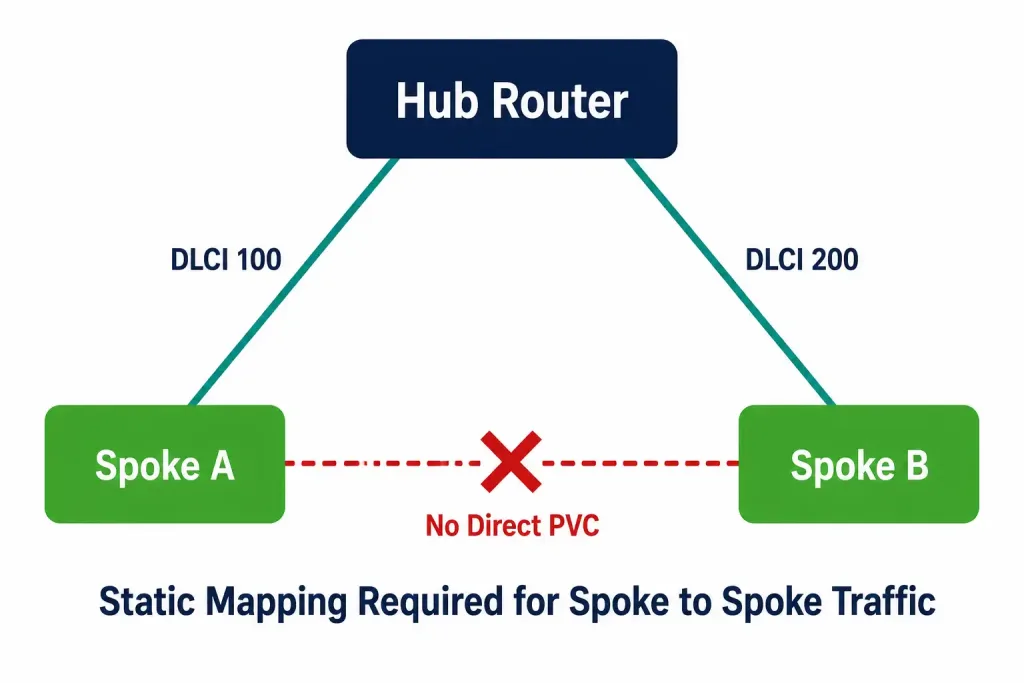
In a hub-and-spoke Frame Relay design, spoke routers have a PVC to the hub but no direct PVC to each other. Inverse ARP only resolves addresses across a PVC that actually exists between two endpoints. Since there’s no direct point-to-point connection between Spoke A and Spoke B, dynamic Inverse ARP has nothing to run over — it cannot invent a mapping for a circuit that isn’t there.
This is precisely where static Frame Relay mapping earns its keep. If the hub is configured to allow spoke-to-spoke connectivity — for instance, on a multipoint subinterface — administrators manually configure static maps on the spoke routers, pointing each spoke’s local DLCI (toward the hub) at the other spokes’ IP addresses. The hub still physically relays the frames, but the spokes now have the Layer 3-to-DLCI mapping needed to address traffic correctly, even though Inverse ARP alone could never have produced it.
The broadcast Keyword: Small Word, Real Consequences
The broadcast keyword on a frame-relay map statement does two specific things. First, it forwards broadcast and multicast traffic across that PVC when multicast isn’t otherwise enabled — Frame Relay PVCs are inherently point-to-point-like from a forwarding perspective, so without it, broadcast-dependent traffic simply doesn’t cross the circuit.
Second, it simplifies configuring routing protocols like OSPF on non-broadcast Frame Relay interfaces, and some protocols — OSPF in broadcast-network mode, and legacy protocols like AppleTalk that rely on regular routing table updates — effectively require it to form and maintain neighbor relationships or exchange updates correctly. On a hub-and-spoke network running a routing protocol across static maps, forgetting broadcast is a classic reason routing updates silently fail to propagate even though basic reachability (ping) still works.
Frame Relay Address Mapping for IPv6
IPv4 isn’t the only protocol that needs DLCI-to-address resolution. Frame Relay supports IPv6 using Inverse Neighbor Discovery (IND) instead of Inverse ARP, since IPv6 replaces ARP entirely with the Neighbor Discovery Protocol.
The mechanism mirrors Inverse ARP’s logic: a Frame Relay router sends an IND Solicitation message out on the PVC, requesting the Layer 3 IPv6 address that corresponds to a known Layer 2 DLCI. That same solicitation carries the sender’s own DLCI to the remote router, so the exchange resolves both directions in a single round trip. The remote router replies with an IND Advertisement, completing the mapping. Functionally, this gives IPv6 over Frame Relay the same dynamic-mapping convenience that Inverse ARP gives IPv4, without requiring a separate IPv6-specific configuration step on most Cisco platforms.
Dynamic vs. Static Mapping: Side-by-Side
[See Infographic: Dynamic vs Static Frame Relay Mapping Comparison]
| Factor | Dynamic (Inverse ARP) | Static Mapping |
|---|---|---|
| Configuration required | None — enabled by default per protocol | Manual, per DLCI and protocol |
| Works across | Only PVCs that physically exist | Any DLCI you configure, including ones used for spoke-to-spoke reachability via a hub |
| Far-end requirement | Far end must support Inverse ARP | No dependency on far-end Inverse ARP support |
| Typical use case | Simple point-to-point or hub-side links | Hub-and-spoke spoke-to-spoke resolution, non-Cisco far ends |
| Overrides the other? | Static map disables Inverse ARP for that DLCI/protocol | Cannot coexist with Inverse ARP on the same DLCI/protocol |
Shown in show frame-relay map as | dynamic | static |
Verifying and Troubleshooting Frame Relay Mapping
Three commands cover most day-to-day mapping issues:
show frame-relay map— the primary tool. Confirms which addresses are mapped to which DLCIs, whether each entry is dynamic or static, and whether the circuit is active.show frame-relay pvc— confirms the PVC itself is up before worrying about mapping at all. A mapping problem on a PVC that’s actually down is a red herring; fix Layer 2 first.debug frame-relay events— shows Inverse ARP requests and responses in real time, useful when a dynamic entry never appears and you need to confirm whether requests are even being sent or answered.
A mapping entry that’s present but never transitions to “active,” or that’s missing entirely on an interface where Inverse ARP should be working, almost always traces back to one of three causes: the PVC hasn’t come up, the far-end device doesn’t support or has disabled Inverse ARP, or a conflicting static map was already configured for that same protocol and DLCI, silently blocking dynamic resolution.
Worked Example: Diagnosing a Spoke-to-Spoke Failure
Consider a hub-and-spoke Frame Relay network: Hub, Spoke-A, and Spoke-B, each with a PVC only to the Hub. Spoke-A can ping the Hub and the Hub can ping Spoke-B, but Spoke-A cannot ping Spoke-B. This is one of the most common Frame Relay support tickets in practice, and it’s almost always a mapping issue rather than a physical one.
Start on Spoke-A with the mapping table:
Spoke-A# show frame-relay map
Serial0 (up): IP 10.1.1.1 dlci 100(0x64,0x1840), dynamic
CISCO, status defined, active
Only one entry exists — Spoke-A’s DLCI 100 toward the Hub, resolved dynamically. There is no entry at all for Spoke-B’s IP address, because no PVC exists between Spoke-A and Spoke-B for Inverse ARP to run over. This confirms the root cause immediately: it’s not a routing problem or an ACL, it’s a missing Layer 3-to-DLCI mapping.
The fix is a static map on Spoke-A pointing Spoke-B’s IP address at the DLCI Spoke-A already uses to reach the Hub (since the Hub relays the frame onward):
Spoke-A(config)# interface serial 0
Spoke-A(config-if)# frame-relay map ip 10.1.1.2 100 broadcast
The same static entry, mirrored, is needed on Spoke-B pointing back at Spoke-A. Re-running show frame-relay map afterward should show a second, static entry alongside the original dynamic one — and if a routing protocol is involved, the broadcast keyword is what allows its updates to actually cross that statically resolved path.
CCNA Exam Tips
A few points show up repeatedly on exam questions and in real configuration mistakes:
- Inverse ARP is on by default on Cisco routers — there’s no command to enable it, only
frame-relay mapto override it. - A static map and Inverse ARP cannot both operate on the same DLCI and protocol simultaneously; configuring one disables the other for that pairing.
- Spoke-to-spoke reachability in hub-and-spoke topologies is a static mapping problem, not a dynamic one — Inverse ARP has no PVC to run over between spokes.
- Don’t forget the
broadcastkeyword when a routing protocol needs to traverse a statically mapped DLCI. - IPv6 uses Inverse Neighbor Discovery, not Inverse ARP — same concept, different protocol family.
Where This Fits in the Series
Address mapping is the piece that connects the DLCI and virtual circuit concepts to actual Layer 3 forwarding. If you haven’t already, it’s worth reviewing how Frame Relay encapsulation structures each frame, since the DLCI field discussed there is exactly what Inverse ARP and static maps are resolving against. Up next in this series: configuring static Frame Relay mapping step by step on Cisco IOS, including full hub-and-spoke examples with subinterfaces.



