

Backblaze is one of the more straightforward names in consumer and small-business cloud backup, built around a genuinely simple pitch: unlimited backup storage for a flat monthly fee, rather than the tiered-by-gigabyte pricing most cloud storage services use. Here’s what that actually means in practice, what it costs right now, and where the real limits sit.
What “Unlimited” Actually Means Here
Backblaze’s Computer Backup plan backs up everything on one computer — including connected external drives — for a flat fee, with no storage cap on that single device. That’s the genuinely distinctive part of the product: most competitors charge by the gigabyte or terabyte, while Backblaze charges per device regardless of how much you’re storing on it.
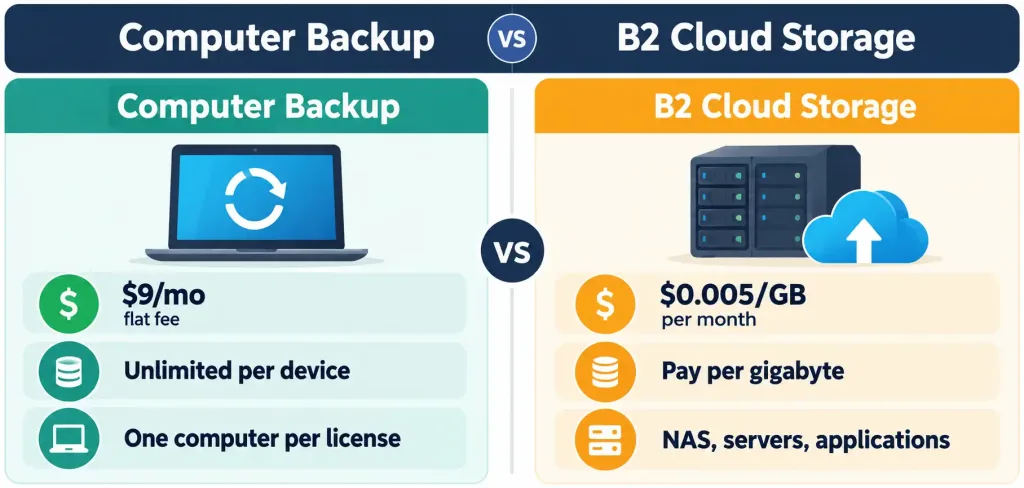
The important nuance, and the one worth correcting directly: “unlimited” describes storage per licensed device, not unlimited devices under one plan. Each computer needs its own separate license — if you want to back up three computers, that’s three separate subscriptions, not one plan covering all of them. Network-attached storage (NAS) and network drives aren’t covered by Computer Backup either; those fall under Backblaze’s separate B2 Cloud Storage product instead, which is priced per gigabyte rather than per device.
Current Pricing
As of the most recent published figures, Backblaze Computer Backup (Personal and Business tiers are priced the same) breaks down as:
- Monthly plan: $9/month
- 1-year plan: $99/year, which works out to about $8.25/month
- 2-year plan: $189 billed every two years, which works out to about $7.88/month
Longer commitments bring a modest discount, but none of the tiers change what’s included — the unlimited-per-device storage and feature set stay the same regardless of billing term. Pricing is subject to change, so confirm the current figures directly on Backblaze’s pricing page before subscribing.
For network storage or server backup rather than a single computer, Backblaze’s B2 Cloud Storage product is priced separately at roughly $0.005 per GB per month for storage, with download costs after a daily free allowance — a genuinely different pricing model aimed at a different use case (object storage and infrastructure backup rather than personal computer backup).
Encryption and Security
Backblaze backs up data using AES-128 symmetric encryption for the stored data itself, layered with HTTPS/SSL for data in transit and public/private key exchange to secure the encryption keys. There’s also an option to set your own private encryption key, which means Backblaze itself can’t decrypt your data without it — a meaningful option for anyone who wants to be the sole holder of their decryption key, though losing that key also means losing access to your own backups, so it’s a real tradeoff. Two-factor authentication is supported on the account itself, which is worth enabling regardless of which encryption option you choose.
How Restoring Data Actually Works
Backblaze offers a few different ways to get your data back, and which one makes sense depends on how much you need and how fast:
- Direct download of individual files or folders through the Backblaze website — the simplest option for recovering a handful of files.
- A physical drive shipped to you for larger restores, which is genuinely useful if you need to recover a large amount of data and don’t want to rely on downloading it all over your internet connection. This option has historically carried an upfront cost that’s refunded if you return the drive within a set window, so check the current terms and return policy before relying on it for a time-sensitive restore.
For most everyday situations — recovering a few accidentally deleted files, or restoring after a drive failure — direct download is usually sufficient; the physical-drive option exists mainly for large-scale recovery scenarios.
What to Actually Check Before Subscribing
- Confirm current pricing and terms directly on Backblaze’s site, since published figures can shift and FAQ pages don’t always match the main pricing table exactly.
- Understand the per-device licensing model before assuming one subscription covers your whole household or office — it doesn’t.
- Decide on your encryption approach upfront: the default lets Backblaze help with password recovery if you lose access; a private encryption key removes that safety net in exchange for being the sole key-holder.
- Check whether your use case is Computer Backup or B2 Cloud Storage — a single computer wants Computer Backup; a NAS, server, or application-level storage need wants B2, and the pricing models are genuinely different.
The Bottom Line
Backblaze’s core pitch — flat-fee, unlimited-per-device backup — is real and a genuine differentiator against gigabyte-tiered competitors, but “unlimited” only applies within a single licensed device, not across multiple computers under one plan. For someone backing up one computer with a lot of data, that’s a straightforward, cost-predictable option. For backing up several devices, a NAS, or server infrastructure, it’s worth comparing the per-device licensing cost against B2 Cloud Storage’s per-gigabyte model, since which one is actually cheaper depends entirely on how much data you’re protecting and how it’s distributed across devices.
Frequently Asked Questions
Does one Backblaze plan cover multiple computers? No. Each Computer Backup license covers one device, with unlimited storage on that device. Backing up multiple computers requires a separate subscription for each one.
How much does Backblaze Computer Backup cost? As of the most recent published pricing, it’s $9/month, $99/year (about $8.25/month), or $189 every two years (about $7.88/month) — the same price for personal and business use. Confirm current figures directly on Backblaze’s site before subscribing.
Does Backblaze encrypt backed-up data? Yes — AES-128 symmetric encryption for stored data, HTTPS/SSL in transit, and an optional private encryption key you can set yourself so Backblaze can’t decrypt your data without it.
What’s the difference between Backblaze Computer Backup and B2 Cloud Storage? Computer Backup is a flat per-device fee for unlimited backup of one computer (including connected external drives, but not network drives). B2 Cloud Storage is priced per gigabyte and is aimed at NAS, server, and application-level storage rather than a single computer.



