A kiosk built for a restaurant counter will not survive a factory floor. Dust gets into the housing. Vibration loosens connectors over time. Gloved hands can’t reliably trigger a capacitive touchscreen built for bare fingertips. An industrial kiosk isn’t a regular kiosk in a tougher shell — it’s a different category of hardware, built against different standards, for a genuinely different environment.
This guide covers what actually separates an industrial kiosk from a commercial one: the ratings that matter, the touchscreen technology choices, the environments that push hardware hardest, and the buyer criteria that actually predict whether a deployment holds up.
Why Commercial Kiosk Specs Don’t Transfer to Industrial Settings
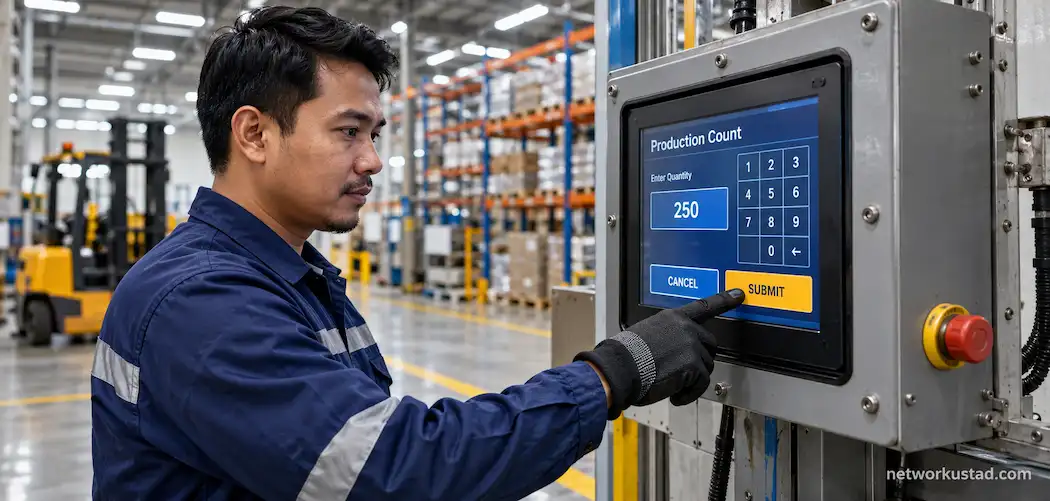
A commercial kiosk is designed for a climate-controlled room, light daily cleaning, and users with clean, bare hands. An industrial kiosk might sit next to a stamping press, inside a cold-storage warehouse, or on an unheated loading dock, operated by someone wearing thick work gloves with dust or grease on their hands.
Three environmental factors drive most of the real design differences: ingress protection against dust and liquid, resistance to vibration and mechanical shock, and operating temperature range well outside normal indoor comfort. A kiosk that handles all three reliably is a genuinely different engineering problem than one that just needs to look good and survive a wipe-down.
Ingress Protection: Reading an IP Rating Correctly
Ingress Protection (IP) ratings describe how well an enclosure resists solid particles and liquid, written as two digits, like IP65 or IP66. The first digit covers protection against solids, from large objects up to fine dust, on a scale of 0 to 6. The second digit covers protection against liquids, from dripping water up to high-pressure jets and, at the top end, full submersion.
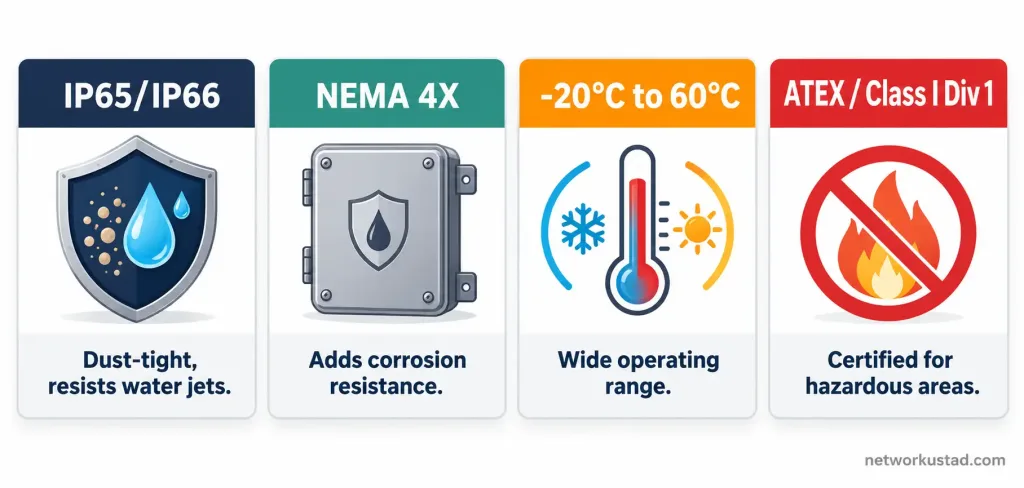
IP65 means complete protection against dust ingress and resistance to low-pressure water jets from any direction — a reasonable minimum for most factory-floor environments. IP66 adds resistance to high-pressure water jets, which matters for environments that get hosed down regularly, like food-processing plants or outdoor industrial sites. IP67 adds temporary submersion resistance, generally more than most indoor industrial settings actually require, though it matters for kiosks mounted somewhere flooding or heavy water exposure is a real possibility.
North American industrial buyers will also see NEMA ratings (NEMA 4, NEMA 4X, NEMA 12) referenced alongside or instead of IP ratings. NEMA 4X roughly corresponds to IP66 in practical terms but adds a corrosion-resistance requirement, which matters in environments with washdown chemicals or coastal/humid air. Checking which rating system a vendor actually tested against, rather than assuming the two systems are perfectly interchangeable, avoids a mismatch between what’s advertised and what’s actually certified.
Touchscreen Technology: Why the Sensor Type Actually Matters Here
Most consumer and commercial kiosks use capacitive touchscreens, the same technology in a smartphone, which senses the electrical charge in a bare finger. That’s a problem in industrial settings, since thick work gloves, wet hands, or hands in contact with grease or oil can all interfere with a capacitive sensor’s ability to register a touch reliably.
Resistive touchscreens, which register the physical pressure of a touch rather than electrical charge, work reliably with gloved hands, a stylus, or wet fingers, which is why they remain common on industrial equipment despite being less common in consumer electronics now. Some manufacturers offer glove-mode capacitive screens, tuned to register a heavier, glove-covered touch, as a middle option that keeps the sharper capacitive display quality while working with gloves most of the time — though reliability with glove mode varies more between vendors than with true resistive touch.
For environments where exact touch precision matters less than reliability under tough conditions — a factory-floor data-entry terminal, say, rather than a design or drafting application — resistive touch is often still the safer default choice, despite the less refined feel compared to a capacitive display.
Temperature, Vibration, and Hazardous-Area Ratings
Operating temperature range matters more in industrial deployments than almost anywhere else kiosks get used. A kiosk rated for a standard 0°C to 40°C range will fail in an unheated warehouse in winter or next to industrial ovens in summer. Industrial-rated hardware commonly specifies a wider range, often -20°C to 60°C or beyond, and it’s worth confirming the specific range against the specific location’s actual recorded temperature extremes, not just a general “industrial” label on the spec sheet.
Vibration and mechanical shock resistance matters for kiosks mounted near heavy machinery, on vehicles, or in any location with constant low-level vibration. Industrial-grade mounting hardware and internal component selection (solid-state storage instead of spinning drives, for instance) both factor into whether a kiosk survives years of vibration rather than developing loose connections or component failures within months.
Hazardous-area ratings matter specifically for environments with flammable gases, vapors, or combustible dust — oil and gas facilities, grain processing, certain chemical plants. Equipment rated for these environments carries certifications like ATEX (in the EU) or a Class/Division rating under the National Electrical Code (in North America), confirming it won’t act as an ignition source. This isn’t a nice-to-have specification; deploying unrated equipment in a genuinely hazardous area is a real safety and regulatory issue, not just a durability one, and it’s worth confirming directly with a qualified safety officer for any deployment in this category rather than relying on a general product description.
Where Industrial Kiosks Actually Get Used
Manufacturing floor data entry. Operators log production counts, quality-check results, or shift handoff notes directly at the workstation, reducing the lag and transcription errors that come from paper logs filled out away from the line and entered into a system later.
Warehouse and logistics check-in. Inventory counts, pallet scans, and shipment confirmations happen at fixed terminals positioned near loading docks or storage racks, often paired with a barcode or RFID scanner built into or attached to the kiosk.
Safety and visitor check-in at industrial sites. Facilities with safety-training requirements or restricted-access zones use kiosks to log visitor and contractor entry, confirm safety-briefing completion, and sometimes print a visitor badge, all without a staffed reception desk at every entry point.
Equipment and maintenance logging. Technicians log inspection results, maintenance actions, or equipment downtime directly at the equipment location, which tends to produce more accurate and timely records than a terminal located elsewhere in the facility.
Oil, gas, and utilities field terminals. In hazardous or remote locations, ruggedized kiosks with appropriate hazardous-area certification support field data collection, equipment monitoring interfaces, or safety-procedure lookups where a standard commercial device simply wouldn’t survive or wouldn’t be rated for the environment.
What the Market Actually Looks Like
The broader interactive kiosk market, which includes but isn’t limited to industrial deployments, was valued at roughly $30.7 billion globally in 2023, with a projected growth rate above 6.8% annually through 2032, according to Global Market Insights. Retail, hospitality, healthcare, and transportation remain the largest adopting sectors in that overall figure, and industrial-specific deployment isn’t broken out as a separate segment in that data — which is worth knowing if you come across a vendor citing broad kiosk-market growth figures as if they specifically describe industrial adoption. They usually don’t, and it’s worth asking a vendor directly for industrial-specific adoption data rather than taking a general market figure as evidence of demand in your specific sector.
Buyer Criteria That Actually Predict a Good Deployment
Match the IP/NEMA rating to the actual environment, not a generic “industrial” label. Ask for the specific tested rating and the standard it was tested against, and compare that against your site’s actual dust, moisture, and washdown conditions.
Confirm the touchscreen technology fits how workers will actually use it. If gloves are standard PPE on your floor, resistive touch or a vendor-proven glove-mode capacitive screen matters more than display sharpness.
Check the full operating temperature range against your site’s actual extremes, including seasonal swings, not just the facility’s typical daytime temperature.
Ask about mounting and vibration tolerance if the kiosk will sit anywhere near heavy equipment, a vehicle, or a production line with constant low-level vibration.
Verify hazardous-area certification directly, with documentation, if your site has any classified hazardous zones — never take a general product description’s word for this when an actual safety classification is involved.
Ask about support and replacement-part availability, specifically how quickly a failed unit can be repaired or replaced, since industrial kiosks are often deployed in locations where downtime has a real, measurable operational cost, unlike a commercial kiosk where a short outage is mostly just an inconvenience.
Common Mistakes When Choosing an Industrial Kiosk
Buying based on a commercial kiosk’s specs and assuming “industrial-looking” housing is enough, without checking the actual tested IP/NEMA rating, is the most common mistake. Choosing a capacitive touchscreen for a glove-heavy environment without testing glove-mode reliability under real working conditions is another. Skipping hazardous-area certification verification in a facility that actually has classified zones is the most serious mistake on this list, since it’s a genuine safety and compliance issue rather than just a durability or convenience one. And treating general kiosk-market statistics as if they describe industrial-specific demand, rather than asking a vendor for sector-specific adoption data, leads to decisions built on a weaker evidence base than it looks like at first glance.
Frequently Asked Questions
What’s the difference between an IP rating and a NEMA rating?
Both describe an enclosure’s resistance to solids and liquids, but they come from different standards bodies — IP is an international standard, NEMA is used primarily in North America. The scales don’t map perfectly onto each other, so it’s worth checking which standard a specific product was actually tested against rather than assuming direct equivalence.
Do all industrial kiosks need a hazardous-area rating?
No. Hazardous-area certification matters specifically for locations with flammable gases, vapors, or combustible dust. A standard factory floor without those conditions doesn’t require it, but a facility with any classified hazardous zones needs certified equipment in those specific zones, verified directly rather than assumed.
Is resistive touch always better than capacitive for industrial use?
Not always — it depends on how workers will actually use the kiosk. Resistive touch is more reliable with gloves, a stylus, or wet hands, but capacitive displays generally offer sharper image quality and more responsive multi-touch gestures. If glove use is inconsistent or occasional, a vendor-proven glove-mode capacitive screen can be a reasonable middle ground.
How much does an industrial kiosk typically cost compared to a commercial one?
Industrial-rated kiosks generally cost more than commercial equivalents, due to the ruggedized enclosure, wider temperature tolerance, and often certified components. The exact premium varies significantly by vendor, rating level, and hazardous-area certification requirements, so it’s worth getting quotes against your specific rating requirements rather than assuming a flat percentage markup.
What happens if an industrial kiosk isn’t properly rated for its environment?
At minimum, expect a shorter lifespan and more frequent failures from dust, moisture, or temperature exposure the hardware wasn’t built to handle. In a classified hazardous area specifically, deploying unrated equipment is also a genuine safety and regulatory compliance issue, not just a reliability one.
The Bottom Line
An industrial kiosk earns that name through specific, verifiable standards — IP/NEMA ingress protection, touchscreen technology suited to how it will actually be touched, a real operating temperature range matched to the site, and hazardous-area certification where the environment actually requires it. None of that shows up by looking at a kiosk and deciding it looks rugged enough. Match the specific ratings to your specific environment, verify hazardous-area certification directly when it applies, and the deployment question becomes a much more answerable one than “which kiosk looks industrial.”