
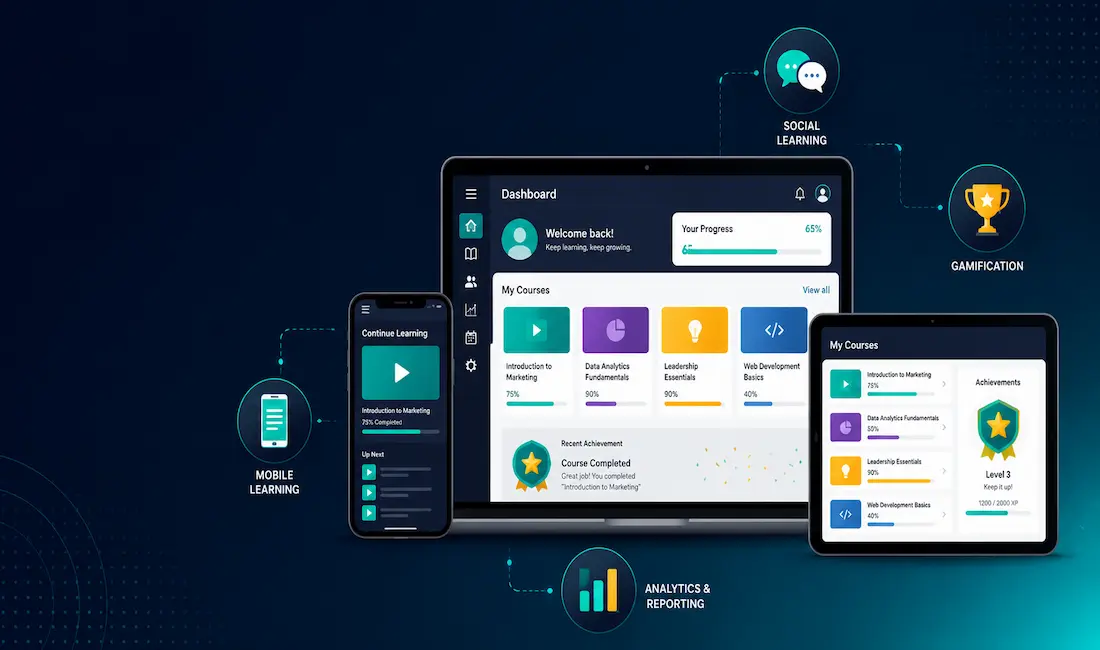
A Learning Management System (LMS) is software that delivers, tracks, and manages training or educational content online, connecting instructors and learners regardless of physical location. Organizations use LMS platforms to train employees on compliance, onboarding, and new tools, while educational institutions use them to deliver coursework, assessments, and grading at scale. Demand for LMS platforms accelerated sharply after 2020, and remains a standard part of both corporate training infrastructure and educational delivery today.
This guide covers the essential features a custom LMS needs, the actual development process, and the platform and vendor decisions that determine whether a custom build succeeds or becomes an expensive maintenance burden.
5 Essential Features for a Custom LMS
Course and Content Management
This is the foundational feature of any LMS: the ability for instructors or training administrators to create, organize, and publish course content, video, documents, quizzes, and structured lesson sequences, without needing developer involvement for routine content updates. A well-designed content management layer should support version control, so outdated training material can be updated without breaking existing learner progress records.
Mobile Learning
The LMS needs a genuinely usable mobile experience, not just a responsive website squeezed onto a smaller screen. This matters practically: learners frequently complete training during commutes, breaks, or outside standard working hours, and a poor mobile experience is one of the most common reasons for low course completion rates. Some organizations are also incorporating AI learning software to deliver personalized learning paths and adaptive assessments that adjust to individual learner performance, a capability increasingly expected in modern LMS platforms rather than treated as a premium add-on.
Social Structure
Features supporting interaction between learners and instructors, discussion boards, comments, peer review, and direct messaging, meaningfully improve engagement and completion rates compared to a purely one-directional content-delivery model. This matters more for longer-form or professional development courses than for short compliance modules, where social interaction adds less value relative to its development cost.
Gamification
Leaderboards, completion badges, and progress-based rewards genuinely do improve engagement metrics for many audiences, particularly for shorter, skills-based training rather than dense academic coursework. Gamification should be treated as an enhancement layered onto solid core content, not a substitute for it, poorly designed content with heavy gamification still underperforms well-designed content without it.
Analytics and Reporting
Robust analytics let administrators track completion rates, quiz performance, time spent per module, and drop-off points where learners commonly disengage. This is the feature that actually lets an organization iterate and improve its training over time, rather than publishing content once and never revisiting whether it’s actually working.
The Process to Create a Custom Learning Management System
Create a Project Plan
Before any development begins, define the LMS’s actual scope clearly: who the users are, what content types need supporting, what integrations with existing systems (HR software, single sign-on, video hosting) are required, and what the realistic timeline and budget look like. A vague plan is one of the most common reasons custom LMS projects run over budget or ship with features nobody actually needed.
Choose the Development Approach
There are three broad paths: building a fully custom platform from scratch, customizing an existing open-source LMS framework, or building on top of an established SaaS platform’s API and extension capabilities. A fully custom build offers maximum flexibility but the highest cost and longest timeline. Extending an existing platform, open-source or SaaS, typically delivers a working product faster and at lower cost, since core infrastructure like user authentication, video streaming, and quiz engines don’t need to be built from zero.
Design the User Experience
The interface needs to be genuinely intuitive, not just visually polished. This matters more than many teams initially expect: a confusing or frustrating interface directly undermines completion rates regardless of how good the underlying content is. Industry research on user experience consistently finds that a meaningful share of users abandon a digital product entirely after one frustrating experience, though exact figures vary by study and industry, treat any single specific statistic on this with some caution and prioritize actual usability testing with real users over relying on a general industry number.
Build Analytics and Reporting Tools
Implement tracking for course completion, quiz scores, time-on-task, and engagement patterns from the start, retrofitting analytics onto an already-built LMS is significantly more difficult than designing for it from the beginning. This data is what allows the organization to actually measure whether the LMS investment is delivering results.
Ensure Mobile Compatibility
Build and test the mobile experience as a first-class requirement, not an afterthought handled by responsive CSS alone. Native mobile apps or a genuinely mobile-optimized web experience meaningfully outperform a desktop-first design that merely resizes for smaller screens.
Test Thoroughly Before Launch
Testing should cover functional bugs, but also real-world usability with actual target users, not just internal QA staff. Load testing matters specifically for LMS platforms, since usage often spikes sharply around specific deadlines (a compliance training due date, an academic term start), and a platform that works fine under light everyday use can fail under that kind of concentrated demand.
Build vs. Buy: A Genuine Consideration
Before committing to a custom build, it’s worth being honest about whether a fully custom LMS is actually the right choice. Established SaaS LMS platforms have matured significantly, and for many organizations, particularly those without highly unusual requirements, an existing platform with solid customization options delivers most of the value of a custom build at a fraction of the cost and development time. Custom development makes the strongest case when an organization has genuinely unique requirements, a specific integration need, an unusual content delivery model, or scale requirements, that existing platforms can’t reasonably accommodate.
Conclusion
A well-built Learning Management System is a genuine asset for organizations delivering training or education at scale, but its value depends entirely on getting the fundamentals right: solid content management, a genuinely usable mobile experience, meaningful analytics, and an interface that doesn’t get in the way of learning. Whether you build fully custom, extend an existing framework, or build on a SaaS platform’s API, the same core principles apply. Plan thoroughly before development starts, and test with real users before launch, not just internal staff.
Frequently Asked Questions
How long does it take to develop a custom LMS?
Timeline varies significantly based on scope and approach. A fully custom LMS built from scratch typically takes several months to a year or more for a genuinely full-featured platform, while extending an existing open-source framework or SaaS platform’s API can deliver a working product in a matter of weeks to a few months, depending on how much customization is actually required beyond the platform’s existing capabilities.
Should I build a custom LMS or use an existing platform?
This depends on how unusual your requirements actually are. If your needs, content types, integrations, and workflows fit reasonably well within what established LMS platforms already offer, extending an existing platform is almost always faster and less expensive than building fully custom. A custom build is worth the additional investment specifically when your organization has requirements that existing platforms genuinely can’t accommodate, not simply because custom feels more tailored in the abstract.
What features are most important for employee training versus academic use?
For employee training, robust analytics and completion tracking tend to matter most, since organizations need to demonstrate compliance and measure training effectiveness. For academic use, social and collaborative features, discussion boards, peer interaction, and more sophisticated assessment tools tend to matter more, since academic learning typically involves deeper engagement over longer periods than a short compliance module.
How important is mobile access for an LMS?
Genuinely important, and increasingly treated as a baseline expectation rather than a nice-to-have. Learners frequently engage with training content outside a desktop work environment, during commutes or between tasks, and a poor mobile experience is a consistently cited factor in low course completion rates. Building mobile support in from the start, rather than retrofitting it later, produces a meaningfully better result.
What is the biggest mistake organizations make when building a custom LMS?
Underinvesting in the project planning phase is one of the most common and costly mistakes. Organizations that skip clearly defining their actual user needs, required integrations, and realistic scope before development begins frequently end up with a platform that either misses critical requirements or includes expensive features nobody actually uses, both of which are far more costly to fix after launch than to address during planning.



