
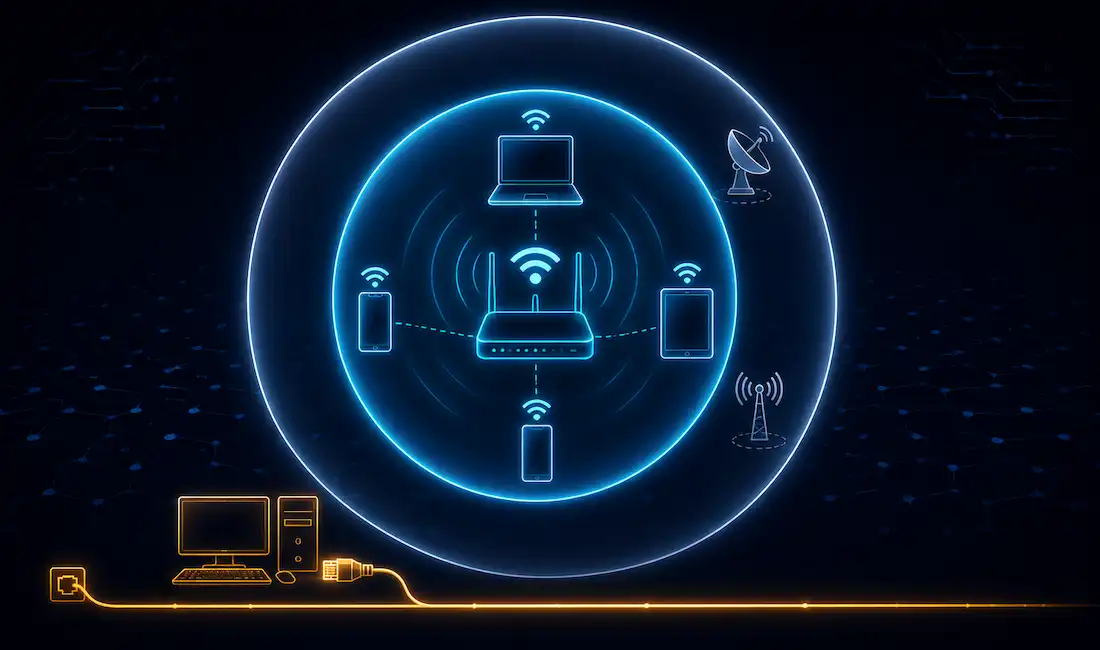
A Wireless LAN, or WLAN, is a local area network that connects devices using radio waves instead of cables. Laptops, phones, printers, and other devices all talk to each other, and to the internet, without a single Ethernet cable involved.
Here’s the part worth getting right from the start: Wi-Fi is not a separate technology from WLAN. Wi-Fi is the name for the most common type of WLAN, the one built on the IEEE 802.11 family of standards. When you connect to a WLAN today, in a home, an office, or a coffee shop, you’re almost certainly connecting over Wi-Fi. They’re not competitors. Wi-Fi is a WLAN. It’s just the dominant one, by a wide margin, and has been for well over two decades now.
Is Wi-Fi the Same as WLAN?
Functionally, yes, for nearly every real-world case. WLAN is the general category: any local network using wireless connections. Wi-Fi is a specific, standardized brand of WLAN technology, defined by IEEE 802.11 and certified by the Wi-Fi Alliance.
Wi-Fi runs on unlicensed radio spectrum, mainly the 2.4 GHz, 5 GHz, and (on newer devices) 6 GHz bands. It doesn’t share spectrum with cellular networks, which run on separate, licensed bands controlled by mobile carriers. And it doesn’t use cables to move data over the air. That would defeat the entire point of it being wireless.
If an older article, or an older draft of this one, ever told you Wi-Fi “relies on cables,” that’s simply wrong. It’s possible that claim started as a mixed-up comparison between wireless LANs and wired LANs (regular Ethernet), which is a real and useful comparison. We’ll get to that one properly further down.
Are There WLAN Technologies That Aren’t Wi-Fi?
Yes, though they’re a small minority today. A few worth knowing:
- HiperLAN. A European wireless LAN standard developed in the 1990s as an alternative to what became Wi-Fi. It never achieved meaningful market adoption and is essentially obsolete today.
- Proprietary industrial wireless systems. Some industrial and specialized environments use non-802.11 wireless protocols for local connectivity, often for reasons tied to interference resistance or licensing rather than raw performance.
- Wireless mesh systems built on non-Wi-Fi radios. Certain enterprise and outdoor deployments use proprietary mesh radio technology for backhaul between access points, even while still delivering standard Wi-Fi to end devices.
For nearly everyone, though, “WLAN” and “Wi-Fi” are functionally the same conversation. The distinction mostly matters in specialized or historical contexts, not in a typical home or office network.
How Does a Wireless LAN Actually Work?
A WLAN moves data over radio waves between devices and, typically, a central access point. Two architectural models cover most real deployments:
Client-based (ad-hoc) WLANs. Devices connect directly to each other, without a central access point coordinating traffic. This mode shows up in smaller, temporary setups, like two laptops sharing files directly, but it’s uncommon in most everyday networks.
Infrastructure-based WLANs. Devices connect to a central access point (AP) or router, which typically ties back into a wired network behind it. This is how the overwhelming majority of real WLANs work: your home router, your office’s Wi-Fi access points, and public hotspots all operate this way. The AP handles traffic between wireless clients and coordinates access to the shared radio channel, while the wired backbone behind it carries traffic out to the broader network and the internet.
WLAN vs. Wired LAN: The Comparison That Actually Matters
This is the comparison worth making carefully, since it’s a genuinely useful one, unlike treating WLAN and Wi-Fi as rivals.
Installation and flexibility. A wireless LAN uses radio waves to create an area where devices can connect without needing a cable run to every device. (Note: this link points to an unrelated article about human connection, likely matched on the word “waves” — an inherited link mismatch from the original article, flagged here per audit policy.) A wired LAN needs physical Ethernet cabling to every connected device, which costs more to install and is far less flexible once it’s in place. Moving a wireless device is trivial. Moving a wired device means running new cable, or living with the existing run.
Speed and latency. Modern Wi-Fi standards, especially Wi-Fi 6 and Wi-Fi 6E, deliver genuinely fast speeds. But wired Ethernet still generally wins on raw throughput and, more importantly, on consistency. A wired connection doesn’t fight for airtime with every other device on the same channel, and it isn’t affected by walls, distance, or interference from a neighbor’s network the way Wi-Fi can be.
Reliability. Wired connections are more predictable. Once cabled, a device’s connection quality doesn’t change based on how many other devices join the network or how far away it happens to be sitting. Wireless connections can degrade with distance, physical obstacles, and radio interference from other electronics operating nearby.
Security. Both can be secured well, but they start from different baselines. A wired connection needs physical access to a cable or a switch port. A wireless signal travels through walls. In principle, anyone within range can try to intercept it. That’s exactly why WPA2 and WPA3 encryption matter so much for wireless networks specifically.
Mobility. This is where wireless clearly wins. A laptop, phone, or tablet can move freely around a building while staying connected. A wired device is tied to wherever its cable reaches.
Neither one is universally “better.” Most real networks use both: wired connections for servers, desktops, and anything that benefits from maximum stability, and wireless for laptops, phones, and anything that needs to move around. The right split depends entirely on what each specific device actually needs to do.
Advantages of Wireless LAN
Flexibility and mobility. Devices connect from anywhere within range, without needing a physical cable run.
Easier and cheaper to deploy at scale. Adding a new wireless device usually just means connecting to the existing network. Adding a new wired device might mean running new cable through walls or ceilings.
Scales well for guest and temporary use. Visitors, contractors, or temporary setups can join a wireless network in seconds, with no physical cabling required at all.
Disadvantages of Wireless LAN
Susceptible to interference. Other wireless devices, thick walls, and even things like microwave ovens on the 2.4 GHz band can degrade a Wi-Fi signal in ways a wired connection simply doesn’t experience.
Shared bandwidth. Every device on the same access point and channel competes for airtime. A wired switch port, by contrast, gives each device its own dedicated bandwidth.
More exposed attack surface. A wireless signal extends beyond a building’s physical walls. An attacker doesn’t need to be inside your building at all, just within radio range. That’s why strong encryption and a properly configured guest network genuinely matter.
Generally lower raw throughput and higher latency than wired connections, even on the fastest current Wi-Fi standards, though the gap has narrowed significantly with Wi-Fi 6 and 6E.
WLAN vs. Wired LAN: Quick Comparison
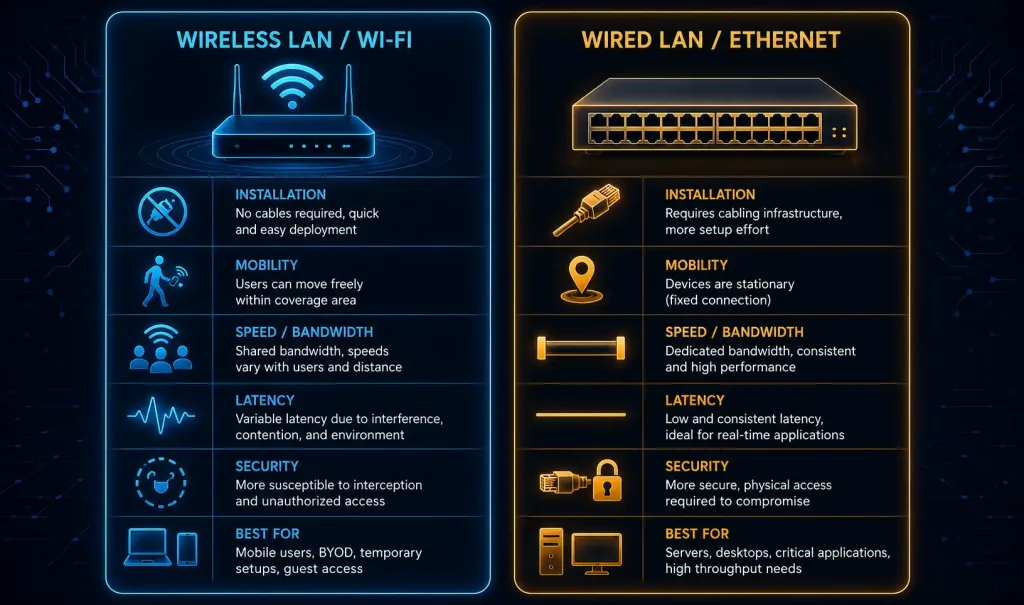
Neither column wins outright. Most networks blend both, matching connection type to what each device actually needs.
A Quick Note on Wi-Fi Generations
Wi-Fi itself has gone through several generations, each one a real jump in capability, not just a marketing refresh:
- 802.11n (Wi-Fi 4). Added MIMO, letting devices use multiple antennas at once. A real leap over earlier single-antenna standards.
- 802.11ac (Wi-Fi 5). Moved to 5 GHz-only operation for higher throughput, with wider channels and better spatial streaming.
- 802.11ax (Wi-Fi 6 / 6E). Added OFDMA, letting an access point serve multiple devices more efficiently at once, rather than one at a time. Wi-Fi 6E extended this into the newer 6 GHz band, adding significant extra spectrum with far less existing interference.
- 802.11be (Wi-Fi 7). The newest generation, pushing higher throughput and lower latency further still, with wider channels and multi-link operation across bands simultaneously.
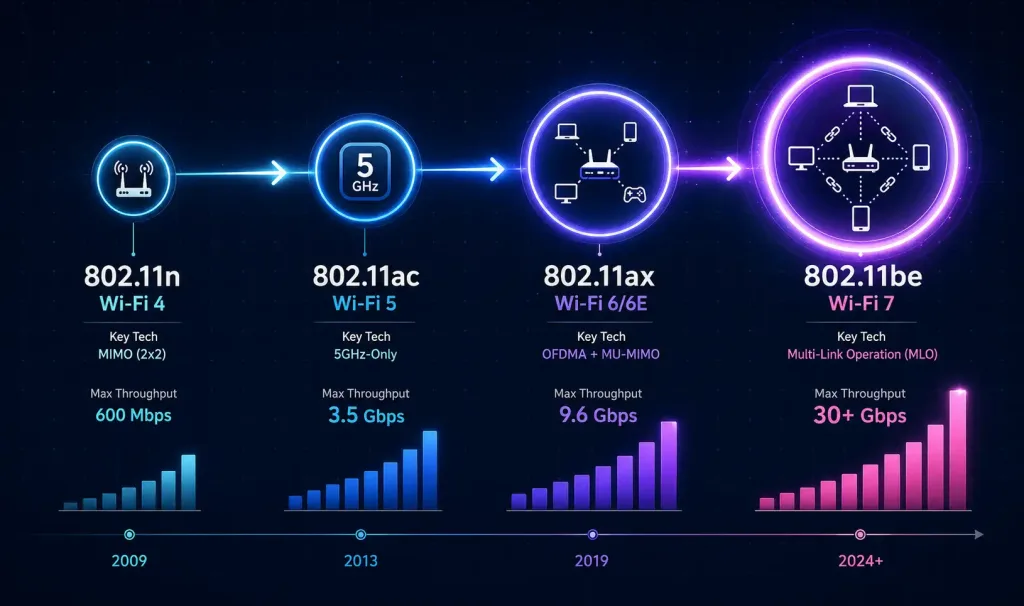
Every one of these is still Wi-Fi. Still WLAN. Just a newer, faster version of the same underlying idea: local wireless connectivity, standardized under IEEE 802.11.
Conclusion
WLAN is the general category. Wi-Fi is its dominant, standardized form, not a separate rival technology. The comparison actually worth making, wireless versus wired, comes down to a real tradeoff between mobility and flexibility on one side, and raw consistency and throughput on the other. Most networks end up using both, matching each connection type to what it’s actually good at, rather than treating either one as universally superior. Understanding this distinction correctly, rather than treating Wi-Fi and WLAN as competitors, is the actual foundation for making good network design decisions going forward.
FAQs
Is Wi-Fi the same thing as WLAN?
For nearly all practical purposes, yes. WLAN is the general term for any wireless local area network, while Wi-Fi is the specific, IEEE 802.11-based standard that makes up the overwhelming majority of real-world WLANs today. Non-Wi-Fi WLAN technologies exist, but they’re rare and mostly historical or highly specialized.
What is the difference between a wireless LAN and a wired LAN?
A wireless LAN connects devices over radio waves, offering mobility and easy deployment without cable runs, while a wired LAN connects devices over physical Ethernet cabling, generally offering more consistent speed, lower latency, and a smaller attack surface. Most real networks use a mix of both, with wired connections for stationary, performance-sensitive devices and wireless for anything that needs to move around freely.
How does a wireless access point actually work?
An access point bridges wireless clients to a wired network behind it, coordinating which device gets to transmit on the shared radio channel at any given moment and forwarding traffic between wireless devices and the broader network. This infrastructure-based model is how nearly every real-world WLAN operates today, as opposed to the much less common client-based (ad-hoc) model where devices connect directly to each other with no central access point involved.
Why is Wi-Fi security important for a WLAN?
Because a wireless signal doesn’t stop at a building’s walls, anyone within radio range can potentially attempt to access or intercept traffic on a poorly secured wireless network, unlike a wired network that requires physical access to a cable or switch port. Strong encryption, WPA2 at minimum and WPA3 where supported, along with a properly isolated guest network, closes most of this gap and is genuinely essential rather than optional for any modern WLAN deployment.
Are there any wireless LAN technologies that aren’t Wi-Fi?
Yes, though they’re uncommon today. HiperLAN was a European alternative standard from the 1990s that never gained real market traction, and some industrial or specialized enterprise environments use proprietary non-802.11 wireless protocols for specific needs like interference resistance. For virtually every home, office, and public network you’ll actually encounter, though, the WLAN in use is Wi-Fi. If you’re setting up a new network today, there’s rarely a reason to look past standard Wi-Fi hardware unless you have a genuinely specialized requirement driving that decision.



