
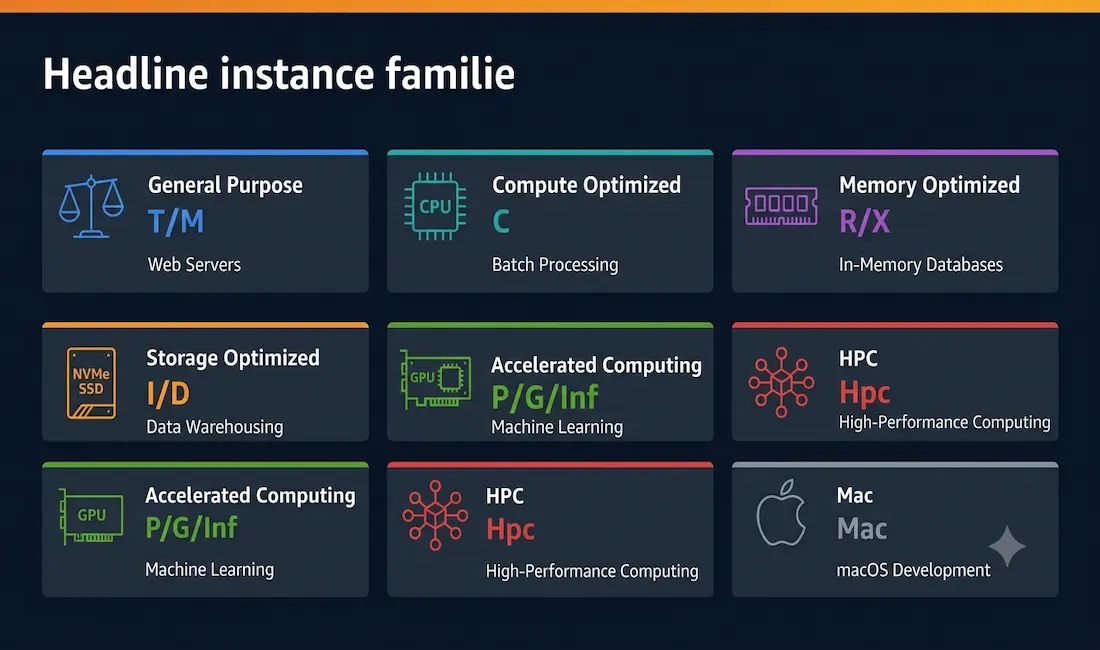
Amazon EC2 gives you access to hundreds of instance configurations spanning seven distinct families, each tuned for a different kind of workload. Picking the wrong one means paying for resources you don’t use or hitting a ceiling you didn’t anticipate. This guide covers every current EC2 instance family, the real instance names inside each one, a comparison table, purchasing models, and a practical decision framework so you can match your workload to the right instance from the start.
What Is an AWS EC2 Instance?
An EC2 instance is a virtual server running in the AWS cloud. It provides a dedicated slice of compute resources — vCPUs, memory, storage, and networking — that you can provision in minutes and pay for by the second. You choose the operating system, install your software, and scale up or down as demand changes.
Each instance is defined by its instance type, a string like m7i.xlarge or c7g.2xlarge that encodes everything you need to know about its hardware. Breaking down m7i.xlarge:
- m — instance family (General Purpose)
- 7 — generation (7th generation hardware)
- i — processor type (Intel)
- xlarge — size (4 vCPUs, 16 GiB memory)
AWS groups all AWS EC2 instance types into families. As of 2026, there are seven: General Purpose, Compute Optimized, Memory Optimized, Storage Optimized, Accelerated Computing, High Performance Computing (HPC), and the newer Mac instances. Understanding what each family optimizes for is the foundation of every good instance decision.
EC2 Instance Families: A Complete Breakdown
General Purpose (T, M, Mac Series)
General Purpose instances provide a balanced mix of compute, memory, and networking. They are the right default for workloads where no single resource is the clear bottleneck.
Current generations: T4g, T3, T3a, M8g, M7i, M7a, M7g, M6i, M6a, M6g, Mac1, Mac2
Use cases: web servers, small to medium databases, development and test environments, enterprise applications (ERP, CRM), containerized microservices.
Key distinction — Burstable vs Fixed:
- T series (t3.micro, t4g.small): burstable instances that accumulate CPU credits during quiet periods and spend them during spikes. Excellent for workloads with variable traffic. t4g instances run on AWS Graviton2 (ARM) and offer up to 40% better price-performance than comparable x86 instances.
- M series (m7i.xlarge, m8g.2xlarge): fixed performance instances for steady, predictable workloads. The M8 family, launched in 2026, is the current generation and available across Intel (m8i), AMD (m8a), and Graviton4 ARM (m8g) processors.
Start here if you are not sure which family fits your application. Monitor with CloudWatch, then migrate once you see where the bottleneck lives.
Compute Optimized (C Series)
Compute Optimized instances deliver the highest ratio of vCPU to memory in the EC2 lineup. They run the latest high-clock-speed processors and are built for workloads that are CPU-bound rather than memory- or I/O-bound.
Current generations: C8g, C7i, C7a, C7g, C6i, C6a, C6g, C6gn
Use cases: high-performance web servers, batch processing, scientific modeling, video encoding, gaming servers, machine learning inference (where the model fits in CPU cache), high-traffic API gateways.
Example: a c7g.4xlarge running on AWS Graviton3 gives you 16 vCPUs and 32 GiB of memory — roughly twice the vCPU density of a comparably priced M-series instance. If your CPU utilization in CloudWatch is consistently above 80–90% on a General Purpose instance, Compute Optimized is the right next step.
Memory Optimized (R, X, Z Series)
Memory Optimized instances provide the largest memory-to-vCPU ratios in EC2. They are built for workloads that load large datasets into RAM and process them at speed.
Current generations: R8g, R7i, R7a, R7g, R6i, R6a, R6g, X2idn, X2iedn, X2iezn, z1d
Use cases: in-memory databases (Redis, Memcached, SAP HANA), real-time big data analytics, high-performance relational databases, genome sequencing, financial risk modeling.
Memory ceiling:
- R series tops out at several hundred GiB per instance.
- X series goes higher — the
x2iedn.metalinstance carries 4 TiB of memory. - z1d instances pair high memory with the highest sustained all-core clock speed in EC2, making them useful for workloads that need both.
If your application is constantly swapping to disk or your database server is showing memory pressure, Memory Optimized is where to go.
Storage Optimized (I, D, H Series)
Storage Optimized instances are built for workloads that require high-throughput, low-latency access to very large local datasets. They deliver hundreds of thousands to millions of IOPS from NVMe SSD storage attached directly to the instance.
Current generations: I4i, I4g, Im4gn, Is4gen, D3, D3en, H1
Use cases: NoSQL databases (Cassandra, MongoDB), data warehousing, distributed file systems, Hadoop clusters, log ingestion and processing, high-frequency trading platforms.
Key figures: an i4i.32xlarge delivers up to 7.5 million random read IOPS and 1.9 million random write IOPS from its local NVMe storage — far beyond what EBS can provide even with Provisioned IOPS volumes.
If your CloudWatch metrics show high disk I/O wait times and your application is reading or writing large sequential or random datasets, Storage Optimized is the right family.
Accelerated Computing (P, G, Inf, Trn, F Series)
Accelerated Computing instances use hardware co-processors — GPUs, AWS custom silicon, or FPGAs — to handle workloads that don’t map efficiently onto general-purpose CPUs.
Current generations:
- P4, P5 — NVIDIA A100 and H100 GPUs for large-scale ML training and HPC
- G4dn, G5 — NVIDIA T4 and A10G GPUs for ML inference, video transcoding, and graphics rendering
- Inf2 — AWS Inferentia2 chips for high-throughput, low-cost ML inference (up to 4× more cost-efficient than GPU-based inference for many models)
- Trn1 — AWS Trainium chips for cost-effective ML model training at scale
- F1 — FPGAs for custom hardware acceleration in genomics, financial analytics, and real-time video processing
Use cases: deep learning training (P and Trn series), ML inference at scale (Inf2, G series), scientific simulation, 3D rendering, video encoding pipelines, custom hardware acceleration (F series).
Practical note: for production ML inference, Inf2 instances typically deliver significantly better cost-performance than GPU instances. For training large models that fit within 512 GiB of accelerator memory, Trn1 offers the best price per training step.
High Performance Computing — HPC (Hpc Series)
The HPC family is AWS’s newest category, purpose-built for tightly coupled, high-performance computing workloads that require fast node-to-node communication.
Current generations: Hpc7g, Hpc6id, Hpc6a
Use cases: computational fluid dynamics (CFD), weather modeling, molecular dynamics, seismic analysis, financial Monte Carlo simulations.
What makes HPC different: HPC instances use Elastic Fabric Adapter (EFA) networking, which provides extremely low-latency, high-bandwidth communication between instances in an HPC cluster — comparable to on-premises InfiniBand. This is the family to use when your workload involves MPI (Message Passing Interface) across many tightly coupled nodes.
Mac Instances (Mac Series)
Mac instances are the only EC2 instances running on Apple hardware. They run macOS and are aimed at developers building, testing, and distributing apps for Apple platforms.
Current generations: Mac1 (Intel Mac mini), Mac2 (M1 Mac mini), Mac2-m2 (M2 Mac mini), Mac2-m2pro (M2 Pro Mac mini)
Use cases: Xcode builds, iOS/macOS CI/CD pipelines, App Store submission workflows.
EC2 Instance Family Comparison Table
| Family | Series | Optimized For | Best Use Cases |
|---|---|---|---|
| General Purpose | T, M, Mac | Balanced CPU / memory / network | Web servers, dev/test, small databases, microservices |
| Compute Optimized | C | vCPU density, high clock speed | Batch processing, gaming servers, ML inference, high-traffic APIs |
| Memory Optimized | R, X, Z | Large memory per vCPU | In-memory databases, real-time analytics, SAP HANA |
| Storage Optimized | I, D, H | High IOPS, local NVMe | NoSQL databases, data warehousing, Hadoop, log processing |
| Accelerated Computing | P, G, Inf, Trn, F | GPUs, AWS silicon, FPGAs | ML training, ML inference, video encoding, scientific simulation |
| HPC | Hpc | EFA networking, HPC cluster | CFD, molecular dynamics, weather modeling, MPI workloads |
| Mac | Mac | Apple hardware + macOS | iOS/macOS app builds, Xcode CI/CD |
Benefits of EC2 Instance Types
Choosing the right instance type unlocks practical advantages that generic “cloud benefits” language tends to obscure.
Right-sized cost. AWS charges for what you provision, not what you own. A workload running on a correctly sized c7g.xlarge costs a fraction of what it would on an over-provisioned m7i.4xlarge. The benefits of AWS include the ability to change instance types at any time — so right-sizing is an ongoing optimization, not a one-time decision.
Performance where it counts. A memory-optimized instance can hold an entire in-memory database in RAM that would otherwise need dozens of disk reads per second. A Compute Optimized instance runs the same CPU-bound batch job in half the time. The difference isn’t marginal — it compounds across every request and every hour of operation.
Processor choice. Within most families, you can choose between Intel, AMD, and AWS Graviton (ARM) processors. Graviton4-based instances typically deliver 30–40% better price-performance than equivalent Intel or AMD configurations, making them the default recommendation for greenfield workloads that don’t have x86 dependencies.
Scalability without hardware. You can resize instances, add more of them, or remove them in minutes. EC2 Auto Scaling handles demand spikes automatically, scaling out during traffic peaks and back in during quiet periods.
How to Choose the Right EC2 Instance Type
Step 1 — Identify your bottleneck
The most important question is: what does your workload actually consume? If you don’t know yet, start with a General Purpose instance (M or T series), deploy your application, and watch four CloudWatch metrics under real load:
- CPU Utilization — consistently above 80–90%? Move to Compute Optimized (C series).
- Memory utilization — running out of RAM, swapping to disk? Move to Memory Optimized (R series).
- Disk I/O — high read/write throughput with low latency required? Move to Storage Optimized (I series).
- GPU or ML workload — running neural network training or inference? Move to Accelerated Computing (P, G, Inf, or Trn series).
Step 2 — Match the processor to your software
- Graviton (ARM) — best price-performance for most modern Linux workloads and containerized applications that don’t have x86 binary dependencies.
- Intel — best for legacy x86 applications, single-threaded workloads, and software that uses Intel-specific optimizations (AMX, AVX-512).
- AMD — strong for highly parallelized, multi-threaded workloads like video encoding and large-scale batch processing.
Step 3 — Choose a purchasing model
The instance type is only half the cost decision. How you pay matters as much.
On-Demand — pay per second, no commitment. Right for testing, variable workloads, and anything you’re not ready to commit to.
Reserved Instances / Savings Plans — commit to one or three years and save up to 72% over On-Demand rates. Right for stable, predictable baseline workloads.
Spot Instances — bid for unused EC2 capacity at discounts of up to 90% off On-Demand. Right for fault-tolerant, interruptible workloads: batch jobs, data processing pipelines, ML training runs.
Dedicated Hosts / Dedicated Instances — your instances run on physically isolated hardware. Required for some compliance frameworks (PCI-DSS, HIPAA) and software licenses tied to physical cores.
Step 4 — Size conservatively, then monitor
AWS makes it easy to resize. Start one size smaller than you think you need, set up CloudWatch alarms on CPU, memory, and disk I/O, and resize after a week of real traffic. This avoids the common pattern of over-provisioning at launch and never revisiting it.
EC2 Decision Flowchart
What does your workload need most?
         │
         ├── Balanced (no clear bottleneck) ──────────────► General Purpose (M, T)
         │
         ├── High CPU, low memory ─────────────────────────► Compute Optimized (C)
         │
         ├── Very large memory ────────────────────────────► Memory Optimized (R, X, Z)
         │
         ├── High-speed local storage / IOPS ─────────────► Storage Optimized (I, D, H)
         │
         ├── GPU / ML / deep learning ────────────────────► Accelerated Computing (P, G, Inf, Trn)
         │
         ├── Tightly coupled HPC cluster ─────────────────► HPC (Hpc series)
         │
         └── macOS / iOS builds ──────────────────────────► Mac (Mac2, Mac2-m2)
Conclusion
There is no single best AWS EC2 instance type — there is only the best instance for your specific workload. General Purpose M and T series instances are the right default starting point for most applications, with CloudWatch data guiding any move to a more specialized family. Compute Optimized for CPU-bound work, Memory Optimized for large in-memory datasets, Storage Optimized for high-IOPS local storage, Accelerated Computing for ML and GPU workloads, and HPC for tightly coupled cluster computing.
The practical approach is always the same: start right-sized, instrument with CloudWatch, and let real traffic data drive your instance decisions. AWS makes it easy to change — so the cost of getting it slightly wrong at the start is low, and the benefit of getting it right over time is significant.



