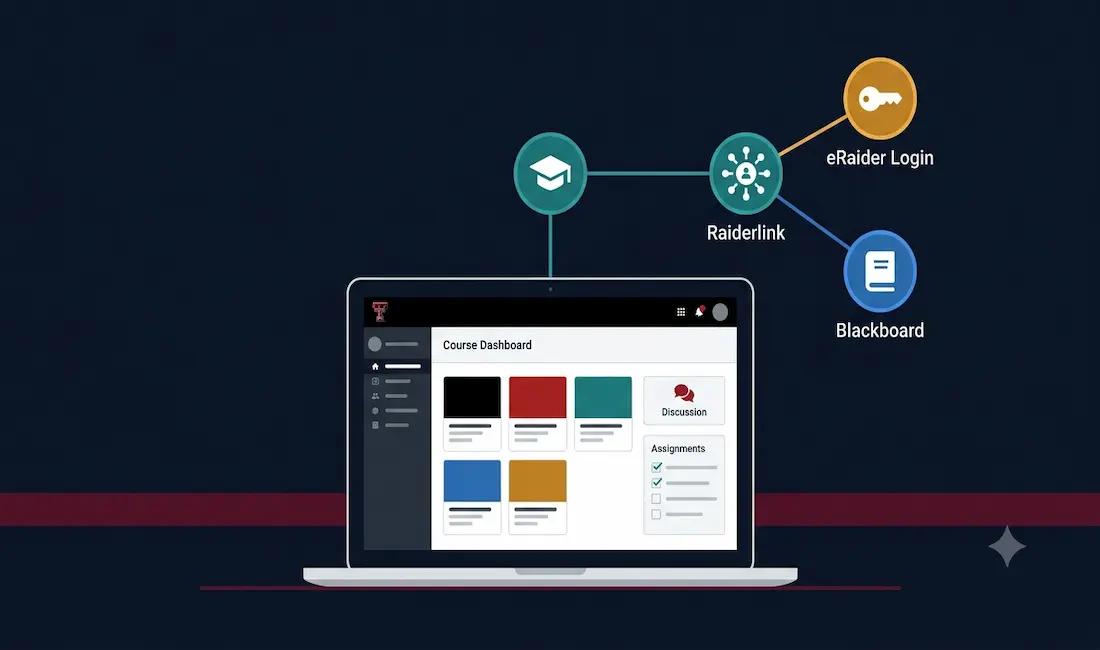
Technology has changed education in fundamental ways, and Texas Tech University (TTU) has built its digital learning experience around Blackboard Learn as its core Learning Management System (LMS). This guide covers how Blackboard actually fits into TTU’s wider IT ecosystem, specifically through Raiderlink and your eRaider credentials, along with its core features and where to actually get help when something goes wrong.
How TTU Blackboard Fits Into the Bigger Picture
A detail that generic Blackboard overviews often miss: at Texas Tech, Blackboard isn’t a standalone website you bookmark separately. It’s accessed through Raiderlink (portal.texastech.edu), TTU’s central campus portal that also handles class registration, financial services, TechMail, campus announcements, and the academic calendar. Your eRaider username and password, the same single credential set used across TTU’s IT systems, is what you use to log into both Raiderlink and Blackboard.
This matters practically: if you can’t log into Blackboard, the problem is very often an eRaider credential issue rather than a Blackboard-specific one, and TTU’s IT support pages address “I forgot my eRaider username and/or password” as a distinct, common help topic separate from Blackboard troubleshooting itself.
TTU Blackboard: An In-Depth Look
Blackboard Learn at TTU serves as a centralized hub for students and instructors, bringing together course materials, assignments, assessments, and communication tools in one place. The interface is designed to streamline the learning process and support collaboration between students and faculty across TTU’s colleges and departments.
Noteworthy Features of TTU Blackboard
- Course Content Management: Instructors upload course materials directly, giving students a single, unified place to access everything related to a course.
- Communication Tools: Discussion boards, internal messaging, and announcements support ongoing interaction between students and instructors outside of class time.
- Assignment and Assessment Management: Instructors create and distribute assignments, quizzes, and exams, and can manage online grading and feedback through the same platform.
- Collaborative Learning: Group projects are supported through wikis, blogs, and discussion boards, encouraging teamwork and shared work on assignments.
- Analytics and Reporting: Instructors can monitor student progress and engagement, helping identify students who may need additional support earlier in the semester.
- Integration: Blackboard connects with other TTU systems accessible through Raiderlink, reducing the need to juggle entirely separate logins for different parts of your coursework.
Benefits of Using TTU Blackboard
- Accessibility: Course materials, discussions, and assignment submission are available from anywhere with an internet connection.
- Centralized Communication: Instructors and students can communicate directly through the platform without relying solely on email.
- Time Management: Clear course structure, deadlines, and progress tracking help students build consistent study habits.
- Resource Centralization: All course materials live in one place, making it easy to revisit earlier lessons when studying for exams.
- Early Intervention: Analytics let instructors flag students who may be struggling early enough in the semester to actually help.
Logging In and Getting Help
To access Blackboard at TTU:
- Go to Raiderlink (portal.texastech.edu).
- Log in with your eRaider username and password, the same credentials used across TTU’s IT systems.
- Navigate to Blackboard through the relevant tab in Raiderlink, or directly through Blackboard@TTU if you already have a bookmarked link.
If you can’t log in:
- If you’ve forgotten your eRaider username or password, use TTU’s password recovery process rather than repeatedly guessing, this is the single most common login issue and has a dedicated self-service reset path.
- If your credentials are correct but Blackboard itself isn’t loading a specific course, confirm the course is actually listed as active for the current term, instructors sometimes make courses unavailable until the term officially begins.
- For anything beyond a credential reset, TTU’s IT Help Central is the correct support resource for both students and faculty, and is the official starting point referenced directly on TTU’s own IT services pages for Blackboard-related assistance.
Security and Privacy
TTU Blackboard operates under the university’s broader IT security and data protection policies, since access runs through the same eRaider credential system used for registration, grading, and financial records. Never share your eRaider password with anyone, including someone claiming to be from IT support, TTU’s own guidance explicitly warns against this, since legitimate IT staff will never ask for your password directly.
Conclusion
TTU Blackboard is most useful once you understand it isn’t a standalone tool, it’s one part of Texas Tech’s connected IT ecosystem, accessed through Raiderlink with your eRaider credentials, and backed by IT Help Central when something goes wrong. Understanding this bigger picture, rather than treating Blackboard as an isolated website, is what actually helps when you’re troubleshooting a login issue or trying to find the right place to ask for help.
For current login help, course access questions, or technical support, visit TTU’s IT Services for Students or IT Services for Faculty pages directly, since specific support contact details and hours are best confirmed there rather than assumed.
Related reading: WKU Blackboard – What Makes a Good LMS?
Frequently Asked Questions
How do I access Blackboard at Texas Tech?
Log into Raiderlink at portal.texastech.edu using your eRaider username and password, then navigate to Blackboard from there. Raiderlink serves as TTU’s central campus portal, connecting Blackboard with registration, TechMail, and other university services under one shared login.
What do I do if I can’t log into TTU Blackboard?
Most login issues trace back to eRaider credentials rather than Blackboard itself, so start with TTU’s eRaider password recovery process if you’ve forgotten your username or password. If your credentials are correct but a specific course isn’t showing up, check whether the course has been made active by your instructor for the current term. For anything beyond this, TTU’s IT Help Central is the official support resource for both students and faculty.
Is my eRaider password the same as my Blackboard password?
Yes. TTU uses a single eRaider credential set across its connected IT systems, including Raiderlink and Blackboard, rather than requiring separate logins for each service. This is also why a Blackboard access problem is often actually an eRaider account issue.
Who do I contact for Blackboard technical support at TTU?
TTU’s IT Help Central is the official support resource referenced on the university’s own IT services pages for Blackboard-related assistance, for both students and faculty. Visit TTU’s IT Services for Students or IT Services for Faculty pages directly for current contact details and support hours.