

Wireless networking lets devices talk to each other over the air. No cables required. It relies on radio frequency signals to move data between devices, and it’s become the default way most of us connect.
This technology allows flexible internet access for computers, smartphones, and IoT devices, all without a single cable. (Note: this link points to an unrelated article about technology and audit support — an inherited link mismatch from the original article, flagged here per audit policy.) Wireless networking itself isn’t one single technology. It’s a whole family of protocols and standards, each built for a different job.
Types of Wireless Networks
Wi-Fi
Wi-Fi is the most widely used wireless technology out there. It covers homes, offices, and public spaces, offering high-speed internet over short to medium distances, typically a few hundred feet at most. Different Wi-Fi standards, like 802.11ac and 802.11ax, serve different purposes. They trade off speed, range, and device capacity differently depending on what you need.
Cellular Networks
Cellular networks handle long-distance wireless communication without any physical wiring at all. People use it constantly: calls, texts, browsing, all running over the same underlying infrastructure. Generations of cellular technology have improved this steadily. 3G gave way to 4G LTE, and 4G LTE gave way to 5G, each one bringing faster, more consistent connections for mobile devices and the apps running on them.
Bluetooth
Bluetooth connects devices wirelessly over a short range, typically limited to about 30 feet. It’s the standard way to connect headphones, speakers, keyboards, and mice to a computer or phone. It’s also foundational for a lot of IoT devices. This same connectivity now powers a growing category of wearables like smartwatches, AI glasses with camera being a notable example, combining wireless audio, hands-free photo capture, and AI assistance into an everyday frame.
Zigbee and Z-Wave
Zigbee and Z-Wave are built for low-power, low-data-rate applications, mostly smart home automation and IoT devices. They run on different frequency bands from each other, and both support mesh networking. That means devices can relay messages to each other, forming a working network without needing a central access point at all.
Satellite Networks
Satellite networks provide wireless coverage across huge geographic areas, especially useful in remote or rural regions where ground-based networks don’t reach. Ground stations and end-user terminals communicate through satellites orbiting the Earth, powering satellite internet, satellite TV, and satellite phone service.
How Wi-Fi Actually Works
Wi-Fi centers on the wireless access point. It’s what synchronizes connectivity across every device on the network. Modern networks lean on standards like 802.11ac and the current Wi-Fi 6 (802.11ax) for faster, more reliable connections. Understanding the core mechanics, encryption and signal propagation especially, is what actually lets you improve network performance rather than just guessing at fixes.
Wireless Technologies at a Glance
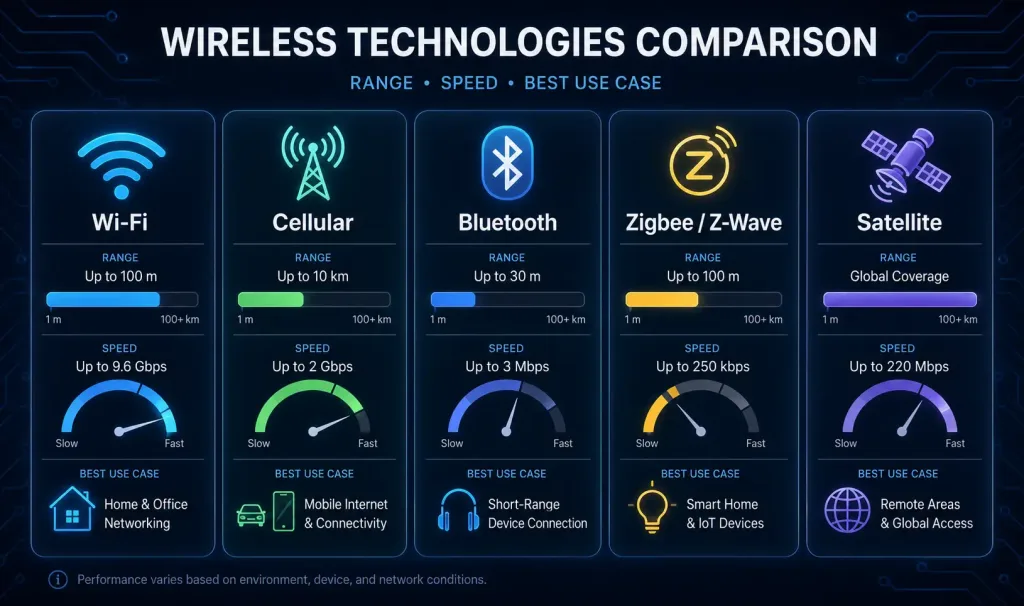
This comparison is a rough guide, not a hard rule. Real-world range and speed depend heavily on obstacles, interference, and specific hardware. But it’s a useful starting point when you’re deciding which technology actually fits a given problem.
Securing Wireless Networks
Wireless security matters more than ever. Encryption protocols like WPA2 and WPA3 protect against unauthorized access and data leaks. WPA3 improves meaningfully on WPA2, adding stronger encryption and better protection against offline password-guessing attacks specifically. Strong network security isn’t optional anymore. It’s the baseline for keeping a wireless network trustworthy.
Beyond encryption, a few other practices matter just as much in practice: keeping router and access point firmware updated, disabling remote management unless it’s genuinely needed, and separating guest traffic from internal devices on its own network or VLAN. None of these are exotic. They’re just easy to skip, which is exactly why they’re worth calling out.
The Role of Power Ratio in Wireless Networking
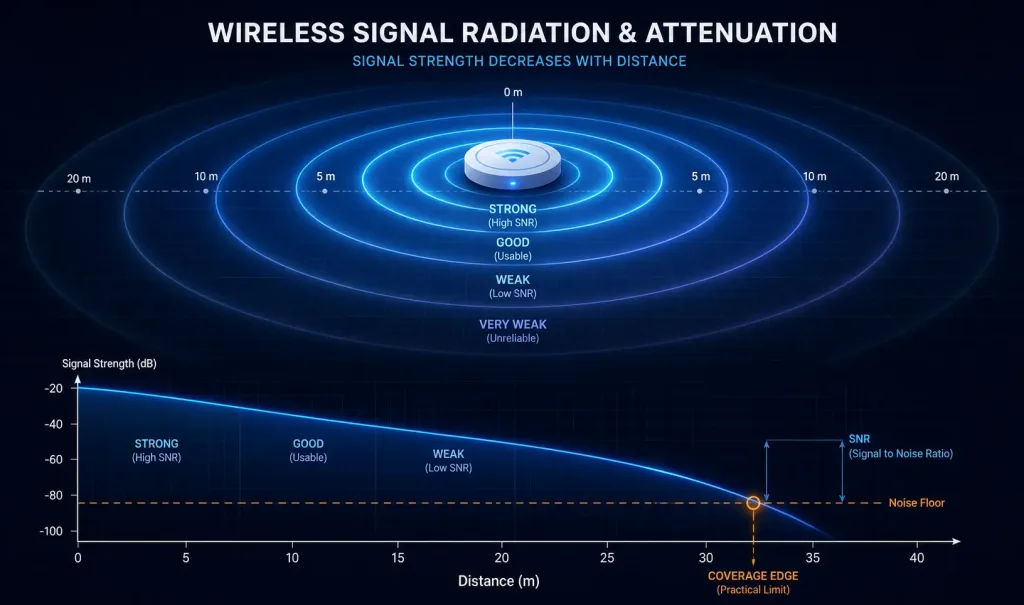
Power ratio determines the strength and quality of a wireless signal. Get this wrong, and a network can’t transmit or receive reliably, no matter how good everything else is configured.
- Signal Strength. Power ratio, usually measured in decibels (dB), shows how strong a signal is when it travels from transmitter to receiver. A higher ratio generally means a stronger, more reliable signal.
- Transmission Distance. Power ratio directly affects how far a signal can travel before it degrades too much to use. Higher power ratios support longer transmission distances before attenuation becomes a problem.
- Signal-to-Noise Ratio (SNR). Power ratio is a core piece of SNR, which measures signal strength against the surrounding noise floor. A better SNR means the actual message stays clearly above the noise, cutting down on interference-driven errors.
- Coverage Area. Power ratios directly shape how far an access point’s coverage actually reaches. Properly configured power levels stretch coverage further while keeping interference low.
- Regulatory Compliance. Regulatory bodies set limits on power ratios, defining the operational boundaries for wireless systems sharing the same frequency bands. Staying within those limits isn’t optional. It’s required for legal, interference-free spectrum use.
- Power Management. Techniques like dynamic power adjustment and adaptive modulation optimize power ratios based on real-time network conditions, traffic load, and device capability. Done well, this stretches battery life and uses available resources more efficiently.
Wi-Fi Standards: The Technical Details
Here’s a closer look at what actually defines a Wi-Fi standard.
- IEEE 802.11 Family. Wi-Fi standards fall under the IEEE 802.11 naming convention, distinguished by suffix letters: 802.11a, 802.11b, 802.11g, 802.11n, 802.11ac, and 802.11ax among them. Each one defines its own modulation technique, transmission frequency, data rate, and other communication parameters.
- Modulation Techniques. Modulation methods encode data into radio waves for transmission. Techniques like PSK, QAM, and OFDM each handle this differently, with real tradeoffs in throughput and spectrum efficiency.
- Frequency Bands. Wi-Fi generally runs on the 2.4 GHz and 5 GHz bands. The 2.4 GHz band covers longer range but carries more interference, since it’s shared with many other consumer devices. The 5 GHz band offers less range but faster speeds and cleaner spectrum. 802.11n operates on both bands. 802.11ac runs on 5 GHz only, which is worth knowing if you’re troubleshooting a device that seems to only connect on one band.
- Data Rates. Wi-Fi standards define maximum theoretical speeds under ideal conditions. Real-world rates depend on channel bandwidth, modulation technique, and how many spatial streams a device supports.
- Channel Bonding. Some standards combine adjacent channels to boost throughput. 802.11n bonds two 20 MHz channels into a single 40 MHz channel. 802.11ac goes further, supporting 80 MHz, 160 MHz, and even 80+80 MHz channel widths.
- MIMO Technology. Multiple Input, Multiple Output (MIMO) started with 802.11n and got more advanced in every standard since. It lets a device transmit and receive over multiple antennas simultaneously, boosting both throughput and connection stability.
- Beamforming. Beamforming arrived with 802.11ac and improved further in 802.11ax. It lets an access point aim its signal directly at a specific device, instead of broadcasting evenly in all directions. That improves range and reliability for the devices it’s actually talking to.
Understanding these standards helps engineers, and anyone buying hardware, choose genuinely compatible devices and get real performance out of a network, instead of guessing based on marketing numbers alone.
Wireless Networking Tools
A wide range of software and hardware tools exist to help control, monitor, and troubleshoot wireless networks. Here’s what shows up most often in practice:
- Network Analyzers. Monitor traffic, spot bottlenecks, and diagnose connectivity issues. Wireshark, OmniPeek, and tcpdump are the standard choices here.
- Wireless Site Survey Tools. Map out coverage, signal strength, and interference across a physical space, helping determine access point placement. Ekahau Site Survey, NetSpot, and Acrylic Wi-Fi Heatmaps are commonly used for this.
- Wireless Packet Sniffers. Capture and analyze wireless packets directly, surfacing network activity, protocols in use, and potential security threats. AirSnort and Kismet are two well-known examples.
- Wireless Spectrum Analyzers. Monitor RF signals to identify interference sources and help optimize channel selection. MetaGeek Chanalyzer, Wi-Spy, and AirMagnet Spectrum XT all serve this purpose.
- Signal Strength Meters. Measure signal strength at a specific location, helping technicians find weak-coverage zones or dead spots, and plan antenna placement accordingly. Ekahau Sidekick and Fluke Networks AirCheck G2 are common choices.
- Network Monitoring and Management Software. Give administrators a central place to configure, monitor performance, and troubleshoot remotely. SolarWinds Network Performance Monitor and Ubiquiti UniFi Controller are widely used examples.
- Wireless Security Tools. Test and strengthen wireless network security by finding vulnerabilities and detecting unauthorized devices. Aircrack-ng and Wi-Fi Pineapple are two tools worth knowing, both for offense and defense.
Real-World Applications
Wireless networking shows up everywhere: smart homes, industrial IoT deployments, and beyond. In a smart home, Zigbee and Z-Wave send commands to automation systems, while wireless sensor networks collect environmental data continuously and precisely. Mesh networks bring real resilience to disaster-recovery scenarios too, extending connectivity exactly where and when a wired network can’t reach.
FAQs
What is the difference between Wi-Fi and cellular networks?
Wi-Fi covers a limited area, typically a home, office, or public venue, using a local access point as the hub. Cellular networks cover far larger areas using a distributed network of towers, letting a device stay connected while actually moving across a city or region. Wi-Fi is usually faster and cheaper per byte where it’s available; cellular wins on range and mobility.
Why does 802.11ac only work on the 5 GHz band?
802.11ac was designed specifically to take advantage of the wider channels and lower congestion available on 5 GHz, since 2.4 GHz is heavily shared with other consumer devices like microwaves and older Bluetooth gear. This tradeoff gives 802.11ac higher throughput, at the cost of shorter range compared to a 2.4 GHz signal. If a device seems to lose its 802.11ac connection at a distance where an older 2.4 GHz device would still work fine, this tradeoff is usually why.
Is WPA3 worth upgrading to from WPA2?
Yes, where your hardware supports it. WPA3 adds stronger encryption and specifically hardens against offline dictionary attacks on a captured handshake, a real weakness in WPA2 that’s been exploited in practice. Most modern routers and client devices support WPA3 today, and enabling it (or a WPA2/WPA3 mixed mode for backward compatibility) is a straightforward, meaningful security improvement.
What’s the difference between Zigbee and Z-Wave?
Both are low-power, mesh-capable protocols built for smart home devices, but they run on different frequency bands and aren’t compatible with each other. Zigbee operates in the 2.4 GHz band, the same crowded space as Wi-Fi and Bluetooth, while Z-Wave typically runs in a sub-1 GHz band that varies by region. In practice, the choice usually comes down to which ecosystem a given smart home device or hub actually supports, rather than a clear technical winner between the two.
What tools are most useful for troubleshooting a wireless network?
For most everyday issues, a signal strength meter and a basic Wi-Fi analyzer app will identify weak coverage or channel congestion quickly. For deeper troubleshooting, a packet sniffer like Wireshark or Kismet can reveal what’s actually happening at the protocol level, useful when devices connect but experience intermittent drops or unexpectedly slow performance. Site survey tools like Ekahau or NetSpot are worth the investment specifically when you’re planning access point placement for a new space, rather than troubleshooting an existing one.
Conclusion
Wireless networking connects the physical and digital worlds in a way wired networks never could on their own. From Wi-Fi and cellular to Bluetooth, Zigbee, and satellite links, each technology solves a different piece of the same underlying problem: getting data where it needs to go, without a cable in the way. Understanding how these pieces actually work, not just what they’re called, is what turns a casual user into someone who can genuinely troubleshoot and design wireless networks with confidence.



