
Cybercrime will cost the world $10.5 trillion in 2026. That’s more than the GDP of Japan. Every 39 seconds, a hacker attacks somewhere on the internet. Your business could be next.
But here’s the good news: most attacks succeed because of weak fundamentals, not advanced hacking. Fix your basics, and you block 90% of threats. This guide shows you how.

What Are Cybersecurity Fundamentals?
Cybersecurity fundamentals are the basic principles that protect your digital assets from threats. Think of them as the foundation of a house. Without a strong foundation, everything else crumbles.
These fundamentals include:
- Understanding what you’re protecting
- Knowing how attackers think
- Building layers of defense
- Responding when things go wrong
Most organizations skip these basics and jump straight to expensive tools. That’s why they still get hacked. The average data breach takes 204 days to detect. That’s almost 7 months of damage before you even know you’re under attack. Companies using strong fundamentals cut that time to 96 days. That’s less than half.

The CIA Triad: Your Security Foundation
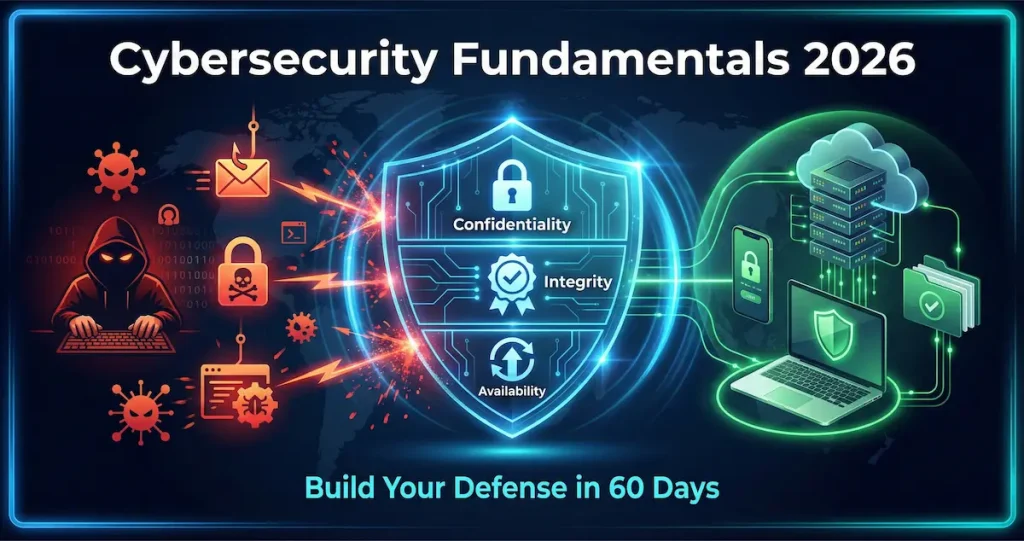
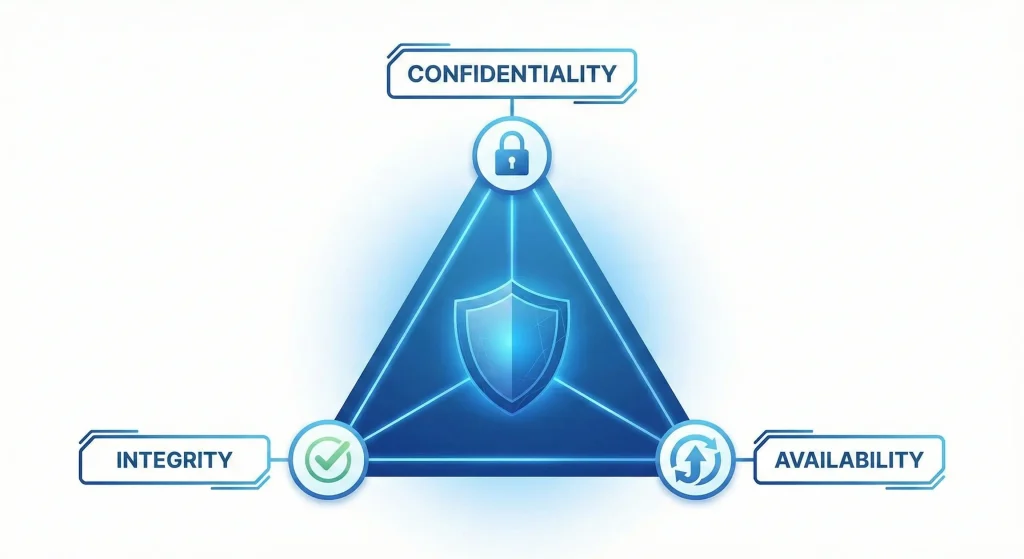
Every security decision starts here: the CIA Triad. CIA stands for Confidentiality, Integrity, and Availability. Not the spy agency. Let me break it down.
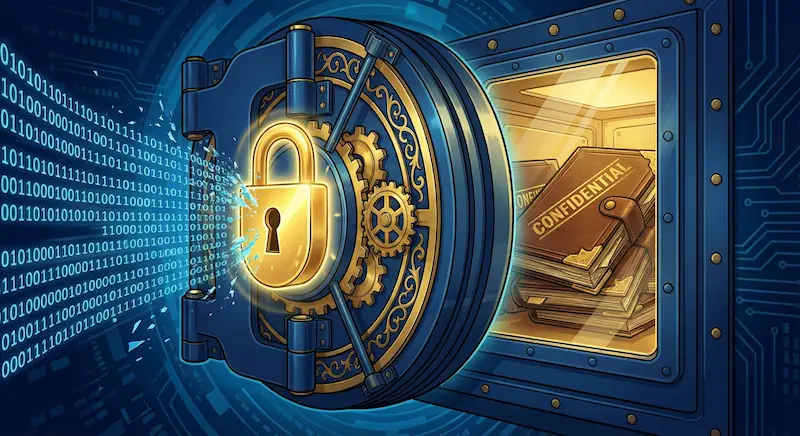
Confidentiality: Keep Secrets Secret
Confidentiality means only authorized people can access your data. Think of it like a locked diary. You don’t want your competitors reading your business plans.
Real-world example: A hospital must keep patient records confidential. If someone hacks their database and steals medical files, that’s a confidentiality breach.
You protect confidentiality through strong passwords with at least 12 characters mixing letters, numbers, and symbols. Enable encryption for sensitive files so even stolen data stays unreadable. Set up access controls to decide who can see what. Use multi-factor authentication to add an extra verification layer. And train employees never to share login credentials, even with colleagues who seem trustworthy.
Integrity: Trust Your Data
Integrity ensures your data hasn’t been tampered with. If a hacker changes your bank account balance from $1,000 to $10, that’s an integrity attack. You need to know your data is accurate and hasn’t been altered without permission.
Real-world example: In 2023, hackers modified patient medication dosages in a hospital system. Doctors almost prescribed wrong amounts. That’s what happens when integrity fails.
Protecting integrity requires multiple approaches. Use checksums and hashing to verify files haven’t changed between transfers. Implement version control systems so you can track and reverse unauthorized modifications. Set up audit logs to record who changed what and when. Use digital signatures for important documents to prove they came from the right source. And regularly backup your data so you can restore clean copies if tampering occurs.
Availability: Be There When Needed
Availability means your systems work when people need them. If your website crashes during Black Friday, you lose money. That’s an availability problem.
Real-world example: A ransomware attack locks all your files. You can’t access anything. Your business stops. That’s an availability attack. Protecting availability means planning for failure. Use redundant systems with backup servers that take over automatically when the primary fails. Implement disaster recovery plans that detail exactly how to restore operations after major incidents. Deploy DDoS protection to block attempts to overwhelm your network with traffic. Monitor system uptime constantly so you catch problems before customers do. And patch systems regularly because unpatched vulnerabilities often cause crashes and service interruptions.
The CIA Triad isn’t just theory. ISO 27001 and GDPR compliance both require it. Article 32 of GDPR specifically mentions confidentiality, integrity, and availability as mandatory security measures.
Understanding the Threat Landscape in 2026
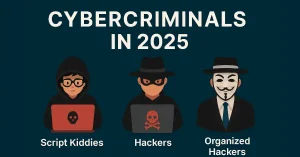
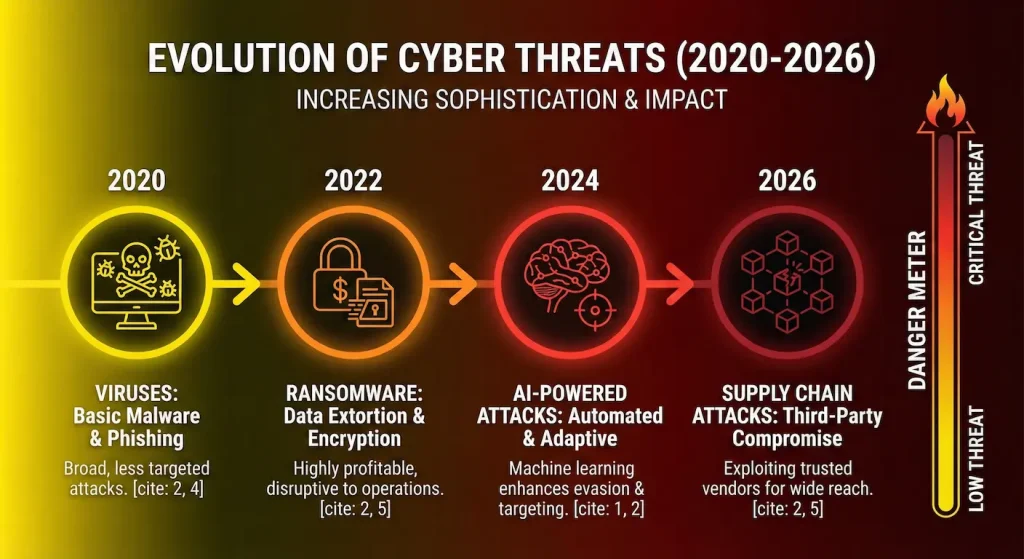
Threats have evolved. Hackers aren’t just teenagers in basements anymore. They’re organized crime groups making millions. They’re nation-states stealing secrets. They’re AI-powered bots working 24/7. Here’s what you’re up against in 2026.
Top Cybersecurity Threats Right Now
Ransomware has become a billion-dollar problem. It locks your files and demands payment to unlock them. In 2025, ransomware attacks increased 34% in healthcare and manufacturing. The average ransom demand is now $2.5 million. Most companies pay because they have no backup plan. LockBit, BlackCat, and Conti are the main ransomware families attacking businesses today.
Phishing remains the number one entry point for attackers. In fact, 82% of data breaches start with phishing emails. Attackers send fake emails pretending to be your bank, your boss, or Microsoft. One click, and they’re inside your network. AI now writes perfect phishing emails with no spelling errors. They look 100% real.
Supply chain attacks have evolved into a major threat vector. Hackers don’t attack you directly anymore. They attack your vendors. Remember the 2020 SolarWinds attack? Hackers compromised one software company and infected 18,000 customers, including US government agencies. In 2026, supply chain attacks target smaller suppliers who have weaker security.
Identity-based attacks exploit the fact that hackers don’t need to break in when they can simply log in. They steal usernames and passwords from old data breaches. Then they try those credentials on your systems. This is why multi-factor authentication has become critical for every organization.
AI-powered attacks represent the newest frontier. Attackers now use AI to find vulnerabilities faster, write malware that adapts to your defenses, create deepfake videos to trick employees, and automate attacks across thousands of targets simultaneously. Defenders also use AI, but attackers moved first and maintain the advantage.
Defense in Depth: Layer Your Security
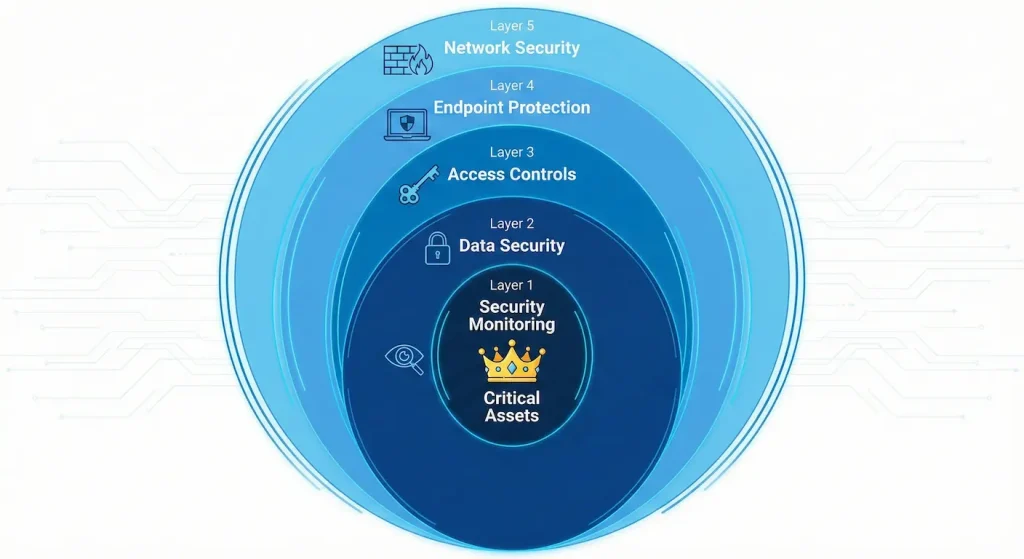
Don’t rely on one security tool. Use multiple layers. This strategy is called “Defense in Depth.” Think of it like a castle with a moat serving as your firewall, walls representing network security, guards acting as intrusion detection, and a vault providing encryption. If attackers get past one layer, another stops them.
Layer 1: Network Security
Your network is the battlefield. Control who enters.
Firewalls: Block unauthorized traffic. Configure rules about what can enter and leave your network.
Network Segmentation: Divide your network into zones. If hackers breach one zone, they can’t reach everything.
Example: Keep your customer database separate from your employee wifi.
VPNs: Encrypt connections for remote workers. This prevents hackers from intercepting data.
For more on VPNs, check our guide on VPN technology and how it protects remote connections.
Layer 2: Endpoint Protection
Every device is a potential entry point: laptops, phones, servers, IoT devices. Antivirus and anti-malware software blocks known threats. Update signatures daily to catch the latest malware variants. However, traditional antivirus only catches threats it already knows about.
Endpoint Detection and Response (EDR) monitors behavior, not just signatures. It detects new, unknown threats by watching how programs act. If a program starts encrypting files rapidly, EDR flags it as potential ransomware even without a signature match.
Patch management keeps all software updated. Here’s a shocking stat: 60% of breaches exploit old, unpatched vulnerabilities. Attackers scan the internet looking for systems running outdated software with known holes. Regular patching closes these doors before hackers can enter.
Layer 3: Access Controls
Not everyone needs access to everything. The Principle of Least Privilege means giving users only the access they need for their job. Nothing more. An accountant needs access to financial systems but not to the HR database. A sales rep needs customer contact info but not employee salary records.
Role-Based Access Control (RBAC) groups users by their role in the organization. All accountants get access to financial systems. The sales team gets CRM access. IT gets administrative rights. This makes managing permissions much simpler than setting individual access for every person.
Multi-Factor Authentication (MFA) requires two or more verification methods. You combine something you know (password), something you have (phone with a code), and something you are (fingerprint). MFA blocks 99.9% of automated attacks. Even if hackers steal your password, they still can’t get in without your phone or fingerprint.
Layer 4: Data Security
Protect your most valuable asset: data. Encryption scrambles data so hackers can’t read it even if they steal it. You need to encrypt data at rest (stored files on servers and laptops) and encrypt data in transit (information traveling across networks). Without encryption, stolen data is readable immediately.
Data Loss Prevention (DLP) prevents sensitive data from leaving your network. It blocks employees from accidentally or deliberately emailing customer lists to personal accounts. DLP scans outgoing messages and file transfers for sensitive patterns like credit card numbers or social security numbers.
Backups follow the 3-2-1 rule: Keep three copies of your data, store them on two different storage types, and keep one copy offsite. Test your backups monthly. A backup you can’t restore is useless. Many companies discover their backups don’t work only after a ransomware attack when it’s too late.
Layer 5: Security Monitoring
You can’t protect what you can’t see.
SIEM (Security Information and Event Management): Collects logs from all systems. Analyzes patterns. Alerts you to suspicious activity.
Popular SIEM tools: Splunk, IBM QRadar, Microsoft Sentinel.
Intrusion Detection Systems (IDS): Watches network traffic for attack patterns.
Log Management: Keep logs for at least 90 days. You’ll need them for forensic analysis after an attack.
Essential Security Frameworks for 2026
Don’t reinvent the wheel. Use proven frameworks. These frameworks give you a roadmap for building security programs.
NIST Cybersecurity Framework 2.0
The National Institute of Standards and Technology (NIST) framework is free and widely adopted. It has 6 core functions that work together. Govern means creating security policies and assigning responsibilities. Identify means knowing what assets you have and what’s at risk. Protect involves implementing safeguards. Detect focuses on finding security events quickly. Respond covers acting when incidents happen. Recover deals with restoring normal operations. Start with Identify. You can’t protect what you don’t know exists.
ISO 27001
This is the international standard for information security management. ISO 27001 certification shows customers you take security seriously. It requires risk assessments to identify threats, security policies that define how you handle data, employee training so everyone knows their role, regular audits to verify compliance, and continuous improvement to adapt as threats evolve. Getting certified takes 6-12 months and costs $15,000-$50,000 depending on company size.
CIS Controls
The Center for Internet Security (CIS) publishes 18 critical security controls. These are prioritized actions that block the most common attacks. The first 5 CIS Controls cover inventory of assets, inventory of software, data protection, secure configuration, and account management. Implement these 5 first. They prevent 85% of attacks.
Zero Trust Architecture
“Never trust, always verify.” Traditional security assumed everything inside your network was safe. That’s wrong. Zero Trust assumes breach. Verify everything, every time.
The core principles work together to create a complete security model. Verify every user and device before granting access. Grant only the minimum access needed for each task. Monitor and log everything to detect anomalies. Assume attackers are already inside your network and design accordingly.
Implementing Zero Trust is a journey, not a destination. Start with critical assets first.
For network fundamentals that support Zero Trust, explore our guide on network components.
| Framework | Difficulty Level | Implementation Time | Primary Benefit |
| CIS Controls | 🟢 Beginner / Intermediate Highly prescriptive and prioritized (IG1 is great for starting). | Weeks – Months Implementation Group 1 (IG1) can be implemented quickly for immediate defense. | Actionable Defense Focuses on blocking the most pervasive/common cyber attacks. |
| NIST CSF 2.0 | 🟡 Intermediate Flexible and voluntary, but requires tailoring to specific organizational needs. | Months – Years An ongoing process; establishing a “Target Profile” takes time to mature. | Risk Management Creates a common language to communicate risk to non-technical stakeholders. |
| ISO 27001 | 🔴 Advanced Rigorous documentation and formal audits required for certification. | 6 – 18 Months Includes audit preparation, gap analysis, and the formal certification process. | Customer Trust Internationally recognized certification often required by enterprise clients. |
| Zero Trust | 🔴 Advanced Complex architectural shift requiring comprehensive identity and network overhaul. | Multi-Year Journey Not a “checklist” project; requires continuous migration of legacy systems. | Damage Containment Minimizes “blast radius” of a breach by assuming no user or device is trusted. |
Key Takeaways
- Start with CIS Controls (IG1) if you are a smaller organization or new to cybersecurity; it offers the fastest “quick wins” against common threats like ransomware.
- Adopt NIST CSF 2.0 if you need a flexible way to assess risk and communicate security goals to executive leadership or the board.
- Pursue ISO 27001 if you are looking to sell to international or enterprise customers who demand proof of security compliance.
- Build toward Zero Trust as a long-term architectural goal to protect critical assets in modern, hybrid cloud environments.
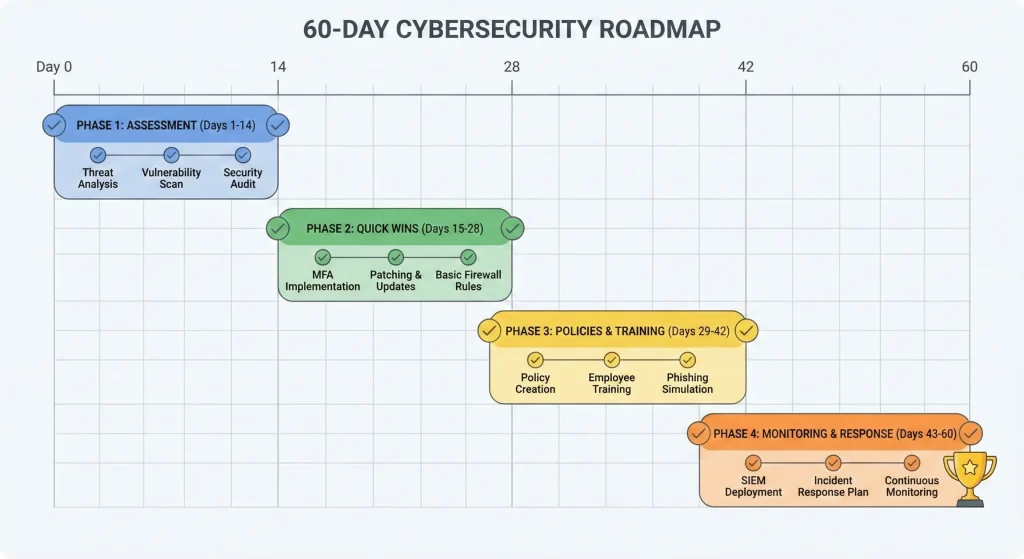
Building Your Security Program: 60-Day Roadmap
You don’t need years to improve security. Start today. Here’s what to do in the next 60 days.
Week 1-2: Assessment
Day 1-3: List all assets
- What devices do you have?
- What data do you store?
- What systems are critical?
Day 4-7: Identify your biggest risks
- What happens if your email goes down?
- What if customer data leaks?
- What if ransomware hits?
Day 8-14: Check current security
- Do you have firewalls?
- Is antivirus up to date?
- Do you have backups?
Week 3-4: Quick Wins
Implement these immediately:
- Enable MFA on all accounts (Day 15-16)
- Update all software and patch vulnerabilities (Day 17-20)
- Change default passwords on routers and devices (Day 21)
- Set up automatic backups (Day 22-24)
- Install endpoint protection on all devices (Day 25-28)
These cost almost nothing but block most attacks.
Week 5-6: Policies and Training
Create basic security policies:
- Acceptable use policy
- Password policy
- Incident response plan
- Data classification policy
Train your team:
- How to spot phishing emails
- How to report security incidents
- How to handle sensitive data
Run a phishing simulation. See who clicks.
Week 7-8: Monitoring and Response
Set up monitoring:
- Enable logging on critical systems
- Set up alerts for failed login attempts
- Monitor for unusual network traffic
Create an incident response plan:
- Who do you call when attacked?
- How do you isolate infected systems?
- When do you call law enforcement?
Test your backups:
- Try restoring files from backup
- Time how long it takes
- Document the process
Beyond 60 Days: Continuous Improvement
Security is not a one-time project. Review your security quarterly. Update your risk assessment. Test your incident response plan. Cyber threats evolve. Your defenses must too.
Common Security Mistakes to Avoid
Learn from others’ failures. Don’t repeat these mistakes.
Mistake #1: Thinking “We’re Too Small to Attack”
Wrong. 43% of cyberattacks target small businesses. Hackers use automated tools. They don’t care about your company size. They scan millions of targets looking for easy victims. Small businesses often have weaker security, making them easier targets.
Mistake #2: Relying Only on Antivirus
Antivirus is necessary but not sufficient. It only catches known threats. New malware appears every 4 seconds. You need multiple layers: firewall, EDR, email filtering, web filtering, and more.
Mistake #3: Not Training Employees
Your employees are your weakest link. Or your strongest defense. 82% of breaches involve human error. One employee clicking a phishing link can compromise your entire network. Invest in security awareness training. Run quarterly phishing tests.
Mistake #4: Weak Password Policies
“Password123” is still the most common password in 2026. Good password policies require a minimum of 12 characters with a mix of uppercase, lowercase, numbers, and symbols. Avoid dictionary words. Change passwords only if you suspect a breach, not every 90 days which causes people to create weak passwords. Better yet, use passphrases like “Coffee!Morning@2024Walk” that are long but memorable.
Mistake #5: No Backup or Untested Backups
40% of businesses never reopen after a major data loss. Having backups isn’t enough. You must test restoring from those backups. A backup you can’t restore is worthless.
Mistake #6: Ignoring Mobile Devices
Your employees use phones and tablets for work. Are those secured? Mobile devices can be lost or stolen, infected with malware, or used on unsecured public WiFi. Implement Mobile Device Management (MDM). Require encryption. Enable remote wipe.
Mistake #7: Not Having an Incident Response Plan
When you get breached, panic makes everything worse. An incident response plan tells everyone exactly what to do. Without a plan, people delete evidence, fail to notify authorities, pay ransoms unnecessarily, or neglect to isolate infected systems. Practice your plan quarterly.
Measuring Your Security Effectiveness
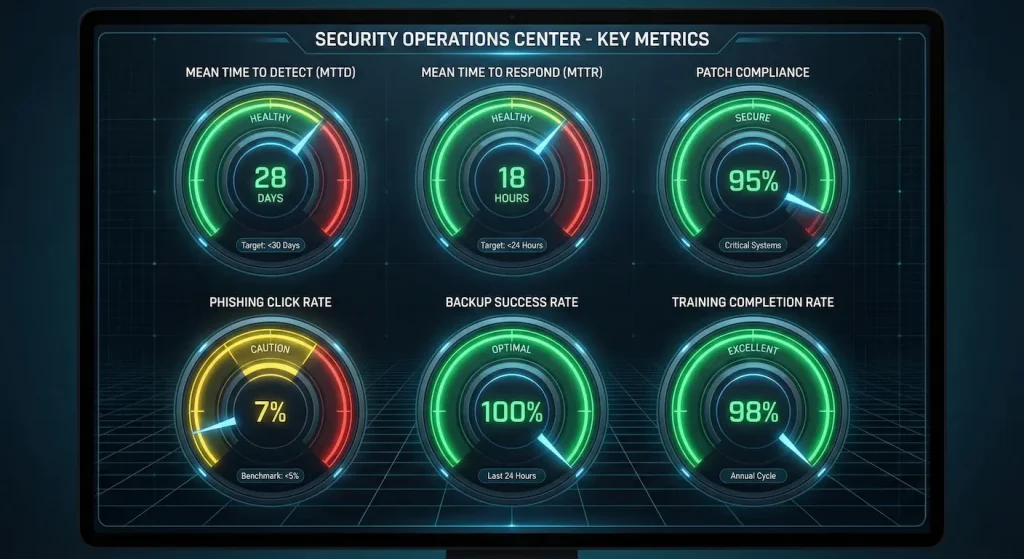
You can’t improve what you don’t measure. Track these key metrics:
Security Metrics That Matter
Mean Time to Detect (MTTD) measures how long before you notice a breach. The industry average sits at 204 days. Your goal should be under 30 days. The faster you detect intrusions, the less damage attackers can cause.
Mean Time to Respond (MTTR) tracks how long it takes to contain a breach once detected. Your goal is under 24 hours. Every hour of delay gives attackers more time to steal data or spread through your network.
Patch Compliance Rate shows what percentage of systems are fully patched. Aim for 95% or higher. Unpatched systems are easy targets for attackers who scan for known vulnerabilities.
Phishing Click Rate reveals how many employees click phishing emails in tests. The industry average is 30%. Your goal should be under 5%. This metric directly shows how well your security training works.
Other important metrics include backup success rate (aim for 100%), failed login attempts (monitor daily for spikes), and security training completion (100% annually).
Run a security assessment quarterly. Compare results. Are you improving?
Tools and Technologies for 2026
You don’t need expensive enterprise tools to start. Here are effective tools for different budgets. For those just starting out, several excellent free and open source tools provide strong security. Wazuh offers SIEM capabilities for monitoring. Suricata provides intrusion detection and prevention. OpenVAS handles vulnerability scanning. KeePass and Bitwarden manage passwords securely. These free tools give you a solid foundation without any licensing costs.
Budget-friendly commercial tools range from $5-50 per month per user. Microsoft Defender for Business, Malwarebytes, and Bitdefender GravityZone all offer quality endpoint protection. For email security, consider Proofpoint Essentials, Mimecast, or Barracuda. Backblaze, Acronis Cyber Protect, and Veeam Backup handle data protection at reasonable prices.
Enterprise organizations need more robust solutions. For SIEM, Splunk Enterprise Security, IBM QRadar, and Microsoft Sentinel lead the market. CrowdStrike Falcon, SentinelOne, and Palo Alto Networks Cortex XDR dominate the EDR and XDR space. Cloud security platforms like Wiz, Prisma Cloud, and Microsoft Defender for Cloud protect cloud environments. Start with free tools. Upgrade as you grow. The best tool is the one you’ll actually use and maintain.
For additional security tools and reviews, see our roundup of 8 new cybersecurity tools.
Compliance and Regulations
Ignoring compliance is expensive. GDPR fines reach €20 million or 4% of global revenue (whichever is higher). Here’s what you need to know.
Key Regulations by Industry
Healthcare organizations must comply with HIPAA, which requires protecting patient health information through encryption of data at rest and in transit, auditing access to medical records, and maintaining detailed logs. Penalties reach up to $1.5 million per violation.
Finance and retail businesses handling credit cards must follow PCI DSS. This means protecting credit card data, never storing CVV codes, running quarterly vulnerability scans, and conducting annual penetration testing. The penalty for non-compliance is severe: losing the ability to process credit cards entirely.
GDPR applies to any business with EU customers. It gives users control over their data and requires reporting breaches within 72 hours. Penalties can reach €20 million or 4% of global revenue, whichever is higher.
US Federal contractors need CMMC certification, which has three levels and covers controlled unclassified information. Certification requires audits by certified assessors.
Compliance Basics Everyone Needs
Even if you’re not in a regulated industry, you should know what data you have, classify data by sensitivity, encrypt sensitive data, control who can access what, log access attempts, have a breach notification plan, and train employees on proper data handling. Compliance isn’t just about avoiding fines. It’s about protecting customer trust.
The Human Factor: Security Culture
Technology alone won’t save you. You need a security-aware culture.
Building Security Awareness
Make security everyone’s job, not just IT’s responsibility. Recognize good security behavior when you see it. When an employee reports a phishing email, give them recognition. When someone locks their screen before leaving their desk, praise that habit. When a team member questions a suspicious request, celebrate their vigilance. Positive reinforcement builds better habits than punishment.
Make reporting easy with a one-click phishing report button in your email client. Set up an anonymous security concern hotline. Never punish honest mistakes. People who fear punishment hide problems instead of reporting them.
Share security wins and losses through a monthly security newsletter. Share anonymized close calls so people learn from real examples. Celebrate when your team successfully stops attacks. This builds awareness without creating fear.
Security Champions Program
Pick security champions in each department. These are people who get extra security training, help their teams with security questions, promote security best practices, and serve as liaisons to the IT security team. Give them a badge, a title, and recognition. Security champions turn security from “IT’s problem” to “everyone’s responsibility.”
Executive Buy-In
Security needs executive support. Present security in business terms. Talk about revenue protection through maintained uptime. Emphasize customer trust built by avoiding breaches. Frame security as a competitive advantage over less secure competitors. Discuss compliance benefits that avoid costly fines.
Don’t say “We need a $50,000 firewall.” Instead say “This $50,000 investment protects our $10 million in annual revenue and prevents the average $4.9 million breach cost.” Executives respond to business value, not technical specifications.
Incident Response: When Things Go Wrong
You will eventually face a security incident. How you respond determines the damage.
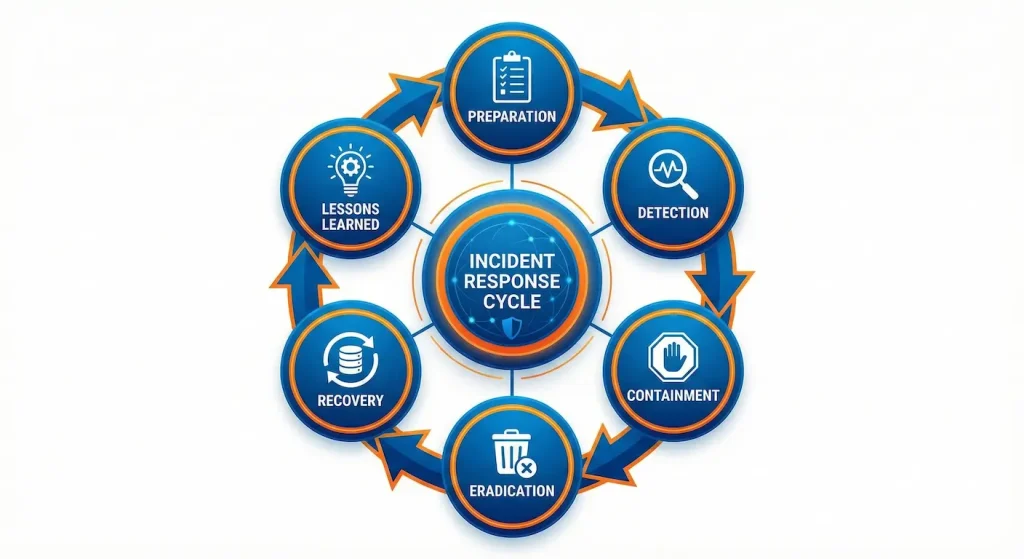
The 6 Phases of Incident Response
1. Preparation (Do This Now)
- Create incident response plan
- Assign roles and responsibilities
- Set up communication channels
- Have legal counsel contact info ready
- Keep forensic tools handy
2. Detection and Analysis
- How did you detect the incident?
- What’s the scope?
- What systems are affected?
- Is it still ongoing?
3. Containment
- Short-term: Isolate affected systems
- Long-term: Patch vulnerabilities, reset passwords
4. Eradication
- Remove malware
- Close attacker access points
- Fix vulnerabilities they exploited
5. Recovery
- Restore systems from clean backups
- Monitor closely for reinfection
- Gradually return to normal operations
6. Lessons Learned
- What went wrong?
- What went right?
- How can we prevent this?
- Update incident response plan
What NOT to Do During an Incident
Don’t panic and shut everything down immediately because you’ll lose valuable evidence. Don’t pay ransoms without exploring all options first. Don’t try to fix it yourself if you’re not trained in incident response. Don’t hide breaches, as that’s illegal in most jurisdictions. And don’t forget to preserve logs and evidence before making changes.
When to Call External Help
Call professionals if ransomware has encrypted critical systems, you suspect nation-state attackers are involved, customer data was stolen, your incident response team feels overwhelmed, or you need forensic investigation capabilities you don’t have in-house.
Keep these contacts ready: your cybersecurity insurance provider, an incident response retainer firm like CrowdStrike or Mandiant, the FBI Cyber Division, and your legal counsel.
Cybersecurity Careers and Skills Development
- The cybersecurity field needs 3.5 million more professionals.
- Jobs outnumber qualified candidates 2-to-1.
- Average salary: $103,000 in the US.
Entry-Level Cybersecurity Paths
Security Analysts earn $65,000-$85,000 and monitor security tools, investigate alerts, and document incidents. This entry-level position provides a solid starting point for a security career.
IT Help Desk positions with security focus pay $45,000-$60,000. You’ll support users, reset passwords securely, and learn to spot phishing attempts. This is a great way to learn the basics while building your resume.
Junior Penetration Testers earn $70,000-$90,000 learning ethical hacking, testing systems for vulnerabilities, and getting hands-on experience. This path requires certifications but offers very practical experience.
Certifications Worth Getting
For beginners, start with CompTIA Security+, which is an entry requirement for many jobs. The ISC² Certified in Cybersecurity is actually free for first-time certification seekers.
Intermediate certifications include Certified Ethical Hacker (CEH), CompTIA CySA+ for Cyber Security Analysts, and GIAC Security Essentials (GSEC).
Advanced professionals pursue Certified Information Systems Security Professional (CISSP), Offensive Security Certified Professional (OSCP), or GIAC Certified Incident Handler (GCIH). Start with Security+. It covers all fundamentals.
Skills to Develop
On the technical side, you need networking basics covering TCP/IP, DNS, and protocols. Learn both Windows and Linux operating systems. Pick up scripting in Python or PowerShell. Understand cloud platforms like AWS and Azure. Get familiar with security tools including SIEM platforms, firewalls, and intrusion detection systems.
Don’t ignore soft skills. You need strong communication to explain technical concepts to non-technical people. Problem-solving skills help you think like an attacker. Attention to detail catches subtle anomalies. Continuous learning keeps you current with evolving threats. Teamwork enables you to work effectively in security operations centers.
Practice using resources like TryHackMe for hands-on labs, HackTheBox for practice environments, PicoCTF for capture the flag competitions, and Cybrary for free courses. The field is growing fast. Now is a great time to start.
Future of Cybersecurity: What’s Coming
Technology evolves. Threats evolve. Your security must evolve.
Trends Shaping 2026 and Beyond
AI in security cuts both ways. For defenders, AI helps detect anomalies faster, automate response actions, and predict attacks before they happen. For attackers, AI creates perfect phishing emails, finds vulnerabilities automatically, and evades traditional detection methods. The AI race is on, and both sides are accelerating.
Quantum computing represents a future threat to current encryption. When quantum computers mature around 2030-2035, they’ll break the encryption we use today. Start preparing now by inventorying what uses encryption, planning migration to post-quantum cryptography, and monitoring NIST’s quantum-resistant standards development.
Identity has become the new perimeter. Networks no longer have clear boundaries with cloud computing, remote work, and mobile devices creating distributed environments everywhere. Securing user and device identities is now critical.
Supply chain security is getting serious attention. After major supply chain attacks, new regulations are emerging. Expect Software Bill of Materials (SBOM) requirements, mandatory vendor security assessments, and continuous monitoring of third-party relationships.
The shift to security by design means stopping the practice of bolting security on at the end. Build it in from the start. DevSecOps integrates security into development, making security automatic rather than an afterthought.
Cyber insurance is changing requirements. Insurance companies now require MFA implementation, EDR deployment, tested backups, and regular security training. No basic security means no insurance coverage.
Frequently Asked Questions (FAQs)
What are the 5 basics of cybersecurity?
The 5 cybersecurity basics are:
- Strong passwords and MFA – Use unique passwords and enable multi-factor authentication
- Regular updates and patches – Keep all software current to fix vulnerabilities
- Backup your data – Follow the 3-2-1 backup rule and test restores regularly
- Employee training – Teach staff to recognize phishing and social engineering
- Basic network security – Use firewalls, antivirus, and network segmentation
Implementing these 5 basics blocks 85% of common attacks and costs less than $1,000 for most small businesses.
How long does it take to learn cybersecurity fundamentals?
You can learn cybersecurity fundamentals in 60-90 days with focused study.
For complete beginner to job-ready:
- Self-study: 6-12 months (10-15 hours/week)
- Bootcamp: 3-6 months (full-time intensive)
- University degree: 2-4 years
The fastest path: Get CompTIA Security+ certification in 3 months, then apply for entry-level SOC analyst positions.
You don’t need a computer science degree. 40% of cybersecurity professionals come from non-technical backgrounds.
What is the CIA Triad and why does it matter?
The CIA Triad stands for Confidentiality, Integrity, and Availability—the three core principles of information security.
Confidentiality ensures only authorized people access data. Integrity ensures data isn’t tampered with or altered. Availability ensures systems work when needed.
It matters because:
- ISO 27001 and GDPR require it
- Every security decision affects at least one pillar
- It helps prioritize security investments
- It’s the foundation all other security builds on
Think of it as the security version of “reduce, reuse, recycle”—a simple framework that guides complex decisions.
Do small businesses really need cybersecurity?
Yes. 43% of cyberattacks target small businesses, and 60% of small companies close within 6 months of a major breach.
Small businesses are attractive targets because:
- They have weaker security than large enterprises
- They often store valuable customer data
- They’re pathways to larger partners in the supply chain
- They’re less likely to report attacks
Good news: Basic security is affordable. For under $2,000/year, a small business can implement:
- MFA on all accounts
- Cloud backups
- Endpoint protection
- Email filtering
- Security awareness training
The question isn’t “Can we afford security?” It’s “Can we afford a breach?”
What should I do first if I think I’ve been hacked?
If you suspect you’ve been hacked, follow these immediate steps:
First 5 minutes:
- Don’t panic – Rushed decisions make it worse
- Disconnect affected device from network (pull ethernet, disable WiFi)
- Don’t delete anything – You need evidence
- Photograph your screen if you see ransom notes or unusual activity
- Contact your IT team or incident response contact
Next steps:
- Change passwords on unaffected devices
- Enable MFA on critical accounts
- Review recent account activity
- Contact your cybersecurity insurance provider
- File a report with law enforcement if data was stolen
- Notify affected parties (may be legally required)
Don’t:
- Pay ransoms immediately (explore options first)
- Try to “fix” it yourself
- Hide the breach (illegal and makes it worse)
For more on defending against attacks, read our guide on thwarting cybercriminals and early warning systems.
Conclusion: Your Next Steps
Cybersecurity fundamentals aren’t complicated. They’re just often ignored. You now know the CIA Triad foundation, current threats and how they work, defense in depth strategy, essential tools and frameworks, how to build a 60-day security program, and how to respond when things go wrong.
Start today with these three actions. First, enable MFA on your email, banking, and critical accounts. This takes just 10 minutes but provides massive protection. Second, review your backups and test restoring a file. When did you last verify your backups actually work? This takes 30 minutes. Third, run a security assessment using the checklist we provided above. This takes about 2 hours but reveals your biggest vulnerabilities. These three steps cost nothing but dramatically improve your security.
Remember: Perfect security doesn’t exist. But good enough security stops 90% of attacks.
Don’t wait for a breach to take security seriously. The best time to start was yesterday. The second best time is now.
Want to learn more? Subscribe to NetworkUstad for weekly cybersecurity guides, practical tutorials, and the latest threat intelligence.
Related Articles
- Network Defence: Protect Your Infrastructure
- VPN Technology: Secure Remote Access Guide
- 8 New Cybersecurity Tools for 2021
- Thwarting Cyber Criminals: Early Warning Systems
- Password Authentication Protocol: Secure Your Login