The Dynamic Host Configuration Protocol (DHCP) is a cornerstone of modern networking, automating IP address allocation to streamline network management. For CCNA and CCNP students, understanding DHCP is critical, as it simplifies the configuration of IP addresses, subnet masks, default gateways, and DNS servers in both small and large networks. Unlike static IP addressing, which requires manual configuration, DHCP dynamically assigns IP addresses from a predefined pool, making it ideal for dynamic environments like enterprise networks or home Wi-Fi setups. This article dives into DHCP’s operations, types (DHCPv4 and DHCPv6), server configurations, and practical Cisco examples to help you master this protocol for your certification exams.
Dynamic Host Configuration Protocol is an ideal and efficient system on a more extensive network to configure IP address settings where the client’s changes occur frequently. A New User may arrive and want a connection, and someone may want to leave the network. Static IP address configuration is too complicated in such a more extensive network.
Clients get IP addresses automatically from the DHCP server on a leased basis. If the client is connected to the network and the lease period has expired, the dynamic host configuration protocol automatically renews the lease period. If the client powers down his device or unplugs the network cable, the address is free for the pool to reuse.
DHCP Servers
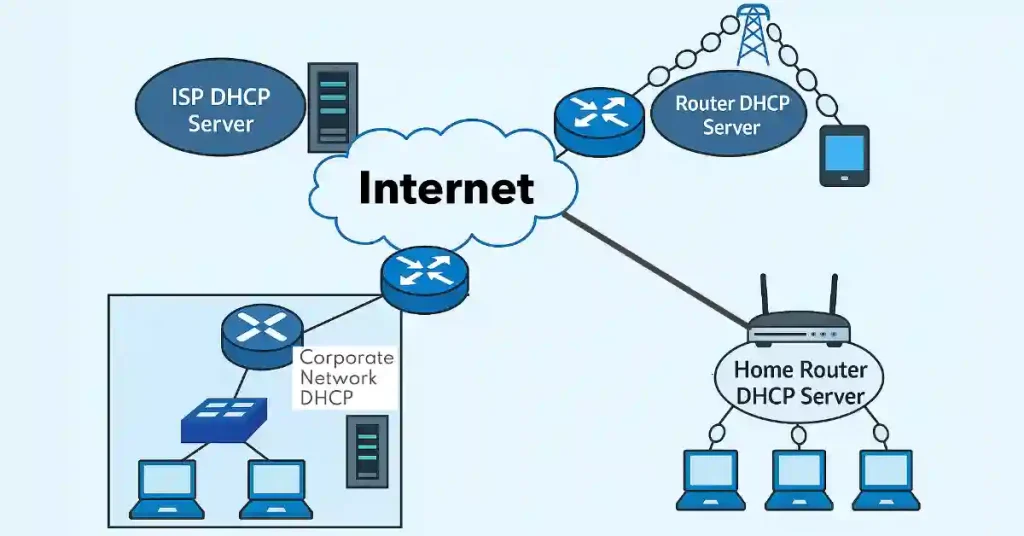
We can use a variety of devices as DHCP servers. The Dynamic Host Configuration Protocol server in most networks is generally a local and dedicated PC-based server. The home user’s DHCP server is usually a local router that connects the home network to the ISP. Several networks use both static and DHCP address settings.
The network administrator uses static addressing for network devices, and DHCP is for general purposes. The figure below illustrates the types of Dynamic Host Configuration Protocol servers that can be used.
Types of Dynamic Host Configuration Protocol
Two types of Dynamic Host Configuration Protocols, DHCPv4 and DHCPv6, give similar services to their clients. The main difference between DHCPv4 and DHCPv6 is the gateway. DHCPv6 does not give a default gateway address. The gateway can only be obtained automatically from the router’s Router Advertisement message.
DHCP Operation: The DORA Process Explained
Step-by-Step DORA Process
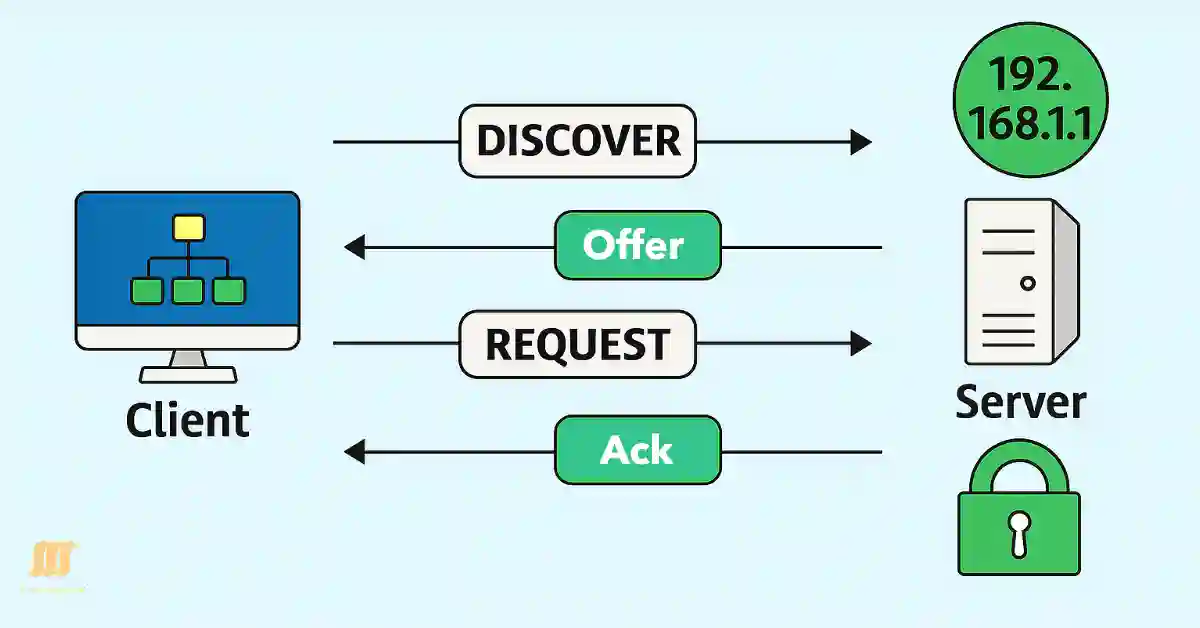
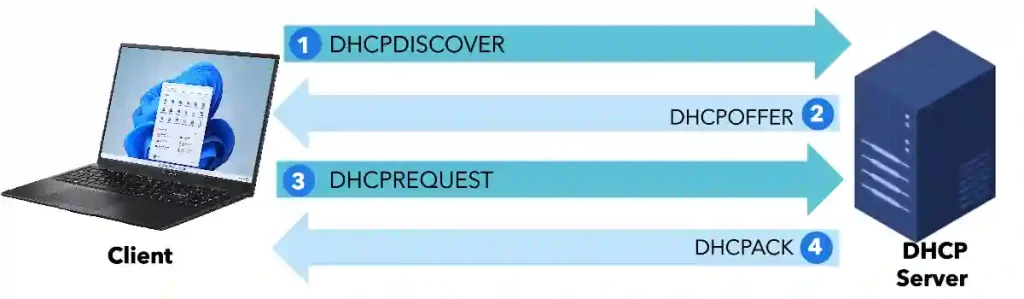
The DHCP DORA process (Discover, Offer, Request, Acknowledge) is the core mechanism by which a client obtains an IP address from a DHCP server. Below is a detailed breakdown of each step, tailored for CCNA and CCNP students.
DHCPDISCOVER: When a client (e.g., a PC or smartphone) connects to a network, it broadcasts a DHCPDISCOVER message to locate available DHCP servers. This message is sent to the broadcast address 255.255.255.255 (since the client has no IP address yet).
DHCPOFFER: DHCP servers on the network respond with a DHCPOFFER message, unicast to the client’s MAC address, offering an IP address, subnet mask, default gateway, DNS server, and lease duration.
DHCPREQUEST: The client selects one offer (if multiple servers respond) and broadcasts a DHCPREQUEST message to accept the chosen IP address and inform other servers of its decision.
DHCPACK/DHCPNAK: The selected server responds with a DHCPACK to confirm the lease, finalizing the IP assignment. If the offer is invalid (e.g., the IP is already in use), the server sends a DHCPNAK, prompting the client to restart the process.
DHCP Simulator
Simulation Details
DHCP Message Types
| Message Type | Direction | Description |
|---|---|---|
| DHCPDISCOVER | Client → Server | Broadcast to find DHCP servers. |
| DHCPOFFER | Server → Client | Offers an IP address and configuration details. |
| DHCPREQUEST | Client → Server | Requests the offered IP address. |
| DHCPACK | server → Client | Confirms the IP lease. |
| DHCPNAK | Server → Client | Rejects the client’s request (e.g., IP no longer available). |
| DHCPRELEASE | Client → Server | Releases the IP address back to the pool when the client disconnects. |
Practical Note
Use tools like Wireshark to capture and analyze DHCP packets. Look for the BootP protocol in Wireshark, as DHCP is built on it. This is a key skill for CCNP troubleshooting exams.
Multiple DHCP servers
The client may receive various DHCPOFFER messages if multiple DHCP servers exist on the network. So, the client should choose between them and send a DHCPREQUEST message. The DHCPREQUEST message identifies the exact server and lease offer the client accepts. A client can also request an address previously allocated to the client.
The server should allow the previously used IP address on a priority basis. Once the DHCP server has made an offer for the chosen IP address, the device responds to the DHCP server with a DHCPREQUEST packet to accept the offered IP address. Then, the server replies with an ack message to confirm the specific IP address for this device and define the lease time. If the server decides the device cannot have the IP address, it will send a NACK.
For example, if the client requests the IPv4 address or the server offers an address that is still available, the server returns a DHCPACK (DHCP Acknowledge) message. The message acknowledges to the client that the lease has been finalized. The server responds with a DHCP negative acknowledgment (DHCPNAK) message if the offer is no longer valid.
If the client received a DHCPNAK message, then the selection process should start again with a new DHCPDISCOVER message from the client. The client’s lease should be renewed before the lease expires through another DHCPREQUEST message. The DHCP server is responsible for assigning a unique IP address to the host. DHCPv6 has a similar set of messages: SOLICIT, ADVERTISE, INFORMATION REQUEST, and REPLY.
Updated DHCPv4 vs. DHCPv6
DHCPv4 and DHCPv6 serve similar purposes but cater to IPv4 and IPv6 networks, respectively. Below is an updated comparison for CCNA and CCNP students.
Key Differences
- Address Type: DHCPv4 assigns 32-bit IPv4 addresses (e.g., 192.168.1.10). DHCPv AnnoDomini
v6 assigns 128-bit IPv6 addresses (e.g., 2001:db8::1). - Default Gateway: DHCPv4 includes the default gateway in the offer. DHCPv6 relies on Router Advertisement (RA) messages for gateway information.
- Operation Modes:
- DHCPv4: Always stateful (assigns full IP configuration).
- DHCPv6: Supports stateful (full configuration) and stateless (only additional options like DNS, no IP address) modes.
- Messages: DHCPv4 uses DORA (Discover, Offer, Request, Acknowledge). DHCPv6 uses SOLICIT, ADVERTISE, REQUEST, REPLY.
Configuring DHCP on Cisco Devices
For CCNA and CCNP students, configuring DHCP on Cisco routers or switches is a critical skill. Below are step-by-step Cisco IOS commands to set up a DHCP server, client, and relay agent.
1. DHCP Server Configuration
Configure a Cisco router as a DHCP server to assign IP addresses to clients in a specific pool.
Router> enable
Router# configure terminal
Router(config)# ip dhcp pool MY_POOL
Router(dhcp-config)# network 192.168.1.0 255.255.255.0
Router(dhcp-config)# default-router 192.168.1.1
Router(dhcp-config)# dns-server 8.8.8.8
Router(dhcp-config)# lease 1 12 0  # Lease duration: 1 day, 12 hours
Router(dhcp-config)# exit
Router(config)# ip dhcp excluded-address 192.168.1.1 192.168.1.10
Router(config)# exit
2. DHCP Client Configuration
Configure a Cisco device interface to obtain an IP address via DHCP.
Router> enable
Router# configure terminal
Router(config)# interface GigabitEthernet0/0
Router(config-if)# ip address dhcp
Router(config-if)# no shutdown
Router(config-if)# exit
3. DHCP Relay Agent (Helper Address)
In multi-subnet networks, a DHCP relay agent forwards DHCP requests to a server on a different subnet.
Router> enable
Router# configure terminal
Router(config)# interface GigabitEthernet0/1
Router(config-if)# ip helper-address 192.168.2.10  # DHCP server IP
Router(config-if)# no shutdown
Router(config-if)# exit
Verification Commands
show ip dhcp binding: Displays leased IP addresses.
show ip dhcp pool: Shows pool configuration and usage.
show running-config | section dhcp: Verifies DHCP settings.
Troubleshooting DHCP Issues
DHCP issues can disrupt network connectivity. Below are common problems and Cisco IOS commands to diagnose them, essential for CCNA and CCNP troubleshooting.
Common DHCP Issues
IP Address Conflicts:
- Cause: Two devices are assigned the same IP address.
- Solution: Use show ip dhcp conflict to identify conflicts. Clear conflicts with clear ip dhcp conflict *.
Lease Exhaustion:
- Cause: The DHCP pool runs out of IP addresses.
- Solution: Check pool usage with show ip dhcp pool. Expand the pool or reduce lease duration.
DHCP Server Unreachable:
Cause: The server is down, or the relay agent is misconfigured.
Solution: Verify server status with ping and check relay configuration with show running-config | include helper-address.
Debugging Commands
debug ip dhcp server packet: Displays DHCP packet exchanges.
debug ip dhcp server events: Logs DHCP server events (e.g., lease assignments).
show ip dhcp binding: Lists current IP leases.
Example Scenario
If a client fails to obtain an IP address:
Verify the client’s interface is up: show ip interface brief.
Check DHCP server logs: show ip dhcp server statistics.
Use Wireshark to capture DHCP packets and ensure DORA messages are exchanged.
DHCP Security Considerations
For CCNP students, understanding DHCP security is crucial to protect networks from unauthorized access and attacks.
DHCP Snooping
Purpose: Prevents rogue DHCP servers from assigning malicious IP addresses.
How It Works: Switches filter DHCP messages, allowing only trusted servers to respond. Configure with:
Switch> enable
Switch# configure terminal
Switch(config)# ip dhcp snooping
Switch(config)# ip dhcp snooping vlan 10
Switch(config)# ip dhcp snooping trust # On the server-connected port
Switch(config)# exit
IP Source Guard
Purpose: Ensures devices use only their assigned DHCP IP addresses.
How It Works: Switch verifies source IP addresses against DHCP snooping database.
Switch(config-if)# ip verify source
Best Practices
- Enable DHCP snooping on access switches.
- Use port security to limit MAC addresses per port.
- Monitor DHCP server logs for unusual activity.
FAQs
What is the difference between DHCP and static IP addressing?
DHCP automatically assigns IP addresses from a pool, simplifying management in dynamic networks. Static IP addressing requires manual configuration, suitable for devices like servers that need consistent IPs.
How does the DHCP lease process work?
The lease process follows the DORA cycle: Discover (client broadcasts request), Offer (server proposes IP), Request (client accepts), and Acknowledge (server confirms). The lease has a set duration, after which it can be renewed or released.
What happens if a DHCP server is unavailable?
Clients may fail to obtain an IP address and use an APIPA address (169.254.x.x) in IPv4 networks, causing connectivity issues. DHCP relay agents can help by forwarding requests to a remote server.
What is DHCP snooping, and why is it important?
DHCP snooping is a security feature on switches that filters unauthorized DHCP messages, preventing rogue servers from assigning malicious IPs. It’s critical for network security in enterprise environments.
How do I configure a Cisco router as a DHCP server?
Use commands like ip dhcp pool, network, default-router, and dns-server to set up a DHCP pool. Exclude reserved IPs with ip dhcp excluded-address. See the configuration section for details.
What are DHCPv6 stateless and stateful modes?
Stateless DHCPv6 provides configuration options (e.g., DNS) but not IP addresses, which are obtained via SLAAC. Stateful DHCPv6 assigns both IP addresses and options, similar to DHCPv4.