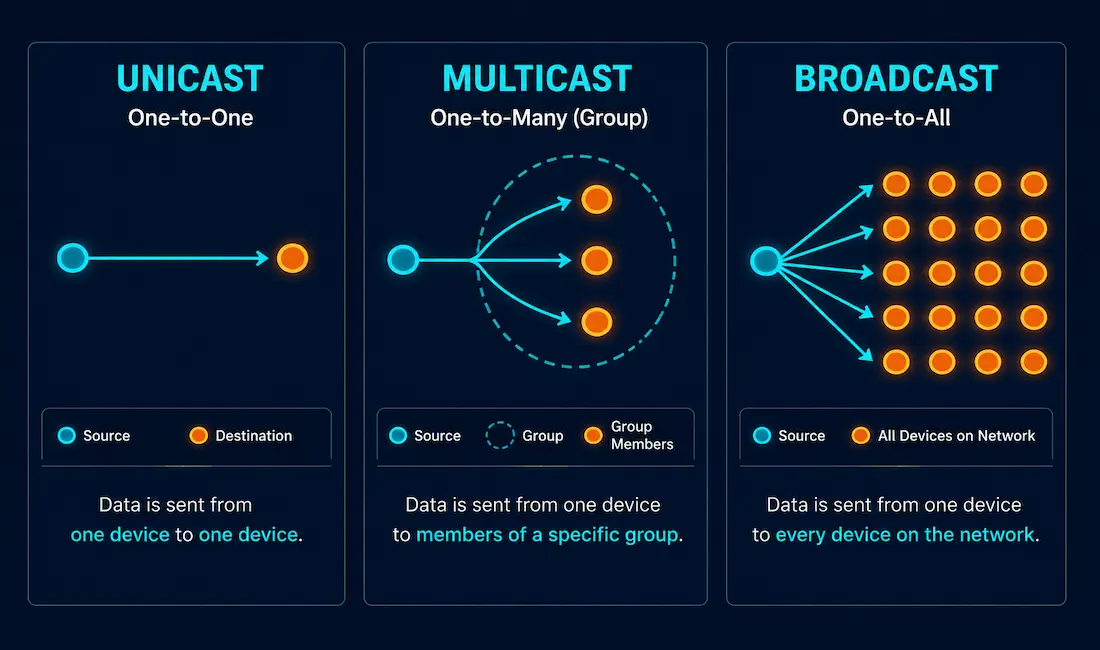
Every packet on a network needs a way to specify who should receive it. Networks handle this through three distinct address types: unicast for one-to-one delivery, multicast for one-to-a-group delivery, and broadcast for one-to-everyone delivery. This guide covers exactly how each one works at both the IP and MAC address level, and where you’ll actually encounter each in practice.
Unicast Addresses
A unicast address represents a single, specific destination device. It’s the most common address type by far: nearly all everyday traffic, web browsing, file transfers, video calls, and remote desktop sessions, uses unicast to move data from one specific source to one specific destination.
Sending a unicast packet requires two pieces of addressing working together: a destination IP address in the IP packet header, and a destination MAC address in the Ethernet frame header wrapping that packet. The IP address gets the packet to the right network; the MAC address gets the frame to the right device on that final local segment. Both are necessary, and both point to exactly one recipient.
Multicast Addresses
A multicast address is a logical identifier representing a group of hosts, rather than one device or every device. Any device that’s joined a given multicast group receives traffic sent to that group’s address; devices that haven’t joined simply ignore it.
Multicast at the IP Layer
IPv4 multicast addresses fall in the range 224.0.0.0 to 239.255.255.255, a reserved block set aside specifically for group communication. A source device sends a single packet addressed to a multicast group’s IP address, and every device that’s joined that group receives a copy, without the source needing to send a separate unicast copy to each individual member.
It’s worth being precise about one detail that’s easy to get backwards: while the destination address of a multicast packet identifies a group, the source address is always an ordinary unicast address. Only one device originates a given multicast transmission at a time, even though many devices may receive it.
Multicast at the MAC Layer
Ethernet reserves a specific MAC address range for IPv4 multicast: 01-00-5E-00-00-00 through 01-00-5E-7F-FF-FF. When an IPv4 packet is addressed to a multicast group, the corresponding multicast MAC address is derived directly from the IP address: the lower 23 bits of the multicast group’s IP address get mapped into the last 23 bits of the MAC address, following the fixed 01-00-5E prefix. This mapping is deterministic, which is exactly why a network device can compute the correct multicast MAC address for a given multicast IP address without needing a separate lookup or negotiation step.
Where Multicast Actually Gets Used
Multicast shows up anywhere the same content needs to reach many recipients simultaneously without wasting bandwidth on redundant unicast copies. Common examples include IPTV and live video streaming to many simultaneous viewers, video conferencing platforms distributing a single stream to many participants, stock market data feeds distributing the same price updates to many trading systems at once, and certain multiplayer game architectures that use multicast for efficient state synchronization across many connected clients on the same local network.
Broadcast Addresses
A broadcast sends a single message to every device on a network segment simultaneously, the networking equivalent of a public announcement rather than a targeted message. Unlike multicast, there’s no opt-in group membership involved; every device on the relevant segment receives and processes a broadcast by default.
Two Kinds of IPv4 Broadcast
Limited broadcast uses the special address 255.255.255.255, meaning “every host on this local network segment,” regardless of what that segment’s specific subnet is. Routers don’t forward limited broadcast traffic beyond the local segment by default, which keeps it genuinely local rather than flooding an entire wider network.
Directed broadcast targets every host on a specific subnet by setting all bits in that subnet’s host portion to 1. For a network like 172.17.0.0/16, the directed broadcast address is 172.17.255.255. Unlike limited broadcast, a directed broadcast can, in principle, be routed toward its target subnet from elsewhere on the network, though many organizations disable this behavior specifically because it’s historically been exploited in denial-of-service attacks like the Smurf attack.
Broadcast at the MAC Layer
When an IPv4 broadcast packet gets encapsulated into an Ethernet frame, the destination MAC address becomes FF-FF-FF-FF-FF-FF, 48 consecutive 1 bits in binary. Every device on the local Ethernet segment processes a frame addressed to this MAC address.
Where Broadcast Actually Gets Used
Several foundational network protocols rely on broadcast specifically because they need to reach devices whose exact address isn’t known yet. ARP broadcasts a request asking which device owns a specific IP address, since the requesting device doesn’t yet know that device’s MAC address. DHCP clients broadcast their initial lease requests, since a client without an IP address yet has no way to unicast directly to a DHCP server. mDNS (multicast DNS, despite the name, used heavily for local device discovery in home automation) also leans on broadcast-adjacent local network discovery techniques for finding devices without prior configuration.
A Note on IPv6: No Broadcast at All
IPv6 deliberately eliminated broadcast entirely, replacing its use cases with multicast instead. Where IPv4 ARP relies on broadcast, IPv6 uses Neighbor Discovery Protocol, built on multicast, to accomplish the same address resolution function more efficiently, since a multicast-based approach only reaches the specific set of devices that actually need to process the request, rather than genuinely every device on the segment. This is a meaningful, deliberate design change worth knowing, not just an incidental difference between the two IP versions.
Comparing the Three Address Types
| Type | Destination Scope | Example MAC/IP | Common Uses |
|---|---|---|---|
| Unicast | One specific device | Any standard MAC; any standard unicast IP | Web browsing, file transfer, remote desktop |
| Multicast | A group of devices that opted in | 01-00-5E-xx-xx-xx; 224.0.0.0–239.255.255.255 | Video streaming, conferencing, stock data feeds |
| Broadcast | Every device on the local segment | FF-FF-FF-FF-FF-FF; 255.255.255.255 or directed broadcast | ARP, DHCP discovery, local device discovery |
Troubleshooting Address-Type Issues
A multicast video stream isn’t reaching some clients on the network. Check whether IGMP snooping is properly configured on the switches involved; without it, a switch may either flood multicast traffic to every port, wasting bandwidth, or fail to forward it correctly to legitimate group members, depending on the switch’s default behavior.
Excessive broadcast traffic slowing down a large network. This usually points to an oversized broadcast domain. Segmenting the network with VLANs reduces the scope of broadcast traffic, since broadcasts only propagate within a single broadcast domain, not across VLAN boundaries, and this is one of the most common reasons a growing flat network eventually needs to be re-segmented as device count increases.
A device isn’t receiving DHCP addresses correctly. Since DHCP relies on broadcast for its initial discovery phase, confirm that broadcast traffic isn’t being inadvertently blocked or filtered somewhere between the client and the DHCP server, particularly across a router that would otherwise need a DHCP relay agent configured to forward those broadcasts appropriately. A missing or misconfigured relay agent is one of the more common causes of this exact symptom on networks where the DHCP server sits on a different subnet than the requesting client.
A Worked Example: All Three Types on One Network
It helps to see all three address types in the same scenario. Imagine a small office network running a video conferencing system, a printer, and a DHCP server.
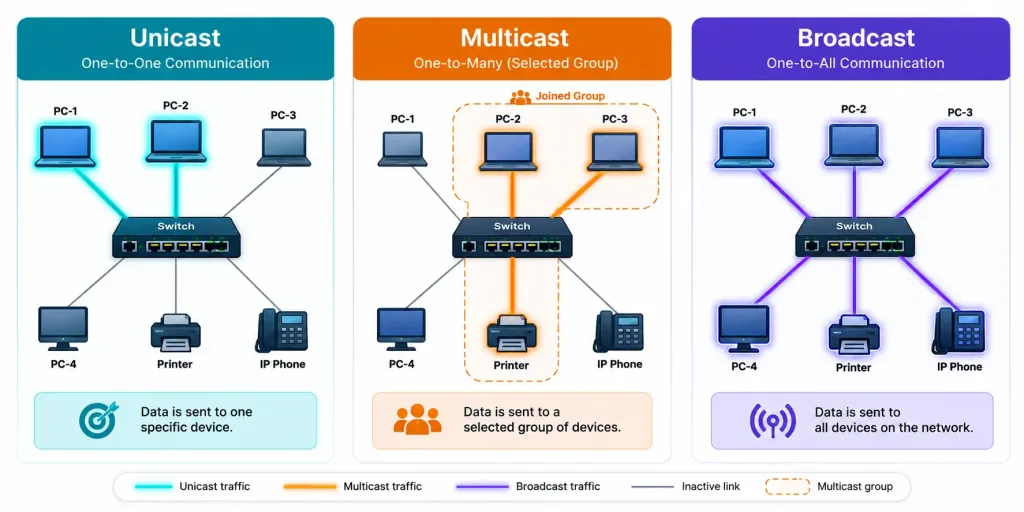
When a laptop sends a print job directly to the office printer, that’s unicast: one specific source, one specific destination, using both a destination IP and a destination MAC address unique to the printer.
When the video conferencing platform streams the same video feed to several participants in a shared meeting simultaneously, that’s multicast, assuming the platform is implemented to take advantage of it rather than sending separate unicast streams to each participant. Each participating device joins the relevant multicast group, and the conferencing server sends a single stream that reaches every joined device without duplicating the data for each one individually.
When a new laptop joins the network and needs an IP address, it broadcasts a DHCP discovery message, since it doesn’t have an IP address yet to send a unicast request from, and doesn’t know which specific device on the network is the DHCP server. Every device on the segment receives that broadcast, but only the DHCP server actually responds.
Three different problems, three different address types, each specifically suited to the communication pattern it’s solving. Recognizing which pattern applies is often the fastest path to diagnosing an addressing-related problem, since the troubleshooting approach for a broadcast-heavy network looks very different from the approach for a multicast configuration issue.
How Devices Actually Join a Multicast Group
Multicast wouldn’t be useful if every device on a network received every multicast stream regardless of interest; that would defeat the bandwidth savings that make multicast worthwhile in the first place. Devices signal their interest in a specific multicast group using IGMP (Internet Group Management Protocol) on IPv4 networks, sending a join message for the groups they want to receive. Switches capable of IGMP snooping listen to this signaling and forward multicast traffic only out the specific ports where interested devices actually are, rather than flooding it to every port on the switch.
Without IGMP snooping properly configured, a switch typically falls back to treating multicast traffic more like broadcast, forwarding it everywhere, which undermines much of multicast’s efficiency advantage on a larger network. This is exactly why IGMP snooping status is one of the first things worth checking when a multicast application performs poorly on a network that should otherwise have plenty of bandwidth for it.
Frequently Asked Questions
What’s the main difference between unicast, multicast, and broadcast?
Unicast sends data to exactly one destination device, multicast sends data to a specific group of devices that have opted in, and broadcast sends data to every device on the local network segment. The distinction matters for both efficiency and network design, since broadcast in particular can create unnecessary traffic if a network isn’t properly segmented.
Why does a multicast MAC address always start with 01-00-5E?
This prefix is reserved by the IEEE specifically for mapping IPv4 multicast group addresses into Ethernet MAC addresses, following a defined, deterministic conversion using the lower 23 bits of the multicast IP address. This lets any device compute the correct multicast MAC address directly from a known multicast IP address without any additional lookup step.
What’s the difference between limited broadcast and directed broadcast?
Limited broadcast, 255.255.255.255, targets every device on the local segment regardless of subnet and is never forwarded by routers by default. Directed broadcast targets every device on a specific remote subnet by setting all host bits to 1, and while it can technically be routed, many networks disable this due to historical denial-of-service exploitation.
Does IPv6 use broadcast addresses?
No, IPv6 eliminated broadcast entirely and replaced its functions with multicast instead. Neighbor Discovery Protocol, IPv6’s replacement for ARP, is built on multicast specifically because it only needs to reach relevant devices rather than genuinely every device on the segment.
Why do protocols like ARP and DHCP need to use broadcast?
Both protocols need to reach a device whose specific address isn’t known yet, ARP is looking for the MAC address matching a known IP, and a new DHCP client doesn’t have an IP address at all yet to unicast a request from. Broadcast solves this by reaching every device on the segment, so the correct recipient can respond regardless of the requester not knowing its address in advance.
Can too much multicast or broadcast traffic actually hurt network performance?
Yes, both can degrade performance if a network isn’t properly designed around them. Excessive broadcast traffic, sometimes called a broadcast storm in severe cases, consumes bandwidth across an entire broadcast domain, while unmanaged multicast traffic without proper switch support like IGMP snooping can flood traffic to devices that never actually requested it.