Creating a custom wallpaper sounds like it should be simple, but without the right tools, it can quickly turn into a frustrating, time-consuming process. Whether you are designing for a desktop background, a phone screen, or a digital workspace, the difference between a polished result and a mediocre one often comes down to the platform you choose and the design elements you have at your disposal. Fortunately, today’s wallpaper creation tools have made it easier than ever to produce professional-looking results in a fraction of the time. This guide breaks down the best platforms, features to look for, and practical tips to help you create wallpapers that look intentional, not accidental.
Why the Right Platform Makes All the Difference
Not every design tool is built with wallpaper creation in mind. Some are optimized for social media graphics, others for print, and only a handful truly cater to the specific dimensions, resolution requirements, and aesthetic variety that wallpapers demand. Choosing a platform that offers dedicated wallpaper templates, a rich library of design elements, and intuitive customization tools will save you hours and help you avoid the all-too-common pitfall of a blurry or poorly cropped result.
Beyond the technical side of things, the right platform also gives you creative momentum. When you open a tool and immediately see hundreds of templates that fit your style, you spend less time staring at a blank canvas and more time actually designing. The best wallpaper makers strike a balance between creative flexibility and ease of use, so whether you are a seasoned graphic designer or someone who has never touched a design tool before, you can walk away with something you are genuinely proud of.
It is also worth noting that wallpaper design has become increasingly personal. People use custom wallpapers to reflect their strong brand identity, mood, aesthetic preferences, or even their organizational style. A platform that supports a wide range of design elements, from typography and color palettes to illustration packs and abstract textures, gives you the raw material to express something uniquely yours.
What to Look for in a Wallpaper Creation Platform
Before diving into specific tips and tools, it helps to know what separates a great wallpaper maker from a frustrating one. Here are the core features worth evaluating before you commit to a platform.
Template Variety and Quality
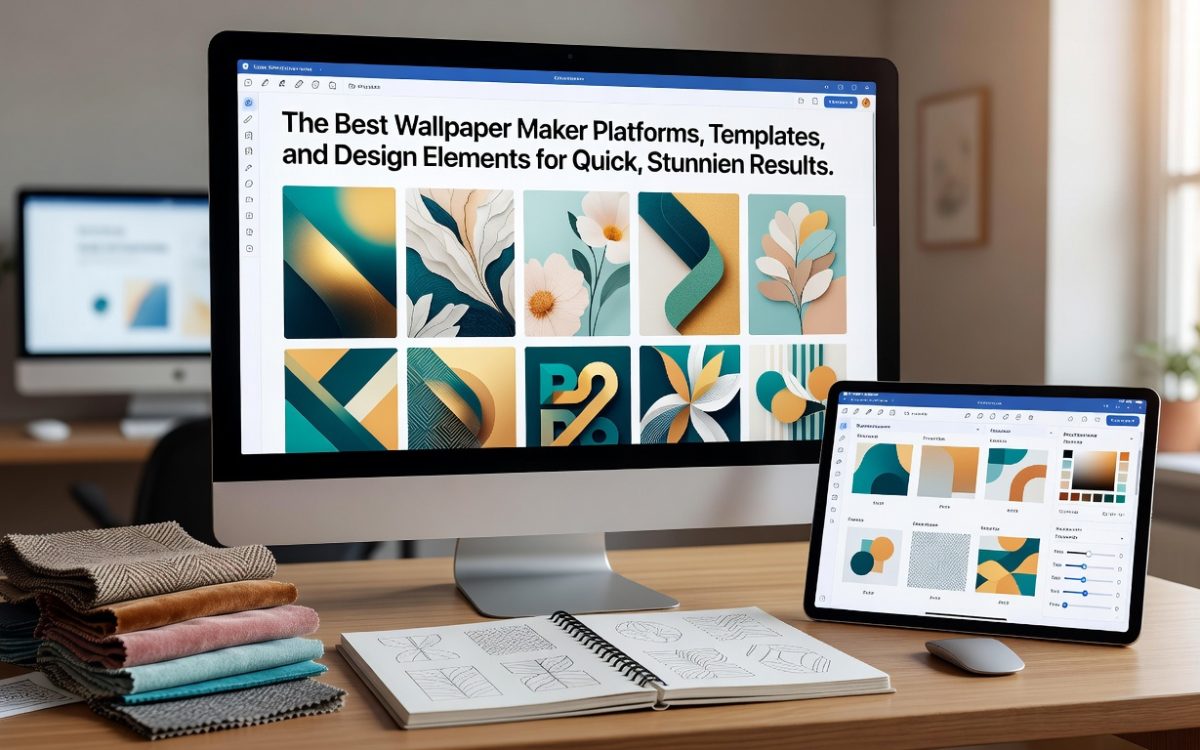
A strong wallpaper creation platform should offer templates across multiple categories and styles. Look for options that include abstract designs, nature-inspired themes, minimalist layouts, geometric patterns, gradient-based compositions, and illustrated styles. The more diverse the template library, the easier it is to find a starting point that matches your vision without requiring you to build everything from scratch.
Quality matters just as much as quantity. Templates should be built at the correct resolution for common screen sizes, and they should be designed with real visual intention, not just filler graphics thrown together. When evaluating a platform’s templates, pay attention to whether they feel current, polished, and customizable, or whether they feel generic and locked down.
Design Element Libraries
Beyond templates, the best platforms give you access to extensive libraries of design elements. This includes icons, shapes, illustrations, textures, patterns, gradients, and background images. The ability to layer these elements and adjust their opacity, scale, and positioning is what allows you to take a template from “pretty good” to “exactly what I had in mind.”
Typography is another critical element. A platform that offers a wide font selection, including serif, sans-serif, script, and display styles, gives you the flexibility to add quotes, labels, or aesthetic text to your wallpaper in a way that feels cohesive and intentional.
Top Tips for Quick and Effective Wallpaper Creation
1. Start With the Correct Dimensions
One of the most common mistakes people make when creating wallpapers is starting with the wrong canvas size. A desktop wallpaper and a mobile wallpaper have very different aspect ratios, and designing at the wrong size means your image will stretch, crop, or pixelate when applied. Before you begin, confirm the resolution of the screen you are designing for. Common desktop resolutions include 1920×1080, 2560×1440, and 3840×2160. For mobile, 1080×1920 or 1170×2532 are standard starting points.
Many platforms now offer preset canvas sizes specifically labeled for wallpaper use, which removes the guesswork entirely. If the platform you are using does not have a wallpaper preset, set your canvas manually using the correct dimensions at 72 DPI for digital use.
2. Use Adobe Express for a Fast, Polished Starting Point
If speed and quality are both priorities, Adobe Express is one of the strongest options available. The platform offers a dedicated wallpaper creation workflow that includes a wide range of professionally designed templates, a built-in asset library, and intuitive editing tools that let you swap colors, fonts, and design elements in seconds. You can make a wallpaper directly from your browser without needing to download any software, which makes it ideal for quick turnaround projects.
What sets Adobe Express apart is its integration with Adobe’s broader design ecosystem. Users have access to Adobe Fonts, a curated collection of high-quality typefaces, as well as Adobe Stock assets directly within the editor. The platform also supports custom uploads, so you can incorporate your own photos, logos, or brand elements into the design. Whether you are creating a wallpaper for personal use or as part of a branded digital workspace, the tool provides the structure and flexibility to get it done efficiently.
3. Choose a Color Palette Before You Start Designing
Jumping into a design without a defined color palette is one of the fastest ways to end up with something that looks chaotic or unintentional. Before you select a template or start placing elements, decide on two to four colors that will anchor the composition. Tools like color palette generators can help you build harmonious combinations based on color theory principles such as complementary, analogous, or triadic schemes.
Once you have your palette locked in, apply it consistently across your design. Backgrounds, text, accent shapes, and decorative elements should all pull from the same set of colors. This creates visual cohesion and gives your wallpaper a finished, professional look even if the design itself is relatively simple.
4. Leverage Abstract and Texture-Based Templates
If you want a wallpaper that looks visually rich without requiring a lot of design work, abstract and texture-based templates are your best friends. These styles use layered gradients, organic shapes, noise textures, and flowing lines to create depth and visual interest without relying on complex illustrations or photography.
The great thing about abstract designs is that they are highly customizable with minimal effort. By simply swapping the color scheme of an existing template, you can take a design from moody and dark to bright and airy in a matter of seconds. Look for platforms that offer a strong selection of abstract wallpaper templates and allow you to adjust gradient stops, layer opacity, and element positioning.
5. Use Negative Space Strategically
Negative space, meaning the empty or background areas of a composition, is one of the most underused design tools in wallpaper creation. Many first-time designers feel compelled to fill every inch of the canvas with elements, which often results in a cluttered, visually overwhelming design.
Strategic use of negative space allows the eye to rest and draws attention to the most important elements of your wallpaper. A simple, high-quality graphic centered on a solid or softly textured background can look far more sophisticated than a design packed with overlapping elements. As a general rule, if you are not sure whether to add another design element, leave it out.
6. Match Your Wallpaper to Its Function
A wallpaper that looks beautiful as a standalone design might be completely impractical as an actual desktop or phone background. For desktop wallpapers, keep in mind that icons and taskbars will overlay parts of the image. This means the areas where you place the most detailed or important design elements matter a great deal.
For desktop use, avoid placing critical design elements in the lower portion of the canvas, as the taskbar will typically cover that region. For mobile wallpapers, consider where your app icons will sit and choose a background that provides enough contrast to keep them readable. Designing with function in mind, not just aesthetics, is what separates a wallpaper that you actually use from one that gets replaced after a day.
7. Incorporate Typography Thoughtfully
Adding a quote, phrase, or piece of text to a wallpaper is a popular design choice, but typography can easily overwhelm a composition if it is not handled carefully. The key is to treat the text as a design element in its own right, considering its scale, weight, color, and placement in relation to everything else in the composition.
Display fonts and script styles can add personality, but they should be used sparingly. If you are adding a quote, consider pairing a bold display font for the most impactful word or phrase with a simpler, lighter font for the rest of the text. This creates visual hierarchy and keeps the composition balanced. Make sure the text color contrasts sufficiently with the background to remain legible.
8. Explore Seasonal and Trend-Based Templates
Many wallpaper creation platforms update their template libraries regularly to reflect seasonal themes, holidays, and current design trends. Taking advantage of these curated collections can dramatically speed up your workflow while ensuring your wallpaper feels fresh and relevant. Staying ahead of emerging trends like these keeps your designs modern.
Trend-based templates often reflect what is happening in the broader design world, including shifts in popular color palettes, typography styles, and illustration aesthetics. Browsing these collections periodically is also a great way to spark new ideas and push your design in directions you might not have considered otherwise.
9. Export at the Highest Available Resolution
Even if you design at the correct canvas size, exporting at a low resolution can undermine the entire effort. Always export your wallpaper at the highest available resolution and, when possible, as a PNG file rather than a JPEG. PNG preserves more image detail, especially in areas with fine text, sharp edges, or flat colors, and avoids the compression artifacts that JPEG can introduce.
Some platforms will give you multiple export options with different quality settings. Choose the maximum available quality, even if the file size is slightly larger. On modern devices with high-resolution screens, even subtle differences in export quality can be visible.
10. Save Multiple Versions for Different Devices
If you plan to use your wallpaper across multiple devices, including a laptop, desktop, tablet, and phone, consider creating separate versions optimized for each screen size rather than trying to make a single design work everywhere. What looks balanced on a widescreen monitor may feel awkwardly cropped on a vertical phone display.
Many platforms make it easy to duplicate a project and resize the canvas, allowing you to adapt the same basic design to different dimensions without starting from scratch. Taking the time to do this ensures that your wallpaper looks intentional and properly composed on every screen you apply it to.
FAQ
What file format is best for saving wallpapers?
PNG is generally the preferred file format for digital wallpapers because it supports lossless compression, meaning image quality is preserved without the compression artifacts that can appear in JPEG files. JPEG can be acceptable for photographic backgrounds where the compression is less noticeable, but for designs that include text, flat colors, or crisp geometric shapes, PNG will always produce a cleaner result. Some high-end displays also support TIFF or WebP formats, which offer excellent quality with smaller file sizes, though PNG remains the most universally compatible option for wallpaper use across different operating systems and devices.
How do I know which resolution to use for my wallpaper?
The best way to determine the correct resolution for your wallpaper is to check your device’s display settings. On a Windows PC, you can find this under Settings, then Display, then Display Resolution. On a Mac, go to System Settings, then Displays. On most smartphones, the native resolution is listed in the device specifications on the manufacturer’s website. Once you know your screen’s native resolution, set your canvas to match it exactly. Designing at a higher resolution than your screen can display will not improve quality, but designing at a lower resolution will result in a blurry or pixelated result. For a helpful reference guide on common screen resolutions across different device types, the resource at GSMArena’s device finder is useful for quickly looking up the display specifications of specific smartphone models.
Can I use my own photos or graphics as part of a wallpaper design?
Yes, and incorporating personal photos or custom graphics is actually one of the best ways to make a wallpaper feel truly unique. Most modern wallpaper creation platforms allow you to upload images directly from your device and integrate them into the design alongside templates and pre-built elements. When using your own photos, make sure the image resolution is high enough for the canvas size you are working with. A photo that looks sharp on a small social media post may appear blurry when stretched to fill a full desktop display. As a general rule, your source photo should be at least as large as the canvas you are designing for, and ideally larger so you have room to crop and reposition without losing quality.
What design styles tend to work best for wallpapers?
This depends heavily on personal taste and the device or context the wallpaper is being used for. That said, some styles tend to be particularly effective across a wide range of use cases. Minimalist designs with clean lines, limited color palettes, and generous negative space work well for both desktop and mobile because they provide a calm visual backdrop that does not compete with app icons or productivity tools. Abstract designs with gradients and organic shapes are also perennially popular because they add visual richness without feeling busy. Nature-inspired photography and illustration styles remain evergreen, while geometric and pattern-based designs offer a modern, structured aesthetic that works well in both personal and professional contexts.
How often should I change my wallpaper?
There is no rule here, but many designers and productivity enthusiasts find that changing their wallpaper seasonally or monthly helps keep their digital environment feeling fresh and intentional. A wallpaper that you set and forget can start to feel