Wi-Fi 7, officially known as IEEE 802.11be, represents the most significant leap in wireless technology since the introduction of Wi-Fi 6. With theoretical speeds reaching up to 46 Gbps and revolutionary features like Multi-Link Operation (MLO) and 320 MHz channel bandwidth, Wi-Fi 7 is poised to transform how we connect, work, and interact with technology.
This comprehensive guide explores every aspect of Wi-Fi 7 adoption, from technical specifications and real-world benefits to implementation strategies and future implications. Whether you’re a technology decision-maker, IT professional, or simply curious about the next generation of wireless connectivity, this guide provides the insights you need to understand and leverage Wi-Fi 7 effectively.
1. Understanding Wi-Fi 7: The Next Generation
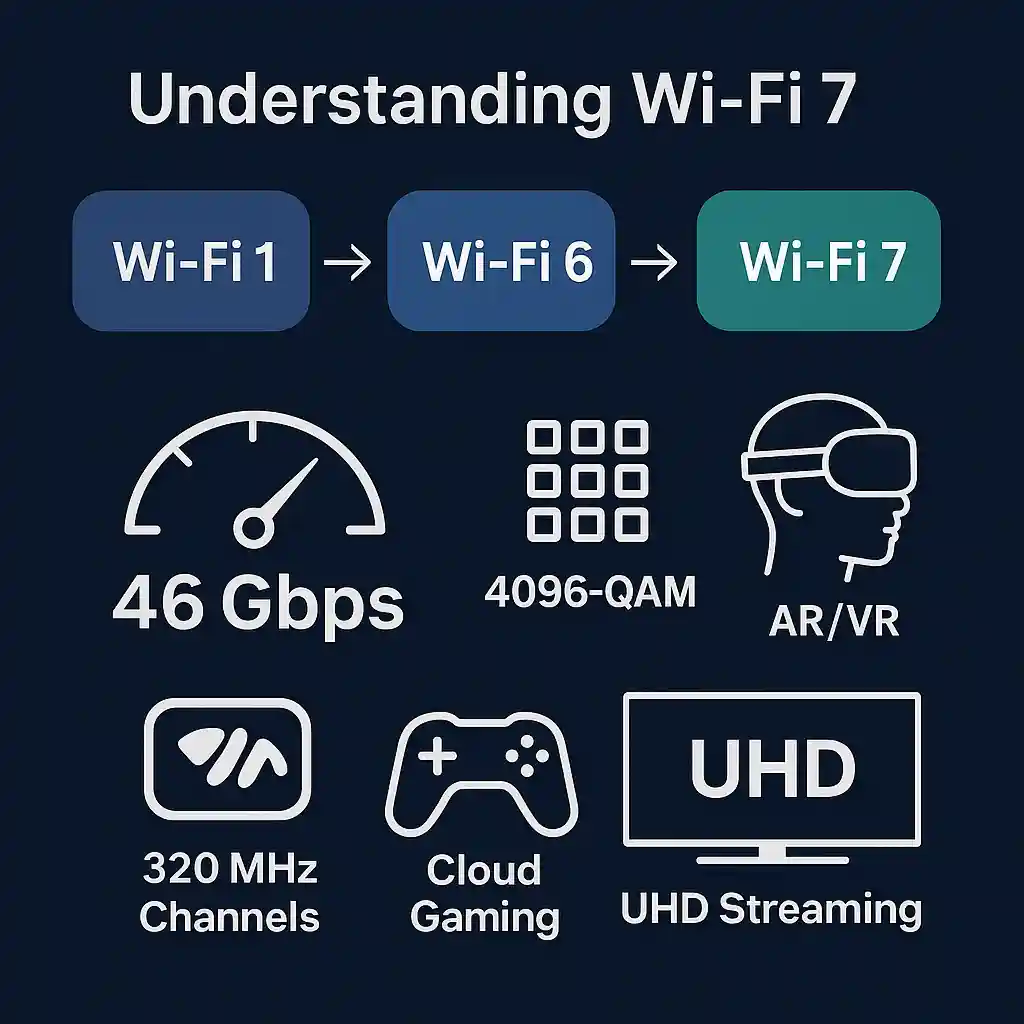
Wi-Fi 7 is the seventh generation of wireless local area network (WLAN) technology, standardized as IEEE 802.11be. It builds upon the foundation laid by Wi-Fi 6 and Wi-Fi 6E, introducing groundbreaking features that address the growing demands of modern connectivity.
What Makes Wi-Fi 7 Revolutionary?
Unlike previous Wi-Fi generations that focused primarily on incremental speed improvements, Wi-Fi 7 introduces fundamental architectural changes that enhance reliability, reduce latency, and increase capacity. The standard was designed with emerging applications in mind, including augmented reality (AR), virtual reality (VR), cloud gaming, and ultra-high-definition video streaming.
Key Specifications at a Glance
| Specification | Wi-Fi 7 Value |
| Maximum Speed | 46 Gbps |
| Channel Bandwidth | Up to 320 MHz |
| Modulation | 4096-QAM |
| Spatial Streams | 16 Streams |
| Frequency Bands | 2.4 GHz, 5 GHz, 6 GHz |
The Wi-Fi Evolution Journey
To fully appreciate Wi-Fi 7’s capabilities, it’s essential to understand the evolution of Wi-Fi technology. Each generation has addressed specific limitations of its predecessor while introducing new capabilities to meet growing bandwidth and connectivity demands.
2. Technical Innovations and Capabilities
Wi-Fi 7 introduces several groundbreaking technical innovations that collectively deliver unprecedented wireless performance. Understanding these features is crucial for appreciating the technology’s transformative potential.
320 MHz Channel Bandwidth
One of the most significant enhancements in Wi-Fi 7 is the support for 320 MHz channel bandwidth, double the 160 MHz maximum of Wi-Fi 6. Think of channel bandwidth as the width of a highway—the wider it is, the more vehicles (data) can travel simultaneously.
This expanded bandwidth is only available in the 6 GHz spectrum, which offers cleaner, less congested frequency space compared to the traditional 2.4 GHz and 5 GHz bands. The result is dramatically improved throughput, particularly in environments with high data demands such as enterprise networks, creative studios, and modern smart homes.
Real-world benefits include:
• Faster file transfers, with multi-gigabit speeds enabling quick backups and cloud synchronization
• Seamless 8K video streaming on multiple devices simultaneously
• Enhanced capacity for bandwidth-intensive applications like video editing and 3D rendering
4096-QAM (4K-QAM) Modulation
Quadrature Amplitude Modulation (QAM) determines how much data can be encoded in each radio signal. Wi-Fi 7’s 4096-QAM represents a 20% improvement over Wi-Fi 6’s 1024-QAM, allowing each symbol to carry more information.
While this technology requires excellent signal quality to function effectively, it significantly boosts data rates in optimal conditions. In practical terms, 4K-QAM is most beneficial in shorter-range, high-quality environments such as office conference rooms, home media centers, and controlled enterprise settings.
Multi-Link Operation (MLO)
Perhaps the most innovative feature of Wi-Fi 7 is Multi-Link Operation, which allows devices to transmit and receive data across multiple frequency bands simultaneously. This is analogous to having multiple lanes on a highway that you can use concurrently rather than switching between them.
MLO provides three key advantages:
1. Enhanced Throughput: By aggregating bandwidth across bands, devices achieve higher data rates
2. Ultra-Low Latency: Critical for gaming and real-time applications, MLO can reduce latency to as low as 2-5 milliseconds
3. Improved Reliability: If one link experiences interference, traffic automatically shifts to another, ensuring consistent connectivity
16 Spatial Streams
Wi-Fi 7 doubles the maximum number of spatial streams from 8 to 16, allowing more data to be transmitted simultaneously through multiple antennas. This enhancement is particularly valuable in Multi-User Multiple Input Multiple Output (MU-MIMO) scenarios, where an access point serves multiple devices concurrently.
For enterprise environments and high-density deployments such as stadiums, conference centers, and open office spaces, this means better performance when numerous users connect to the same access point.
Preamble Puncturing
Preamble puncturing is a spectrum efficiency feature that allows Wi-Fi 7 devices to use parts of a wide channel even if some portions are occupied by other devices or interference. Previous generations would avoid the entire channel if any part was busy.
This intelligent spectrum management ensures maximum utilization of available bandwidth, particularly in congested environments with mixed device types and overlapping networks.
Deterministic Latency and Quality of Service
Wi-Fi 7 introduces advanced Quality of Service (QoS) mechanisms that provide more predictable, deterministic latency. This is crucial for time-sensitive applications like:
• Cloud gaming with competitive multiplayer requirements
• Virtual and augmented reality experiences requiring precise head tracking
• Industrial IoT applications with strict timing requirements
• Professional video production and live streaming
3. The Evolution from Wi-Fi 6 to Wi-Fi 7
Understanding the progression from Wi-Fi 6 to Wi-Fi 7 helps clarify when and why upgrading makes sense. While Wi-Fi 6 represented a substantial improvement over Wi-Fi 5, Wi-Fi 7 takes several quantum leaps forward.
Comparative Analysis
| Feature | Wi-Fi 6 | Wi-Fi 7 |
| Max Speed | 9.6 Gbps | 46 Gbps |
| Channel Width | 160 MHz | 320 MHz |
| QAM | 1024-QAM | 4096-QAM |
| Spatial Streams | 8 | 16 |
| Multi-Link | No | Yes |
| Latency | 10-20 ms | 2-5 ms |
Performance Improvements in Real-World Scenarios
While theoretical maximum speeds are impressive, real-world performance varies based on environmental factors, device capabilities, and network congestion. Nevertheless, Wi-Fi 7 delivers substantial improvements across multiple use cases:
Streaming and Entertainment:
• Wi-Fi 6 can support 4K streaming on multiple devices with occasional buffering during peak usage
• Wi-Fi 7 enables seamless 8K streaming on numerous devices simultaneously, with bandwidth to spare
Gaming:
• Wi-Fi 6 latency of 10-20ms is acceptable for most gaming
• Wi-Fi 7 latency of 2-5ms rivals wired connections, crucial for competitive gaming and VR
Professional Applications:
• Wi-Fi 6 handles standard office applications and video conferencing well
• Wi-Fi 7 enables wireless workstations for 4K/8K video editing, 3D rendering, and large dataset transfers
4. Real-World Benefits and Use Cases
Understanding Wi-Fi 7’s technical capabilities is important, but recognizing how these translate into tangible benefits for different users and organizations is crucial for making informed adoption decisions.
For Home Users
Modern homes have become technology hubs with dozens of connected devices competing for bandwidth. Wi-Fi 7 transforms the home networking experience:
Smart Home Integration:
With 16 spatial streams and improved spectrum efficiency, Wi-Fi 7 easily manages high-density IoT deployments. This means your smart lights, thermostats, security cameras, door locks, appliances, and entertainment systems all operate flawlessly without network congestion.
Immersive Entertainment:
Wi-Fi 7’s high throughput and low latency enable true wireless VR and AR experiences. Whether you’re exploring virtual worlds, attending remote meetings in VR, or engaging in mixed reality gaming, the connection feels as responsive as a wired setup.
Multi-Gigabit Internet:
As internet service providers roll out multi-gigabit fiber connections, Wi-Fi 7 ensures your wireless network doesn’t become the bottleneck. You can fully utilize 2Gbps, 5Gbps, or even 10Gbps internet plans wirelessly.
For Businesses and Enterprises
Enterprise environments benefit significantly from Wi-Fi 7’s enhanced capabilities:
High-Density Workspaces:
Open offices, conference centers, and collaborative spaces with numerous simultaneous users experience improved performance. MU-MIMO enhancements ensure each user receives adequate bandwidth even during peak usage.
Wireless Office Infrastructure:
Wi-Fi 7 enables truly wireless offices where even bandwidth-intensive workstations can operate without ethernet cables. This flexibility reduces infrastructure costs and allows for dynamic workspace reconfiguration.
Enhanced Collaboration:
High-quality wireless connectivity supports seamless video conferencing, wireless presentation systems, and cloud-based collaboration tools without the lag or quality degradation common with earlier Wi-Fi generations.
For Creative Professionals
Content creators, video editors, and designers have particularly demanding networking needs:
Wireless Editing Workflows:
Transfer multi-gigabyte 4K and 8K video files in seconds rather than minutes. Work directly from network-attached storage without the latency that makes editing frustrating.
Real-Time Rendering:
Access cloud-based rendering farms and GPU resources with minimal latency, enabling real-time preview of complex 3D scenes and visual effects.
Collaborative Production:
Multiple team members can simultaneously access and edit large project files stored on a central server without performance degradation.
For Healthcare Facilities
Healthcare represents a critical application area where Wi-Fi 7’s reliability and performance enhancements have significant impact:
Medical Imaging:
Quickly transfer large medical imaging files (CT scans, MRIs, X-rays) between departments, enabling faster diagnosis and treatment planning.
Telemedicine:
Support high-quality video consultations, remote patient monitoring, and even remote surgery assistance with ultra-low latency and reliable connectivity.
IoT Medical Devices:
Connect numerous patient monitoring devices, smart beds, medication dispensers, and tracking systems without network congestion or reliability concerns.
5. Adoption Timeline and Market Landscape
Understanding where we are in the Wi-Fi 7 adoption cycle helps set realistic expectations and plan implementation timelines.
Current Market Status (2024-2025)
As of early 2024, Wi-Fi 7 has transitioned from development to early commercial availability. Several major manufacturers have released Wi-Fi 7 routers and access points, with prices ranging from premium consumer products to enterprise-grade solutions.
Device Support:
• High-end smartphones and laptops from major manufacturers are beginning to include Wi-Fi 7 support
• Flagship devices released in 2024 and beyond increasingly feature Wi-Fi 7 chipsets
• Gaming PCs and workstations are among the first adopters due to performance benefits
Infrastructure:
• Enterprise access points are available from major vendors like Cisco, Aruba, and Ruckus
• Consumer routers range from $200 to $800+ depending on features and capabilities
• Mesh systems are beginning to incorporate Wi-Fi 7 across multiple nodes
Near-Term Outlook (2025-2026)
The next two years will see accelerated adoption across multiple segments:
Consumer Market:
• Mid-range smartphones and laptops will increasingly include Wi-Fi 7
• Router prices will decrease as production scales, making Wi-Fi 7 accessible to mainstream consumers
• Smart home devices will begin incorporating Wi-Fi 7, particularly high-bandwidth devices like security cameras and streaming devices
Enterprise Deployment:
• Large organizations will begin pilot programs and phased rollouts
• Educational institutions will upgrade high-density areas like lecture halls and libraries
• Hospitality and public venues will deploy Wi-Fi 7 to differentiate service quality
ISP Integration:
• Internet service providers will begin offering Wi-Fi 7 routers with premium internet plans
• Multi-gigabit service tiers will increasingly bundle Wi-Fi 7 equipment
Long-Term Projection (2027-2030)
By the late 2020s, Wi-Fi 7 is expected to become the dominant wireless standard:
• Mainstream adoption across all device categories
• Budget devices incorporating Wi-Fi 7 as manufacturing costs decrease
• Wi-Fi 6 and earlier standards relegated to legacy support
• Complete ecosystem maturity with optimized chipsets and refined implementations
6. Implementation Considerations
Successfully deploying Wi-Fi 7 requires careful planning and consideration of various technical and practical factors.
Infrastructure Requirements
Network Backbone:
To fully leverage Wi-Fi 7’s multi-gigabit capabilities, your network infrastructure must support high throughput. This means:
• Minimum 2.5 Gbps ethernet connections to access points (10 Gbps recommended for maximum performance)
• Switches with sufficient backplane capacity to handle aggregate traffic
• Internet connectivity that matches your wireless capability (multi-gigabit fiber ideal)
Power Delivery:
Wi-Fi 7 access points typically require Power over Ethernet (PoE++) with higher wattage than previous generations:
• Standard PoE (802.3af, 15.4W) is insufficient
• PoE+ (802.3at, 30W) supports basic Wi-Fi 7 functionality
• PoE++ (802.3bt, 60-90W) recommended for full feature support
Spectrum Considerations
6 GHz Availability:
Wi-Fi 7’s most significant advantages require 6 GHz spectrum access. Regulatory approval varies by country:
• United States: Full 1200 MHz of 6 GHz spectrum available
• European Union: Limited 6 GHz availability (varies by country)
• Other regions: Check local regulatory status before deployment
Spectrum Management:
Effective Wi-Fi 7 deployment requires thoughtful channel planning:
• Utilize 6 GHz for high-performance applications
• Maintain 5 GHz for legacy device support
• Reserve 2.4 GHz for IoT devices and maximum range coverage
Compatibility and Migration Strategy
Wi-Fi 7 is backward compatible with previous standards, but planning the migration path is essential:
Phased Approach:
1. Deploy Wi-Fi 7 access points in high-demand areas first (conference rooms, collaborative spaces)
2. Maintain existing Wi-Fi 6 infrastructure for general coverage
3. Gradually expand as device support increases and costs decrease
4. Plan for complete infrastructure refresh over 3-5 year timeframe
Device Ecosystem:
Consider your device landscape when planning deployment:
• Inventory current devices and their Wi-Fi capabilities
• Prioritize Wi-Fi 7 deployment where compatible devices exist or are planned
• Account for a mixed environment supporting multiple Wi-Fi generations simultaneously
7. Industry-Specific Applications
Different industries have unique networking requirements that Wi-Fi 7 addresses in specific ways.
Education
Educational institutions face unique challenges with high-density deployments and diverse device types:
Classroom Technology:
• Support for 30-40 students simultaneously streaming educational content
• Wireless presentation and collaboration tools
• VR/AR learning experiences requiring low latency and high bandwidth
Campus-Wide Coverage:
• Consistent performance across lecture halls, libraries, common areas, and dormitories
• Support for research activities requiring large data transfers
• High capacity during peak usage periods (class changes, events)
Manufacturing and Industrial
Industry 4.0 and smart manufacturing rely heavily on wireless connectivity:
Industrial IoT:
• Thousands of sensors and devices requiring reliable, deterministic connectivity
• Real-time monitoring and control systems
• Predictive maintenance systems with critical timing requirements
Robotics and Automation:
• Wireless control of automated guided vehicles (AGVs)
• Collaborative robots (cobots) requiring precise, low-latency communication
• Machine vision systems processing high-resolution imagery
Retail and Hospitality
Customer experience and operational efficiency depend on robust wireless infrastructure:
Guest Experience:
• High-speed public Wi-Fi as a competitive differentiator
• Support for bandwidth-intensive guest activities (streaming, gaming, video calls)
• Consistent coverage throughout facilities
Operational Systems:
• Point-of-sale systems requiring reliable, secure connectivity
• Inventory management and tracking systems
• Digital signage and interactive displays
Transportation and Logistics
Complex logistics operations benefit from Wi-Fi 7’s reliability and capacity:
Warehouse Operations:
• Handheld scanners and mobile devices for inventory management
• Automated sorting and routing systems
• Real-time tracking and location services
Passenger Services:
• High-capacity Wi-Fi in airports, train stations, and transit vehicles
• Support for thousands of simultaneous users
• Integration with operational systems and passenger information displays
8. Cost-Benefit Analysis
Evaluating the financial implications of Wi-Fi 7 adoption requires examining both costs and quantifiable benefits.
Implementation Costs
Consumer Deployment:
• Entry-level Wi-Fi 7 routers: $200-$400
• Mid-range with advanced features: $400-$600
• High-end mesh systems: $600-$1,200+
• Compatible devices may require upgrades ($200-$2,000+ per device)
Enterprise Deployment:
• Access points: $800-$2,500 each (depending on specifications)
• Controller hardware/software: $5,000-$50,000+ (scalable by network size)
• Network infrastructure upgrades: Variable (switches, cabling, power)
• Professional installation and configuration: $100-$300 per access point
• Ongoing management and licensing: $50-$200 per access point annually
Quantifiable Benefits
Productivity Improvements:
• Reduced time waiting for file transfers and cloud synchronization
• Fewer disruptions from network connectivity issues
• Ability to work from anywhere in the facility without performance degradation
• Studies suggest 15-25% productivity improvement for knowledge workers with high-quality wireless
Infrastructure Flexibility:
• Reduced cabling requirements (labor savings of $100-$300 per drop avoided)
• Easier workspace reconfiguration without rewiring
• Support for flexible and hot-desking arrangements
Competitive Advantages:
• Enhanced customer experience in hospitality and retail
• Ability to offer premium services requiring high bandwidth
• Talent attraction and retention through modern workplace technology
Return on Investment Timeline
ROI varies significantly by use case:
Enterprise environments with high-value knowledge workers may see ROI within 12-18 months through productivity gains alone. Creative professionals and content creators often realize immediate value through workflow improvements. Consumer ROI is harder to quantify but includes enhanced entertainment experiences, future-proofing for emerging applications, and potential home value increase.
The key question is not whether Wi-Fi 7 provides value, but when the benefits justify the investment for your specific situation.
9. Common Challenges and Solutions
While Wi-Fi 7 offers substantial benefits, implementation comes with challenges that require careful planning and mitigation.
Early Adoption Challenges
Limited Device Support:
Challenge: Most existing devices don’t support Wi-Fi 7, limiting immediate benefits.
Solution: Deploy Wi-Fi 7 infrastructure in high-priority areas where compatible devices exist or are planned. Leverage backward compatibility to support existing devices while future-proofing the network.
Higher Equipment Costs:
Challenge: Wi-Fi 7 equipment carries a premium price compared to mature Wi-Fi 6 products.
Solution: Implement phased deployment, starting with areas that will benefit most. Monitor pricing trends as competition increases and manufacturing scales. Consider waiting for second-generation products with refined features and lower costs unless immediate benefits justify the premium.
Technical Challenges
6 GHz Spectrum Access:
Challenge: Regulatory approval for 6 GHz varies by region, limiting Wi-Fi 7’s full potential in some areas.
Solution: Verify 6 GHz availability in your region before deployment. In areas with limited 6 GHz access, focus on other Wi-Fi 7 benefits like improved efficiency and MLO across 2.4 and 5 GHz bands. Monitor regulatory developments for future spectrum availability.
Infrastructure Upgrades:
Challenge: Existing network infrastructure may not support Wi-Fi 7’s full bandwidth potential.
Solution: Audit current infrastructure capabilities. Prioritize upgrades to switches and backhaul connections. Consider whether 1 Gbps, 2.5 Gbps, or 10 Gbps connections are necessary based on actual usage patterns and device density. Not all deployments require maximum throughput to every access point.
Operational Challenges
Complexity Management:
Challenge: Wi-Fi 7’s advanced features add configuration complexity.
Solution: Invest in training for IT staff. Utilize vendor professional services for initial deployment and optimization. Implement robust management and monitoring tools. Start with conservative configurations and gradually enable advanced features as expertise develops.
Mixed Device Environments:
Challenge: Supporting devices across Wi-Fi 4, 5, 6, and 7 simultaneously.
Solution: Design network with distinct SSIDs or band steering policies for different device capabilities. Monitor network analytics to understand device distribution and optimize accordingly. Plan for gradual device refresh cycles that align with network upgrades.
10. Future-Proofing Your Network
Deploying Wi-Fi 7 is not just about current needs but preparing for future technological developments and use cases.
Emerging Technologies Enabled by Wi-Fi 7
Extended Reality (XR):
The metaverse and enterprise XR applications require wireless connections that were impossible with previous Wi-Fi generations. Wi-Fi 7’s low latency and high throughput enable truly wireless VR/AR headsets without the motion sickness induced by network lag.
Autonomous Systems:
From delivery robots to indoor drones, autonomous systems require deterministic, ultra-reliable wireless connectivity. Wi-Fi 7’s advanced QoS and MLO provide the foundation for these applications to operate safely and effectively.
8K and Beyond:
As content creation and consumption move toward 8K resolution and eventually higher, Wi-Fi 7 ensures wireless networks can handle these bandwidth demands without compromise.
AI at the Edge:
Distributed AI processing, where edge devices perform sophisticated machine learning tasks while communicating with centralized systems, requires high-bandwidth, low-latency connectivity that Wi-Fi 7 uniquely provides.
Design Principles for Longevity
Scalability:
Design your Wi-Fi 7 network with growth in mind. Oversize infrastructure slightly to accommodate increasing device density and bandwidth demands. Choose modular, scalable management platforms that can grow with your organization.
Flexibility:
Avoid vendor lock-in where possible. Choose standards-based equipment and open management interfaces. This provides flexibility to evolve your network as requirements change and new technologies emerge.
Manageability:
Invest in comprehensive management and monitoring tools from the start. Visibility into network performance, device behavior, and usage patterns enables proactive optimization and troubleshooting.
Security:
Implement WPA3 encryption and consider additional security layers like network segmentation and zero-trust architectures. Security requirements only increase over time, so build robust foundations now.
Lifecycle Planning
Expect Wi-Fi 7 infrastructure to serve effectively for 5-7 years, similar to previous Wi-Fi generations. However, plan for firmware updates and potentially hardware upgrades as the standard matures and new features are standardized.
Budget for ongoing maintenance, including:
• Regular firmware updates to address security vulnerabilities and add features
• Periodic performance optimization and channel planning
• Capacity expansion as device counts grow
• Staff training on new capabilities and best practices
11. Conclusion and Recommendations
Wi-Fi 7 represents a transformative advancement in wireless technology, offering capabilities that enable entirely new use cases while dramatically improving existing applications. However, successful adoption requires careful consideration of timing, costs, and implementation strategy.
Who Should Adopt Wi-Fi 7 Now?
Immediate adoption makes sense for:
• Organizations with bandwidth-intensive workflows (video production, 3D rendering, large dataset transfers)
• Environments requiring ultra-low latency (competitive gaming centers, VR/AR facilities)
• High-density deployments where capacity is currently constrained
• New construction or major renovations where infrastructure costs are already budgeted
• Technology leaders wanting to differentiate through superior connectivity
Who Should Wait?
Delaying adoption may be prudent for:
• Organizations with recently deployed Wi-Fi 6 infrastructure performing adequately
• Environments with limited Wi-Fi 7 capable devices
• Budget-constrained situations where current performance meets needs
• Regions with unclear 6 GHz spectrum availability
• Those preferring second-generation products with refined features and lower costs
Key Recommendations
1. Assess Current and Future Needs:
Conduct a thorough analysis of your wireless requirements, device landscape, and planned technology initiatives. Understand not just where you are but where you’re headed.
2. Start with Pilot Deployments:
Before committing to organization-wide deployment, implement Wi-Fi 7 in select areas to understand real-world performance, identify challenges, and refine your implementation strategy.
3. Verify Infrastructure Readiness:
Ensure your network backbone, power delivery, and management systems can support Wi-Fi 7. Address infrastructure gaps before deploying access points.
4. Plan for Mixed Environments:
Expect to support multiple Wi-Fi generations simultaneously for several years. Design networks that gracefully handle this heterogeneity while providing optimal experience for all device types.
5. Invest in Management Tools:
Sophisticated wireless networks require sophisticated management. Choose platforms that provide deep visibility, automated optimization, and comprehensive security controls.
6. Develop Internal Expertise:
Wi-Fi 7’s advanced features require knowledgeable staff. Invest in training and consider working with experienced integrators during initial deployment.
7. Monitor the Ecosystem:
Stay informed about device availability, regulatory developments, and pricing trends. The Wi-Fi 7 landscape is evolving rapidly, creating new opportunities and reducing barriers to adoption.
Final Thoughts
Wi-Fi 7 is not merely an incremental improvement but a fundamental advancement that will shape wireless connectivity for the next decade. Its combination of increased bandwidth, reduced latency, improved reliability, and enhanced capacity addresses current limitations while enabling future applications we’re only beginning to imagine.
The question is not whether to adopt Wi-Fi 7, but when and how to do so strategically. By carefully considering your specific requirements, constraints, and timeline, you can make informed decisions that maximize the value of this powerful technology.
As wireless technology continues its relentless evolution, Wi-Fi 7 represents our current frontier—delivering the connectivity foundation for an increasingly wireless, interconnected future. If you like this guide subscribe to our news latter and you can also download this guide for fair usage in free.
FAQs
What are the key technical features of Wi-Fi 7?
Wi-Fi 7 (IEEE 802.11be) introduces 320 MHz channel bandwidth in the 6 GHz band, 4096-QAM modulation for 20% higher data rates, Multi-Link Operation for simultaneous band usage, 16 spatial streams for better MU-MIMO, and preamble puncturing for efficient spectrum use. These enhance throughput up to 46 Gbps, reduce latency to 2-5 ms, and improve reliability in dense environments. Ideal for AR/VR and IoT.
How does Wi-Fi 7 compare to Wi-Fi 6?
Wi-Fi 7 offers 4.8x higher max speeds (46 Gbps vs 9.6 Gbps), doubles channel width to 320 MHz, upgrades to 4096-QAM from 1024-QAM, adds MLO for multi-band aggregation, and supports 16 streams vs 8. It cuts latency by 75% and handles denser networks better, making it superior for high-bandwidth apps like 8K streaming and cloud gaming, while backward compatible.
What are the benefits of Wi-Fi 7 for home users?
For homes, Wi-Fi 7 manages 100+ devices seamlessly, supports lag-free 8K streaming and VR gaming with <5 ms latency, improves IoT reliability in congested areas, and maximizes multi-gig internet speeds. MLO ensures failover and higher throughput, enabling smart homes with appliances, cameras, and entertainment systems without buffering or drops.
What challenges come with adopting Wi-Fi 7?
Challenges include needing Wi-Fi 7-compatible clients for full benefits, higher costs for premium hardware, infrastructure upgrades like multi-gig switches and PoE++, potential 6 GHz interference or regulatory limits, and ensuring WPA3 security. Backward compatibility helps, but site surveys and firmware updates are essential to mitigate issues in mixed environments.
How do I upgrade to Wi-Fi 7 step by step?
Assess current setup and device compatibility; choose hardware like TP-Link Deco BE63 mesh; upgrade backbone to 2.5/10 Gbps ports and Cat6a cabling; install router centrally, configure via app with WPA3 and MLO; add mesh nodes for coverage; optimize channels, test speeds/latency, and troubleshoot issues like 6 GHz access. Regular firmware updates ensure performance.
What is the current adoption status of Wi-Fi 7 in 2026?
By 2026, Wi-Fi 7 shipments reach ~118 million APs, with enterprises leading at 59% planning upgrades. Consumer meshes under $100 are common, flagships like Qualcomm devices support it, and ISPs offer gateways. Full ecosystem maturity expected by 2029, but 6 GHz regulations vary globally, accelerating in high-density sectors like campuses and healthcare.
What industries benefit most from Wi-Fi 7?
Healthcare gains from fast imaging transfers and telemedicine; enterprises from high-density workspaces and wireless offices; creatives from real-time rendering and large file edits; gaming/entertainment from low-latency VR; industrial IoT from deterministic QoS. It supports AR training, robotics, and smart buildings, reducing AP needs and costs in critical sectors.
Is Wi-Fi 7 future-proof?
Yes, Wi-Fi 7 integrates with AI ops, zero trust, and hybrid clouds, preparing for multigig wireless demands. With features like TSN for industrial use and 20 MHz IoT support, it bridges to Wi-Fi 8 (2027+). Adoption in 2026-2027 ensures scalability for AI/IoT growth, though ongoing updates and compatibility checks are needed for long-term viability.
Disclaimer: This article provides general information on Wi-Fi 7 technology based on current standards and market trends as of February 2026. It is for educational purposes only and does not constitute professional advice. Network implementations vary by environment; consult certified IT professionals or vendors for personalized recommendations, compatibility assessments, and regulatory compliance. Actual performance may differ based on hardware, interference, and other factors. The authors and publisher assume no liability for any issues arising from applying this information.