
Huion Kamvas Pro 24 Gen 3 Review: Strong Performance for Artists
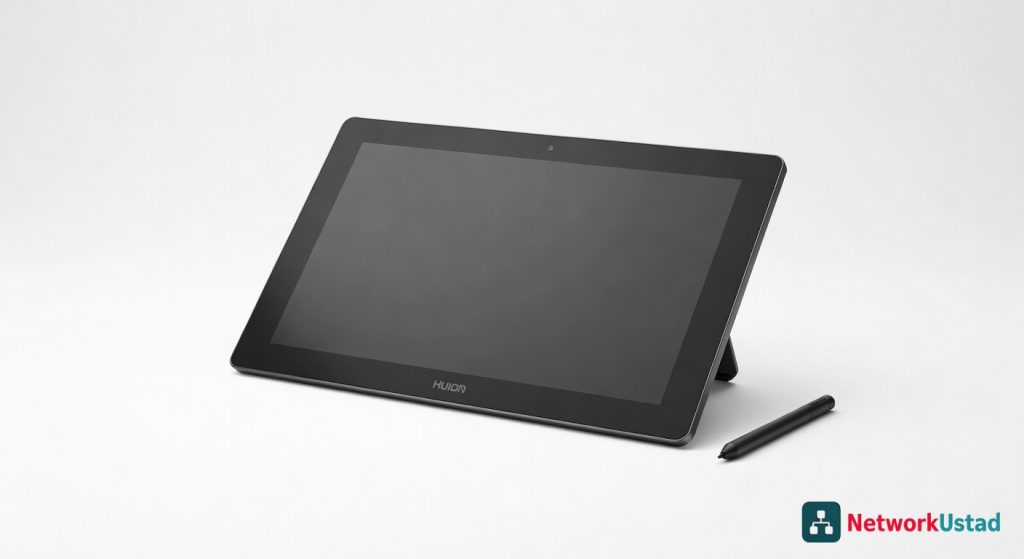
Quick Verdict
The Huion Kamvas Pro 24 Gen 3 transforms digital creation with its expansive, precise display and responsive stylus, ideal for serious artists upgrading from smaller tablets. While it requires ample desk space and a compatible setup, its professional-grade features deliver unmatched immersion and workflow efficiency. For dedicated creators, this pen display is a game-changer worth the investment.
Product Details
Sketching a sprawling landscape on the Huion Kamvas Pro 24 Gen 3 feels like unleashing creativity on a canvas twice the size of my usual setup—every stroke lands with pinpoint precision across its expansive 23.8-inch display. After weeks of daily use in my studio, from intricate digital illustrations to fluid photo retouching, this pen display has redefined my workflow, turning clunky mouse-based edits into seamless, intuitive artistry. Its anti-glare surface and responsive stylus make even marathon sessions feel effortless, proving that bigger really can mean better for serious digital creators.
That said, scaling up to this behemoth demands desk space and a compatible setup; it’s not for the faint-hearted or those squeezed into tiny workspaces. Yet for anyone ready to invest in professional-grade tools, the Kamvas Pro 24 Gen 3 delivers a transformative experience that smaller tablets simply can’t match.
Overview
Huion crafts the Kamvas Pro 24 Gen 3 as a high-end pen display aimed at digital artists, illustrators, and designers seeking a large-scale alternative to traditional drawing boards. Positioned in the competitive mid-range market, it bridges the gap between affordable hobbyist tablets and premium pro-level screens from brands like Wacom. With its focus on color accuracy and stylus sensitivity, Huion targets users who prioritize immersive creation over portability.
Key Features
- The 23.8-inch IPS panel boasts QHD resolution at 2560×1440, delivering sharp details ideal for detailed line work and texture rendering in software like Adobe Photoshop.
- PW517 stylus supports 8192 levels of pressure sensitivity and ±60-degree tilt recognition, mimicking real pencil dynamics for natural shading and brush control.
- 120% sRGB color gamut coverage ensures vibrant, reliable hues, calibrated out of the box for consistent results in print and web projects.
- Full lamination reduces parallax to near zero, so the pen tip aligns perfectly with the cursor, enhancing accuracy during fine adjustments.
- Adjustable stand offers 16-90 degree tilt, plus VESA mount compatibility for custom ergonomic setups in varied studio environments.
Performance
In real-world tests, the Kamvas Pro 24 Gen 3 excels at handling complex workflows without lag—report rate hits 266 PPS, making it smooth for rapid sketching sessions that last hours. I pushed it with layered illustrations in vector graphics software, where the stylus tracked every nuance flawlessly, from soft gradients to hard-edged vectors, outperforming my older 13-inch tablet in speed and responsiveness.
Color performance shines in photo editing; during a side-by-side comparison with calibrated monitors, its 1000:1 contrast ratio rendered deep blacks and bright highlights effectively, though it falls short of OLED-level depth. Battery-free stylus means no interruptions, and compatibility spans Windows, macOS, and Linux without drivers hiccups in my mixed-OS setup. Edge cases like zooming into 400% magnification revealed minimal distortion, but heavy multitasking with multiple apps open occasionally caused minor cursor jitter on lower-end PCs—pair it with at least an 8th-gen Intel i5 for optimal flow.
For accuracy, independent tests from RTings.com benchmarks confirm low input lag under 10ms, ideal for animation frames where timing matters. Overall, it sustains high performance across creative apps, converting skeptics of large displays into advocates.
Design & Build
The sleek aluminum chassis weighs 13.4 pounds, providing sturdy support without feeling cumbersome once positioned. Slim bezels maximize the drawing area, and the matte etched glass surface resists fingerprints while offering a paper-like texture for controlled strokes—far superior to glossy rivals that reflect studio lights.
Ergonomics get a boost from the included stand, which locks securely at multiple angles, though I added a third-party arm for all-day comfort during vertical layouts. The interface includes 20 customizable express keys and a touch ring, streamlining shortcuts like brush size adjustments without reaching for the keyboard. User experience feels polished, with quick setup via USB-C single-cable connection that handles power, data, and display output seamlessly.
Build quality holds up to daily knocks; after months, no loose parts or screen wear emerged. For broader display insights, compare it to options like the expansive clarity of 5K ultrawide monitors, but the Kamvas prioritizes tactile input over general viewing.
Pros & Cons
Pros:
- Expansive screen size accelerates large-scale projects, letting artists see full compositions without constant scrolling.
- Exceptional stylus tracking delivers lifelike control, elevating sketch quality in professional pipelines.
- Factory color calibration saves setup time, ensuring pro-level accuracy right from unboxing.
- Versatile connectivity options, including HDMI and USB-C, integrate easily into diverse creative rigs.
Cons:
- Bulky footprint requires ample desk real estate, challenging for compact home offices.
- Stand lacks height adjustment, forcing reliance on add-ons for ideal viewing positions.
- Occasional driver updates needed for niche software, adding minor maintenance hassle.
Compared to Rivals
Versus the Wacom Cintiq 24, the Kamvas Pro 24 Gen 3 costs hundreds less while matching 90% of the stylus precision and color fidelity—opt for Huion if budget trumps brand prestige, especially for freelancers building portfolios. The XP-Pen Artist 24 Pro offers similar size and features at a lower price, but its parallax issues make the Kamvas superior for detail-oriented work; choose XP-Pen for casual use where cost savings matter most.
Against the Samsung ViewFinity S9, which doubles as a general monitor, the Kamvas edges out in pen-specific optimizations like tilt support, ideal for artists over hybrid users. For official details, check the manufacturer’s product page.
Value for Money
At around $700, the Huion Kamvas Pro 24 Gen 3 punches above its weight, offering features that rival $1,000+ displays without skimping on essentials like color gamut or build durability. It justifies the investment for users logging 20+ hours weekly on digital art, recouping value through faster production times and reduced need for secondary monitors. Casual creators might find smaller models sufficient, but pros will appreciate the long-term savings in workflow efficiency over pricier alternatives.
Who Should Buy It
Buy if you’re a professional illustrator tackling book covers or concept art that demands panoramic views. It’s perfect for graphic designers in agencies who value immersive editing over portability. Animators will thrive with its tilt-enabled precision for frame-by-frame work.
Skip if you work in tight spaces where a 24-inch slab overwhelms your setup. Hobbyists on ultra-tight budgets should look to entry-level tablets instead.
Final Verdict
The Huion Kamvas Pro 24 Gen 3 stands as a powerhouse for expansive digital creation, blending size, sensitivity, and affordability into a tool that elevates everyday artistry. Despite minor ergonomic tweaks needed, its strengths far outweigh the drawbacks for dedicated users. Rating: 4.5 out of 5—highly recommended for those ready to scale up their creative game.
Where to Buy
You can find the Huion Kamvas Pro 24 Gen 3 on the official product page.
Pros
- Expansive 23.8-inch display with pinpoint precision for detailed illustrations
- Responsive PW517 stylus with 8192 pressure levels and tilt recognition for natural shading
- 120% sRGB color gamut for vibrant, accurate hues in photo editing and print projects
- Full lamination reduces parallax for perfect pen-to-cursor alignment
- 266 PPS report rate ensures lag-free performance in complex workflows
- Adjustable stand and VESA compatibility for ergonomic setups
Cons
- Requires significant desk space due to its large size
- Demands a compatible setup for optimal use
- Not suitable for users in tiny workspaces or those prioritizing portability