Roku Streambar Review: Solid Sound and Streaming in One
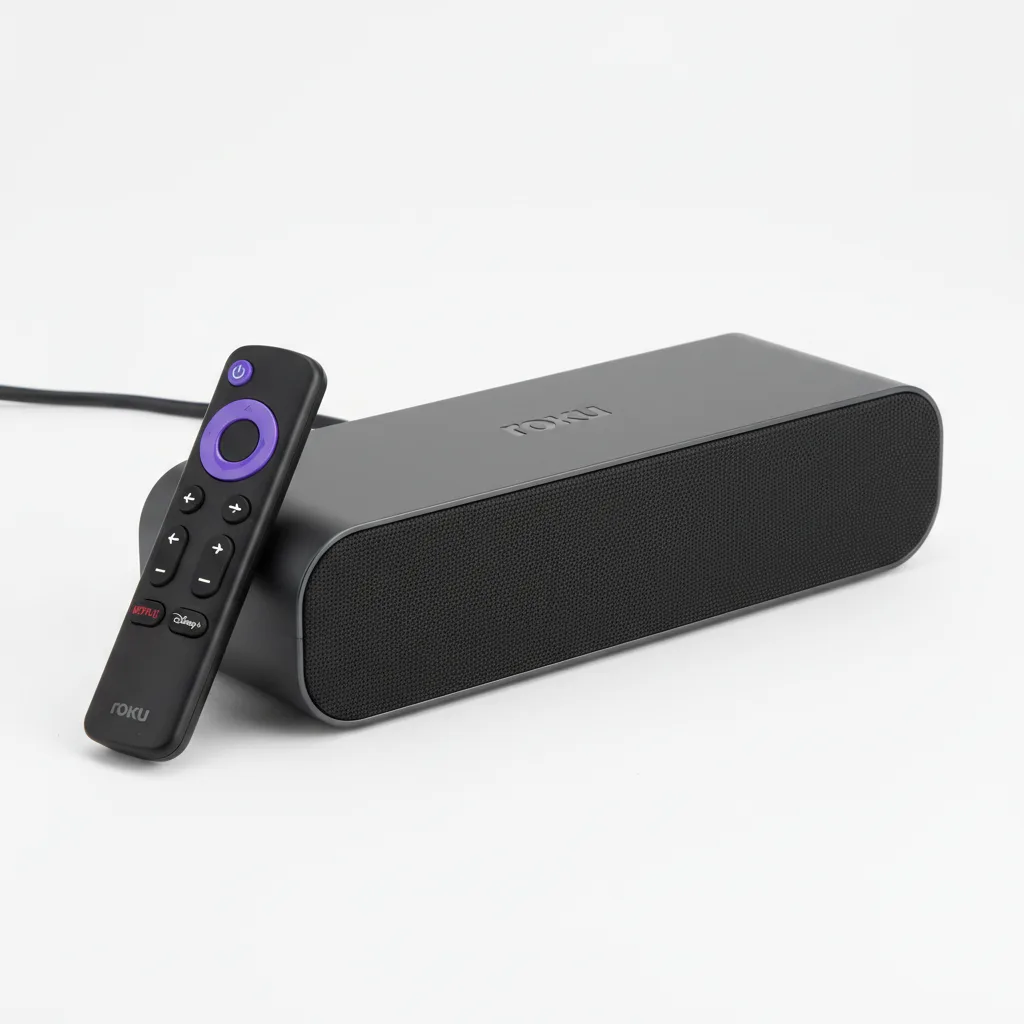
The Roku Streambar is one of the smartest all-in-one upgrades for average living rooms. It combines Roku's best-in-class streaming platform with a genuinely useful audio upgrade in a compact 14-inch bar. Dialogue clarity is excellent, setup is effortless, and the value at $100 MSRP is hard to argue with. Bass lovers and home cinema enthusiasts will want more, but for everyday TV watching it delivers exactly what it promises.
What Is the Roku Streambar?
The Roku Streambar is a 2-in-1 device that replaces both a streaming stick and a basic soundbar with a single compact bar. Roku announced it on September 28, 2020, with units shipping on October 15 of that year at a launch price of $130. Since then, Roku has released the updated Roku Streambar SE (model 9104R), which carries an MSRP of $100 and frequently dips to $70–$90 during sales — making it the current mainstream pick in the lineup.
The concept is simple: plug it into your TV via HDMI ARC or an optical cable, connect to Wi-Fi, and you instantly gain both the full Roku OS streaming experience and improved audio over your TV’s built-in speakers. There is no separate streaming stick to manage, no extra remote to charge, and no complex menu system to learn.
At its core, the Streambar runs Roku’s well-regarded platform with access to hundreds of streaming channels including Netflix, Disney+, Prime Video, Max, and Apple TV+. Voice control works through the included Roku voice remote, or via Amazon Alexa and Google Assistant on compatible smart speakers. The bar houses four 1.9-inch full-range drivers — two front-facing and two angled outward — plus Dolby Audio processing. It supports up to 4K resolution with HDR10 and HLG, though it does not support Dolby Vision, which buyers with compatible TVs should note before purchasing.
Performance: Streaming and Sound Quality
Streaming performance is where the Roku Streambar earns its strongest marks. The Roku OS interface is consistently one of the fastest and least cluttered in the streaming device category. Apps open quickly, voice search responds accurately to natural-language queries like “find action movies with Tom Cruise,” and the home screen never buries free content behind paid-tier walls.
On the audio side, dialogue clarity is the Streambar’s biggest strength. The dedicated vocal processing keeps speech intelligible and well-centred even at moderate volume, which matters during dialogue-heavy dramas or news broadcasts more than any frequency response measurement would suggest. The built-in automatic volume levelling also reduces the need to constantly adjust volume between quiet scenes and loud commercials — a feature that sounds minor but makes a real difference during extended viewing sessions.
Bass, however, is the expected limitation for a compact bar at this size and price. The four small drivers produce a reasonably full mid-range but roll off noticeably in the lower frequencies. Intense action sequences and music lose punch compared to even an entry-level dedicated soundbar with a subwoofer. Rtings.com's independent measurements of the Streambar confirm a frequency response consistent with a compact, sealed enclosure — respectable for casual TV viewing, but not satisfying for a dedicated home cinema setup. Roku’s optional wireless subwoofer solves this if bass depth becomes a priority.
Picture quality matches what you’d expect from a standalone Roku 4K player. HDR10 content looks accurate and well-detailed; HLG broadcasts handle smoothly. The interface adds no processing lag, and 60fps content plays back cleanly. For most users upgrading from a built-in TV app, the jump in responsiveness alone makes streaming feel noticeably faster.
Design and Build Quality
The Roku Streambar is compact and unobtrusive. At 14 inches wide, it fits in front of most TVs without extending beyond the base, making it a practical fit for smaller TV stands, bedroom setups, or office displays. The fabric-wrapped exterior resists dust and looks neutral in most room styles — neither cheap nor premium, but clearly considered.
Port selection is minimal but practical: HDMI ARC, optical audio input, USB, and Ethernet. The power adapter is bulkier than expected relative to the bar’s slim profile, but it routes neatly behind furniture. Physical buttons on top handle volume and mute when the remote is unavailable, which is a useful safety net.
The included voice remote has a sensible button layout with satisfying tactile feedback. It lacks backlit keys, which can mean fumbling in dark rooms until the layout becomes familiar, but the low button count means muscle memory develops quickly. The overall build inspires enough confidence that it does not feel like a compromise product despite its all-in-one nature.
How It Compares to the Competition
Against the Amazon Fire TV Soundbar, the Roku Streambar wins clearly on interface speed and voice accuracy. Roku’s OS is more intuitive and responsive; Fire OS can feel slower and more cluttered with promoted content. The Fire TV Soundbar does deliver noticeably stronger bass at comparable pricing, which may matter to buyers prioritising audio depth over streaming experience.
The Sonos Beam Gen 2 outclasses the Streambar on every audio metric — richer soundstage, Trueplay room correction, and proper Dolby Atmos support. But the Beam Gen 2 costs roughly three times as much and requires separate streaming hardware and the Sonos app, making the total cost of ownership considerably higher. For most living rooms, the Roku Streambar’s all-in-one simplicity represents better practical value.
As CNET noted in their original coverage, few all-in-one streaming soundbars match this level of setup convenience at the price point. Against Roku’s own lineup, the Streambar SE at $100 MSRP is the everyday choice, with the Streambar Pro available for buyers who want enhanced stereo separation and wider soundstage performance.
Verdict
The Roku Streambar does not try to be everything — and that restraint is why it works. It takes the two most common frustrations with everyday TV setups (poor built-in speakers and sluggish streaming interfaces) and fixes both with one device, one cable, and one remote. The Roku OS remains the best streaming platform at this price tier, and the audio improvements over any built-in TV speaker are immediately noticeable from the first viewing session.
The limitations are real but honest: no Dolby Vision, no passthrough, and bass that falls short of dedicated audio equipment. Buyers who know these trade-offs exist before purchasing will have no complaints. Everyone else should verify their setup requirements against the spec table above before committing.
For apartment dwellers, bedroom TVs, secondary setups, or anyone who simply wants better sound and smarter streaming without the complexity of separate components, the Roku Streambar SE at $100 — or less during frequent retailer sales — is one of the most sensible home entertainment purchases available in 2026.
Rating: 4.2 / 5 — Recommended for everyday viewers who want better sound and smarter streaming in one compact, no-fuss device.
Sources: Roku IR press release, September 2020, Rtings.com Roku Streambar measurements, CNET Roku Streambar review, GSMArena launch coverage, DealNews Roku pricing guide, May 2026, CamelCamelCamel Streambar SE price history — Reviewed July 2026
Frequently Asked Questions
What is the Roku Streambar and how does it work?
How do you set up the Roku Streambar step by step?
How much does the Roku Streambar cost in 2026?
Does the Roku Streambar support Dolby Vision?
Is the Roku Streambar worth buying over a separate streaming stick and soundbar?
Can the Roku Streambar connect to wireless speakers or a subwoofer?
+Pros
- Roku OS is the fastest, cleanest streaming platform at this price — genuinely better than Fire TV or built-in smart TV apps
- Dialogue clarity and automatic volume levelling work well out of the box with no configuration needed
- Private Bluetooth listening is stable and lip-sync accurate — practical for shared households
- 14-inch compact design fits in front of virtually any TV without extending past the stand edges
- HDMI ARC setup is automatic and takes under ten minutes from unboxing to watching
- Expandable with Roku Wireless Bass Subwoofer if more low-end is needed later
- MSRP of $100 with frequent sale prices of $70–$90 makes it one of the most affordable all-in-one streaming soundbars available
−Cons
- No Dolby Vision support — HDR10 and HLG only, which limits compatibility with some premium TV setups
- No HDMI passthrough — the Streambar occupies the TV's ARC port with no way to chain additional HDMI devices through it
- Bass is noticeably limited for action movies and music; the subwoofer add-on is effectively required for a fuller sound
- Auto volume levelling can occasionally compress dynamics too aggressively during live sports broadcasts
- Remote lacks backlit keys, making button identification difficult in dark rooms until muscle memory develops
- Power adapter is disproportionately bulky relative to the bar's slim footprint