Valve Steam Machine (2026) Review: The Living Room PC Dream, Priced Like a Nightmare
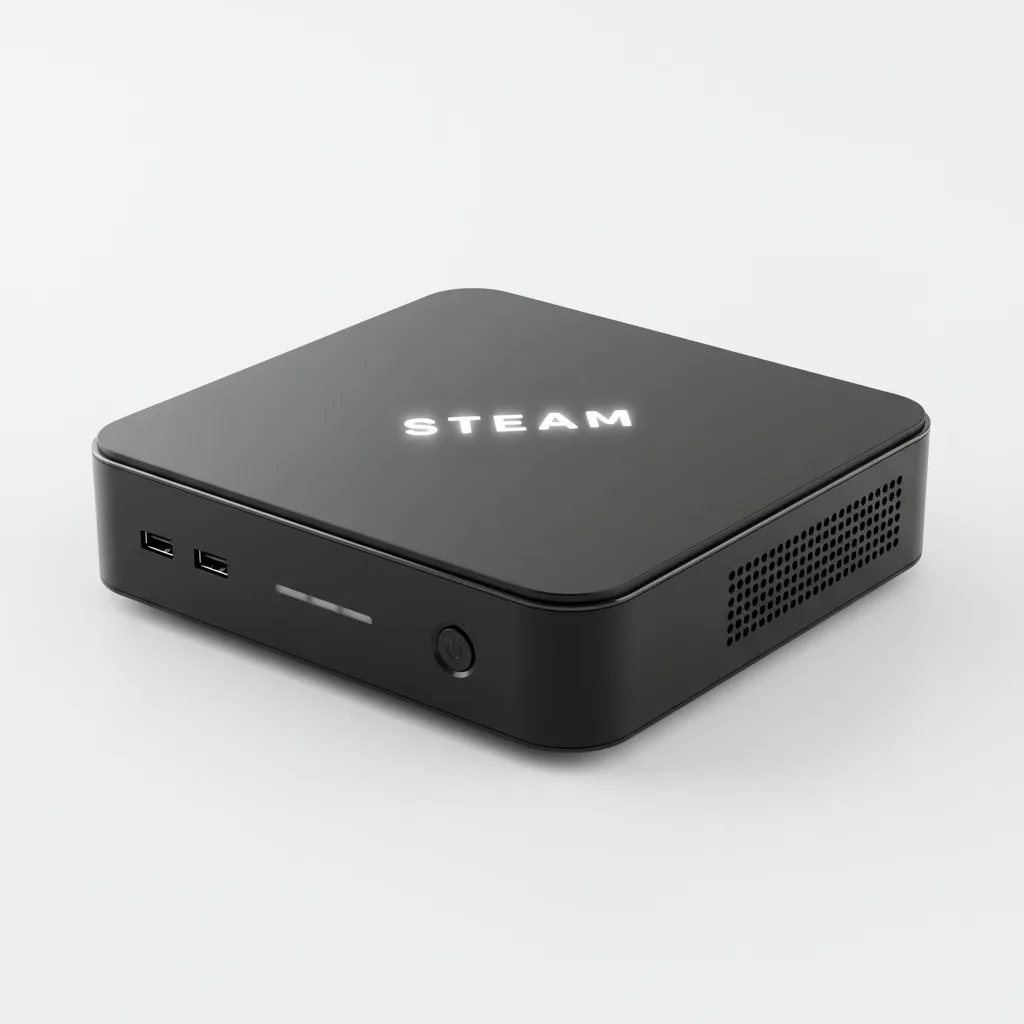
The Steam Machine is Valve's most polished living room PC yet — beautiful design, near-silent acoustics, and SteamOS that just works. But at $1,049 for midrange 2026 GPU performance and only 8 GB VRAM, the price (inflated by AI-driven memory shortages) makes it a tough sell unless you are already deep in the Steam ecosystem. ---
The Living Room PC Valve Always Wanted to Build
Valve has been trying to get PC gaming onto the couch since 2015. The original Steam Machines — a partnership with third-party manufacturers — were quietly retired within a few years, undermined by weak software and a fragmented hardware lineup. This time, Valve built everything itself. One device, one OS, one price.
The result, announced on November 12, 2025 alongside the Steam Frame headset and a new Steam Controller, is a compact black cube that slots under your TV and boots straight into Steam. It launched on June 29, 2026 after a series of delays driven by global memory and storage shortages tied to AI infrastructure demand — the same crunch that pushed Steam Deck prices up by over 40% earlier this year.
The ambition is clear. The execution is largely excellent. The price is where things get complicated.
Design and Build: A Genuinely Beautiful Small PC
At roughly 160 mm on each side, the Steam Machine is one of the cleanest small form factor PCs ever produced. The black cube houses a built-in power supply — no external brick, which immediately puts it ahead of most mini PC competitors — and features a magnetic front panel that snaps off for cleaning or replacement. Valve plans to release CAD files so users can 3D-print custom panels, a thoughtful nod to the PC modding community it is trying to attract.
A configurable RGB strip at the bottom serves as a status indicator for downloads and system states. It can be switched off entirely. Connectivity is handled via a dedicated 6 GHz wireless receiver for the Steam Controller 2, which avoids the 2.4 GHz congestion that plagues many living room setups.
The acoustic engineering deserves specific praise. At 20–21 dBA under gaming load, this machine is quieter during actual use than most competing hardware. Power consumption sits between 170–180 W during gaming — reasonable for the performance class.
Performance: Honest Midrange, Not the Next Generation
Valve has been consistent about one number: the Steam Machine delivers roughly six times the graphical performance of the Steam Deck. That framing is accurate but requires context.
Independent testing by GamersNexus places the GPU in the same performance bracket as the AMD RX 6600, Intel Arc B570, and Nvidia RTX 3060. That is capable, playable hardware for 1080p and 1440p gaming. Reaching 4K at 60 fps requires AMD’s FSR upscaling — Valve originally marketed 4K/60 flatly, and has since revised the product page to the more cautious “up to 4K.” That revision is the right call, and buyers should read “up to 4K” as the ceiling rather than the expectation for demanding titles.
CPU performance tells a similar story. In Stellaris simulation benchmarks, GamersNexus found the Steam Machine’s custom Zen 4 part performing around the level of an AMD Ryzen 7 3700X or Ryzen 5 3600 — respectable chips from 2019. The strict 30W TDP cap is the reason: Valve has constrained the CPU hard to manage heat and power within the sealed cube chassis. It is a deliberate trade-off, not an oversight.
In practical terms: modern games at 1080p run well. Most titles at 1440p are manageable. Native 4K gaming in demanding 2026 titles will require either FSR or settings reductions. Cyberpunk 2077 at 4K with FSR on medium settings averaged around 65 fps in Valve’s own internal testing — a reasonable living room result.
The 8 GB of GDDR6 VRAM is a genuine concern looking forward. Several current-generation titles already push past 8 GB at higher resolutions, and the Steam Machine is a device people will likely hold for five or more years.
SteamOS: The Real Competitive Advantage
Where the hardware is a compromise, the software is not. SteamOS on the Steam Machine is the most polished version of the operating system Valve has shipped. Fast suspend-and-resume works reliably. The controller-first Big Picture interface handles the full Steam library without requiring a keyboard. Desktop Mode is a full Linux desktop (Arch-based) where users can install additional storefronts like Epic or GOG, or any other Linux-compatible software.
Proton, Valve’s Windows compatibility layer, brings the vast majority of Steam’s Windows-only catalogue to SteamOS. Compatibility gaps exist — some titles with aggressive anti-cheat systems remain unsupported — but the library coverage has improved significantly since the Steam Deck's 2022 launch.
The Steam Machine can also pair with the Steam Frame VR headset for untethered local streaming, and it integrates seamlessly with Steam’s cloud save system. Setup genuinely is plug-in-and-play: sign in, and your library is available.
The Price Problem
This is where the honest recommendation gets difficult.
The base Steam Machine — 512 GB storage, no Steam Controller — costs $1,049 / £879. The fully loaded 2 TB bundle with a Steam Controller runs $1,428. Valve has been transparent that these prices reflect real component costs in a market where DDR5, GDDR6, and NVMe storage all became significantly more expensive due to AI-driven demand. Unlike Sony or Microsoft, Valve does not subsidise hardware at a loss.
That explanation is genuine. It is also cold comfort when comparing options. For $1,049, a custom-built mini PC with equivalent or better specifications is achievable — GamersNexus noted this explicitly. For the same money, a PlayStation 5 costs significantly less and includes first-party exclusives. For buyers already deep in the Steam ecosystem with hundreds of purchased games, the calculus looks different. For a newcomer, it is a hard sell.
Valve’s reservation system — a randomised draw, not a standard storefront purchase — adds further friction. First-wave buyers needed a Steam account in good standing with a purchase before April 27, 2026. Unsuccessful applicants are on a waitlist.
Who Should Buy the Steam Machine?
The Steam Machine makes the most sense for one specific buyer: someone with an established Steam library who wants a living room device that handles that library with minimal setup, runs quietly, and leaves the option open for occasional desktop use. For that person, the combination of SteamOS polish, near-silent acoustics, compact design, and full ecosystem integration is genuinely compelling in a way no existing mini PC delivers as cleanly.
For everyone else — newcomers to PC gaming, buyers primarily interested in 4K/60 native performance, anyone price-sensitive — the value case is strained. The hardware is midrange by 2026 standards, the VRAM is already tight, and $1,049 before a controller is a significant ask.
Valve’s second attempt at the living room PC is meaningfully better than the first. The hardware is purposeful, the software is excellent, and the long-term vision is coherent. The price, set by a component market Valve did not control, makes that vision harder to recommend without qualification.
Verdict
The Steam Machine is the best version of this product Valve has ever made — and the market has handed it one of the worst launch windows imaginable. Component shortages inflated the price above where it should land, and the hardware inside, while capable, sits in 2026’s midrange rather than its premium tier. If you are already in the Steam ecosystem and the living room convenience genuinely matters to you, the experience is worth serious consideration. If you are evaluating it purely on performance per pound, comparable builds edge it out at the same price point.
Rating: 3.6 / 5 — Recommended for Steam ecosystem enthusiasts; a harder sell for general buyers at this price.
Frequently Asked Questions
Can the Steam Machine run Windows games?
Does the Steam Machine come with a controller?
Can I upgrade the RAM in the Steam Machine?
Can the Steam Machine run at native 4K?
How do I buy a Steam Machine — is it available on the Steam store?
Is the Steam Machine quieter than a PS5 or Xbox Series X?
Can I install other storefronts like Epic Games or GOG on the Steam Machine?
Will the Steam Machine work with my existing Steam library?
+Pros
- Stunning compact design — clean cube that looks great under any TV
- Near-silent acoustics (20–21 dBA) — quieter than most consoles under load
- SteamOS is polished, fast resume/suspend, console-simple out of the box
- Full Desktop Mode — install Epic, GOG, or any Linux software
- RAM is user-upgradeable (SODIMM slots — rare for this form factor)
- Entire Steam library accessible including Proton-translated Windows titles
- Internal PSU is a genuinely clever engineering decision
- Can pair with [Steam Frame VR headset](https://store.steampowered.com/steamframe/) for untethered play
−Cons
- $1,049 starting price is steep — no controller included at that price
- GPU performance sits in RTX 3060 / RX 6600 territory — midrange at best
- 8 GB GDDR6 VRAM is a limitation for demanding 4K titles in 2026
- 4K/60 fps requires FSR upscaling — not native rendering
- CPU performance equivalent to a 2019-era Ryzen 5 3600 (per GamersNexus)
- Not sold openly — randomised reservation draw with waitlist
- SteamOS Linux compatibility gaps remain for a small number of titles
- No optical media, no native Windows support out of the box