
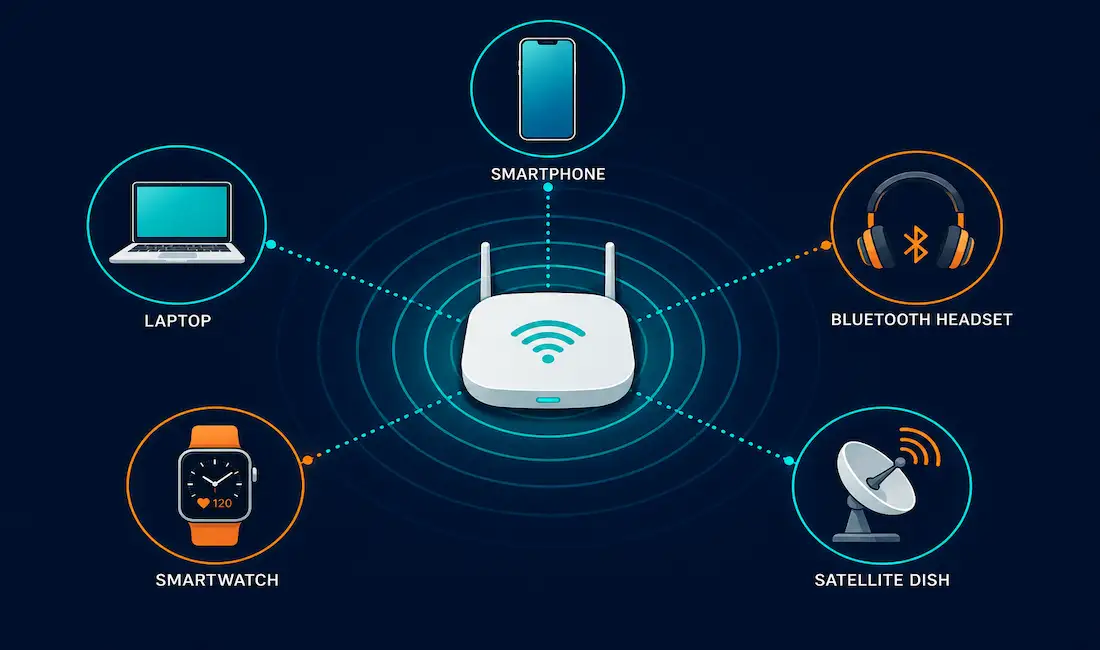
Wireless media carries data through radio frequency (RF) signals instead of a physical cable. It’s the technology behind Wi-Fi, Bluetooth, cellular networks, satellite internet, and dozens of other everyday connections, from cordless keyboards to GPS receivers. This guide covers how wireless media actually works at the physical and data link layers, the main standards you’ll encounter, and the practical tradeoffs that come with going cable-free.
What Counts as Wireless Media
Cellular phones, GPS receivers, cordless mice and keyboards, cordless telephones, remote controls, satellite television, wireless LANs, and wireless monitoring devices like intrusion alarms all rely on radio frequency signals to communicate. This is worth stating precisely, since it’s sometimes described incorrectly elsewhere: wireless communication uses electromagnetic radio waves, not acoustic (sound) waves. RF signals travel as electromagnetic energy through the air, entirely separate from sound.
Before planning any wireless deployment, a few practical realities need consideration:
- Coverage area: Wireless works best in open environments. Building materials, structural elements, and terrain all limit effective coverage, sometimes significantly.
- Interference: Wireless media shares the airwaves with cordless phones, fluorescent lighting, microwave ovens, and other wireless devices, all of which can degrade signal quality.
- Security: Because wireless doesn’t require physical access to a cable, unauthorized devices and users can potentially intercept or join the network without ever touching a physical connection point. This makes wireless network security a first-order design concern, not an afterthought.
- Shared medium: Most WLAN technology operates in half-duplex, meaning only one device transmits at a time on a given channel. Bandwidth is shared among every connected device, so more simultaneous users means less bandwidth available per user.
How Wireless Standards Are Defined
IEEE and telecommunications industry standards for wireless data communication cover the physical and data link layers. Each standard specifies transmission frequency, transmission power, how data gets encoded onto the radio signal, how the receiving end decodes it, and antenna design requirements. Cellular and satellite communication can also provide network connectivity, though this guide focuses on the LAN and PAN-scale standards most relevant to everyday networking work.
Types of Wireless Media
Wi-Fi (IEEE 802.11)
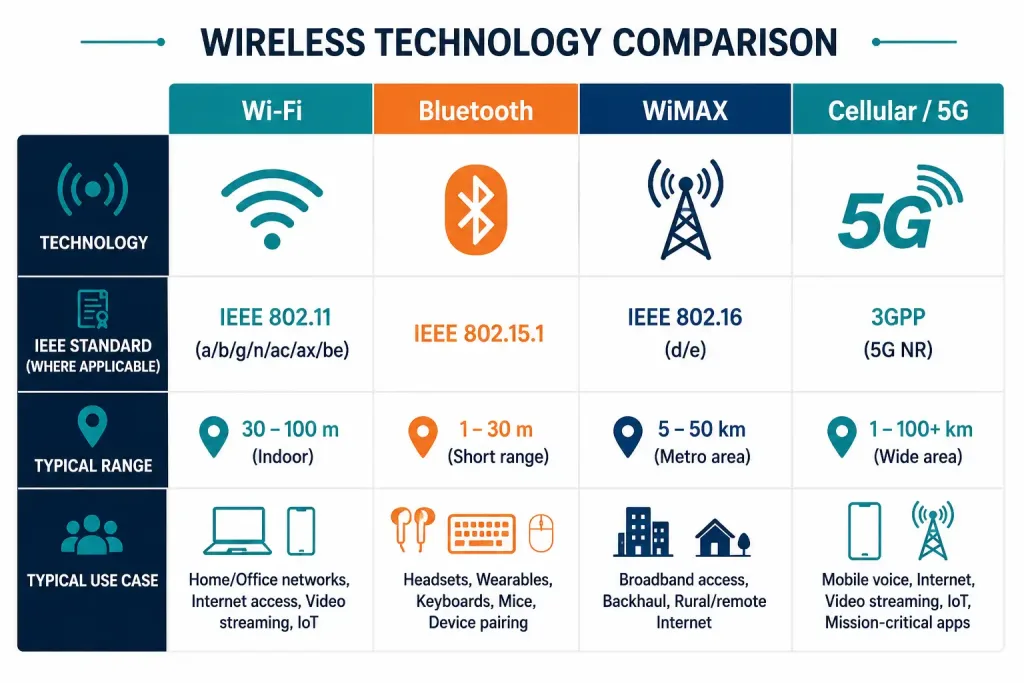
Wi-Fi is the common name for WLAN technology built on the IEEE 802.11 family of standards, and “Wi-Fi” itself is a trademark of the Wi-Fi Alliance, the organization that certifies compliant devices. Wi-Fi uses Carrier Sense Multiple Access with Collision Avoidance (CSMA/CA): before transmitting, a wireless NIC listens to confirm the channel is clear, and if another device is already transmitting, it waits. This collision-avoidance behavior is fundamentally different from wired Ethernet’s older collision-detection approach, and it’s a direct consequence of the shared, half-duplex nature of the wireless medium.
Wi-Fi has continued to evolve through successive 802.11 amendments, each generation adding wider channels, more efficient modulation, and support for more simultaneous devices. Current-generation Wi-Fi standards support multi-gigabit theoretical throughput and Multi-User MIMO, which lets an access point serve multiple devices’ data streams more efficiently in crowded environments like offices and airports. Real-world throughput is always well below the theoretical maximum, since it depends heavily on distance, interference, and how many devices are competing for airtime.
Bluetooth (IEEE 802.15)
Bluetooth is the common name for Wireless Personal Area Network (WPAN) technology under IEEE 802.15. It connects devices over short range, typically under 10 meters for standard connections, using a device pairing process rather than the always-on association model Wi-Fi uses. Recent Bluetooth versions added a long-range mode using a more robust, lower-data-rate coded physical layer, which extends effective range considerably at the cost of throughput, useful for applications like sensor beacons rather than high-bandwidth audio or file transfer.
WiMAX (IEEE 802.16)
WiMAX, short for Worldwide Interoperability for Microwave Access, provides wireless broadband access using a point-to-multipoint topology, historically positioned as a longer-range alternative to Wi-Fi for metropolitan-area wireless broadband. WiMAX has seen far less commercial deployment than originally anticipated, largely displaced by LTE and 5G cellular technology for wide-area wireless broadband, though it remains relevant in some fixed-wireless deployments.
Wireless LAN (WLAN) Components
A functioning WLAN requires two core components:
- Wireless Access Point (AP): A station that transmits and receives data, connecting wireless clients to each other and, typically, to a wired network. Each AP serves multiple users within its coverage area, and as a device moves beyond one AP’s range, it’s handed off to the next AP automatically, provided the APs are configured as part of the same roaming network.
- Wireless NIC adapters: Give each host device the ability to transmit and receive wirelessly in the first place.
A small WLAN may need only a single access point; larger deployments need more APs as user count and physical coverage area grow. Because WLAN standards have evolved over time, checking compatibility and interoperability before purchasing wireless equipment remains genuinely important, particularly when mixing older and newer devices on the same network.
Cellular and 5G Wireless
Cellular networks, now predominantly 5G in markets where it’s been deployed, use licensed spectrum managed by mobile carriers rather than the unlicensed spectrum Wi-Fi and Bluetooth share. 5G’s headline advantages over earlier cellular generations are substantially higher peak theoretical throughput, meaningfully lower latency under ideal conditions, and the ability to support a much larger number of simultaneously connected devices per cell, which matters for dense IoT sensor deployments. Real-world 5G performance varies enormously by carrier, spectrum band, and location; peak theoretical figures you’ll see quoted in marketing material are rarely what an end user experiences day to day.
5G rollout timelines and coverage vary significantly by country and even by city within a country, and figures on coverage percentage age out quickly as networks continue to build out. If you need current 5G coverage data for a specific market, check that country’s telecom regulator directly rather than relying on a general estimate, since rollout pace differs enormously between regions.
Satellite Wireless
Low-earth-orbit (LEO) satellite constellations have made satellite internet dramatically more practical than older geostationary satellite internet, which suffered from high latency due to the much greater distance to a geostationary orbit. LEO satellite internet brings broadband-class connectivity to locations that traditional wired or cellular infrastructure can’t reach cost-effectively, which matters significantly for rural connectivity, disaster response, and remote worksites. Latency with LEO satellite internet is still typically higher than a good terrestrial fiber or cable connection, though it’s improved substantially compared to older geostationary satellite services.
Benefits of Wireless Media
Wireless media’s core advantage is mobility: users and devices connect without being tied to a fixed cable run, which matters enormously in dynamic environments like open offices, warehouses, and any space where device locations change regularly. It also reduces the cost and disruption of running physical cabling through walls, ceilings, and floors, particularly in existing buildings where retrofitting cable runs is expensive and invasive. Wireless scales well for supporting large numbers of connected devices, which is exactly why it underpins most consumer IoT deployments, from smart thermostats to wearable fitness trackers.
Challenges to Overcome
Wireless media faces real limitations that don’t apply the same way to wired connections. Interference from overlapping wireless networks, and from unrelated devices operating in the same frequency bands, can meaningfully degrade signal quality, especially in dense urban or multi-tenant environments. Wireless bandwidth, while continuing to improve with each new standard generation, still generally lags behind what a comparable wired fiber connection can deliver for sustained, high-bandwidth applications. Security requires deliberate design, since anyone within range of a wireless signal has a physical opportunity to attempt to intercept or join the network, unlike a wired connection that requires physical access to a cable or port.
Securing Wireless Networks
Strong encryption is the foundation of wireless network security; using the current-generation WPA standard on any access point you control, rather than older, weaker protocols like WEP, WPA, or WPA2, is a baseline requirement, not an optional hardening step. Beyond encryption, regular security audits, strong and unique network credentials, and MAC address filtering as a supplementary control all contribute to a layered defense. For sensitive traffic over any wireless network you don’t fully control, adding a VPN provides an additional layer of protection independent of the wireless network’s own security.
Troubleshooting Common Wireless Issues
Weak or dropped signal in part of a building. Start by checking for physical obstructions, thick walls, metal structures, and elevator shafts are common culprits, before assuming an equipment problem. Sometimes the fix is as simple as relocating an access point rather than replacing it.
Slow performance despite a strong signal. Channel congestion is a frequent cause, particularly in dense apartment buildings or office parks where many networks compete for the same limited set of non-overlapping channels. A wireless site survey tool can show you exactly how crowded your local spectrum actually is, rather than guessing.
Devices connecting but frequently dropping. This often points to interference from a specific non-Wi-Fi device operating in the same frequency band, such as an older cordless phone or a poorly shielded microwave oven. Isolating the timing of the drops against when the interfering device is in use usually confirms the cause quickly.
Inconsistent performance across different devices on the same network. Older client devices supporting only older Wi-Fi standards can drag down performance for the whole network in some configurations, since the access point may need to accommodate the slowest connected client’s capabilities. Checking which devices are connecting at reduced data rates is a useful first diagnostic step.
Frequently Asked Questions
What is wireless media in networking?
Wireless media refers to any communication channel that transmits data using radio frequency signals rather than a physical cable, covering technologies like Wi-Fi, Bluetooth, cellular, and satellite. It operates at the physical and data link layers, the same layers wired media like copper and fiber operate at, just using a fundamentally different transmission medium.
What’s the difference between Wi-Fi and Bluetooth?
Wi-Fi is designed for wireless local area networking, typically covering a building or campus with higher throughput, while Bluetooth is designed for short-range personal area networking between nearby devices, generally at lower throughput and lower power consumption. Wi-Fi devices join a network through association with an access point, while Bluetooth devices connect through an explicit pairing process between two specific devices.
Why does Wi-Fi use collision avoidance instead of collision detection?
Wireless devices can’t reliably detect a collision while transmitting, the way wired Ethernet historically could, because a device’s own transmission can drown out its ability to hear a collision in the shared radio medium. CSMA/CA works around this by having devices check that the channel is clear before transmitting in the first place, reducing the likelihood of a collision rather than detecting one after it happens.
Is wireless networking less secure than wired networking by default?
Wireless introduces a security consideration wired networks don’t have to the same degree: anyone within physical range of the signal has an opportunity to attempt interception or unauthorized access, without needing to physically access a cable or switch port. With strong current-generation encryption and proper network configuration, wireless can still be made genuinely secure, but it requires deliberate configuration rather than relying on physical access control alone.
What’s the practical range of Bluetooth compared to Wi-Fi?
Standard Bluetooth connections typically operate over about 10 meters, though long-range modes in recent Bluetooth versions extend that considerably at reduced data rates. Wi-Fi typically covers a much larger area, often 30-plus meters indoors depending on the access point and building materials, though its exact range varies widely with obstacles and interference.
Why does 5G matter for IoT deployments specifically?
5G’s ability to support a much higher density of simultaneously connected devices per cell, compared to earlier cellular generations, makes it well suited to environments with large numbers of low-bandwidth IoT sensors, like industrial monitoring or smart city infrastructure. This device-density advantage matters more for many IoT use cases than 5G’s peak throughput figures, which most IoT sensors never come close to needing.
Related: Self-Assessment – Wireless Media



