
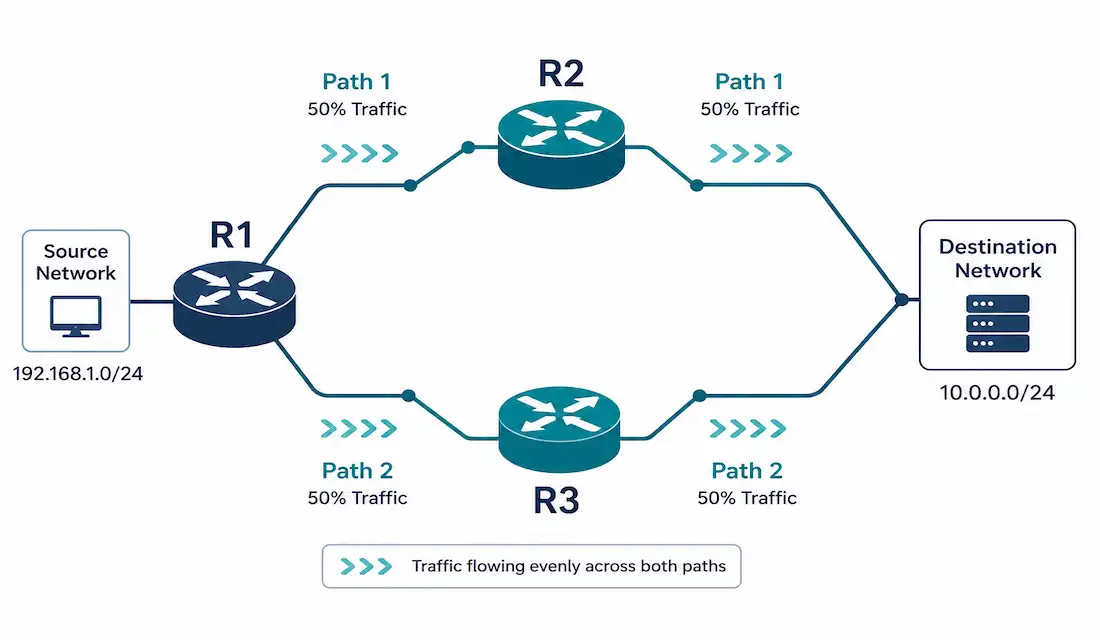
When a router has more than one valid path to the same destination, it needs a way to decide what to do with all of them — use only the best one, or spread traffic across several. That decision is network load balancing, and understanding exactly how routers make it, right down to which paths actually qualify, is core CCNA and CCNP material.
This guide covers administrative distance and metrics as the foundation, equal-cost load balancing, EIGRP’s unique unequal-cost load balancing (including the feasibility condition that’s easy to get wrong), and the switching mechanisms that determine how load balancing actually gets applied to traffic.
Administrative Distance and Metrics
Routers use administrative distance (AD) to prioritize routes learned from different sources when multiple paths to the same destination exist — lower AD wins.
| Route Source | Administrative Distance |
|---|---|
| Connected | 0 |
| Static | 1 |
| EIGRP (Internal) | 90 |
| OSPF | 110 |
| RIP | 120 |
| EIGRP (External) | 170 |
If multiple paths exist within the same protocol (identical AD), the router falls back to that protocol’s metric to choose the best path. EIGRP uses a composite metric based on bandwidth, delay, reliability, load, and MTU. OSPF uses cost, based on interface bandwidth. If multiple paths end up with genuinely equal metrics, the router installs all of them — this is equal-cost load balancing.
Equal-Cost Load Balancing
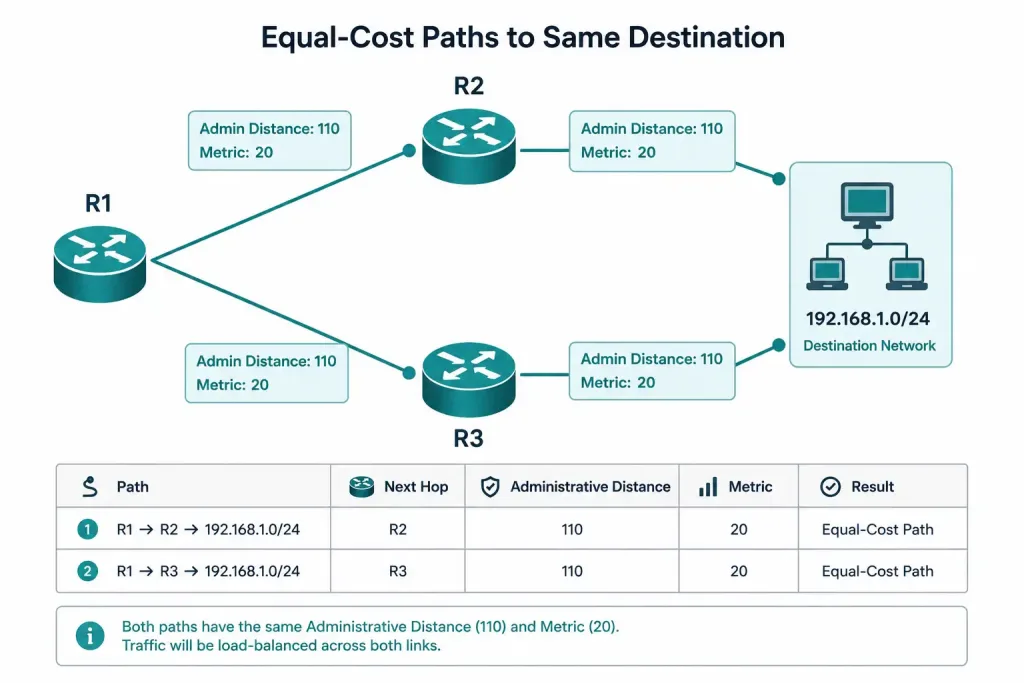
Equal-cost load balancing requires multiple paths to the same destination through a single protocol, with identical AD and identical metric. EIGRP, OSPF, and BGP all support it:
| Protocol | Default Equal-Cost Paths | Maximum (Configurable) |
|---|---|---|
| EIGRP | 4 | 32, via maximum-paths |
| OSPF | 4 | 32, via maximum-paths |
| BGP | 1 (disabled by default) | Requires explicit maximum-paths configuration for ECMP |
Verify equal-cost paths directly:
Router# show ip route 192.168.1.0
Routing entry for 192.168.1.0/24
  Known via "eigrp 100", distance 90, metric 307200
  Last update from 10.1.1.2 on GigabitEthernet0/0, 00:00:05 ago
  Last update from 10.1.2.2 on GigabitEthernet0/1, 00:00:05 ago
  * 10.1.1.2, via GigabitEthernet0/0
  * 10.1.2.2, via GigabitEthernet0/1
Both asterisked entries share the identical AD (90) and metric (307200), confirming both are eligible for load balancing rather than one simply being a documented backup.
A simple topology example: router R1 has two equal-cost paths to 192.168.1.0/24, one through neighbor R2 and one through neighbor R3. Both paths share the same AD and metric, so R1 installs both and load balances traffic across them rather than favoring one exclusively.
EIGRP Unequal-Cost Load Balancing
EIGRP is the only major routing protocol that supports unequal-cost load balancing — using paths with genuinely different metrics, not just ties. This is configured with the variance command, which sets a multiplier applied to the best path’s metric: any path with a metric up to variance × best metric becomes eligible for inclusion.
Eligible isn’t automatic, though — a path also has to satisfy EIGRP’s feasibility condition: its advertised distance (AD, the metric as reported by the neighboring router) must be strictly less than the feasible distance (FD, the successor route’s own total metric) of the current best path. This condition exists specifically to guarantee loop-free paths; without it, EIGRP could install a path that routes traffic back through a neighbor who is themselves routing through you, causing a loop.
A Correct Worked Example
Suppose R1 has two paths to 192.168.1.0/24:
- Path 1 (best path, via 10.1.1.2): FD = 307200, AD = 281600
- Path 2 (alternate, via 10.1.2.2): FD = 614400, AD = 250000
With variance 2, the metric ceiling is 2 × 307200 = 614400 — Path 2’s FD of 614400 falls exactly at that ceiling, so it clears the variance check. Separately, the feasibility condition requires Path 2’s AD (250000) to be less than Path 1’s FD (307200) — 250000 < 307200 is true, so Path 2 also passes feasibility. Both conditions are satisfied, so Path 2 gets installed alongside Path 1 for unequal-cost load balancing.
Configuration:
Router(config)# router eigrp 100
Router(config-router)# variance 2
Router(config-router)# maximum-paths 4Verification, checking both metric and AD/FD relationship directly:
Router# show ip route 192.168.1.0
Routing entry for 192.168.1.0/24
  Known via "eigrp 100", distance 90, metric 307200
  Last update from 10.1.1.2 on GigabitEthernet0/0, 00:00:05 ago
  Last update from 10.1.2.2 on GigabitEthernet0/1, 00:00:05 ago
  * 10.1.1.2, via GigabitEthernet0/0 (307200/281600)
  * 10.1.2.2, via GigabitEthernet0/1 (614400/250000)
For a full breakdown of every candidate path and exactly why each one does or doesn’t qualify, show ip eigrp topology is the more detailed command to reach for — show ip route confirms what got installed, but the topology table shows the full feasibility picture.
A worthwhile sanity check whenever you’re configuring variance: if a path you expect to see included isn’t showing up, the variance multiplier is rarely the actual problem — check the feasibility condition first. A path can easily satisfy the variance ceiling on metric alone while still failing feasibility, exactly as the corrected numbers above demonstrate the difference between passing and failing that second check.
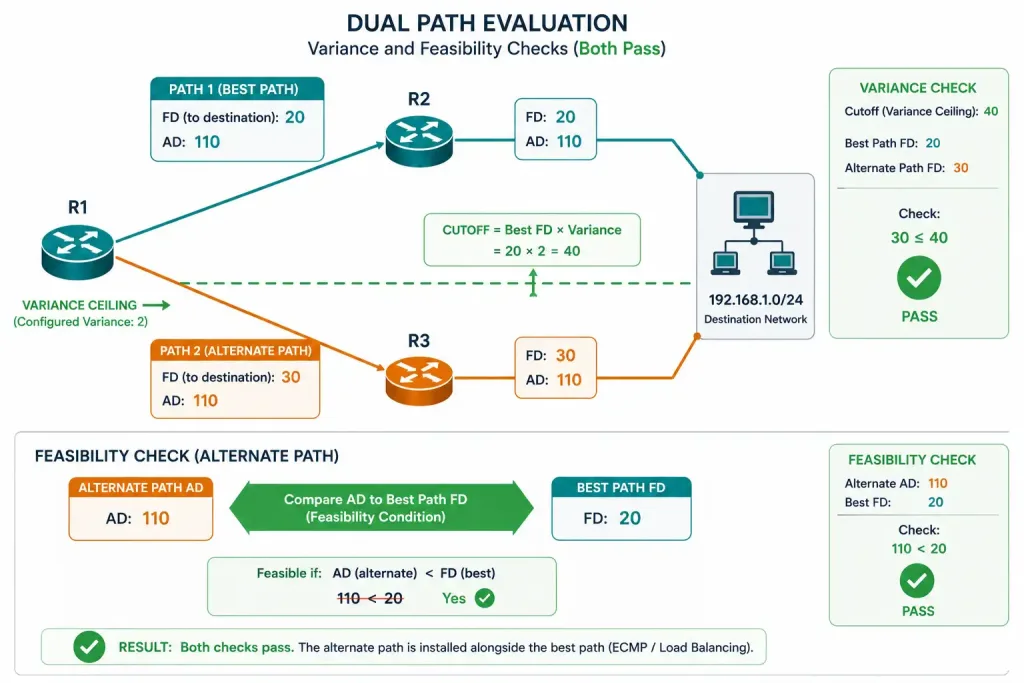
[See Infographic: EIGRP Variance and Feasibility Condition]
Switching Mechanisms and Load Balancing
Load balancing effectiveness depends heavily on how the router actually forwards packets, not just which paths are in the routing table.
Process switching: the CPU examines each packet individually against the routing table. This is slow, adds meaningful latency and CPU load, and isn’t suitable for high-throughput load balancing on any modern network.
Cisco Express Forwarding (CEF): pre-builds a Forwarding Information Base (FIB) and adjacency table ahead of time, enabling fast, largely hardware-based forwarding. CEF is the default on essentially all modern Cisco routers and is what makes efficient load balancing practical at real traffic volumes.
Per-Destination vs. Per-Packet Load Balancing
Per-destination (the default): CEF hashes the source and destination IP address pair to consistently select one outgoing path for that specific flow — all packets between a given source and destination take the same path, while different destination pairs may take different paths. This keeps packets in order, which matters for most applications.
Per-packet: CEF alternates packets across available paths on a strict rotation, maximizing even utilization across all links but with a real cost — packets can arrive out of order, since different paths may have different latency. This is genuinely disruptive for latency- and order-sensitive applications like VoIP, and should be enabled deliberately, not by default.
Enable per-packet load balancing:
Router(config-if)# ip load-sharing per-packetVerify the current mode:
Router# show cef interface GigabitEthernet0/0
GigabitEthernet0/0 is up (if_number 2)
  IP CEF switching enabled
  IP CEF load sharing: per-destination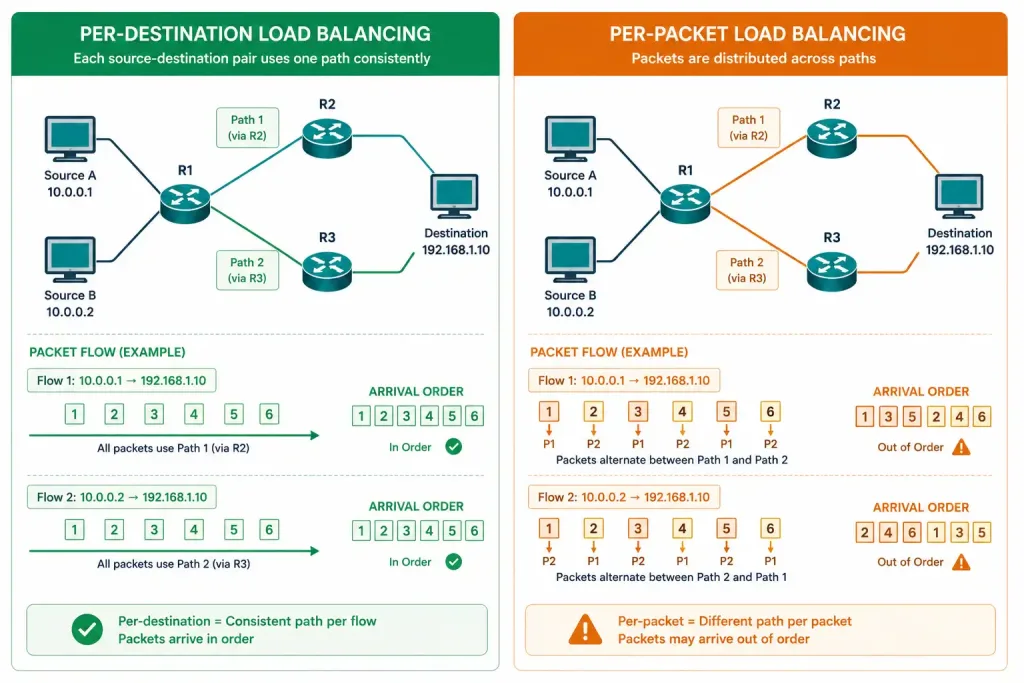
When Load Balancing Actually Matters in Practice
Understanding the mechanics is one thing; knowing when to actually reach for these tools is another.
Equal-cost load balancing earns its keep whenever a network genuinely has redundant, similarly-provisioned paths — dual uplinks from a branch office to a data center, or dual paths across a campus core. In these cases, splitting traffic evenly makes full use of capacity that would otherwise sit partially idle if only one path were ever used, with the added benefit that a single link failure doesn’t force an abrupt, disruptive reconvergence — the remaining path was already carrying traffic.
EIGRP’s unequal-cost load balancing solves a narrower but real problem: two paths that genuinely aren’t equal — say, a primary 1 Gbps link and a backup 100 Mbps link — where you’d still like to use both, proportionally, rather than leaving the slower link completely idle until the faster one fails. Variance lets the slower link carry a smaller, appropriate share of traffic rather than none at all, which is a meaningfully different outcome than simple failover.
Per-packet load balancing is the one tool on this list worth reaching for cautiously. It maximizes raw link utilization, which sounds appealing, but the out-of-order delivery it introduces is a real cost for a lot of modern traffic — not just VoIP, but any application sensitive to jitter or sequencing. It tends to make more sense for bulk, non-latency-sensitive transfers (large file replication between data centers, for instance) than for general-purpose traffic mixes, where per-destination’s more conservative default behavior is usually the better choice.
Troubleshooting Load Balancing
Unequal-cost paths not being used despite configuring variance: this is almost always a feasibility condition failure, not a variance value problem — verify with the full topology breakdown rather than guessing:
Router# show ip eigrp topology 192.168.1.0Check specifically whether the candidate path’s AD is actually less than the successor’s FD; if it isn’t, no variance value will make that specific path eligible.
Load balancing not occurring despite multiple equal-cost paths in the routing table: confirm CEF is actually enabled and check the current load-sharing mode.
Router# show cef interface GigabitEthernet0/0If CEF shows disabled, or load sharing shows neither per-destination nor per-packet configured as expected, that’s the actual root cause — the routing table having multiple paths doesn’t guarantee they’re being used if the switching mechanism isn’t cooperating.
Out-of-order packets after enabling per-packet load balancing: switch back to per-destination, particularly if the affected traffic includes VoIP or other latency-sensitive applications where reordering causes real, user-visible problems:
Router(config-if)# no ip load-sharing per-packetEqual-Cost vs. EIGRP Unequal-Cost: A Direct Comparison
| Factor | Equal-Cost Load Balancing | EIGRP Unequal-Cost Load Balancing |
|---|---|---|
| Protocol support | EIGRP, OSPF, BGP | EIGRP only |
| Requires matching metrics | Yes | No — metrics can differ, within variance |
| Governing command | maximum-paths | variance combined with maximum-paths |
| Loop-prevention check | Not applicable (metrics already equal) | Feasibility condition (AD < FD of successor) |
| Best fit | Redundant, similarly-provisioned links | Genuinely mismatched-capacity links worth partially utilizing |
FAQs
What is the difference between equal-cost and unequal-cost load balancing?
Equal-cost load balancing uses multiple paths that share an identical metric within the same routing protocol, supported by EIGRP, OSPF, and BGP. Unequal-cost load balancing, supported only by EIGRP, allows paths with genuinely different metrics to be used together, governed by the variance command and the feasibility condition.
Why would EIGRP not use a path even though variance is configured high enough?
The variance multiplier only controls the metric ceiling — a separate requirement, the feasibility condition, also has to be satisfied, requiring the candidate path’s advertised distance to be strictly less than the current best path’s feasible distance. A path can easily fall within the variance ceiling on metric alone while still failing this feasibility check, which is a common point of confusion when troubleshooting unequal-cost load balancing.
What’s the difference between per-destination and per-packet load balancing?
Per-destination load balancing, the default, keeps all packets for a given source-destination pair on the same path, preserving packet order. Per-packet load balancing alternates every packet across available paths for maximum link utilization, but can cause out-of-order delivery, which is disruptive for latency-sensitive applications like VoIP.
Why does CEF matter for load balancing?
CEF pre-builds forwarding tables ahead of time, enabling fast, largely hardware-based packet forwarding instead of the CPU processing every packet individually the way process switching does. Efficient load balancing at real network traffic volumes depends on CEF being enabled — without it, load balancing decisions still happen, but far too slowly to matter on a busy network.
How many equal-cost paths can a router use by default?
Both EIGRP and OSPF install up to 4 equal-cost paths by default, configurable up to 32 with the maximum-paths command. BGP is different — it doesn’t perform equal-cost multipathing by default at all and requires explicit maximum-paths configuration to enable it.
How do I verify whether load balancing is actually happening on my router?
Check show ip route for multiple asterisked entries with matching AD and metric, then confirm the switching mechanism with show cef interface to see whether load sharing is set to per-destination or per-packet. Having multiple paths in the routing table doesn’t guarantee traffic is actually being split across them if CEF or the load-sharing mode isn’t configured as expected.



