
In network environments, routers often receive multiple routes to the same destination from different sources — routing protocols (OSPF, EIGRP, RIP), static routes, or directly connected networks. To select the most trustworthy route among them, Cisco routers use Administrative Distance (AD), a foundational concept in the CCNA curriculum. This article covers AD’s purpose, default values, configuration, redistribution behavior, and troubleshooting.
Note:- At the end of this article, the assessment test is waiting for you about the Administrative Distance
What Is Administrative Distance?
Administrative Distance is a numeric value between 0 and 255 that routers use to evaluate the reliability of a routing information source. The lower the AD value, the more trustworthy the source. When multiple routes to the same network exist from different sources, the router compares their ADs and selects the route with the lowest one. Only when two routes share the exact same AD does the router fall back to comparing metrics (such as hop count or cost) to pick the best path.
For example, if a router learns a route to the same destination network from both Enhanced Interior Gateway Routing Protocol (EIGRP) and Routing Information Protocol (RIP), each protocol may calculate a different best path based on its own metric — RIP uses hop count, while EIGRP uses a composite metric based on bandwidth and delay. Administrative Distance is what tells the router which of these two sources to trust in the first place, before either protocol’s metric ever comes into play.
The static route AD is 1, while Internal EIGRP‘s default AD is 90 — so between a static route and an EIGRP route to the same destination, the static route is preferred, since its lower AD value makes it more trustworthy by Cisco’s default logic. Similarly, if EIGRP and OSPF are both configured toward the same destination, the router chooses EIGRP, since EIGRP’s AD (90) is lower than OSPF’s (110).
Default Administrative Distance Values
The table below shows Cisco’s default AD values for common route sources. You can modify a routing protocol’s administrative distance using the distance command in routing sub-configuration mode, but changing these values carries real risk — an incorrect AD can create routing loops or routing black holes, so any change should be made deliberately and tested.
| Route Source | Default AD |
|---|---|
| Directly Connected Interface | 0 |
| Static Route | 1 |
| EIGRP Summary Route | 5 |
| External Border Gateway Protocol (eBGP) | 20 |
| Internal EIGRP | 90 |
| Open Shortest Path First (OSPF) | 110 |
| Intermediate System-to-Intermediate System (IS-IS) | 115 |
| Routing Information Protocol (RIP) | 120 |
| External EIGRP | 170 |
| Internal BGP (iBGP) | 200 |
| Unknown/Unreachable | 255 (never used) |
Key notes:
- Directly connected networks (AD 0) are always preferred — nothing beats a direct connection.
- Static routes (AD 1) override dynamically learned routes by default, unless their AD is manually raised.
- EIGRP has separate ADs for internal (90) and external (170) routes, reflecting Cisco’s general design pattern of trusting a protocol’s own internally-learned routes more than routes it learned from redistribution.
- A route source with an AD of 255 is considered completely untrustworthy and will never be installed in the routing table.
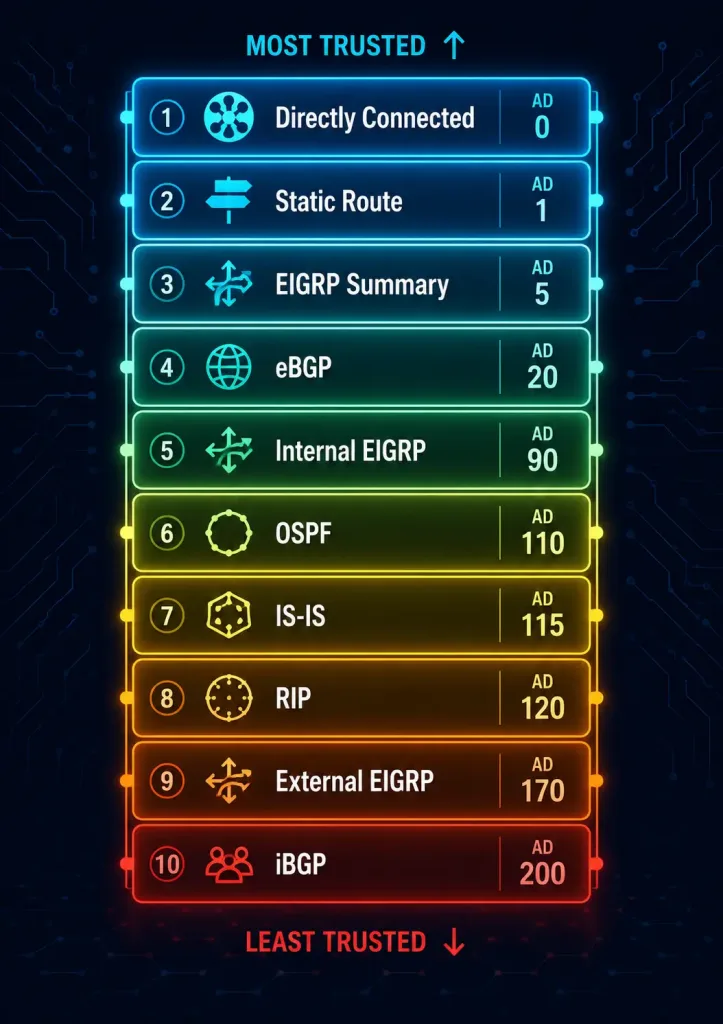
Worked Example: Multiple Sources to the Same Destination
Consider a router that learns a route to 10.0.0.0/24 from three different sources at once: a static route (AD 1), an OSPF route (AD 110), and an EIGRP route (AD 90). Only one of these will actually be installed in the routing table — the static route, since AD 1 is the lowest of the three. The show ip route output would show only the winning route:
Router# show ip route 10.0.0.0
Routing entry for 10.0.0.0/24
  Known via "static", distance 1, metric 0
  Routing Descriptor Blocks:
  * 10.0.0.2
      Route metric is 0, traffic share count is 1
If that static route were later removed, the router would re-evaluate the remaining sources and install the EIGRP route instead (AD 90), since it’s now the lowest AD available. Only if the EIGRP route also disappeared would OSPF’s route (AD 110) finally get installed. This layered fallback behavior is exactly why AD matters — it defines a clear, predictable pecking order among every possible route source, rather than leaving route selection to chance.
Administrative Distance vs. Metric
It’s crucial to distinguish between AD and metric, since they operate at entirely different stages of route selection:
- AD determines trustworthiness between different routing sources — comparing a static route against an OSPF route, for instance.
- Metric determines the best path within the same routing protocol — comparing two different OSPF routes to the same destination using OSPF cost.

An OSPF route (AD 110) will always be preferred over a RIP route (AD 120) to the same destination, even if the RIP route technically has a “better” metric, such as fewer hops. AD is evaluated first and takes absolute priority; metric is only ever used as a tiebreaker between routes that already share the same AD.
Configuring Administrative Distance
Administrators can adjust AD values, though the exact command syntax differs depending on the protocol.
Changing a static route’s AD — append the desired AD value directly to the ip route command. To configure a static route with AD 150 instead of the default 1:
Router(config)# ip route 192.168.1.0 255.255.255.0 10.0.0.2 150Adjusting OSPF’s AD — use the distance command inside the OSPF routing process. To set OSPF’s AD to 100 globally:
Router(config)# router ospf 1
Router(config-router)# distance 100
Adjusting EIGRP’s AD — EIGRP uses a slightly different syntax that lets you set separate distances for internal and external routes:
Router(config)# router eigrp 100
Router(config-router)# distance eigrp 80 150
In this example, 80 sets the AD for internally-learned EIGRP routes, and 150 sets the AD for externally-redistributed EIGRP routes — reflecting the same internal/external distinction shown in the default values table above.
Caution: Incorrect AD configurations are one of the more common causes of unexpected routing behavior in production networks, since a badly chosen AD can silently override a route you actually wanted the router to prefer.
Administrative Distance in Route Redistribution
Route redistribution happens when routes learned from one routing protocol are shared into another — for example, redistributing EIGRP routes into OSPF. AD plays a critical role here: when a route is redistributed, the router assigns it the AD of the target protocol, not the AD of the protocol it originally came from.
For example, if network 10.0.0.0/24 is learned natively via EIGRP (AD 90) and that same network is also redistributed into OSPF (which assigns it OSPF’s AD of 110), the router still prefers the native EIGRP route, since 90 is lower than 110 — even though both routes ultimately point toward the same destination.
To prioritize the redistributed OSPF routes instead, you can manually lower the AD assigned specifically to redistributed (“external”) OSPF routes:
Router(config)# router ospf 1
Router(config-router)# redistribute eigrp 100 subnets
Router(config-router)# distance ospf external 80
This sets the AD of redistributed OSPF routes to 80, making them preferred over EIGRP’s native routes (AD 90) for any network learned through both paths.
Best practices for redistribution:
- Avoid loops — ensure AD values align with your overall network design before changing them, since redistribution combined with mismatched AD values is a common source of routing loops.
- Test changes — use
show ip routeto verify which route actually gets installed after any AD modification. - Document changes — always record AD modifications, since a non-default AD value can be genuinely confusing to a future engineer troubleshooting the network without that context.
Troubleshooting with Administrative Distance
AD-related issues typically show up as routes being selected in ways that don’t match what an engineer expected. Two common scenarios illustrate how to diagnose and resolve them.
Case Study 1: Static Route Unexpectedly Overriding OSPF
Scenario: A router has a static route to 10.0.0.0/24 (AD 1) and an OSPF route to the same network (AD 110). Traffic unexpectedly uses the static route instead of the intended OSPF path.
Router# show ip route
...
S    10.0.0.0/24 [1/0] via 10.0.0.2
O    10.0.0.0/24 [110/20] via 10.0.0.3
Solution: Increase the static route’s AD above OSPF’s, so OSPF wins instead:
Router(config)# no ip route 10.0.0.0 255.255.255.0 10.0.0.2
Router(config)# ip route 10.0.0.0 255.255.255.0 10.0.0.2 150
Verification:
Router# show ip route
...
O    10.0.0.0/24 [110/20] via 10.0.0.3
Case Study 2: Floating Static Route as a Backup Path
Scenario: A network uses OSPF (AD 110) as its primary routing protocol, with a floating static route (AD 200) intended to serve purely as a backup.
Router# show ip route
...
O    192.168.1.0/24 [110/30] via 10.0.0.2
If the OSPF route later fails, the floating static route takes over automatically:
Router# show ip route
...
S    192.168.1.0/24 [200/0] via 10.0.0.3
Solution/verification: Confirm the static route’s AD is genuinely higher than OSPF’s, so it only activates as intended:
Router(config)# ip route 192.168.1.0 255.255.255.0 10.0.0.3 200General Troubleshooting Tips
show ip route— check the AD value shown in brackets for each route (the first number in[AD/metric]) to confirm which source actually won.debug ip routing— monitor route changes in real time when diagnosing an intermittent or hard-to-reproduce AD-related issue.- Verify configuration — confirm any AD modifications genuinely align with your intended network design, rather than assuming a change had the expected effect without checking.
Conclusion
Administrative Distance is a foundational concept in Cisco networking that ensures routers select the most reliable path when multiple routes to the same destination exist. By understanding the default AD values, how AD differs from metric, how it behaves during redistribution, and how to troubleshoot AD-related routing surprises, network engineers can build more predictable, well-documented network designs. Mastery of this concept is essential both for CCNA certification and for real-world network troubleshooting.
Key takeaways:
- A lower AD value means a more trustworthy route source.
- AD is always evaluated before metric — metric only matters when AD is tied.
- Route redistribution assigns a route the AD of the target protocol, not its original source.
- Always verify AD values with
show ip routeafter any configuration change.