
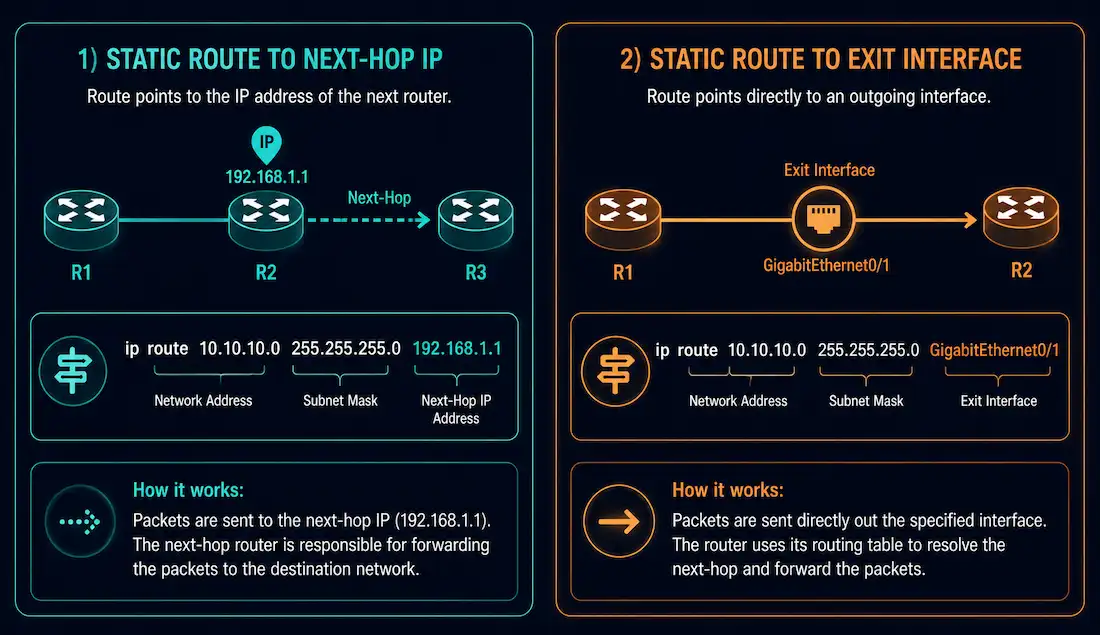
A static route can point to a destination in one of two ways: by specifying the next-hop IP address, or by specifying the exit interface directly. This second form — using the exit interface — is what’s called a directly connected static route, and understanding when and why to use it is a useful piece of CCNA and CCNP knowledge, even though modern Cisco Express Forwarding (CEF) has made the historical performance argument for it mostly obsolete. It’s a small configuration detail, but it shows up regularly in certification questions and in real router configurations, so it’s worth understanding thoroughly rather than treating it as a footnote to ordinary static routing.
The Recursive Lookup Problem
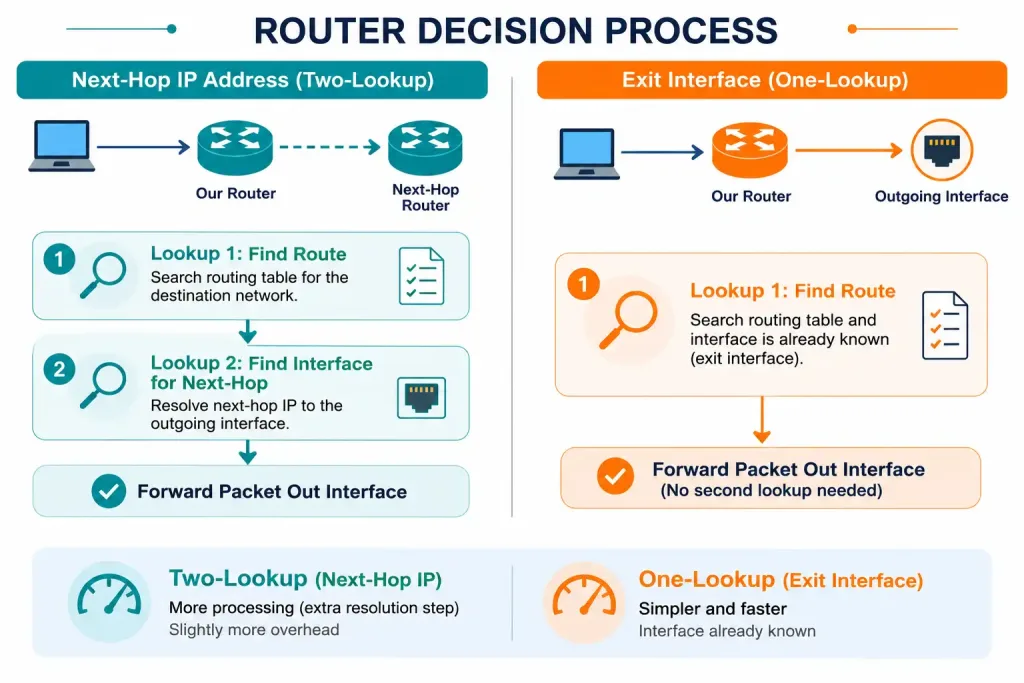
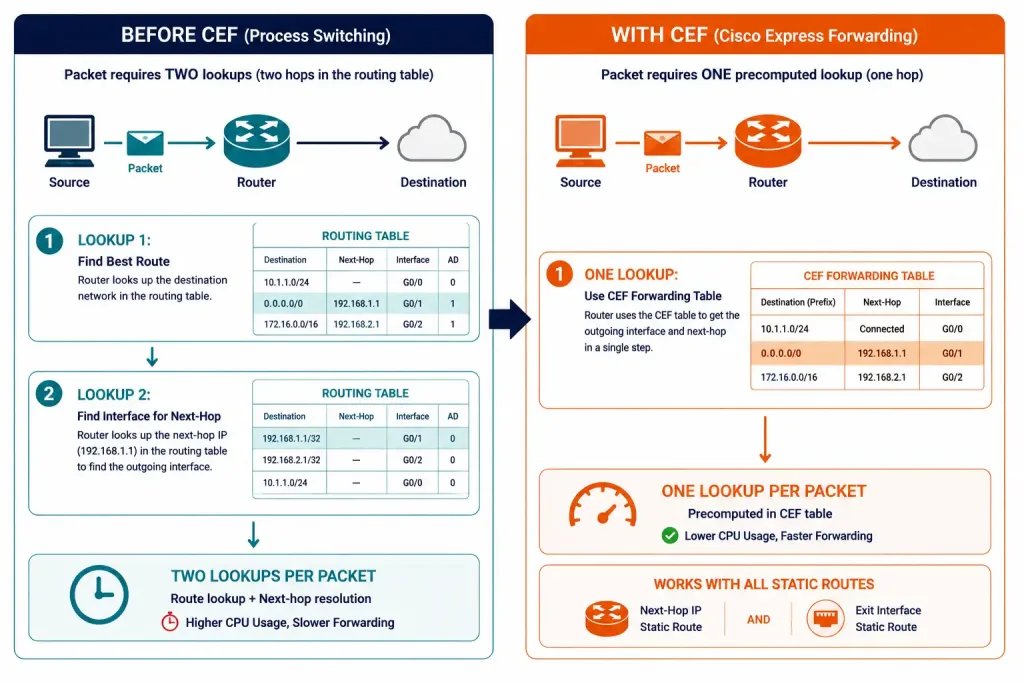
Before CEF became the default forwarding mechanism, a static route configured with a next-hop IP address required the router to perform two lookups for every packet: first to find the route matching the destination network, and then a second lookup to determine which physical interface actually reaches that next-hop IP address. This second step is called a recursive lookup.
Configuring the static route with the exit interface instead of a next-hop IP address skips that second lookup entirely. The router already knows which interface to use — it’s specified directly in the route — so it resolves the outgoing interface in a single search rather than two. This is what “directly connected static route” refers to: the route behaves, in terms of lookup efficiency, more like a directly connected network than a typical static route to a remote next hop.
CEF eliminates the recursive-lookup performance penalty for next-hop-based static routes as well, by pre-building forwarding tables with adjacency information already resolved. So on modern IOS, the performance difference between the two approaches is largely historical — but the configuration technique itself is still valid, still tested on certification exams, and still used deliberately in certain topologies.
Configuring a Directly Connected Static Route
Take a topology where Router1 needs static routes to two networks: 192.168.10.0/24, reachable out FastEthernet0/0, and 192.168.30.0/24, reachable out FastEthernet0/1.
Router1(config)# ip route 192.168.10.0 255.255.255.0 FastEthernet0/0
Router1(config)# ip route 192.168.30.0 255.255.255.0 FastEthernet0/1
Notice the difference from a typical static route: instead of a next-hop IP address as the final argument, each command specifies the exit interface directly.
Verifying the Configuration
Router1# show ip route staticExpected output:
S    192.168.10.0/24 is directly connected, FastEthernet0/0
S    192.168.30.0/24 is directly connected, FastEthernet0/1
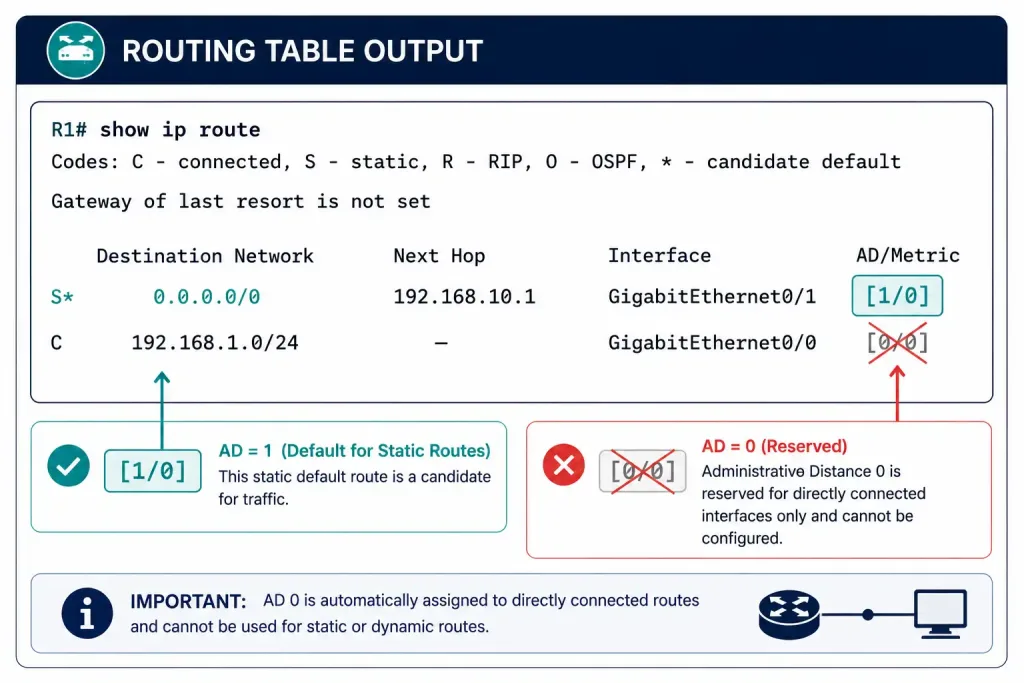
Two details are worth noticing in this output. First, the routing table entry says “is directly connected” — but that phrasing describes how the route resolves its next hop, not its administrative distance. Second, and more importantly: the administrative distance of this route is still 1, exactly like any other static route. Only a genuinely directly connected interface — one configured with ip address directly, not a static route pointing at an interface — has an administrative distance of 0. Confirm this with:
Router1# show ip route 192.168.10.0The output will show [1/0] for this route, confirming an AD of 1 and a metric of 0, not AD 0.
When a packet destined for 192.168.10.0/24 arrives, Router1 checks the routing table, finds the match, and forwards the packet straight out FastEthernet0/0 — no second lookup required, regardless of whether the router is running CEF or not.
[See Infographic: Verifying AD Stays at 1, Not 0]
When to Use an Exit Interface vs. a Next-Hop IP Address
This choice isn’t just a historical artifact — it still matters for correctness, not just performance, depending on the type of link involved.
Point-to-point links (such as serial WAN links or point-to-point Ethernet) are a good fit for exit-interface static routes. There’s exactly one device on the other end of the link, so there’s no ambiguity about where traffic destined for that interface actually goes. Using the exit interface here is common practice and doesn’t introduce any downside.
Multipoint or broadcast interfaces (such as a standard Ethernet segment with multiple devices) are a different story. Pointing a static route at an exit interface on this kind of link is ambiguous — the router doesn’t know which specific device on that segment should actually receive the traffic, so it falls back to sending an ARP request for every destination address covered by the route, which is unnecessary overhead and, at scale, a legitimate performance concern. On multipoint or broadcast interfaces, pointing the static route at a specific next-hop IP address is the more appropriate and more common choice.
| Link Type | Recommended Method | Why |
|---|---|---|
| Point-to-point (serial, P2P Ethernet) | Exit interface | No ambiguity — only one device on the other end |
| Multipoint / broadcast (Ethernet segment) | Next-hop IP address | Avoids unnecessary ARP overhead for every destination |
Comparing the Two Configuration Styles
Configuring the same destination network both ways illustrates the difference directly:
! Next-hop IP address style
Router1(config)# ip route 192.168.10.0 255.255.255.0 10.1.1.2

! Exit interface style
Router1(config)# ip route 192.168.10.0 255.255.255.0 FastEthernet0/0
Both produce a working route to 192.168.10.0/24 with the same administrative distance of 1. The routing table output differs slightly — the next-hop version shows via 10.1.1.2, while the exit-interface version shows is directly connected, FastEthernet0/0 — but functionally, on a point-to-point link, they behave the same way. Either style will forward matching traffic correctly; the choice mainly affects lookup behavior on pre-CEF platforms and, more relevantly today, whether the link type makes an exit interface unambiguous in the first place.
IPv6 Directly Connected Static Routes
The same exit-interface technique works with IPv6 static routes, using the same underlying logic:
Router1(config)# ipv6 route 2001:DB8:10::/64 FastEthernet0/0
Router1(config)# ipv6 route 2001:DB8:30::/64 FastEthernet0/1
Verify with:
Router1# show ipv6 route staticThe output follows the same pattern as IPv4 — the route displays as directly connected via the specified interface, and the administrative distance remains 1, not 0, for exactly the same reason as the IPv4 case. The point-to-point versus multi-access guidance also carries over unchanged: exit-interface IPv6 static routes are appropriate on point-to-point links, while next-hop-address-based routes are the safer choice on broadcast or multi-access IPv6 segments, where the same neighbor-discovery overhead concern applies in place of IPv4’s ARP overhead.
Troubleshooting Directly Connected Static Routes
Route disappears when the interface goes down. Unlike a next-hop-based static route, which can sometimes remain in the table depending on how reachability is tracked, an exit-interface static route is directly tied to that interface’s up/down state. If the physical interface or line protocol goes down, the route is removed from the routing table immediately. Check interface status with show interfaces FastEthernet0/0 and confirm both the interface and line protocol show “up” before assuming the route configuration itself is the problem.
Unexpected ARP traffic on a multi-access link. If a directly connected static route was mistakenly configured on an Ethernet segment with multiple devices rather than a genuine point-to-point link, watch for excessive ARP requests using debug arp (used cautiously, and only briefly on a production device). This is usually the clearest sign the route should be reconfigured to use a next-hop IP address instead of the exit interface.
Route appears in the table but traffic isn’t forwarding correctly. Confirm the destination network and mask in the static route actually match what’s expected with show ip route static, and separately confirm the interface itself has a correctly configured IP address in the right subnet with show ip interface brief. A directly connected static route only works correctly if the interface it references is both up and correctly addressed for the topology it’s part of.
Administrative distance shows unexpectedly. If show ip route shows an AD other than 1 for a route that should be a plain directly connected static route, check the running configuration for a manually specified distance value at the end of the ip route command — for example, a leftover floating-route AD from an earlier configuration change that wasn’t cleaned up.
Example Topology
[See Topology Diagram: Router1 with Two Directly Connected Static Routes]
A practical lab: connect Router1 to two separate point-to-point serial or Ethernet links, each leading to a different downstream network — 192.168.10.0/24 and 192.168.30.0/24 in the example above. Configure both static routes using the exit-interface method, verify with show ip route static, and confirm the AD shows as 1 (not 0) with show ip route 192.168.10.0. Then reconfigure the same routes using next-hop IP addresses instead, and compare the two show ip route outputs side by side to see exactly how the routing table entry differs between the two styles.
Frequently Asked Questions
What administrative distance does a directly connected static route have?
A directly connected static route — meaning a static route configured with an exit interface rather than a next-hop IP address — still has an administrative distance of 1, exactly like a next-hop-based static route. The routing table entry displaying “is directly connected” describes how the route resolves its outgoing interface, not its trustworthiness ranking. Only a genuinely connected interface, one configured with its own IP address rather than referenced by a static route, carries the administrative distance of 0.
Why would I use an exit interface instead of a next-hop IP address in a static route?
On a point-to-point link, using the exit interface avoids the historical recursive-lookup penalty, since the router already knows exactly which interface to use without a second table lookup. Even though Cisco Express Forwarding has largely eliminated that performance difference on modern routers, exit-interface static routes remain a valid, commonly tested, and sometimes deliberately used configuration technique. The main advantage today is really about the specific link type it’s being used on rather than raw performance.
Is it safe to use an exit interface for a static route on an Ethernet segment?
Generally, no — not on a multipoint or broadcast segment with more than one device. Pointing a static route at an exit interface on that kind of link is ambiguous about which specific device should actually receive the traffic, so the router resorts to sending an ARP request for every destination address the route covers, adding unnecessary overhead. A next-hop IP address is the more appropriate choice on Ethernet and other multi-access links, while an exit interface remains a solid choice on genuine point-to-point connections.
How is a directly connected static route different from a truly directly connected network?
A truly directly connected network is one where the router has an IP address configured directly on that interface — no static route is involved at all, and the administrative distance is 0. A directly connected static route is still a manually configured static route, just one that references an exit interface instead of a next-hop IP address as its way of reaching a remote network; it retains the standard static route administrative distance of 1. The “directly connected” wording in the routing table refers only to how the next hop is resolved, not to whether the destination network is actually attached to that interface.
Does CEF completely remove any reason to use an exit interface in a static route?
Not entirely — CEF removes the historical performance argument, since it eliminates the recursive-lookup penalty for next-hop-based static routes as well as exit-interface ones. What CEF doesn’t change is the topological argument: on a genuine point-to-point link, an exit interface is still an unambiguous, simple way to configure the route, and many administrators and course materials continue to use it for that reason alone. The choice today comes down more to link type and configuration clarity than to raw forwarding performance.



