
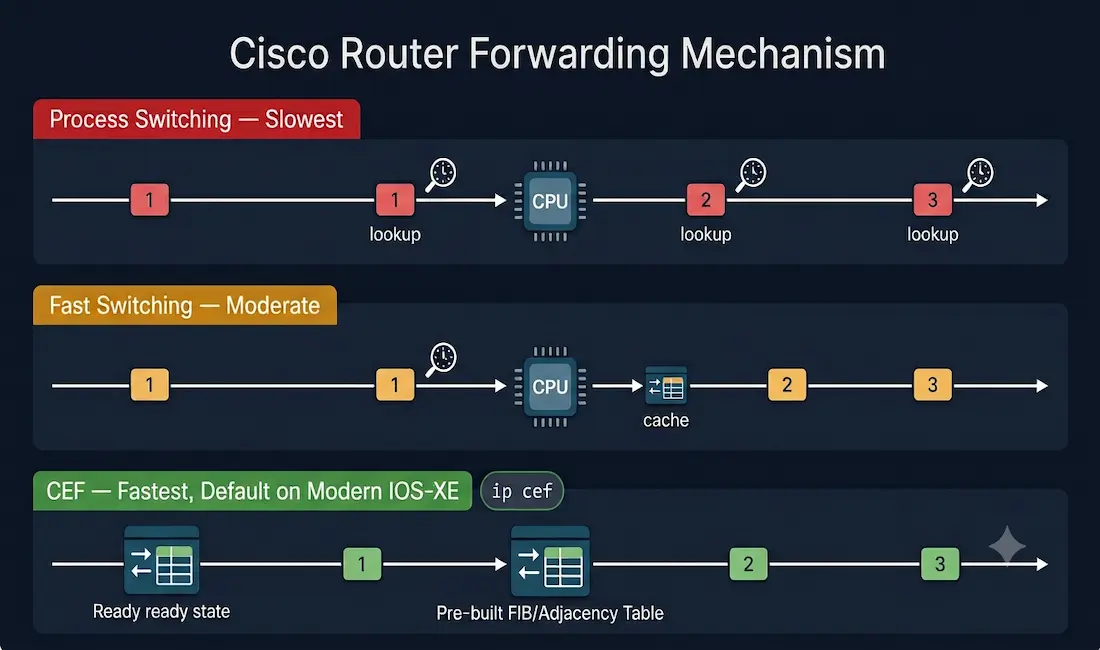
Understanding Cisco router forwarding mechanisms is a cornerstone of networking for CCNA and CCNP students. Routers, the backbone of network connectivity, rely on efficient packet-forwarding mechanisms to direct traffic toward its destination. Cisco routers support three primary methods, Process Switching, Fast Switching, and Cisco Express Forwarding (CEF), each with unique characteristics affecting performance, scalability, and resource usage. This article covers all three mechanisms with clear explanations, configuration steps for both legacy and current IOS syntax, and practical troubleshooting guidance.
Process Switching
Process switching is the most basic and resource-intensive packet-forwarding mechanism in Cisco routers. When a packet arrives at an interface, the router’s CPU processes it by performing the following steps:
- Packet Reception: The packet is received and stored in the router’s system memory.
- Routing Table Lookup: The CPU performs a full lookup in the routing table to determine the destination interface and next-hop address.
- Frame Encapsulation: The packet is encapsulated in the appropriate data link layer frame for the outgoing interface.
- Packet Forwarding: The packet is sent out via the exit interface.
Key Characteristics
- High CPU Usage: Each packet requires individual processing, leading to significant CPU overhead, especially under high traffic loads.
- Memory Impact: Packets are stored in system memory, which can strain resources in low-memory devices.
- Use Case: Rarely used in modern networks due to its inefficiency, but useful for troubleshooting or specific scenarios requiring per-packet processing, for example, temporarily forcing process switching to capture detailed per-packet behaviour while diagnosing a suspected forwarding issue.
Example Scenario
Imagine a small branch office router receiving 100 packets per second, all destined for the same subnet. With process switching, the CPU processes each packet individually, leading to potential delays and high CPU utilization. This makes process switching unsuitable for high-traffic environments.
Configuration (Legacy IOS)
On classic IOS platforms, process switching can be forced on an interface by disabling the fast-switching cache:
Router> enable
Router# configure terminal
Router(config)# interface FastEthernet0/0
Router(config-if)# no ip route-cache
Modern hardware note: on current IOS-XE platforms, including the ISR4000 series, Catalyst 9000 series, and most current virtual IOS-XE images, CEF-based forwarding is the only forwarding path implemented in hardware, and this legacy command may not be present or may not produce the described behaviour. This configuration and the concept it demonstrates remains directly relevant for CCNA/CCNP exam questions and for understanding legacy platforms, but should not be expected to force a visible fallback to process switching on modern hardware.
Verification
Check if process switching is enabled:
Router# show ip interface FastEthernet0/0 | include route-cacheFigure 1 illustrates the packet-forwarding behaviour of process switching. Assume a traffic flow consists of three packets, all destined for the same destination. With process switching, each packet must be processed by the CPU one by one, with no reuse of previous lookup results.
Fast Switching
Fast switching improves upon process switching by using a cache to store next-hop information, reducing CPU involvement for subsequent packets to the same destination. When a packet arrives:
- Initial Processing: The first packet to a destination is process-switched, and the CPU performs a routing table lookup.
- Cache Creation: The forwarding information (next-hop address, exit interface, and Layer 2 details) is stored in the fast-switching cache.
- Subsequent Packets: Additional packets to the same destination use the cached information, bypassing full routing table lookups.
Key Characteristics
- Improved Speed: Significantly faster than process switching due to cache utilization.
- Limitations: Cache invalidation occurs when the routing table changes (for example, route flaps), requiring new process-switched lookups for the affected destinations.
- Use Case: Suitable for small to medium networks with stable routing tables, but less efficient for dynamic environments like internet backbones, where frequent route changes repeatedly invalidate cache entries.
Configuration (Legacy IOS)
Router> enable
Router# configure terminal
Router(config)# interface FastEthernet0/0
Router(config-if)# ip route-cache
Router(config)# interface FastEthernet0/1
Router(config-if)# ip route-cache
Modern hardware note: as with process switching, fast switching as a distinct, separately configurable forwarding path is largely a legacy concept. Modern IOS-XE platforms operate exclusively on CEF-based hardware forwarding, and these commands are retained here for CCNA/CCNP conceptual understanding and for working with legacy or classic IOS platforms rather than as an expected configuration step on current hardware.
Verification
Router# show ip interface FastEthernet0/0 | include route-cache
Router# show ip cache
Figure 2 illustrates fast switching, where only the first packet of a flow is process-switched and then stored in the fast-switching cache. Subsequent packets in the same flow are forwarded quickly based on the cached information, without a repeated full routing table lookup.
Practical Note
Fast switching is less common in modern Cisco devices, as CEF is the default. However, understanding the concept, and specifically the distinction between fast switching’s reactive, per-flow cache and CEF’s proactive, pre-built forwarding table, remains directly relevant for CCNA/CCNP exam questions and for working with legacy systems.
Cisco Express Forwarding (CEF)
Cisco Express Forwarding (CEF) is the most advanced and efficient packet-forwarding mechanism in Cisco routers. Unlike process or fast switching, CEF builds its forwarding tables proactively, before packets arrive, making it ideal for high-performance networks.
How CEF Works
CEF uses two key data structures:
- Forwarding Information Base (FIB): A mirror of the routing table, optimized for fast lookups. It contains pre-computed next-hop information, including IP addresses, interfaces, and Layer 2 headers.
- Adjacency Table: Stores Layer 2 information, such as MAC addresses, for directly connected devices, enabling quick frame encapsulation without a live ARP lookup at forwarding time.
Key Characteristics
- Proactive Cache Building: CEF constructs the FIB and adjacency table when the network topology stabilizes, not when packets arrive, eliminating the “first packet is slow” behaviour inherent to fast switching.
- Scalability: Handles large routing tables and high traffic volumes, making it ideal for enterprise and service provider networks.
- Use Case: Default in modern Cisco IOS versions, including IOS-XE, and foundational to SD-WAN, MPLS, and data centre environments.
Configuration
Modern IOS/IOS-XE (current standard): CEF is enabled globally by default. To explicitly enable or verify it:
Router> enable
Router# configure terminal
Router(config)# ip cef
This single global command is the primary, current-standard way CEF is enabled and referenced on modern platforms, and is the command most directly relevant for present-day CCNA study.
Legacy per-interface syntax (older IOS platforms): on some older IOS releases, CEF could also be toggled at the interface level:
Router(config)# interface FastEthernet0/0
Router(config-if)# ip route-cache cef
Router(config)# interface FastEthernet0/1
Router(config-if)# ip route-cache cef
This interface-level command is retained here for completeness when working with legacy equipment or older exam material, but the global ip cef command is what you will encounter on virtually all current IOS-XE deployments.
Verification
Router# show ip cef
Router# show adjacency
Router# show cef interface FastEthernet0/0
show cef interface provides a per-interface view confirming CEF is active on that specific interface, complementing the global show ip cef output.
Figure 3 illustrates the CEF process, where the FIB and adjacency tables are built once the network has converged, allowing all subsequent packets to be forwarded quickly using the pre-built tables rather than triggering new lookups.
Modern Context
CEF is the backbone of modern Cisco routers and switches, supporting technologies like SD-WAN and MPLS. Its ability to handle complex routing scenarios makes it essential for CCNP-level study and real-world deployments, and on current IOS-XE hardware, it is effectively the only forwarding path available, process and fast switching exist primarily as legacy concepts and exam topics rather than configurable alternatives.
Comparison of Packet Forwarding Mechanisms
| Feature | Process Switching | Fast Switching | Cisco Express Forwarding (CEF) |
|---|---|---|---|
| Speed | Slowest | Moderate | Fastest |
| CPU Usage | High | Moderate | Low |
| Cache Mechanism | None | Reactive (post-first packet) | Proactive (pre-built) |
| Scalability | Poor | Moderate | Excellent |
| Use Case | Troubleshooting, legacy platforms | Legacy networks | Modern enterprise/service provider, default on IOS-XE |
| Legacy Config Command | no ip route-cache | ip route-cache | ip route-cache cef (interface, legacy) |
| Modern Config Command | Not applicable on current IOS-XE | Not applicable on current IOS-XE | ip cef (global, current standard) |
Troubleshooting Packet Forwarding Issues
Common Issues and Solutions
- High CPU Usage (Process Switching)
- Symptoms: Router performance degrades under load.
- Solution: Verify whether process switching is unexpectedly active with
show ip interface | include route-cache. On current platforms, confirm CEF is active globally withshow ip cefand per-interface withshow cef interface.
- Cache Invalidation (Fast Switching)
- Symptoms: Intermittent packet drops or latency spikes coinciding with routing table changes.
- Solution: Check routing table stability with
show ip route. On legacy platforms still using fast switching, frequent route flaps causing repeated cache invalidation is a strong signal to migrate to CEF where the platform supports it.
- CEF Not Behaving as Expected
- Symptoms: Unexpected performance issues or forwarding failures in a high-traffic network.
- Solution: Confirm CEF is enabled globally with
show ip cef, confirm it on the specific interface withshow cef interface [id], and inspect the FIB and adjacency table directly for missing or incomplete entries withshow ip cef [prefix]andshow adjacency.
Verification Command Reference
| Command | Purpose |
|---|---|
show processes cpu | Monitor overall CPU usage |
show ip interface [id] | include route-cache | Check legacy process/fast switching status on an interface |
show ip cache | View the legacy fast-switching cache |
show ip cef | Inspect the global CEF Forwarding Information Base |
show cef interface [id] | Confirm CEF status on a specific interface |
show adjacency | Verify the CEF adjacency table (Layer 2 next-hop information) |
debug ip cef | Real-time CEF event debugging; use sparingly in production and always follow with undebug all |
CCNA Exam Pointers
- Three forwarding mechanisms, in order of increasing efficiency: Process Switching → Fast Switching → CEF
- Process switching performs a full routing table lookup for every packet; highest CPU cost
- Fast switching builds a cache reactively, after the first packet in a flow is process-switched
- CEF builds the FIB and Adjacency Table proactively, at topology convergence, before any packets arrive
- CEF is the default forwarding mechanism on all modern IOS and IOS-XE platforms
- Modern, current-standard CEF command:
ip cef(global configuration mode) - Legacy, interface-level CEF command on older platforms:
ip route-cache cef - On current IOS-XE hardware, process switching and fast switching are largely legacy/conceptual topics, not configurable alternatives, since CEF-based hardware forwarding is the only implemented path
show ip cef,show cef interface, andshow adjacencyare the primary CEF verification commands
Conclusion
Mastering Cisco’s packet-forwarding mechanisms, Process Switching, Fast Switching, and Cisco Express Forwarding, is essential for CCNA and CCNP students aiming to excel in certification exams and real-world networking roles. Process switching, while foundational to understanding how forwarding works at its most basic level, is resource-intensive and effectively absent as a configurable option on modern hardware. Fast switching improved on this with reactive caching but is similarly a legacy concept on current platforms. CEF, proactive, scalable, and the universal default on modern Cisco IOS-XE devices, is the mechanism you will actually configure, verify, and troubleshoot in real-world deployments, using the global ip cef command and the show ip cef / show cef interface / show adjacency verification toolkit.
Understanding all three mechanisms, including which ones remain practically configurable on the hardware you are actually working with, prepares you both for exam questions covering the full historical picture and for effective real-world router performance troubleshooting.
FAQs
What is the difference between process switching and CEF?
Process switching requires the router’s CPU to perform a full routing table lookup and forwarding decision for every single packet, making it slow and resource-intensive under any meaningful traffic load. CEF instead pre-builds a Forwarding Information Base (FIB) and Adjacency Table proactively, as soon as the network topology stabilizes, so that forwarding decisions for every subsequent packet are made from an already-computed table rather than requiring a fresh lookup. This proactive, pre-built approach is what allows CEF to sustain high throughput with minimal CPU overhead, in contrast to process switching’s per-packet CPU cost.
Why is CEF the default in modern Cisco routers?
CEF offers superior performance and scalability, handling large routing tables and high traffic volumes efficiently by eliminating both the per-packet CPU cost of process switching and the “slow first packet, cache invalidation on route change” behaviour of fast switching. On current IOS-XE platforms, CEF-based forwarding is implemented directly in hardware as the sole forwarding path, making it not just the preferred option but effectively the only forwarding mechanism actually available, which is why it ships enabled by default and generally cannot be disabled on modern router and switch platforms.
Can I use process switching in production networks?
Process switching is not recommended for production networks due to its high CPU usage under any significant traffic load, and on current-generation IOS-XE hardware it is not typically available as a configurable alternative to CEF at all. Historically, on older classic IOS platforms, process switching was occasionally used deliberately and temporarily for detailed per-packet troubleshooting, since forcing a specific packet down the process-switched path allows an engineer to capture and inspect its handling in detail, but this remains a diagnostic technique rather than a production forwarding strategy.
How do I verify if CEF is enabled on my router?
Use show ip cef to confirm CEF is enabled globally and to inspect the Forwarding Information Base contents, including specific destination prefixes with show ip cef [prefix]. Use show cef interface [interface-id] to confirm CEF is specifically active on a given interface, and show adjacency to verify the Layer 2 adjacency information CEF is using for frame encapsulation. On modern IOS-XE platforms, CEF is enabled by default globally, so these commands are primarily used to confirm expected state and to diagnose specific FIB or adjacency entries rather than to check whether CEF needs to be manually turned on.
Is fast switching still relevant for CCNA/CCNP exams?
Yes, understanding fast switching’s reactive caching model, and specifically how it differs from both process switching’s complete lack of caching and CEF’s proactive, pre-built approach, remains a directly testable CCNA and CCNP concept. However, it is important to understand that on current-generation hardware, fast switching is not typically a configurable forwarding option the way it was on classic IOS platforms; CEF is the only forwarding path implemented in modern router and switch hardware. Exam questions on fast switching should be understood as testing conceptual and historical knowledge of how Cisco forwarding evolved, rather than describing a configuration you would actually perform on a current production device.



