
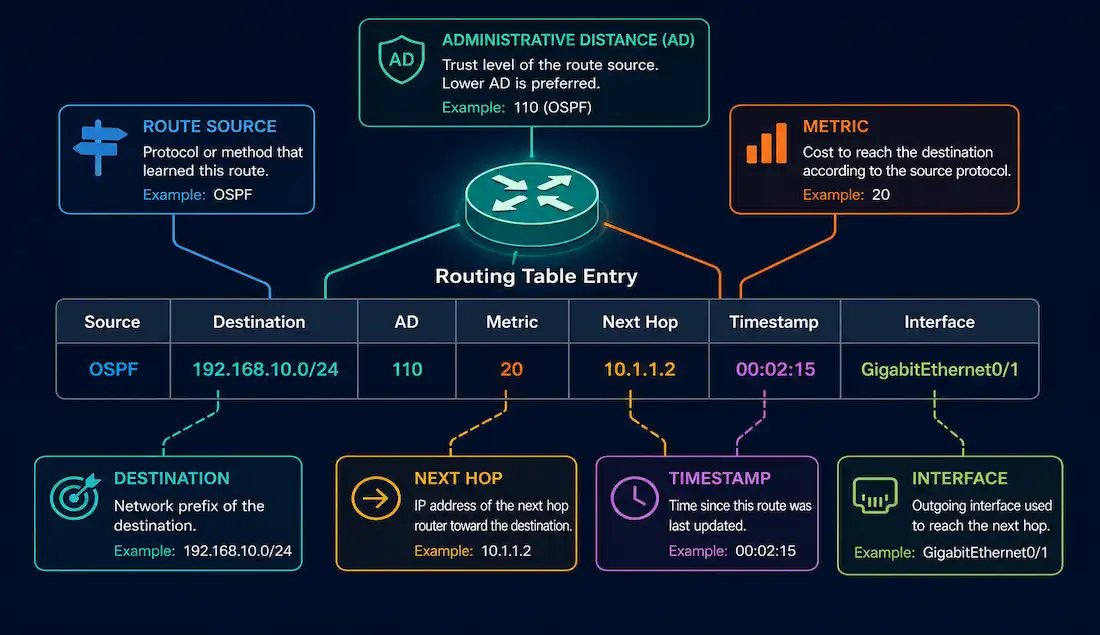
A router’s core job is directing traffic across multiple networks, and it does that using a routing table — a list of known networks and the directions to reach them. Each entry in that table is called a route entry, or simply a route. Understanding what information a route entry actually contains, and how a router chooses between competing entries when more than one could match a packet, is fundamental CCNA and CCNP material.
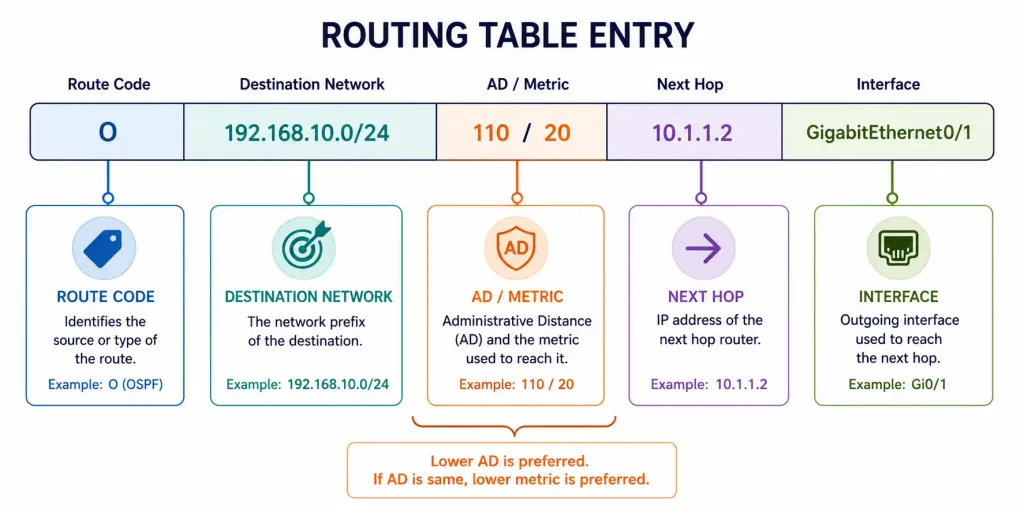
Where Routing Table Entries Come From
A route identifies a destination network — expressed as an IP address and a subnet mask — which can represent a full network, a subnetwork, a supernet, or even a single host route. Routing table entries can come from four sources:
- Directly connected networks
- Dynamic routing protocols, such as EIGRP, OSPF, and RIP
- Routes imported from other routers or virtual routers
- Statically configured routes
Directly Connected Route Entries
When a router interface is configured with an IP address and comes up (interface and line protocol both up), a directly connected route for that network is added to the routing table automatically — no configuration beyond the IP address itself is required.
Connected routes always take priority over static or dynamically learned routes to the same destination, because they carry an administrative distance of 0, the lowest possible value on the entire 0–255 AD scale. A directly connected route entry carries three key pieces of information:
- Route source — the code indicating how the route was learned. Directly connected routes use two codes: C, for the connected network itself, created automatically when an interface is activated with an IP address; and L, for the local route representing that interface’s own specific IP address. The L code is a relatively recent addition — it didn’t appear in routing table output before Cisco IOS release 15.
- Destination network — the network address reachable through this entry.
- Outgoing interface — the specific interface used to forward packets toward that destination.
Remote Route Source Codes
A router’s routing table holds both directly connected and remote routes together, and remote routes carry their own source codes identifying how each was learned:
| Code | Source | Meaning |
|---|---|---|
| S | Static | Manually configured by an administrator |
| D | EIGRP | Learned dynamically via EIGRP |
| O | OSPF | Learned dynamically via OSPF |
| R | RIP | Learned dynamically via RIP |
What a Remote Route Entry Contains
A full route entry for a remote network — one not directly connected to the router — carries considerably more information than a connected route does. Take a representative entry for the remote network 192.168.0.0/24, learned via EIGRP:
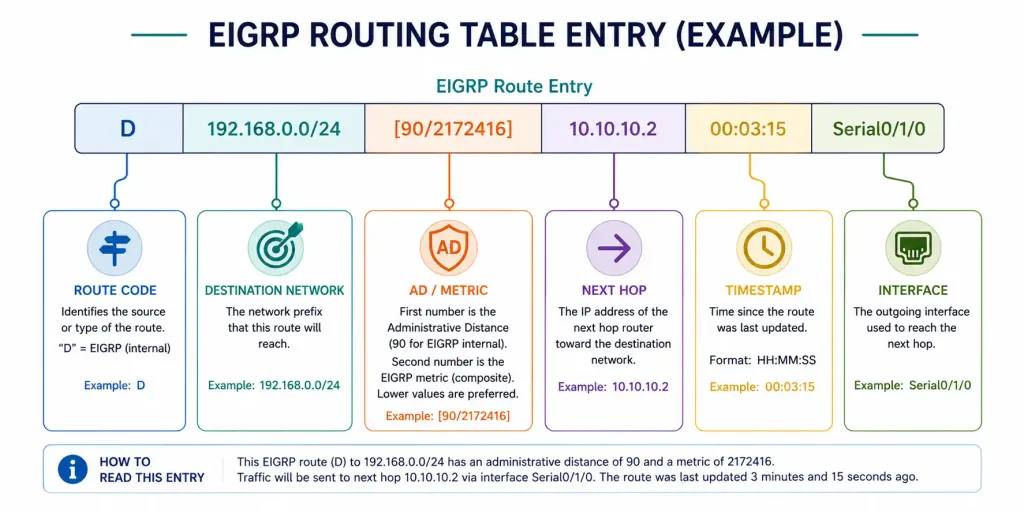
D 192.168.0.0/24 [90/2172416] via 10.10.10.2, 00:14:22, Serial0/1/0Breaking this down field by field:
- Route source —
D, confirming this route was learned via EIGRP. - Destination network —
192.168.0.0/24, the network this entry reaches. - Administrative distance —
90, the first number in brackets, reflecting how trustworthy this route source is considered relative to other possible sources. - Metric —
2172416, the second number in brackets — EIGRP’s composite metric in this case. Lower metric values are preferred; this number is only compared against other EIGRP routes to the same destination, since different protocols calculate metrics on entirely different scales. - Next hop —
10.10.10.2, the IPv4 address of the next router along the path. - Route timestamp —
00:14:22, how long ago this route was last confirmed or updated. - Outgoing interface —
Serial0/1/0, the interface used to forward matching packets.
How the Routing Table Lookup Process Actually Works
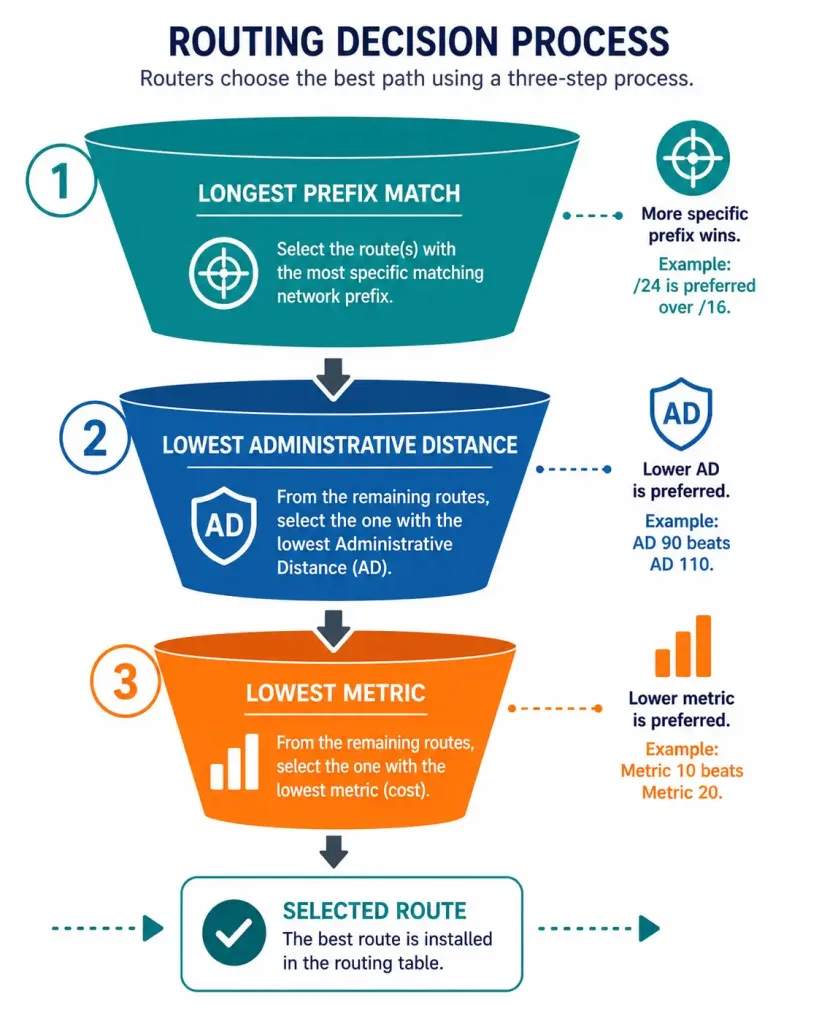
Knowing what a route entry contains is only half the picture — the more important question is how a router chooses between multiple entries when more than one could plausibly match a packet’s destination. This is the actual lookup process, and it follows a strict, three-step priority order.
Step 1 — Longest prefix match. The router first identifies every entry in the table whose network address matches the destination, then selects the entry with the most specific match — the longest subnet mask, or prefix length. A route to 192.168.0.0/24 is more specific than a route to 192.168.0.0/16, and if both exist and a packet is destined for an address inside 192.168.0.0/24, the more specific /24 route wins regardless of its source or administrative distance. This is the single most important rule in the entire lookup process, and it takes priority over every other factor.
Step 2 — Lowest administrative distance. If two or more routes to the exact same destination (identical network address and mask) exist from different sources — say, a static route and an OSPF-learned route to the same /24 network — the router selects the one with the lower administrative distance. A static route (AD 1) would win over an OSPF route (AD 110) to that identical destination.
Step 3 — Lowest metric. If multiple routes to the same destination come from the same source — for example, two EIGRP routes to the same network via different paths — administrative distance ties, since they’re identical. The router then falls back to the metric, selecting whichever path has the lower value according to that protocol’s own metric calculation.
Only when all three of these are tied does a router install multiple routes and load-balance across them, which some protocols support explicitly (EIGRP supports unequal-cost load balancing; most others support equal-cost only).
IPv6 Routing Table Entries
IPv6 routing tables function on the same underlying principles as IPv4 — the same longest-prefix-match-then-AD-then-metric priority order applies — but with IPv6-specific codes and addressing. View the IPv6 routing table with show ipv6 route:
R1# show ipv6 route
IPv6 Routing Table - default - 6 entries
Codes: C - Connected, L - Local, S - Static, U - Per-user Static route
       B - BGP, R - RIP, D - EIGRP, O - OSPF Intra, OI - OSPF Inter

C    2001:DB8:CAFE:1::/64 [0/0]
     via GigabitEthernet0/0/0, directly connected
L    2001:DB8:CAFE:1::1/128 [0/0]
     via GigabitEthernet0/0/0, receive
S    2001:DB8:CAFE:3::/64 [1/0]
     via 2001:DB8:CAFE:1::2
O    2001:DB8:CAFE:4::/64 [110/20]
     via FE80::1, Serial0/1/0
The codes map closely to their IPv4 counterparts: C and L for connected and local routes, S for static, O for OSPF (OSPFv3 for IPv6 specifically), and so on. The main structural difference worth noting is that IPv6 next-hop addresses are frequently link-local (FE80:: range) rather than global unicast addresses, which is a direct consequence of how IPv6 routing protocols like OSPFv3 typically advertise next-hops — a topic covered in more depth in the IPv6 route next-hop guide.
Worked Example: Applying the Lookup Process
Suppose a router’s table contains these four entries, and a packet arrives destined for 192.168.1.50:
S    192.168.0.0/16 [1/0] via 10.1.1.1
O    192.168.1.0/24 [110/20] via 10.1.1.2
D    192.168.1.0/24 [90/2172416] via 10.1.1.3
D    192.168.1.0/24 [90/2684416] via 10.1.1.4
Walking through the lookup process step by step:
Step 1 — Longest prefix match. The destination 192.168.1.50 falls inside all four routes’ address ranges, but three of them — the /24 entries — are more specific than the /16 static route. Longest prefix match eliminates the /16 route immediately, regardless of its low AD of 1. This is worth sitting with: administrative distance never even gets a chance to matter here, because the /16 route simply isn’t as specific a match as the /24 routes.
Step 2 — Lowest administrative distance. Among the three remaining /24 routes, the OSPF route carries AD 110, while both EIGRP routes carry AD 90. The OSPF route is eliminated at this step, leaving only the two EIGRP entries.
Step 3 — Lowest metric. The two remaining EIGRP routes share the same AD (90), since they’re from the same protocol, so the router falls back to comparing metrics. The first EIGRP route has metric 2172416; the second has 2684416. The lower value wins, so the router installs the first EIGRP route — via 10.1.1.3 — as the active path to 192.168.1.0/24.
If the two EIGRP routes had carried identical metrics as well, the router would install both and load-balance traffic across them, since every prior tiebreaker would have been exhausted without producing a single winner.
Frequently Asked Questions
What are the key components of a Cisco routing table entry?
A full remote route entry includes a route source code identifying how the route was learned (such as D for EIGRP or O for OSPF), the destination network and mask, the administrative distance reflecting the route source’s trustworthiness, a metric used to compare routes from the same source, the next-hop IP address, a timestamp showing when the route was last confirmed, and the outgoing interface used to forward matching traffic. When more than one route could match a given destination, the router applies longest prefix match first, then administrative distance, and finally metric, in that specific order, to decide which single entry actually gets used.
How do directly connected routes appear in the Cisco routing table, and why do they always win?
Directly connected routes appear automatically once an interface is configured with an IP address and comes up, using the code C for the connected network itself and L for the interface’s own specific address — the L code only appearing in output from IOS 15 onward. These routes carry an administrative distance of 0, the lowest possible value on the entire scale, which is why a directly connected route always takes priority over a static or dynamically learned route to the same destination, without exception.
What is the role of administrative distance and metric in the routing table lookup process?
Administrative distance is used to choose between routes learned from different sources to the exact same destination network — lower values are more trusted, so a static route at AD 1 beats an OSPF route at AD 110 to that same destination. Metric only comes into play as a tiebreaker among routes from the same protocol, since different protocols calculate their metrics on entirely different, non-comparable scales — EIGRP’s composite metric and OSPF’s cost aren’t measuring the same thing, so they’re never compared against each other directly. Critically, both administrative distance and metric are only even considered after longest prefix match has already narrowed the field down to routes with the exact same destination network and mask.
How do IPv6 routing table entries differ from IPv4 in Cisco IOS?
IPv6 routing tables are viewed with show ipv6 route rather than show ip route, but use a very similar set of codes — C and L for connected and local, S for static, O for OSPF — and follow the exact same longest-prefix-match-then-AD-then-metric lookup logic as IPv4. The most noticeable practical difference is that IPv6 next-hop addresses are frequently link-local rather than global unicast addresses, a direct result of how protocols like OSPFv3 typically advertise their next-hops on a shared link.
What happens if two routes to the same destination have identical administrative distance and metric?
When a router finds two or more routes to the exact same destination with identical administrative distance and identical metric, it installs multiple routes into the routing table and load-balances traffic across them, rather than arbitrarily picking just one. Most routing protocols support equal-cost load balancing in this scenario; EIGRP additionally supports unequal-cost load balancing under certain configurations, allowing it to split traffic across paths with different metrics in proportion to their relative cost. This behavior only applies once longest prefix match, administrative distance, and metric have all failed to produce a single clear winner.



