
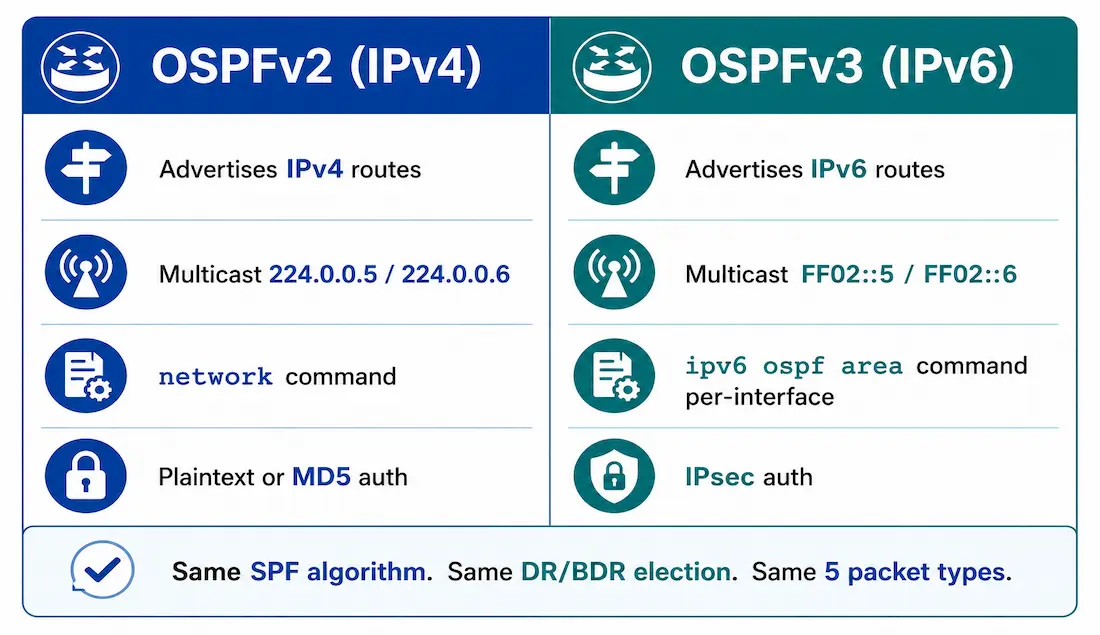
OSPFv3 is a routing protocol for IPv6, just as OSPFv2 is for IPv4. While both share core principles, there are vital differences in their operation. OSPFv3 serves as the IPv6 equivalent to OSPFv2 for exchanging prefixes, making it essential for modern networks handling dual-stack environments.
In IPv6, the network address is referred to as the prefix, and the subnet mask is called the prefix length. Similar to IPv4, OSPFv3 exchanges routing information to populate the IPv6 routing table with remote prefixes. The OSPFv3 Address Families (AF) feature supports both IPv4 and IPv6 within a single OSPF process, allowing efficient dual-stack routing — this enables multi-AF configurations, reducing overhead in mixed environments, a detail worth knowing at the CCNP level.
OSPFv2 operates over the IPv4 network layer, communicating with other OSPFv2 peers and advertising only IPv4 routes. OSPFv3 provides similar functionality but uses IPv6 as the network layer transport, communicating with OSPFv3 peers and advertising IPv6 routes. Unlike OSPFv2, it is designed to be network protocol independent, supporting extensions beyond IPv6.
OSPFv3 also uses the Shortest Path First (SPF) algorithm as the computation engine to determine the best paths throughout the routing domain — the same algorithm, run against a separate IPv6-specific database, covered in more depth in the Hello packets and OSPF convergence guide.
Separate Processes, Same Underlying Mechanics
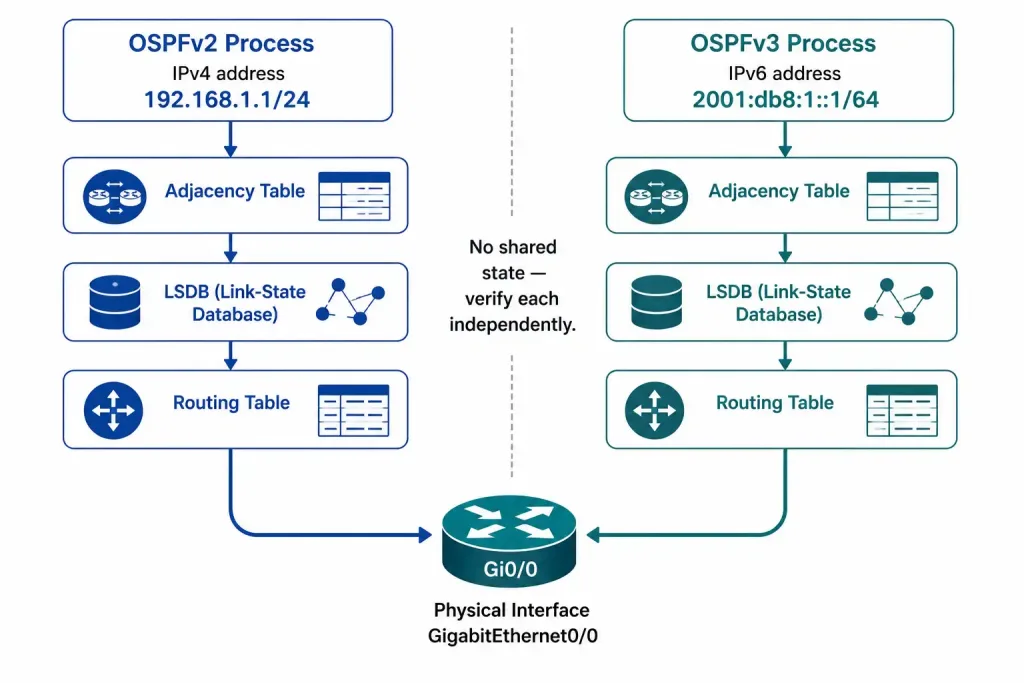
Like other IPv6 routing protocols, OSPFv3 runs a separate process from its IPv4 counterpart, OSPFv2. The processes and operations are similar but execute independently. Both maintain their own adjacency tables, OSPF topology tables (LSDBs), and IP routing tables — a router running both protocols simultaneously for dual-stack support is genuinely running two independent instances of OSPF side by side, not one instance handling both address families under the traditional configuration style.
| Component | OSPFv2 | OSPFv3 |
|---|---|---|
| Adjacency Table | IPv4-based | IPv6-based (link-local) |
| Topology Table | LSDB for IPv4 | LSDB for IPv6 |
| Routing Table | IPv4 routes | IPv6 routes |
Configuration and verification commands are similar between the two, for example show ip ospf versus show ipv6 ospf, which keeps the learning curve from OSPFv2 to OSPFv3 relatively short once the core concepts are already familiar.
Similarities Between Both Versions
- Link-state routing. Both use link-state algorithms and are classless.
- Routing algorithm. Both employ the SPF algorithm for routing decisions.
- Metric. Both use cost based on interface bandwidth, modifiable with
auto-cost reference-bandwidth. See the OSPF cost calculation guide for the full formula and worked examples — it applies identically to both versions. - Areas. Both support hierarchical areas for scalability.
- OSPF packet types. Same five packets: Hello, DBD, LSR, LSU, LSAck — see the Hello packets guide for full packet structure and the adjacency states each one drives.
- Neighbor discovery. Similar state machine; no subnet matching is required in OSPFv3, since it uses link-local addressing instead.
- DR/BDR election. Identical process — priority first, Router ID as the tiebreaker, covered in detail in the single-area OSPFv2 configuration guide.
- Router ID. 32-bit, prefers a manually configured ID or the highest loopback IPv4 address if none is set.
A Router ID Gotcha Specific to IPv6-Only Networks
That last point carries a real-world trap. OSPFv3’s automatic Router ID selection still looks for an IPv4 address to derive from — a quirk it inherited from OSPFv2 — even though OSPFv3 itself only routes IPv6. On a router with no IPv4 address configured anywhere, not even on a loopback, there’s nothing for that auto-selection to find, and OSPFv3 will fail to start correctly. In a genuinely IPv6-only deployment, manually configuring router-id is not just best practice — it’s required. This trips up engineers who assume OSPFv3’s IPv6-only design means router ID selection is IPv6-only too.
Differences Between Both Versions
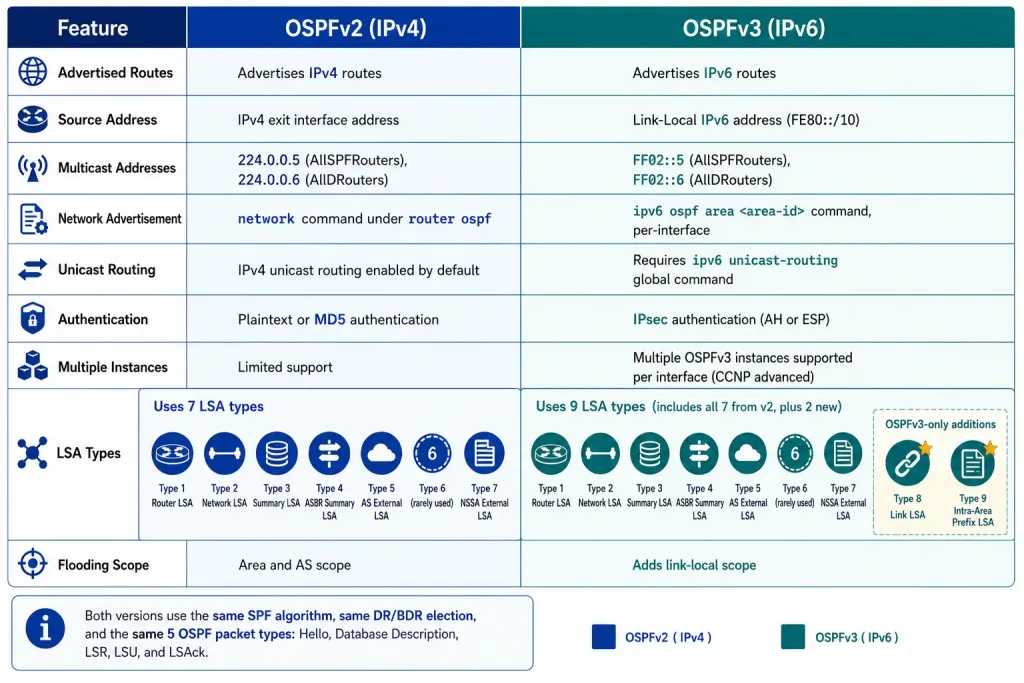
| Feature | OSPFv2 | OSPFv3 |
|---|---|---|
| Advertised Routes | IPv4 routes | IPv6 routes |
| Source Address | IPv4 exit interface | Link-local IPv6 address |
| Multicast Addresses | 224.0.0.5 (AllSPFRouters), 224.0.0.6 (AllDRouters) | FF02::5 (AllSPFRouters), FF02::6 (AllDRouters) |
| Network Advertisement | Uses network command | Uses ipv6 ospf process-id area area-id on interfaces |
| Unicast Routing | IPv4 enabled by default | Requires ipv6 unicast-routing |
| Authentication | Plaintext or MD5 | IPsec (AH/ESP) |
| Multiple Instances | Limited support | Supports multiple instances per interface (CCNP advanced) |
| LSA Types | Standard LSA types (1–7) | Introduces Type 8 (Link LSA), Type 9 (Intra-Area Prefix LSA); runs on links, not subnets |
| Flooding Scope | Area and AS scope | Adds link-local scope |
The multicast address change is a direct IPv6 translation, not a coincidence — FF02::5 and FF02::6 are the link-local-scope IPv6 equivalents of 224.0.0.5 and 224.0.0.6, serving the exact same roles (all SPF routers, and all DR/BDR routers respectively).
Worked Configuration Comparison
Seeing both configurations side by side makes the practical differences concrete. Enabling OSPF on a single interface in each version:
OSPFv2:
Router(config)# router ospf 1
Router(config-router)# router-id 10.10.10.1
Router(config-router)# network 192.168.1.0 0.0.0.255 area 0
OSPFv3 (traditional configuration style):
Router(config)# ipv6 unicast-routing
Router(config)# interface GigabitEthernet0/0
Router(config-if)# ipv6 ospf 1 area 0
Three structural differences jump out immediately. First, ipv6 unicast-routing is a prerequisite that OSPFv2 never needs, since IPv4 routing is enabled by default. Second, OSPFv3 is enabled directly under the interface rather than via a network statement matched against an address and wildcard mask — there’s no wildcard mask calculation involved at all in this style. Third, no router ID was set manually in this example, which works here only because the router has an IPv4 address configured elsewhere to auto-derive one from — a pure IPv6-only router would need an explicit router-id line per the gotcha above.
Cisco IOS also supports a newer, unified address-family style for OSPFv3, covered along with passive-interface configuration for both styles in the OSPF passive interfaces guide — useful to know since some platforms support only one style or the other, and the two aren’t interchangeable mid-configuration.
Verifying OSPFv3
Verification follows the same pattern as OSPFv2, with ipv6 substituted into each command:
Router# show ipv6 ospf neighbor
Router# show ipv6 ospf interface
Router# show ipv6 ospf database
For the full verification workflow — including the troubleshooting checklist for adjacency failures, LSA database interpretation, and debug commands — see the OSPF troubleshooting and verification guide. Every command and checklist item there applies to OSPFv3 as directly as it does to OSPFv2; only the command prefix changes.
Common Migration Pitfalls
- Forgetting
ipv6 unicast-routing. Without this global command, OSPFv3 never starts, and the symptom looks identical to a much more complicated problem — no neighbors, no LSDB, nothing to debug, because the process itself never came up. - Assuming OSPFv2 authentication config carries over. OSPFv2’s plaintext or MD5 authentication commands have no OSPFv3 equivalent — OSPFv3 relies on IPsec instead, a fundamentally different configuration surface, not a syntax variant of the same thing.
- Missing the Router ID requirement on IPv6-only routers. Covered above, but worth repeating as a checklist item: if a router has genuinely no IPv4 address anywhere,
router-idmust be set manually before OSPFv3 will function. - Mixing traditional and address-family OSPFv3 syntax. Pick one style per router and stay consistent — the two configuration modes aren’t meant to be combined on the same process.
Illustrative Scenario: The Missing Global Command
Here’s a common scenario, meant to show the troubleshooting logic in action rather than describe a specific real event.
A team migrating a branch office to dual-stack configures OSPFv3 on every interface using ipv6 ospf 1 area 0, mirroring the OSPFv2 configuration that’s already working fine. No neighbors ever appear in show ipv6 ospf neighbor, on any router, on any interface — not a partial adjacency, not a stuck state, just nothing at all.
Since OSPFv2 continues working perfectly on the same routers throughout, the team initially suspects something interface-specific — cabling, VLAN tagging, an IPv6 addressing mistake. Checking show ipv6 interface brief rules that out; every interface has a valid link-local address and shows up. The actual cause turns out to be simpler and easy to overlook precisely because it’s a single global command: ipv6 unicast-routing was never entered. Without it, IPv6 routing is disabled at the router level entirely, and no IPv6 routing protocol — OSPFv3 included — can function, regardless of how correctly each interface is configured underneath it.
Entering ipv6 unicast-routing in global configuration mode resolves it on all affected routers immediately, with adjacencies forming within seconds of the next Hello exchange. The broader lesson: when an IPv6 routing protocol shows zero activity across an entire router rather than a problem isolated to one interface, check the global enablement command before troubleshooting anything more specific.
Worked Example: Dual-Stack on One Interface
A single interface can run both OSPFv2 and OSPFv3 simultaneously, advertising an IPv4 subnet and an IPv6 prefix over the same physical link — this is exactly what dual-stack means in practice, two independent OSPF processes sharing the same wire.
Router(config)# ipv6 unicast-routing
Router(config)# interface GigabitEthernet0/0
Router(config-if)# ip address 192.168.1.1 255.255.255.0
Router(config-if)# ipv6 address 2001:db8:1::1/64
Router(config-if)# ipv6 ospf 1 area 0
Router(config-if)# exit
Router(config)# router ospf 1
Router(config-router)# router-id 10.10.10.1
Router(config-router)# network 192.168.1.0 0.0.0.255 area 0
Verifying both processes separately confirms they’re genuinely independent:
Router# show ip ospf neighbor
Router# show ipv6 ospf neighbor
Each command shows only its own protocol’s neighbors, even though both are running across the identical physical interface. A neighbor appearing in one output and not the other isn’t necessarily a problem — it means only one of the two OSPF processes has completed adjacency formation on that link so far, and the other should be checked independently using its own troubleshooting checklist rather than assumed to be in the same state.
FAQs
What are the key similarities between OSPFv2 and OSPFv3?
Both are link-state, classless protocols using the SPF algorithm for routing decisions. They share metrics based on interface cost, support hierarchical areas, use the same five OSPF packet types (Hello, DBD, LSR, LSU, LSAck), have identical DR/BDR election processes, and employ a 32-bit router ID. Neighbor discovery follows a similar state machine, though OSPFv3 skips subnet matching entirely since it relies on link-local addressing instead.
How do OSPFv2 and OSPFv3 differ in authentication and multicast addresses?
OSPFv2 uses plaintext or MD5 authentication and multicast addresses 224.0.0.5/224.0.0.6. OSPFv3 relies on IPsec (AH/ESP) for security instead, and uses the link-local IPv6 equivalents FF02::5/FF02::6. These changes reflect IPv6’s design more broadly — OSPFv3 also introduces link-local flooding scope and supports multiple instances per interface for advanced CCNP scenarios that OSPFv2 handles only with limited support.
What commands are used to configure OSPFv3 versus OSPFv2?
For OSPFv2, use router-mode commands like router ospf 1, router-id 10.10.10.1, and network 192.168.1.0 0.0.0.255 area 0. OSPFv3 requires ipv6 unicast-routing globally first, then interface-mode ipv6 ospf 1 area 0 on each participating interface. This per-interface approach in OSPFv3 simplifies IPv6 prefix advertisement without any wildcard mask calculation, though it does mean there’s no single router-mode network statement covering multiple interfaces at once.
Why does OSPFv3 introduce new LSA types like Type 8 and Type 9?
OSPFv3 operates on links rather than subnets, so Type 8 (Link LSA) handles link-local information and the IPv6 prefixes present on a given link, while Type 9 (Intra-Area Prefix LSA) advertises prefixes within an area independently of router topology information. This separates topology from addressing, a deliberate design change from OSPFv2’s more integrated approach, where router and network information carried prefix data directly in the same LSA.
How can I verify and troubleshoot OSPFv3 configurations?
Use show ipv6 ospf neighbor for adjacencies, the direct equivalent of show ip ospf neighbor in OSPFv2, and follow the same checklist logic — check router ID conflicts, authentication mismatches, and confirm ipv6 unicast-routing is actually enabled before assuming a more complex problem. For multi-area OSPFv3, verify that the separate IPv6 process and database are behaving as expected independently of any OSPFv2 process running on the same router, since the two never share state even when configured on the same interfaces for dual-stack support.



