Access Control Lists are a fundamental component of Cisco networking, filtering traffic based on predefined rules. For CCNA and CCNP students, understanding the exact order in which a router processes packets against an ACL — not just how to write one — is what separates a memorized configuration from a genuine understanding of why a rule behaves the way it does. This guide covers the underlying logic behind inbound and outbound ACLs, and how standard and extended ACLs reach a permit-or-deny decision differently.
This builds on the standard and extended ACL configuration guides — this piece focuses specifically on the processing logic underneath the syntax those guides cover.
Inbound ACL Logic
When a router receives a packet on an interface with an inbound ACL applied, it compares the packet’s header against the ACL’s entries in order, one at a time. The first entry that matches decides the outcome immediately — the rest of the list is never checked for that packet. If an entry doesn’t match, the router tests the packet against the next entry, continuing until either a match is found or the list is exhausted.
If the router reaches the end of the list with no match found, the implicit deny any applies. This statement never appears in show access-lists output — it exists, but silently, as covered in the ACL statistics guide — and it results in the packet being dropped rather than forwarded. This is exactly why every functional ACL needs at least one explicit permit statement: without one, the implicit deny catches everything, and the ACL blocks all traffic regardless of intent.
Critically, inbound ACL processing happens before the router makes any routing decision. The packet is checked against the ACL immediately upon arrival — if it’s denied, it’s dropped right there, and the routing table is never even consulted for that packet.
Outbound ACL Logic
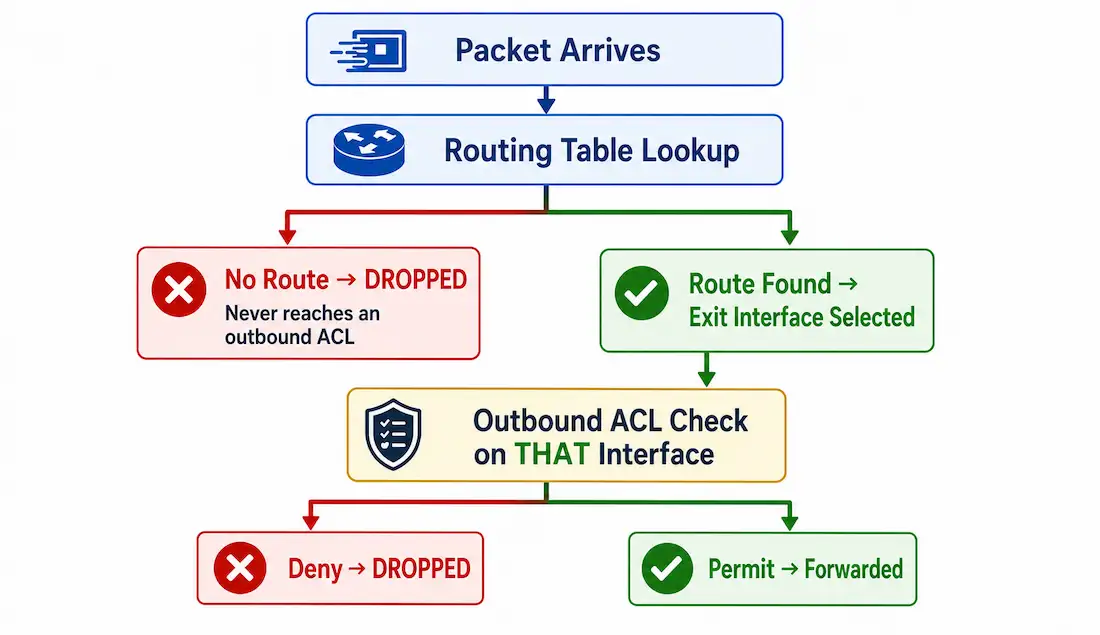
Outbound ACL processing follows a meaningfully different sequence. When a router receives traffic, it first sends the packet to the routing table for a forwarding decision. If no route exists for the destination, the packet is dropped at that point — an outbound ACL never even gets a chance to evaluate it. If a route does exist, the router determines which interface the packet will exit through, and only then checks whether that specific outbound interface has an ACL applied.
If the outbound interface has no ACL, the packet proceeds directly out. If it does, the packet is tested against that ACL’s entries before being allowed to leave — permitted or denied by the same first-match logic as inbound processing, just applied at a different point in the pipeline.
[See Infographic: Outbound ACL Processing Pipeline]
The practical difference this creates: an inbound ACL can reject a packet before the router does any real work on it at all, while an outbound ACL only ever sees packets the router has already decided how to route — meaning a packet can be dropped by routing (no route exists) for reasons that have nothing to do with any ACL, before an outbound ACL is ever consulted.
The Full Packet Processing Pipeline
Putting both directions together into a single pipeline, from arrival to departure:
- Layer 2 acceptance. The router checks the frame’s destination Layer 2 address against its own interface address, or confirms the frame is a broadcast. Frames that match neither are discarded immediately, before Layer 3 processing of any kind begins.
- De-encapsulation. The Layer 2 frame information is stripped off, exposing the Layer 3 packet.
- Inbound ACL check. If the inbound interface has an ACL applied, the packet is tested against it now — before routing.
- Routing decision. If the packet was permitted (or no inbound ACL existed), the router checks the routing table for a matching entry. No entry means the packet is dropped here.
- Outbound ACL check. If a route exists, the router identifies the exit interface and checks whether it has an ACL applied. If so, the packet is tested against it now.
- Re-encapsulation and forwarding. If permitted (or no outbound ACL existed), the packet is encapsulated in whatever Layer 2 protocol the outbound interface uses — which may differ entirely from the inbound interface’s Layer 2 protocol, such as Ethernet in and Serial/HDLC out — and forwarded to the next device.
A packet can be stopped at three genuinely different points in this pipeline — Layer 2 rejection, an inbound ACL deny, or an outbound ACL deny — and each one produces the same end result (the packet never arrives) for a different underlying reason, which matters when troubleshooting.
Worked Example: Tracing a Single Packet Through the Pipeline
Following one packet through all six stages makes the pipeline concrete. Suppose a router has an inbound ACL on its LAN-facing interface permitting HTTP traffic, and an outbound ACL on its WAN-facing interface permitting only established TCP connections outbound — matching the pattern from the extended ACL guide’s request/return example.
A web request arrives from a LAN host, destined for an external server on port 80:
- Layer 2 acceptance. The frame’s destination MAC matches the router’s LAN interface — accepted.
- De-encapsulation. The Ethernet frame is stripped away, exposing the IP packet.
- Inbound ACL check. The LAN interface’s inbound ACL is tested. The packet matches the permit statement for port 80 — it proceeds.
- Routing decision. The routing table has a route to the external server’s network via the WAN interface — the packet proceeds.
- Outbound ACL check. The WAN interface’s outbound ACL is tested. This ACL only permits established return traffic outbound, and this packet is a new outbound request, not a return — but since it’s genuinely leaving the network toward the internet rather than coming back in, in a real topology this direction would typically be governed by a separate, appropriately-scoped statement permitting new outbound requests, distinct from the established-only rule governing the return leg.
- Re-encapsulation and forwarding. Once permitted, the packet is re-encapsulated for the WAN interface’s Layer 2 protocol and sent on.
The return traffic from the server retraces this pipeline in the opposite direction: arriving on the WAN interface, checked against that interface’s inbound ACL if one exists, routed back toward the LAN, and checked against the LAN interface’s outbound ACL if one exists — a completely separate set of ACL evaluations from the outbound request’s trip, even though both belong to the same overall connection.
Standard ACL Decision Process
Standard ACLs examine only the packet’s source IP address — never destination, port, or protocol. IOS tests the source address against each condition in order; the first match decides whether the packet is permitted or denied, and testing stops immediately at that point. Because of this first-match behavior, statement order is critical — a broader statement placed ahead of a more specific one can shadow it entirely, exactly as covered in the standard ACL configuration guide’s discussion of statement ordering. If no condition matches, the implicit deny rejects the packet.
Extended ACL Decision Process
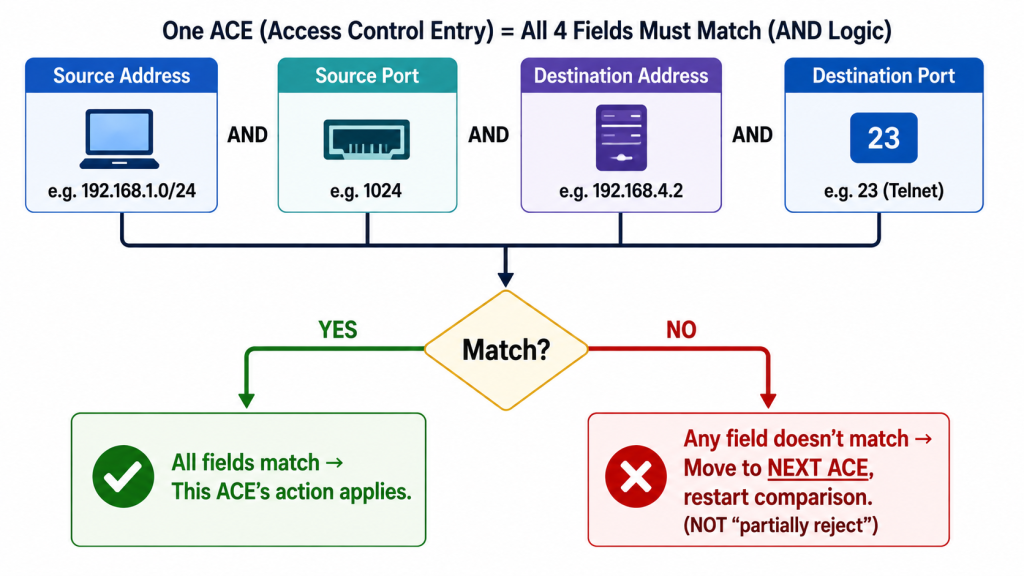
Extended ACLs decide using source address, destination address, protocol, and port numbers together — but it’s important to be precise about how these combine. Within a single ACE, all specified criteria must match simultaneously for that entry to apply at all: source address, source port (if the ACE specifies one), destination address, destination port (if specified), and protocol. It’s a single combined match, not a sequence of independent checkpoints a packet passes through one at a time.
[See Infographic: Extended ACL Single-Entry AND-Match Logic]
If any one field in an ACE doesn’t match, the router doesn’t partially reject the packet or stop evaluating — it simply moves to the next ACE in the list and starts the comparison over against that entry’s full set of criteria. This continues top-down, exactly as with standard ACLs, until a complete match is found or the list is exhausted and the implicit deny applies. The extra fields extended ACLs check don’t change the fundamental first-match, top-down logic — they just give each individual entry more criteria to match against before it counts as a hit.
Troubleshooting with the Pipeline in Mind
Understanding exactly where in the pipeline a packet was stopped makes troubleshooting far more targeted than guessing:
- Packet never reaches the router at all. Check Layer 2 — a mismatched or misconfigured interface can reject frames before any ACL or routing logic is ever consulted.
- Packet arrives but the inbound ACL denies it. Check
show access-listsfor match counts on the inbound ACL’s deny statements — the routing table was never even consulted for this packet. - Packet is dropped with no ACL denying it. This points to the routing table specifically, not an ACL — no route to the destination exists, and an outbound ACL never gets the chance to evaluate a packet that’s already been dropped by routing.
- Packet is permitted inbound and has a valid route, but still doesn’t arrive. Check the outbound ACL on the actual exit interface the routing table selected — this is the one ACL check that happens after routing, and it’s easy to overlook when troubleshooting starts by assuming the inbound side is the only thing worth checking.
Illustrative Scenario: Confusing a Routing Problem for an ACL Problem
Here’s a common scenario, meant to show the troubleshooting logic in action rather than describe a specific real event.
A network administrator configures an outbound ACL correctly on an interface, then notices that traffic to a specific destination never arrives, despite the ACL appearing to have no relevant deny statement for that destination at all. Assuming the ACL is somehow misconfigured, they spend time reviewing and re-testing every statement in it — finding nothing wrong, since there genuinely isn’t anything wrong with the ACL.
Checking the routing table reveals the actual cause: no route exists to the destination network at all. Because outbound ACL processing happens after the routing decision, and the routing decision fails first, the packet never reaches the outbound ACL to be tested against it — the ACL was never the problem, and no amount of reviewing it would have found one.
Adding the missing route resolves the issue immediately, with the outbound ACL — unchanged the entire time — now correctly evaluating the traffic exactly as originally configured. The broader lesson: knowing which stage of the pipeline a symptom points to saves real troubleshooting time, since an ACL review is the wrong first step for a problem that’s actually happening at the routing stage, before any outbound ACL is ever consulted.
FAQs
What is the difference between inbound and outbound ACL logic?
Inbound ACLs filter packets immediately upon arrival at an interface, before any routing decision is made — a denied packet is dropped without the routing table ever being consulted. Outbound ACLs filter after routing has already determined the exit interface, meaning they only ever evaluate packets that already have a valid route and have been assigned to a specific outbound interface. Both apply the same implicit deny if no explicit statement matches, but they act at genuinely different points in the packet’s journey through the router.
Why is the order of conditions important in standard ACLs?
Cisco IOS stops evaluating a standard ACL at the first matching condition, using only the source IP address to decide permit or deny. Because testing stops immediately at the first match, a broader statement placed earlier in the list can shadow a more specific one that comes after it, making that later statement effectively unreachable even though it’s configured correctly. Getting the order right is as important as getting the addresses right.
What happens if no ACL entry matches a packet?
The implicit deny any applies, and the packet is dropped — this statement exists on every ACL by default and never appears in show access-lists output unless added explicitly. At least one genuine permit statement is required somewhere in the ACL, or the implicit deny catches every packet and the ACL blocks all traffic, regardless of what the administrator actually intended.
How does an extended ACL make its permit or deny decision?
Each ACE requires all of its specified criteria — source address, destination address, protocol, and ports where specified — to match the packet simultaneously as one combined condition, not as a sequence of separate pass/fail steps. If any single field in an ACE doesn’t match, the router moves on to test the packet against the next ACE entirely, restarting the full comparison rather than partially evaluating the current one. This continues top-down until a complete match is found or the implicit deny applies at the end of the list.
At which point in packet processing does an inbound ACL get checked, versus an outbound one?
An inbound ACL is checked immediately after Layer 2 acceptance and de-encapsulation, before the router even looks at the routing table — a deny here means the packet is dropped without any routing decision ever being made. An outbound ACL is checked only after the routing table has already selected an exit interface, meaning a packet must first survive both the inbound ACL (if any) and the routing lookup before an outbound ACL ever gets the chance to evaluate it.