
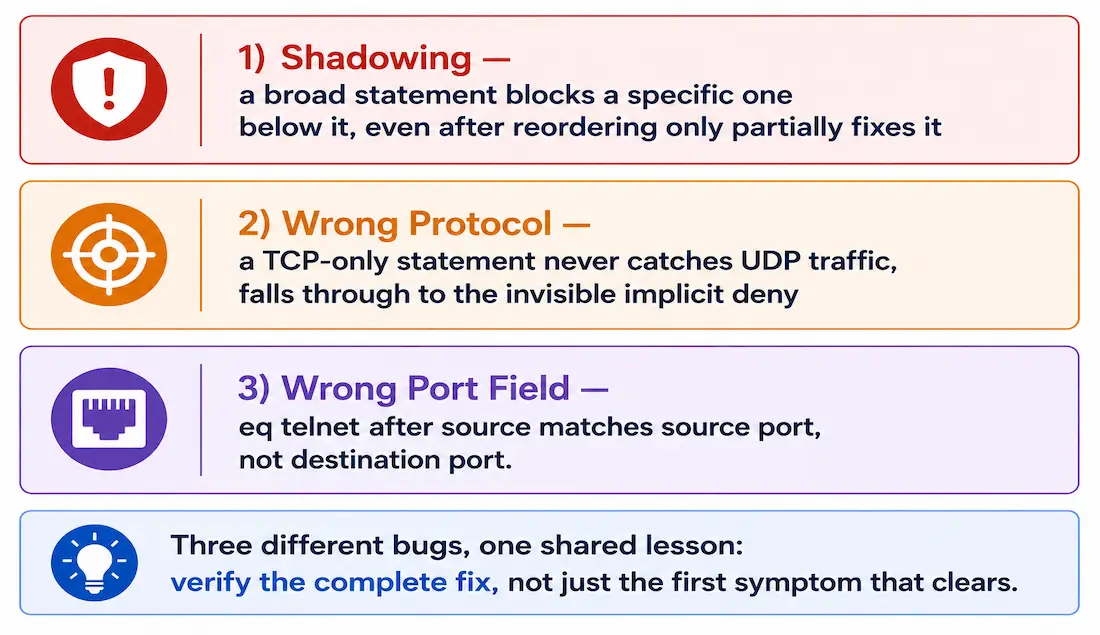
Access Control Lists are fundamental to network security and traffic management in Cisco environments, but misconfigurations can block legitimate traffic or allow unauthorized access just as easily as a correctly written ACL prevents both. This guide walks through three real categories of ACL bugs, using show access-lists to diagnose each one, and gives the genuinely complete fix rather than just the first thing that happens to restore some traffic.
This builds directly on the rest of the ACL series — Configuring Standard ACLs, Extended ACLs, ACL Statistics, and Inbound and Outbound ACL Logic — applying that foundation to three specific bug patterns worth recognizing on sight.
Example 1: A Shadowed Statement That Only Half-Fixes When Reordered
Host 192.168.2.2 has no HTTP or HTTPS access to 192.168.4.2. Running show access-lists shows matches accumulating on the first deny statement:
Extended IP access list 101
 10 deny tcp 192.168.2.0 0.0.0.255 any (matches)
 20 permit tcp 192.168.2.0 0.0.0.255 host 192.168.4.2 eq www
 30 permit ip any any
Statement 10 denies all TCP traffic from the entire 192.168.2.0/24 subnet to any destination — including 192.168.4.2. Since ACLs process top-down and stop at the first match, statement 20’s more specific permit is shadowed entirely; it can never be reached, exactly the shadowing pattern covered in the standard ACL configuration guide. Reordering statements 10 and 20 — permit before deny — is the instinctive fix, and it does restore HTTP.
But tracing through the reordered ACL reveals it doesn’t fully solve the stated problem:
Extended IP access list 101
 10 permit tcp 192.168.2.0 0.0.0.255 host 192.168.4.2 eq www
 20 deny tcp 192.168.2.0 0.0.0.255 any
 30 permit ip any any
HTTP (port 80) now matches statement 10 and is permitted correctly. But HTTPS (port 443) was never given its own statement anywhere in this ACL — it isn’t port 80, so it skips statement 10, and it’s still TCP from 192.168.2.0/24, so it matches statement 20’s broad deny before ever reaching the catch-all permit in statement 30. Reordering alone fixes HTTP; it leaves HTTPS exactly as broken as before.
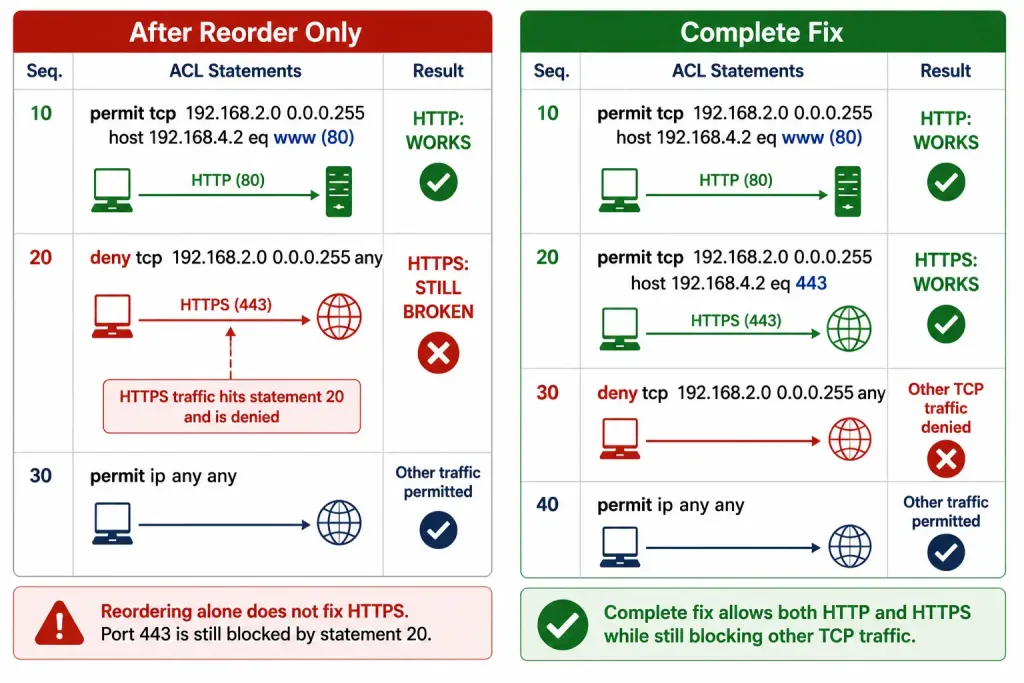
The genuinely complete fix needs both a reorder and an explicit HTTPS statement:
Extended IP access list 101
 10 permit tcp 192.168.2.0 0.0.0.255 host 192.168.4.2 eq www
 20 permit tcp 192.168.2.0 0.0.0.255 host 192.168.4.2 eq 443
 30 deny tcp 192.168.2.0 0.0.0.255 any
 40 permit ip any any
This is worth internalizing as a general habit: when a fix restores some of the expected traffic, verify every protocol or port the original problem actually named, rather than assuming a single reorder resolved everything the ticket described.
Example 2: A Protocol Mismatch Hidden Behind the Implicit Deny
The 192.168.2.0/24 network can’t reach 192.168.4.2 via TFTP. show access-lists for this ACL shows:
R2# show access-lists
Extended IP access list 101
  10 permit tcp 192.168.2.0 0.0.0.255 host 192.168.4.2 eq www (6 match(es))
  20 deny tcp 192.168.2.0 0.0.0.255 any
  30 permit tcp any any
R2#
TFTP uses UDP, not TCP — and every statement in this ACL is TCP-specific. Statement 10 doesn’t match (wrong protocol), statement 20 doesn’t match (wrong protocol), and statement 30’s permit tcp any any doesn’t match either, for the same reason. The TFTP traffic falls all the way through to the implicit deny, which never shows a match count no matter how much traffic it’s actually blocking — exactly the invisible-denial pattern covered in the ACL statistics guide.
There are two ways to fix this, and they aren’t equally good. Changing statement 30 to permit ip any any does work — ip matches every protocol, UDP included — but it also opens every other protocol from every source, not just the TFTP traffic actually intended. The more precise, more secure fix adds a targeted UDP statement instead:
R2(config)# access-list 101 permit udp 192.168.2.0 0.0.0.255 host 192.168.4.2 eq tftpplaced ahead of the broad TCP deny, so it’s actually reachable. This permits exactly the traffic the problem describes, without silently opening the ACL to unrelated protocols as a side effect — the broad permit ip any any version should be treated as a last resort, not the default fix, precisely because of how much more it changes than the problem actually called for.
Example 3: Matching the Wrong Port Field Entirely
The 192.168.1.0/24 network can Telnet to 192.168.4.0/24, against policy — this connection should be blocked. show access-lists shows the permit statement racking up matches instead of the intended deny:
R3# show access-lists
Extended IP access list 103
 10 deny tcp any eq telnet any
 30 permit tcp any any (162 match(es))
R3#
The bug is in exactly where eq telnet sits in statement 10. Extended ACL syntax is protocol source [operator port] destination [operator port] — an operator placed immediately after the source address matches the source port, not the destination port. As written, statement 10 denies traffic whose source port is 23 (Telnet). Real clients initiating a Telnet connection don’t send from port 23 — they connect to port 23 from a random high source port assigned by their own OS. This statement, as written, essentially never matches genuine client-initiated Telnet traffic, which is exactly why it shows zero relevant matches while the catch-all permit absorbs everything instead.
The fix moves eq telnet to the destination side, where it belongs:
R3(config)# no access-list 103 10
R3(config)# access-list 103 deny tcp any 192.168.4.0 0.0.0.255 eq telnet
This denies any source connecting to destination port 23 within 192.168.4.0/24 — the actual policy intent — rather than the nearly-unmatchable source-port version originally configured. Source-versus-destination port placement is a subtle enough distinction that it’s worth double-checking any time an ACL involving eq seems to have no effect at all: confirm which side of the statement the operator actually landed on.
Common Misconfigurations
- Missing
permit ip any anywhere a catch-all was intended, leaving the implicit deny to silently block more than planned. - ACL applied to the wrong direction —
inwhenoutwas intended, or vice versa — covered in depth in the inbound and outbound ACL logic guide, where inbound and outbound processing happen at genuinely different points in the packet pipeline. - Overlapping address ranges causing an earlier, broader statement to shadow a later, more specific one — the same pattern as Example 1 above.
- Operator placed on the wrong side of a statement — matching source port instead of destination port, or vice versa, as in Example 3.
Lab Exercise
Configure an ACL permitting HTTP from 192.168.1.0/24 to 192.168.2.0/24:
- Create the ACL:
access-list 101 permit tcp 192.168.1.0 0.0.0.255 192.168.2.0 0.0.0.255 eq www
access-list 101 permit ip any any- Apply it:
ip access-group 101 inon the appropriate interface. - Test with
ping(confirms basic reachability, though ICMP isn’t what this ACL is filtering) andtelnet <destination> 80(a practical way to test TCP port 80 reachability specifically without needing a full HTTP client). - Verify with
show access-lists 101, confirming match counts actually increment on the permit statement after your test traffic.
Troubleshooting ACLs with Packet Captures
Wireshark captures make ACL behavior visible at the packet level, which is often faster than reasoning through statement order in the abstract. Apply a capture filter — host 192.168.2.2, for instance — to isolate traffic to or from a specific host, then compare what’s actually leaving the client against what show access-lists reports as matched or denied. A request visibly leaving the client but never appearing to hit any permit statement is a strong sign the ACL, direction, or interface is wrong, rather than the traffic itself.
Common ACL Misconfigurations Checklist
- Verify ACE order and placement — confirm nothing broader sits ahead of a more specific statement it would shadow.
- Check protocol match — TCP-only statements never catch UDP traffic, and vice versa, regardless of address or port correctness.
- Confirm operator placement — source port versus destination port, as in Example 3.
- Ensure explicit permits exist for every protocol and port the intended traffic actually uses, not just the first one tested.
- Test with
ping,telnet <host> <port>, or a protocol-appropriate client after every change, and re-checkshow access-listsmatch counts immediately after.
Illustrative Scenario: A Fix That Looked Complete but Wasn’t
Here’s a common scenario, meant to show the troubleshooting logic in action rather than describe a specific real event.
A help desk ticket reports that a branch office can’t reach an internal web application over HTTPS. An administrator finds a shadowed statement — a broad deny sitting ahead of a specific permit, the same pattern as Example 1 — reorders it, tests with a browser, and confirms the page loads. The ticket is closed.
Days later, a related ticket reports the same application’s HTTP-only fallback page still isn’t reachable for users on older browsers. Reviewing the ACL again shows the reorder only ever included a port-443 statement — no port-80 equivalent exists anywhere in the ACL, so HTTP traffic has been hitting the broad deny (now sitting after the HTTPS permit) the entire time, unnoticed because the original test only checked HTTPS.
Adding the missing port-80 statement resolves it. The broader lesson mirrors Example 1 directly: testing only the specific symptom that was reported, rather than every protocol or port the underlying policy is supposed to cover, can make a partial fix look complete simply because nobody tested the part that was still broken.
Conclusion
Troubleshooting ACL errors well means going past “traffic works now” to “traffic works for every case the policy actually intended.” Shadowed statements, protocol mismatches hidden behind the invisible implicit deny, and operators matching the wrong port field are three of the most common categories — and each one can produce a fix that appears to work while leaving part of the original problem unresolved, as both Example 1 and the illustrative scenario above show. Practice with show access-lists, verify statement order and protocol match deliberately, and test every case a policy is supposed to cover, not just the first one that happens to confirm the fix.
FAQs
What causes ACL errors in Cisco routers?
The most common causes are shadowed statements (a broader rule placed ahead of a more specific one it accidentally blocks), protocol mismatches (a TCP-only statement that never catches UDP traffic, or vice versa), and operators matching the wrong port field — source instead of destination, or the reverse. show access-lists is the fastest way to confirm which statement is actually catching the traffic in question, since match counts reveal what’s really happening rather than what the configuration appears to intend.
How can I troubleshoot ACL misconfigurations?
Start with show access-lists to see which statement is accumulating matches for the traffic in question, then confirm the ACL’s applied direction with show running-config or show ip interface. Trace through the statement order by hand for the specific traffic type involved, checking protocol, port, and operator placement rather than assuming a single visible error explains the whole symptom. Test with ping, telnet <host> <port>, or a protocol-appropriate client, and re-verify match counts immediately after any change.
Why does ACL order affect network traffic?
Cisco routers process ACL statements top-down and stop at the first match, so a broader statement placed ahead of a more specific one can shadow it entirely, making the later statement unreachable even though it’s configured correctly. This is exactly what happened in Example 1 above — but reordering alone only fixes whichever specific case was reordered around; it doesn’t automatically cover every port or protocol the underlying problem actually involves, which is why verifying the complete fix matters as much as verifying the reorder itself.
How do I allow UDP traffic in an ACL?
Add a specific permit statement naming UDP and the port involved — for example, permit udp 192.168.2.0 0.0.0.255 host 192.168.4.2 eq tftp — placed ahead of any broader deny that might otherwise shadow it. Avoid defaulting to a catch-all permit ip any any as the fix for a single missing protocol; it technically works, but it also opens every other protocol from every source as a side effect, which is a much bigger change than a single missing UDP permit actually calls for.
How do I know if an ACL statement is matching the wrong port field?
Check whether the eq (or other operator) sits immediately after the source address or the destination address in the statement — an operator right after source matches source port, and one after destination matches destination port. If a deny statement meant to block a service shows almost no matches while unrelated traffic keeps getting through, this is one of the first things worth checking, since real client traffic almost never originates from a well-known port the way it connects to one.



