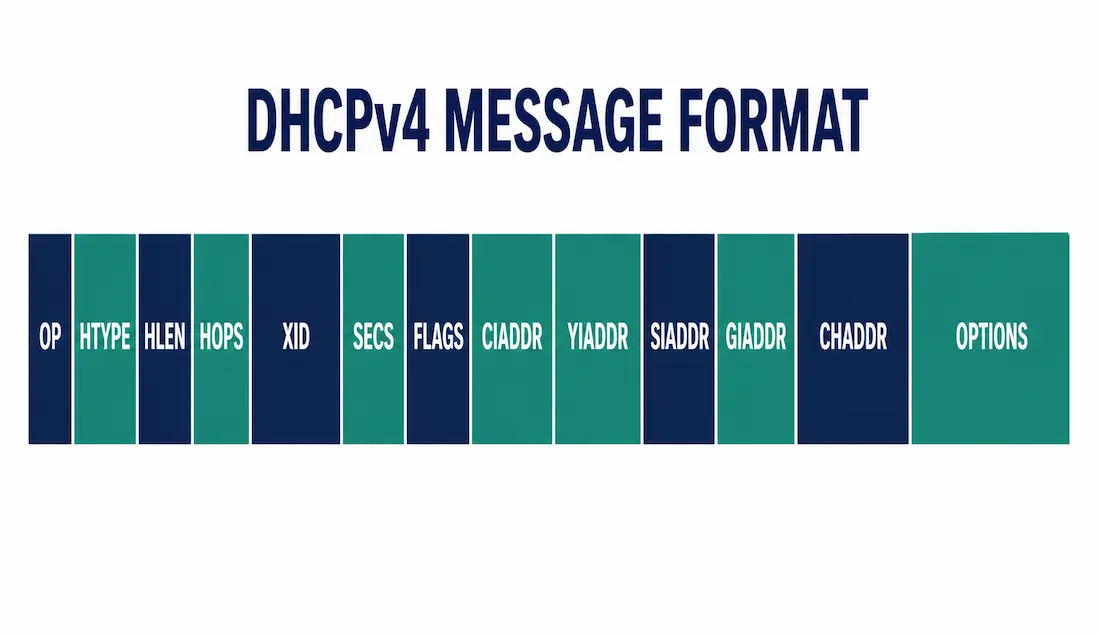
Every DHCPv4 exchange — Discover, Offer, Request, Acknowledge — rides inside the same fixed DHCPv4 message format, inherited from BOOTP. Once you know what the message format is, what each field actually holds, and why, reading a DHCP packet capture stops being guesswork and starts being straightforward: the fields tell you exactly what stage of the exchange you’re looking at and whether something’s gone wrong.
This guide breaks down every field in the DHCPv4 message, walks through how the values actually change across a real Discover-Offer-Request-Ack exchange, and covers DHCPv4 vs. DHCPv6 for anyone moving on to IPv6-focused material.
DHCPv4 Field Descriptions
OP Code
An 8-bit field marking the message direction: 1 for a REQUEST-type message sent client-to-server (DHCPDISCOVER, DHCPREQUEST), 2 for a REPLY-type message sent server-to-client (DHCPOFFER, DHCPACK). It’s the simplest field in the message and the fastest way to tell, at a glance in a packet capture, which direction a given message traveled.
Hardware Type (htype)
An 8-bit field identifying the underlying hardware, almost always 1 for Ethernet in modern networks. This tells the receiving side how to interpret the hardware address carried in CHADDR.
Hardware Address Length (hlen)
An 8-bit field giving the length of the client’s hardware address in bytes — 6 for Ethernet, matching the standard 6-byte MAC address length.
Hops
An 8-bit field the client always sets to 0. Each relay agent the message passes through increments it by one, giving a rough sense of how many relay hops a message has traveled through a multi-relay topology.
Transaction Identifier (xid)
A 32-bit value the client generates randomly and reuses across a matched pair of messages — the same xid appears in a DHCPDISCOVER and its corresponding DHCPREQUEST, letting the client (and anyone reading a packet capture) match a server’s DHCPOFFER and DHCPACK to the correct original request, even with multiple exchanges happening on the same segment at once.
Seconds (secs)
A 16-bit field the client fills in with the elapsed time since it started trying to obtain or renew a lease. Servers can use this to prioritize responses when several clients are requesting addresses at once.
Flags
A 16-bit field where only the leftmost bit is defined — the broadcast flag. When set, it tells the server to send its reply as a broadcast rather than unicast, which matters for a client that genuinely can’t receive a unicast reply yet (no IP address assigned, and not guaranteed to process an ARP request correctly at that point). The remaining 15 bits are reserved and unused.
CIADDR (Client IP Address)
Holds the client’s current address, but only when the client already has a valid one — during renewal (BOUND, RENEWING, or REBINDING states). During initial acquisition, when the client has no address yet, this field is 0.0.0.0. Critically: a server’s response only ever echoes back whatever value the client put in this field on its DHCPREQUEST — the server never fills in a newly assigned address here. The new address always arrives via YIADDR instead.
YIADDR (Your IP Address)
Holds the address the server is offering or has assigned. The server sets this in both DHCPOFFER and DHCPACK — this is the field that actually carries the new address to the client, not CIADDR.
SIADDR (Server IP Address)
The address of the next server to contact in the bootstrap process — often, but not always, the same server that sent the message. This matters more in network-boot scenarios (PXE, TFTP-based booting) than in ordinary address leasing.
GIADDR (Gateway IP Address)
Set by a relay agent to its own interface address when relaying a request from a client on a different subnet than the DHCP server. This is what lets a single DHCP server serving multiple subnets figure out which address pool a relayed request should draw from — the exact mechanism covered in more depth in our DHCPv4 relay guide.
CHADDR (Client Hardware Address)
The client’s MAC address, used throughout the exchange to make sure a reply reaches the correct client on a segment with multiple devices requesting addresses simultaneously.
Optional Fields: SNAME and File
Two optional fields used mainly in network-boot scenarios: SNAME can carry the server’s host name, and File can specify a boot file’s path — both are largely legacy from BOOTP and less commonly used in ordinary DHCP address leasing today.
DHCP Options
A variable-length field carrying everything beyond the basic address assignment — subnet mask, default gateway, DNS servers, domain name, lease time, and dozens of other defined options. In practice, this field carries most of the configuration a client actually needs; the fixed fields above establish the addressing, and Options fills in the rest.
Watching a Real Exchange: Field Values Step by Step
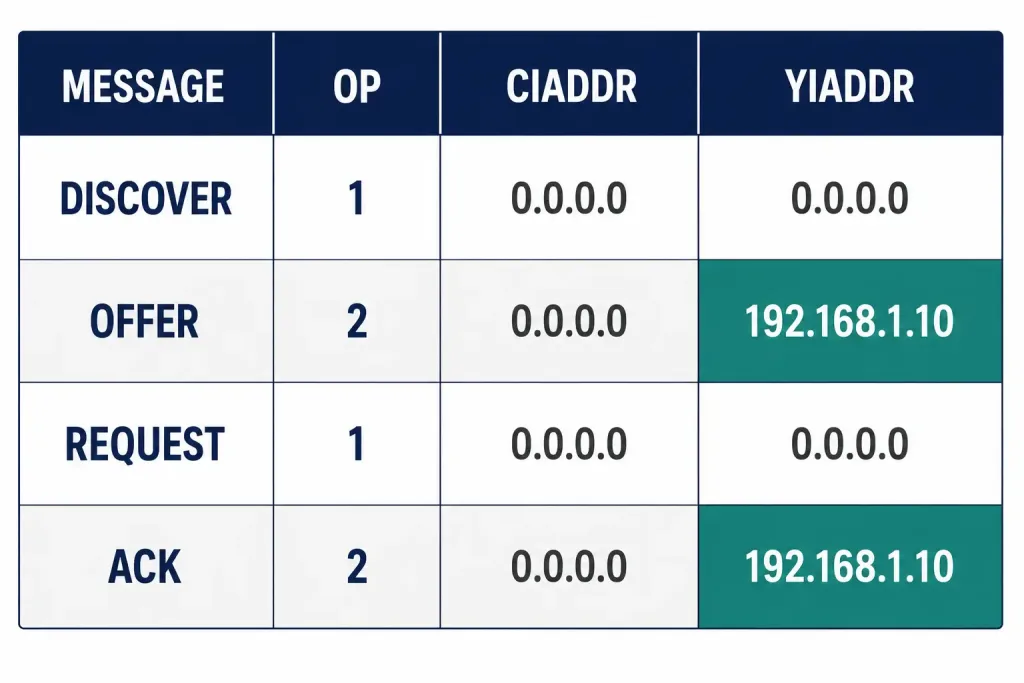
Here’s how the fields that matter most actually change across a full Discover-Offer-Request-Ack exchange for a client obtaining a brand-new lease (not renewing an existing one):
| Message | OP Code | CIADDR | YIADDR | Flags |
|---|---|---|---|---|
| DHCPDISCOVER | 1 | 0.0.0.0 | 0.0.0.0 | Broadcast |
| DHCPOFFER | 2 | 0.0.0.0 | 192.168.1.10 | — |
| DHCPREQUEST | 1 | 0.0.0.0 | 0.0.0.0 | — |
| DHCPACK | 2 | 0.0.0.0 | 192.168.1.10 | — |
Notice CIADDR stays 0.0.0.0 through the entire exchange here — that’s the detail that surprises people. The new address only ever shows up in YIADDR. CIADDR would only carry a real address if this were a renewal, where the client already has 192.168.1.10 and is confirming it directly with the server that issued it — a different scenario from the one shown here.
This exchange is straightforward to observe directly with Wireshark using the filter udp.port == 67 || udp.port == 68 — worth doing at least once on a lab client, since watching CIADDR stay at zero while YIADDR carries the new address makes the distinction stick in a way reading about it doesn’t.
Worked Example: A DHCPDISCOVER Byte by Byte
Seeing a couple of fields as they’d actually appear in a raw capture makes the abstract field list concrete. Here’s a simplified breakdown of the fixed-header portion of a DHCPDISCOVER from a client with MAC 00:1A:2B:3C:4D:5E:
op      = 1                    (BOOTREQUEST)
htype   = 1                    (Ethernet)
hlen    = 6                    (6-byte MAC address)
hops    = 0                    (no relay agents yet)
xid     = 0x3903F326           (client-generated, random)
secs    = 0                    (just started)
flags   = 0x8000                (broadcast bit set)
ciaddr  = 0.0.0.0               (no address yet)
yiaddr  = 0.0.0.0               (not assigned yet — server hasn't responded)
siaddr  = 0.0.0.0               (no bootstrap server identified yet)
giaddr  = 0.0.0.0               (no relay agent involved — same subnet)
chaddr  = 00:1A:2B:3C:4D:5E     (client's MAC, padded to 16 bytes)
Every address field is zero here except the broadcast flag — which makes sense, since a DHCPDISCOVER is sent by a client that has nothing yet and is asking, broadly, whether anyone can help. Compare this to the DHCPOFFER that follows: op flips to 2, yiaddr fills in with the offered address, xid stays identical so the client can match this reply to its own discover, and ciaddr stays at zero — because, as covered above, it’s not the field that carries a newly offered address.
If a relay agent were involved — the client on a different subnet than the server — the only additional change at this stage would be giaddr picking up the relay agent’s interface address once the message reaches it, exactly as covered in the DHCPv4 relay guide. Recognizing this pattern in a live capture is often the fastest way to confirm whether a relay agent is actually intercepting traffic the way its configuration claims it should.
Troubleshooting with Message Format Knowledge
Understanding the fields directly helps with real troubleshooting, not just exam questions:
| Symptom | What to Check | Why |
|---|---|---|
| Client stuck with no address, capture shows repeated DHCPDISCOVER | XID changing on every retry | A changing XID on every attempt (rather than reuse) can indicate the client is restarting the whole process instead of retrying cleanly — worth checking client-side logs |
| Client seems to get an offer but never completes the lease | Compare XID across OFFER and the client’s REQUEST | A mismatched XID means the client is discarding the offer as unrelated to its own request — often caused by multiple overlapping DHCP transactions on a busy segment |
| Renewal appears to fail silently | CIADDR in the client’s DHCPREQUEST | If CIADDR is 0.0.0.0 during what should be a renewal, the client isn’t actually in the BOUND state it thinks it’s in — check the client’s own lease state before assuming a server problem |
| Client gets an address from the wrong subnet’s pool | GIADDR in the relayed request | If GIADDR doesn’t match the subnet the client is actually on, check relay agent placement — see the DHCPv4 relay guide for the full configuration workflow |
On a Cisco device, clear ip dhcp binding <address> (or clear ip dhcp binding * for all bindings) is the standard first step when a lease looks stuck or a client seems to have an address the server no longer recognizes — it clears the server-side record and forces a clean renegotiation on the next request.
DHCPv4 vs. DHCPv6
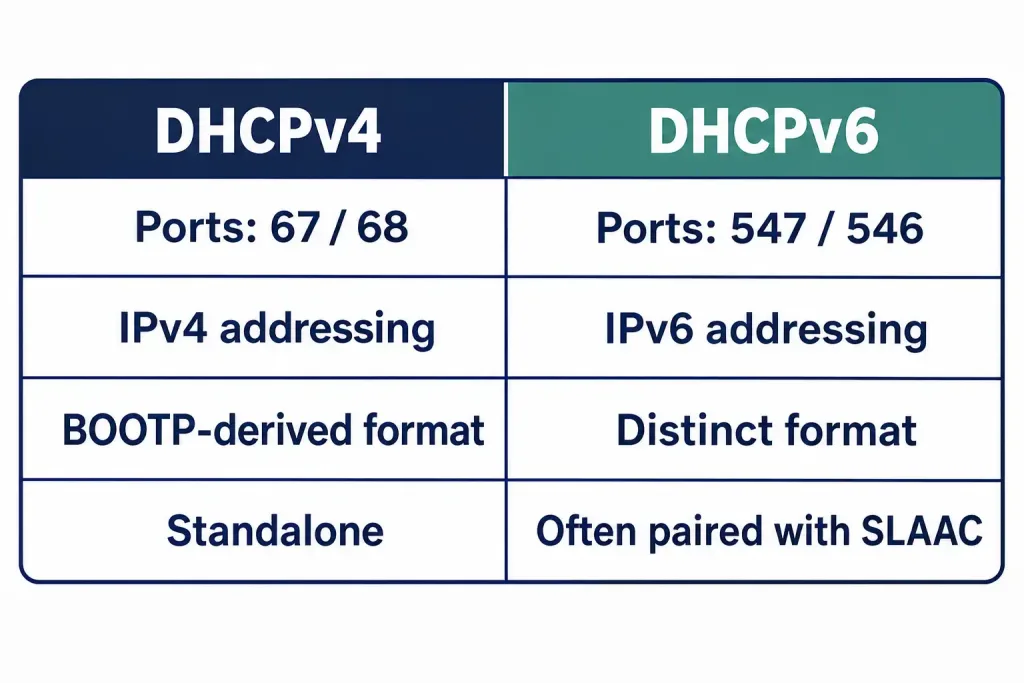
| Feature | DHCPv4 | DHCPv6 |
|---|---|---|
| Ports | UDP 67 (server) / 68 (client) | UDP 547 (server) / 546 (client) |
| Address type | IPv4 | IPv6 |
| Message format | BOOTP-derived fixed fields + options | Distinct format, not BOOTP-based |
| Common pairing | Standalone | Often paired with SLAAC |
DHCPv6 doesn’t reuse the DHCPv4 message layout at all — it’s a genuinely different format with its own field set, not the same structure with a wider address field. It’s also frequently used alongside Stateless Address Autoconfiguration (SLAAC), where a client can self-generate its own address from router advertisements and use DHCPv6 only for supplementary information like DNS servers — a very different division of labor than DHCPv4, where the server handles the address itself.
FAQs
What is the purpose of the OP Code in the DHCPv4 message format?
It’s an 8-bit field marking message direction: 1 for client-to-server REQUEST-type messages (Discover, Request), 2 for server-to-client REPLY-type messages (Offer, Ack).
How does the CIADDR field actually work?
It holds the client’s current address, but only during renewal when that address is already valid — it stays at 0.0.0.0 throughout initial address acquisition. A server’s response only ever echoes the value the client already put there; it never introduces a newly assigned address into CIADDR.
What role does GIADDR play?
A relay agent sets GIADDR to its own interface address when forwarding a client’s request from one subnet to a DHCP server on another. This lets a server managing multiple subnets’ address pools know which pool a given relayed request belongs to.
How do I troubleshoot a DHCPv4 issue involving CIADDR?
Check whether the client’s actual lease state matches what it’s assuming — a client attempting what it thinks is a renewal but sending ciaddr = 0.0.0.0 isn’t really in the BOUND state, and needs to restart from DHCPDISCOVER rather than renew. clear ip dhcp binding on the Cisco server side is the standard way to force a clean restart if the server’s own binding table looks stuck.
What’s the key structural difference between DHCPv4 and DHCPv6 messages?
They’re not the same format at different address widths — DHCPv6 uses an entirely distinct message structure that isn’t BOOTP-derived, uses different ports (546/547 instead of 67/68), and is commonly paired with SLAAC rather than being the sole address-assignment mechanism the way DHCPv4 typically is.
Why does the assigned address never appear in CIADDR during initial acquisition?
Because CIADDR is defined specifically as the client’s already-valid address — during initial acquisition there isn’t one yet. The newly offered and assigned address is carried entirely through YIADDR instead, in both the DHCPOFFER and the DHCPACK.