
Stateful DHCPv6 is the IPv6 mode that behaves the way DHCPv4 always has: the server assigns the address itself, tracks which client has which address, and hands out supplementary options alongside it — no SLAAC involved on the client side at any point. That’s the core distinction from stateless DHCPv6, and it changes almost every command in the setup that follows.
This guide covers the full server configuration, the M-flag mechanics that actually enable it, client setup, and verification — including two real inconsistencies worth knowing about if you’ve seen this configuration example elsewhere, since they show up often enough to be worth clearing up directly.
Before Anything Else: Enable IPv6 Unicast Routing
Router(config)# ipv6 unicast-routingSame prerequisite as stateless DHCPv6 — Router Advertisements depend on this being enabled, and RAs are what signal clients to use stateful mode in the first place.
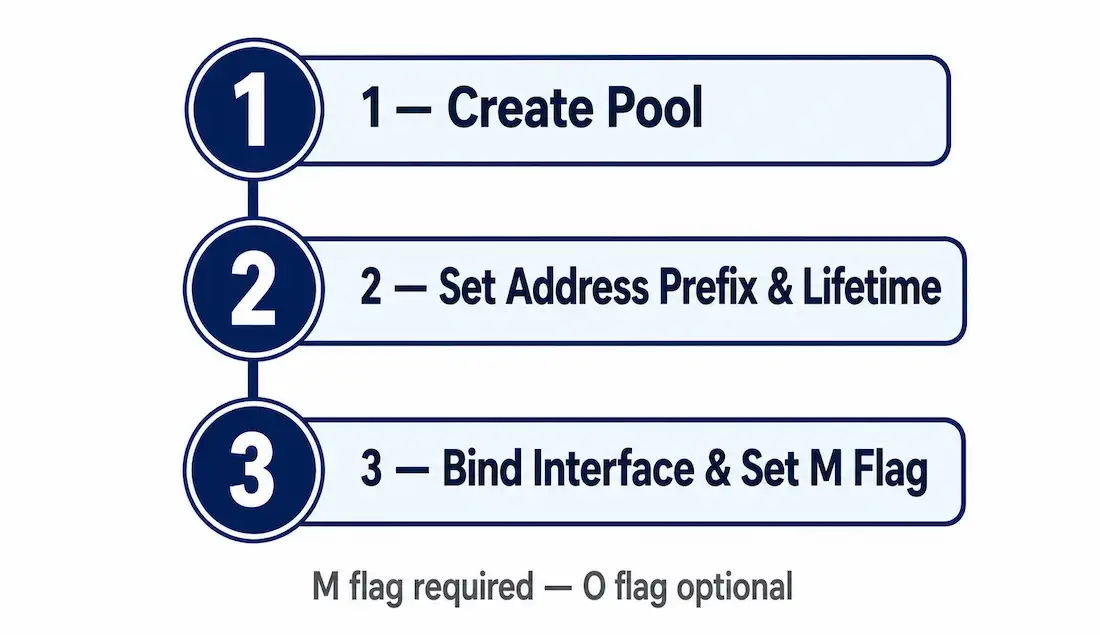
Step 1: Create the DHCPv6 Pool
Router(config)# ipv6 dhcp pool STATEFUL-POOL
Router(config-dhcpv6)#
Same starting point as a stateless pool — the difference is entirely in what gets configured inside it.
Step 2: Configure Pool Parameters
This is where stateful and stateless configurations genuinely diverge. A stateless pool never includes an address — the client already has one from SLAAC. A stateful pool must include one, because the server is the sole source of the client’s address in this mode:
Router(config-dhcpv6)# address prefix 2001:ABC1:B001:1::/64 lifetime 3600 3600
Router(config-dhcpv6)# dns-server 2001:ABC1:B001:1::20
Router(config-dhcpv6)# domain-name networkustad.com
Router(config-dhcpv6)# exit
The lifetime command takes two values: valid lifetime first, preferred lifetime second, in seconds (or infinite for no expiration). Here both are set to 3600 — one hour. The preferred lifetime should never exceed the valid lifetime; setting them equal, as done here, is valid and common in lab environments specifically to make lease behavior easy to observe.
Step 3: Bind the Pool to an Interface and Set the M Flag
Router(config)# interface gigabitEthernet 0/1
Router(config-if)# ipv6 nd managed-config-flag
Router(config-if)# ipv6 dhcp server STATEFUL-POOL
Router(config-if)# exit
ipv6 nd managed-config-flag sets the M flag to 1 in this interface’s RAs — this is the command that actually tells clients “get your address from a stateful DHCPv6 server here,” which is the single most important line in the whole setup. Without it, clients have no signal to attempt stateful DHCPv6 at all, regardless of how the pool itself is configured.
A note on the O flag: only the M flag is strictly required for stateful DHCPv6 to function. Setting ipv6 nd other-config-flag (O flag) alongside it is common practice — some client operating systems check it as well — but it isn’t a hard requirement the way the M flag is. If you see the O flag configured alongside M in other stateful examples, that’s good practice, not a strict necessity.
The default gateway doesn’t get configured anywhere in this pool — as covered in the DHCPv6 operation guide, DHCPv6 in any mode, stateful included, never provides a default gateway. The client learns that exclusively from the RA’s source address, which defaults to the router’s link-local address automatically.
Full Worked Example
DHCPv6_SERVER> enable
DHCPv6_SERVER# configure terminal
DHCPv6_SERVER(config)# ipv6 unicast-routing
DHCPv6_SERVER(config)# ipv6 dhcp pool STATEFUL-POOL
DHCPv6_SERVER(config-dhcpv6)# address prefix 2001:ABC1:B001:1::/64 lifetime 3600 3600
DHCPv6_SERVER(config-dhcpv6)# dns-server 2001:ABC1:B001:1::20
DHCPv6_SERVER(config-dhcpv6)# domain-name networkustad.com
DHCPv6_SERVER(config-dhcpv6)# exit
DHCPv6_SERVER(config)# interface gigabitEthernet 0/1
DHCPv6_SERVER(config-if)# ipv6 nd managed-config-flag
DHCPv6_SERVER(config-if)# ipv6 dhcp server STATEFUL-POOL
DHCPv6_SERVER(config-if)# exit
DHCPv6_SERVER(config)# exit
DHCPv6_SERVER# write memory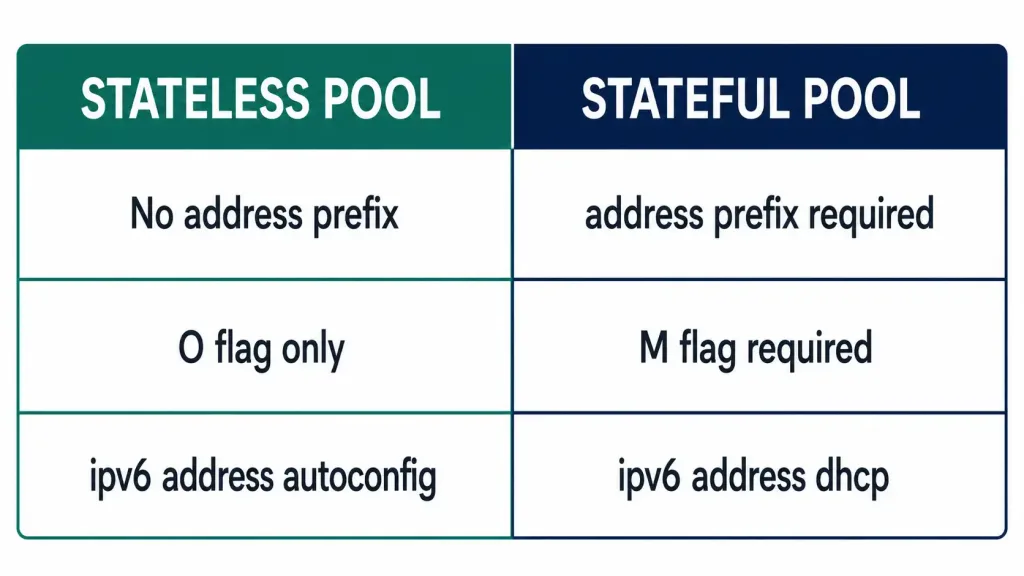
Configuring a Router as a Stateful DHCPv6 Client
DHCPv6_Client(config)# interface gigabitEthernet 0/1
DHCPv6_Client(config-if)# ipv6 enable
DHCPv6_Client(config-if)# ipv6 address dhcp
DHCPv6_Client(config-if)# exit
ipv6 enable creates a link-local address, needed before the router can send or receive any IPv6 messages at all, RS included. ipv6 address dhcp is the key difference from the stateless client configuration — where stateless used ipv6 address autoconfig to trigger SLAAC, this command tells the interface to request its address directly from a stateful DHCPv6 server instead, with no SLAAC involved.
Rapid-Commit: Skipping the Four-Message Exchange
By default, stateful DHCPv6 uses the full four-message exchange covered in the DHCPv6 operation guide — SOLICIT, ADVERTISE, REQUEST, REPLY, in that exact order. Cisco IOS also supports rapid-commit, which collapses this down to just two messages: SOLICIT and REPLY, with the server committing the address immediately rather than waiting for a separate REQUEST confirming the client’s choice.
DHCPv6_SERVER(config-dhcpv6)# rapid-commitThis has to be enabled on both the server and the client for it to actually take effect — a server configured for rapid-commit still uses the full four-message exchange with a client that doesn’t request it. On the client side, this typically isn’t something manually configured on a router the way the server side is; it depends on the client’s own DHCPv6 implementation requesting rapid-commit in its SOLICIT message.
The trade-off is speed versus the built-in redundancy of the longer exchange — rapid-commit is faster, but the four-message version gives the client a real chance to evaluate offers from multiple servers before committing to one, which rapid-commit skips entirely by design. For a single-server lab or a small network with one authoritative DHCPv6 server, this particular trade-off rarely matters much in practice.
Worked Scenario: A Binding That Doesn’t Look Like the Docs
This is a composite scenario built to walk through a genuinely common point of confusion, not a specific reported incident.
An administrator configures a simple stateful DHCPv6 pool for a LAN of end-user laptops — one address per client, nothing unusual or advanced about the setup at all. After confirming clients are getting addresses successfully, they check show ipv6 dhcp binding to verify things look right, and find themselves comparing it against an example from elsewhere that shows an IA PD entry with a /64 prefix — while their own output shows IA NA with a single /128-style address instead. Confused about which one is actually “correct,” they start second-guessing an already-working configuration unnecessarily.
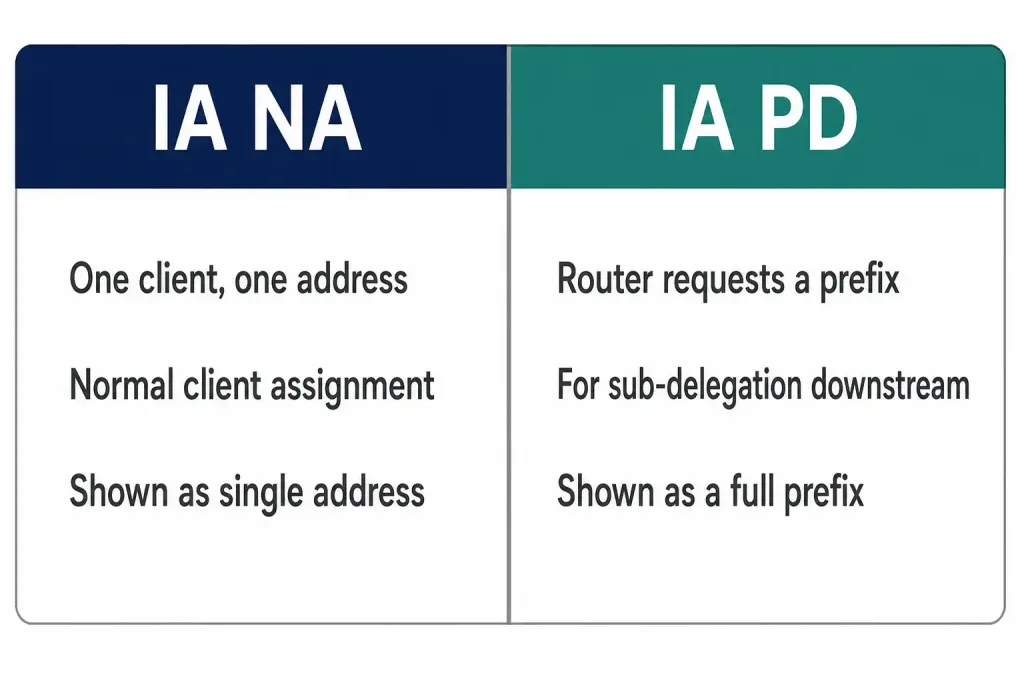
The resolution is simply that both outputs are correct — just for two genuinely different scenarios. IA NA is what a normal client-address-assignment setup produces: one client, one address, exactly what this LAN of laptops actually needs.
IA PD only shows up when a router is specifically configured to request a whole prefix for further sub-delegation downstream — a CPE router getting a prefix from an ISP to hand out to its own internal subnets, for example. Nothing about a standard “assign my laptop an address” scenario should ever produce an IA PD binding; if it does, that’s worth investigating carefully, since it suggests the pool or client request is somehow configured for prefix delegation rather than the simple addressing that was actually intended in the first place.
Verifying the Server
DHCPv6_SERVER# show ipv6 dhcp pool
DHCPv6 pool: STATEFUL-POOL
  Address allocation prefix: 2001:ABC1:B001:1::/64 valid 3600 preferred 3600 (1 in use, 0 conflicts)
  DNS server: 2001:ABC1:B001:1::20
  Domain name: networkustad.com
  Active clients: 1
Both the valid and preferred lifetime now correctly read 3600 — matching the lifetime 3600 3600 configured on the pool — and the in-use count matches the active client count. When checking this output on a real device, those numbers should always agree with each other; if “in use” and “Active clients” ever show different counts, that’s worth investigating rather than assuming it’s normal.
DHCPv6_SERVER# show ipv6 dhcp binding
Client: GigabitEthernet0/1
  DUID: 00030001000021694C01
  IA NA: IA ID 3040, T1 1800, T2 2880
    Address: 2001:ABC1:B001:1::100
    preferred lifetime 3600, valid lifetime 3600
    expires at Aug 20 2026 10:33:37 AM (3600 seconds)
Note this shows IA NA (Identity Association for Non-temporary Address) — the correct binding type for a single client receiving one address, which is what’s happening in this scenario. IA NA bindings show a single host address, not a full prefix. IA PD (Prefix Delegation) is a different, more advanced binding type used when a router requests an entire prefix to sub-delegate further to its own downstream network — a distinct use case from a simple client-address assignment, and not what’s shown here.
Verifying the Client
DHCPv6_Client# show ipv6 interface gigabitEthernet 0/1
DHCPv6_Client# show ipv6 interface brief
DHCPv6_Client# show running-config | section ipv6
Confirm the client shows a global unicast address matching what the server’s pool is configured to assign, and that it’s marked as coming from DHCPv6 rather than SLAAC.
Stateless vs. Stateful, Side by Side
| Stateless | Stateful | |
|---|---|---|
Pool needs address prefix? | No | Yes — the server assigns the address |
| Flag that enables it | O flag (ipv6 nd other-config-flag) | M flag (ipv6 nd managed-config-flag) |
| Is the other flag required too? | No | No — O flag is common practice, not required |
| Client interface command | ipv6 address autoconfig | ipv6 address dhcp |
| Binding type on server | N/A — server doesn’t track state | IA NA (single address) |
show ipv6 dhcp pool active clients | Typically stays at 0 | Reflects real tracked bindings |
Troubleshooting Stateful DHCPv6
| Symptom | Likely Cause | Fix |
|---|---|---|
| Client falls back to SLAAC instead of using DHCPv6 | M flag not set on the server’s interface | Confirm ipv6 nd managed-config-flag is applied; check show ipv6 interface for the M flag status |
| Client gets no address at all | ipv6 unicast-routing missing, or pool not bound to the correct interface | Confirm both are in place on the server-facing interface |
Verification shows a /64 binding instead of a single address | Pool or scenario is actually configured for prefix delegation (IA PD), not simple addressing | Confirm whether IA PD was genuinely intended — for a normal client scenario, expect IA NA with a single address |
| Client has no default gateway | Expecting DHCPv6 to provide one | It never does, in any mode — the gateway always comes from the RA’s source, not the DHCPv6 exchange |
FAQs
What’s the difference between stateful and stateless DHCPv6?
Stateful DHCPv6 assigns the full IPv6 address plus configuration options directly from the server, and the server tracks which client has which address. Stateless DHCPv6 only supplies supplementary options — the client generates its own address via SLAAC, and the server never tracks state.
Which command binds a DHCPv6 pool to an interface?
ipv6 dhcp server <pool-name> in interface configuration mode — the same command used for stateless DHCPv6, since the binding mechanism itself is identical between the two modes.
What flag is actually required for stateful DHCPv6?
Only the M flag, set with ipv6 nd managed-config-flag. The O flag is commonly configured alongside it as good practice, since some client operating systems check it too, but it isn’t strictly necessary for stateful DHCPv6 to function.
How do you verify active DHCPv6 clients on the server?
show ipv6 dhcp binding shows each client’s DUID, assigned address, and lease expiration directly. show ipv6 dhcp pool shows aggregate pool usage — both the “in use” count and “Active clients” count should always match each other.
What’s the difference between an IA NA and an IA PD binding?
IA NA (Non-temporary Address) is a single address assigned to one client — the normal case for stateful DHCPv6 address assignment. IA PD (Prefix Delegation) is an entire prefix delegated to a router for it to sub-delegate further downstream, a different and more advanced scenario entirely.
Can a stateful DHCPv6 server provide a default gateway?
No — DHCPv6 never provides a default gateway, in stateful or stateless mode. That information always comes exclusively from the Router Advertisement’s source address, which defaults to the router’s own link-local address.
Does rapid-commit need to be configured on both the server and client?
Yes. A server configured with rapid-commit still falls back to the full four-message exchange with any client that doesn’t request rapid-commit in its own SOLICIT message — the shortcut only applies when both sides support and request it.



