
IPv4 only has about 4.3 billion addresses total — a number that looked enormous in the early 1980s and nowhere near enough once personal computing and the web took off. Network Address Translation, alongside RFC 1918 private addressing, is the pairing that kept IPv4 usable for decades past when it otherwise would have run out. IPv6 is the permanent fix; NAT was always meant as a bridge, but it’s a bridge nearly every network still crosses today.
This guide covers the RFC 1918 ranges, how NAT actually translates addresses, and full worked configuration for static NAT, dynamic NAT, and PAT (NAT overload) on a Cisco router — plus verification and troubleshooting.
RFC 1918 Private IPv4 Address Ranges
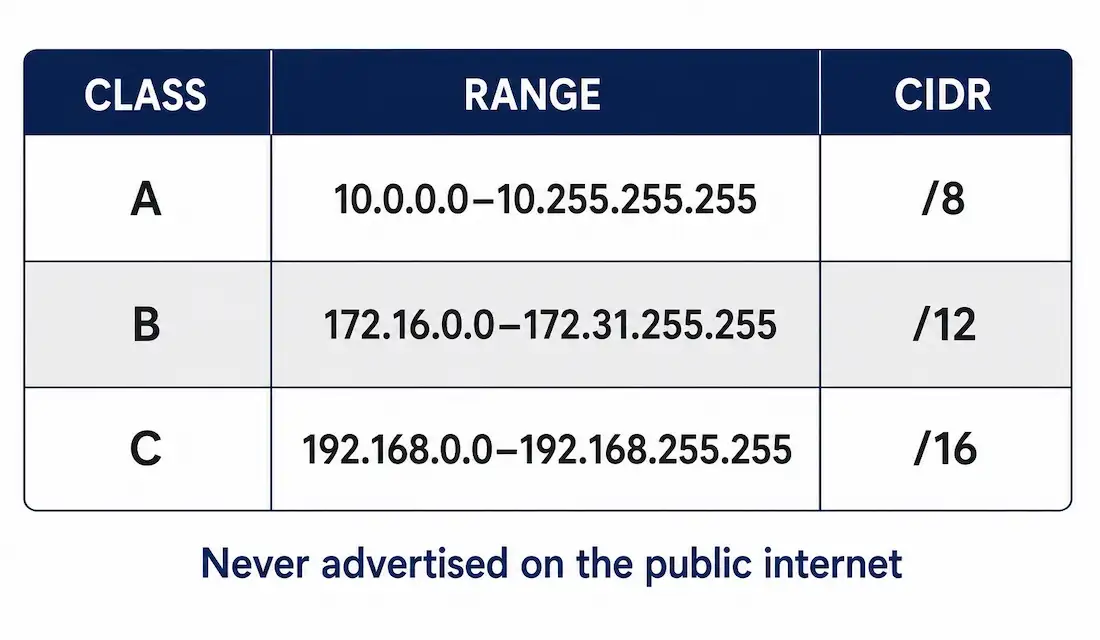
RFC 1918 reserves three blocks of IPv4 address space for internal use — not globally unique, and never advertised on the public internet:
| Class | Private Range | CIDR | Usable Hosts | Example Subnet |
|---|---|---|---|---|
| A | 10.0.0.0 – 10.255.255.255 | 10.0.0.0/8 | 16,777,214 | 10.1.1.0/24 → 254 hosts |
| B | 172.16.0.0 – 172.31.255.255 | 172.16.0.0/12 | 1,048,574 | 172.16.10.0/23 → 510 hosts |
| C | 192.168.0.0 – 192.168.255.255 | 192.168.0.0/16 | 65,534 | 192.168.1.0/25 → 126 hosts |
The 10.0.0.0/8 block is a full Class A on its own — over 16 million addresses, which is why it’s the common choice for large enterprise networks that need serious headroom.
Why these addresses can’t be used directly on the internet: they aren’t globally unique, so backbone routers simply have no route for them — millions of different organizations all use 192.168.1.0/24 internally, and the global routing table has no way to distinguish between them. Many networks also actively filter incoming traffic claiming to originate from these ranges as a security practice, but that’s a secondary reinforcement — the fundamental reason is that private addresses were never meant to be routable in the first place, by RFC 1918’s own design.
What Network Address Translation (NAT) Actually Does
NAT translates a private address into a public one (and back) at the boundary between an internal network and the internet. It solves two problems at once: it lets an entire organization share a small number of public addresses instead of needing one per device, and it hides the internal addressing scheme from anyone outside — a real, if secondary, security benefit.
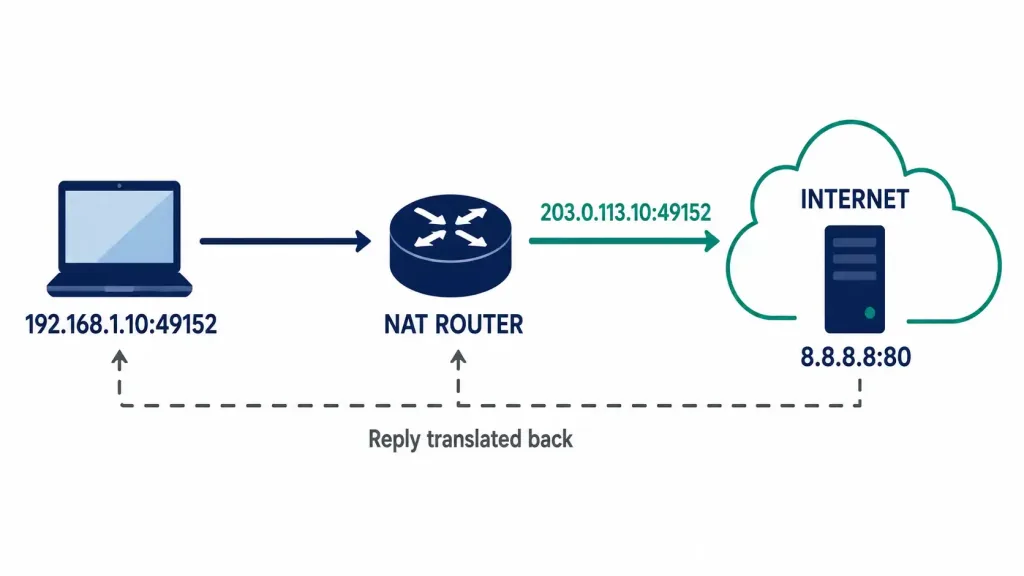
A NAT-enabled router needs at least one public IPv4 address — its NAT pool — to translate into. When an internal device sends traffic outward, the router swaps the private source address for a public one from that pool. When the reply comes back addressed to that public address, the router translates it back to the original private address and forwards it to the correct internal device.
Worked example: a PC at 192.168.1.10, source port 49152, sends a request toward a server at 8.8.8.8. The NAT router translates the source to 203.0.113.10:49152 before forwarding it onward. The reply comes back addressed to 203.0.113.10:49152, and the router translates it back to 192.168.1.10:49152 before delivering it to the PC. Private address in, public address out — that direction never reverses.
Where NAT Sits: The Stub Network
A NAT router is typically deployed at the border of a stub network — a network with exactly one path in and out, no alternate route around it. Every device inside sends outbound traffic to that single border router, which is where the private-to-public translation happens. This single-exit-point structure is exactly what makes NAT practical: one router, one translation point, one place to manage the entire address pool.
Configuring Static NAT
Static NAT maps one specific private address to one specific public address, permanently — used when an internal device (a mail server, a web server) needs to be reliably reachable from outside at the same public address every time.
Router(config)# ip nat inside source static 192.168.1.100 203.0.113.20
Router(config)# interface gigabitEthernet 0/0
Router(config-if)# ip nat inside
Router(config-if)# exit
Router(config)# interface gigabitEthernet 0/1
Router(config-if)# ip nat outside
Router(config-if)# exit
ip nat inside and ip nat outside mark which interface faces the private network and which faces the public internet — NAT needs both defined to know which direction it’s translating. Without marking both, the static mapping exists in configuration but nothing actually triggers the translation.
Configuring Dynamic NAT
Dynamic NAT maps private addresses to public addresses from a pool, on a first-come-first-served basis — useful when you have more internal devices than you want to give static one-to-one mappings, but still fewer public addresses than internal devices overall.
Router(config)# ip nat pool PUBLIC-POOL 203.0.113.10 203.0.113.15 netmask 255.255.255.0
Router(config)# access-list 1 permit 192.168.1.0 0.0.0.255
Router(config)# ip nat inside source list 1 pool PUBLIC-POOL
Router(config)# interface gigabitEthernet 0/0
Router(config-if)# ip nat inside
Router(config-if)# exit
Router(config)# interface gigabitEthernet 0/1
Router(config-if)# ip nat outside
The access list defines which private addresses are eligible for translation — it’s a selector here, not a security filter. The pool has six addresses (203.0.113.10–15); once all six are in active use, the seventh device requesting translation simply won’t get one until an address frees up.
Configuring PAT (NAT Overload)
PAT — Port Address Translation, commonly called NAT overload on Cisco gear — maps many private addresses to a single public address, distinguishing each internal device’s traffic by port number instead of by address. This is what makes it possible for an entire office, or an entire home network, to share one public IP simultaneously.
Router(config)# access-list 1 permit 192.168.1.0 0.0.0.255
Router(config)# ip nat inside source list 1 interface gigabitEthernet 0/1 overload
Router(config)# interface gigabitEthernet 0/0
Router(config-if)# ip nat inside
Router(config-if)# exit
Router(config)# interface gigabitEthernet 0/1
Router(config-if)# ip nat outside
The overload keyword is what turns this into PAT rather than plain dynamic NAT — instead of pulling from a pool of addresses, every internal device shares the single address on the outside interface, differentiated by source port. This is by far the most common NAT configuration in real networks; a dedicated pool of public addresses (plain dynamic NAT) is comparatively rare outside specific enterprise scenarios.
Static vs. Dynamic vs. PAT, Side by Side
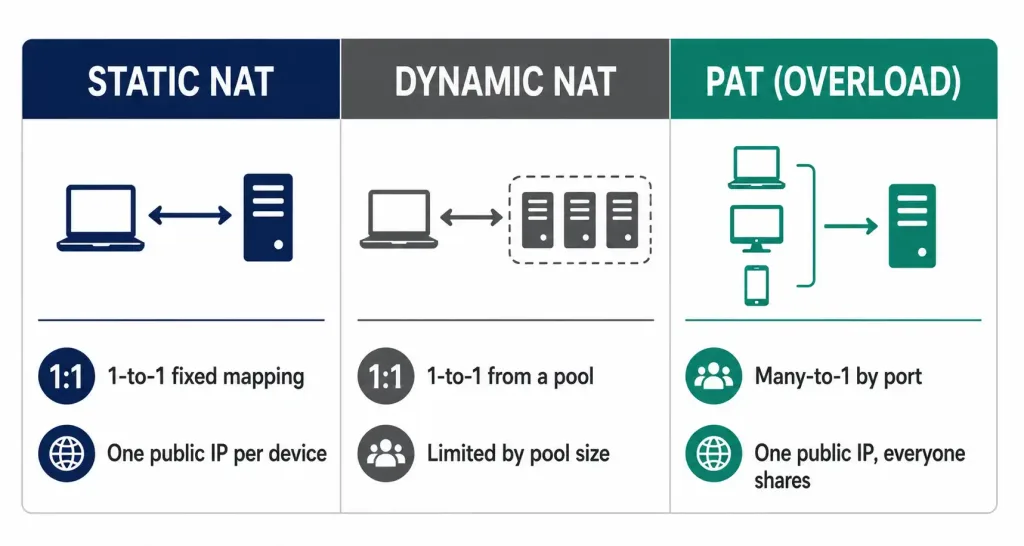
| Static NAT | Dynamic NAT | PAT (Overload) | |
|---|---|---|---|
| Mapping | One private → one fixed public | One private → one public from a pool | Many private → one public, by port |
| Public addresses needed | One per mapped device | One per simultaneous device (up to pool size) | Just one, total |
| Typical use case | Hosting an internally-located server reachable from outside | Enterprise with a modest pool of public addresses | Nearly everything else — offices, homes, most internet-facing NAT |
| Predictable public address? | Yes, always the same | No — assigned from the pool as needed | Yes, always the single configured address |
PAT’s port-based differentiation is what makes it scale so much further than the other two: a /24 pool with 254 devices behind a single public address is completely normal for PAT, because each device’s traffic is distinguished by port rather than by needing its own address at all.
Worked Scenario: Static NAT for an Internal Web Server
This is a composite scenario built to show static NAT solving a specific, common need.
A company hosts its own web server internally at 192.168.1.50, and wants it reachable from the internet at a fixed public address — 203.0.113.30 — that never changes, since external DNS records point to it.
Router(config)# ip nat inside source static tcp 192.168.1.50 80 203.0.113.30 80
Router(config)# interface gigabitEthernet 0/0
Router(config-if)# ip nat inside
Router(config-if)# exit
Router(config)# interface gigabitEthernet 0/1
Router(config-if)# ip nat outside
This variant of the static NAT command includes port numbers explicitly, mapping only port 80 rather than every port on the device — a more precise version than a blanket address-to-address mapping, since it only exposes the specific service actually meant to be reachable from outside, rather than the server’s entire address.
Confirming it works: show ip nat translations should show an active entry the moment an external client connects to 203.0.113.30:80, translating back to 192.168.1.50:80 internally. If nothing shows up when a connection is attempted, the most common cause is exactly what’s in the troubleshooting table above — ip nat outside missing from the internet-facing interface, which is easy to configure on the wrong interface entirely if the topology isn’t double-checked first.
Verifying NAT
Router# show ip nat translations
Pro  Inside global      Inside local       Outside local      Outside global
tcp  203.0.113.10:49152 192.168.1.10:49152 8.8.8.8:80         8.8.8.8:80
This is the live translation table — confirms an actual translation happened and shows exactly which internal device mapped to which external-facing address and port.
Router# show ip nat statisticsShows counts of active translations, hits, and misses — useful for spotting a pool that’s running out of addresses (dynamic NAT) or confirming translations are actually occurring at all.
Troubleshooting NAT
| Symptom | Likely Cause | Fix |
|---|---|---|
No translations appear in show ip nat translations | ip nat inside / ip nat outside not applied to the correct interfaces | Confirm both directions are marked; NAT does nothing without them |
| Internal devices can’t reach the internet at all | Access list referenced by the NAT rule doesn’t match the actual internal subnet | Compare the ACL’s permitted range against real internal addressing |
| Dynamic NAT pool exhausted, new connections fail | More internal devices than pool addresses, no overload configured | Add overload to convert to PAT, since one address can then serve everyone via port differentiation |
| A specific internal server isn’t reachable from outside | Static NAT missing or mapped to the wrong public address | Confirm the static mapping and that ip nat outside is applied on the internet-facing interface |
FAQs
What is the main purpose of NAT?
Conserving public IPv4 addresses by letting many private devices share a small number of public ones, translating between the two at the network boundary, while also hiding the internal addressing scheme from outside networks.
Why can’t private IP addresses be used directly on the internet?
Because they’re not globally unique — millions of different networks all reuse the same RFC 1918 ranges, so backbone routers have no meaningful way to route them, and by RFC 1918’s own design they were never meant to appear in global routing tables at all.
What’s the difference between static NAT, dynamic NAT, and PAT?
Static NAT maps one private address to one fixed public address permanently. Dynamic NAT maps private addresses to public addresses from a pool, first-come-first-served. PAT (NAT overload) maps many private addresses to a single public address at once, using port numbers to keep each device’s traffic distinct — the most common setup in practice.
What is a stub network in the context of NAT?
A network with exactly one path in and out. NAT is typically deployed on that single border router, since it’s the one point every outbound packet has to pass through, making it the natural place to handle translation for the entire internal network.
Why does dynamic NAT need an access list?
The access list defines which private addresses are actually eligible for translation from the pool — it’s functioning as a selector for the NAT rule, not as a security filter, even though it’s written using the same ACL syntax used for filtering elsewhere.
What does the overload keyword actually change?
It converts a NAT rule from one-to-one pool-based translation into PAT — instead of drawing from a pool of public addresses, every internal device shares a single public address, distinguished by source port number, which is what lets far more devices share one address simultaneously than dynamic NAT alone could ever support.
Can static NAT map just one port instead of an entire address?
Yes — ip nat inside source static tcp <inside-address> <port> <outside-address> <port> maps only the specified port rather than the whole device, which is the more precise choice when only one service (a web server on port 80, for instance) actually needs to be reachable from outside.



