Updated November 26, 2025 – This guide covers PortFast and BPDU Guard configurations for CCNA (200-301) and CCNP (ENARSI) exams, including labs, best practices, and RSTP integrations. Ideal for students asking, “What is PortFast and how do I enable it on a Cisco switch for CCNA?”
The switch port directly connected to an end station cannot create bridging loops. So, the port can rapidly enter the forwarding state by skipping the listening and learning state. PortFast is a Cisco proprietary solution that allows the switch port to skip the listening and learning state and immediately enter the forwarding state. It is working in PVST+, RSTP, or MSTP environments (Cisco IOS 15.x+ recommended for CCNA labs).
We can use PortFast on access ports to allow the immediate connection of the attached devices to the network rather than waiting for IEEE 802.1D STP to converge on each VLAN. Access ports are usually connected to a single workstation or a server. A switch-enabled port fast cannot generate a topology change and notification for an interface with Port Fast enabled.
In a Port Fast configuration, BPDUs should never be received because receiving BPDUs indicates that another bridge or switch is connected to the port. Receiving BPDUs causes a spanning tree loop. The BPDU guard is a feature called BPDU guard. BPDU guard is Cisco proprietary, and it puts the port in an error-disabled state on receipt of a BPDU.
Port Fast is functional for Dynamic Host Configuration Protocol (DHCP). If Port Fast is not enabled on the switch, the host can send a DHCP request before the port is in the forwarding state, which prevents the host from receiving an IP address and related information from the DHCP server. If PortFast is enabled, the port state changes immediately to the forwarding state, and the host can get a usable IP address. This is critical in CCNA labs where DHCP timeouts can fail topology tests. Note: In production, combine with DHCP Snooping for security.
We can enable Port Fast on a switch port using the command spanning-tree portfast in interface configuration mode. If we want to configure PortFast for all access interfaces, we can use the command spanning-tree portfast default in global configuration mode. The command enables Port Fast on all non-trunking interfaces.
The figure below illustrates the PortFast configuration on the Switch-3 interface Fa0/2.
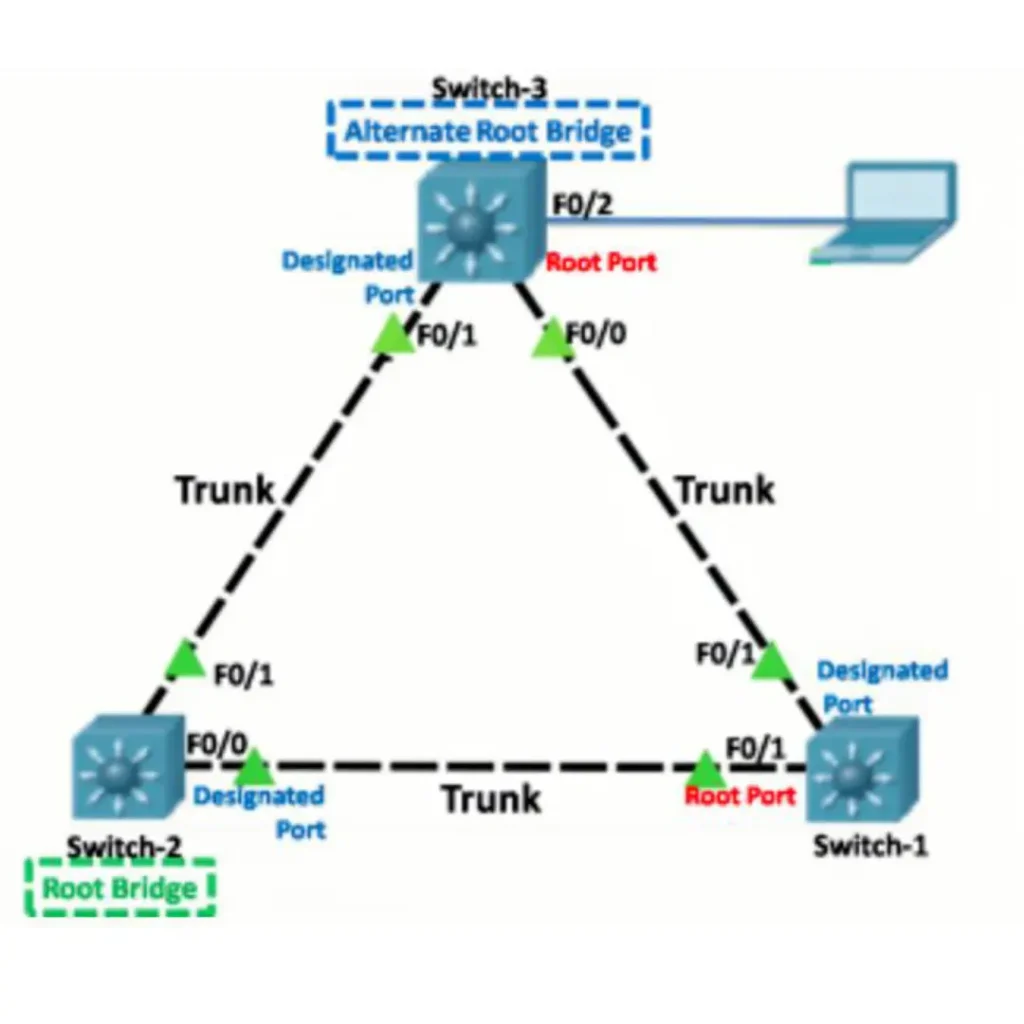
PortFast
When to Use PortFast: Best Practices
- End-user PCs/servers (not trunks—risks loops).
- Avoid on inter-switch links.
- CCNA Tip: Test convergence time with show spanning-tree.
- Benefits of enabling BPDU Guard with PortFast in spanning tree: Prevents accidental loops from misconnected devices, ensuring network stability without manual intervention.
PortFast Configuration Example: Cisco IOS for Access Ports
To configure PortFast and BPDU Guard on a specific access port (e.g., for “portfast configuration example cisco ios for access ports”):
Switch-3> enable
Switch-3# configure terminal
Enter configuration commands, one per line. End with CNTL/Z.
Switch-3(config)# interface fastEthernet0/2
Switch-3(config-if)# spanning-tree portfast
Switch-3(config-if)# spanning-tree bpduguard enable
Switch-3(config-if)# exit
Switch-3(config)# exit
Switch-3# write memory
Building configuration...
[OK]
Switch-3#
To configure BPDU Guard on an access port, use the spanning-tree bpduguard enable command in interface configuration mode. If we want to configure the BPDU guard on all interfaces, use the command spanning-tree portfast bpduguard default in global configuration mode. The command enables BPDU guard on all PortFast-enabled ports. The global command spanning-tree portfast bpduguard default enables it only on PortFast-enabled ports, not all interfaces—key for selective deployment in CCNP designs.
BPDU Guard in Action: What Happens on Violation?
If a rogue switch connects to a PortFast-enabled port, BPDU Guard detects the incoming BPDU and err-disables the port to prevent loops. For example:
- Log entry:
%SPANTREE-2-BLOCK_BPDUGUARD: Received BPDU on port Fa0/2 with BPDU Guard enabled. Disabling port. - Port status:
show interfaces statusshows “err-disabled”. - Recovery: Manually with
interface Fa0/2,shutdown,no shutdown. Or globally:errdisable recovery cause bpduguardwith a timer (e.g.,errdisable recovery interval 300). This is essential for troubleshooting BPDU received on PortFast-enabled ports.
We can verify the PortFast and BPDU guard enabled for the switch port using the show running-config command. Use show spanning-tree interface FastEthernet0/2 for VLAN-specific status and show interfaces status err-disabled to determine guard triggers. By default, PortFast and BPDU guard are disabled on all interfaces.
Security Implications of PortFast and BPDU Guard
While PortFast speeds up connectivity, it introduces risks if misconfigured—e.g., connecting a switch to an access port can cause broadcast storms or DoS attacks via loops. BPDU Guard mitigates this by isolating violations, but pair it with broader security features for CCNA robustness:
- Port Security: Limit MAC addresses on access ports (
switchport port-security maximum 1). - DHCP Snooping: Prevent rogue DHCP servers that could exploit fast-forwarding.
- Best Practices for BPDU Guard on Trunk vs Access Ports (CCNA Lab): Enable on access only; for trunks, use Root Guard to protect against superior BPDUs. In labs, simulate attacks with a second switch to see err-disable in action.
Hands-On CCNA Lab: Configuring and Testing PortFast and BPDU Guard
Expand your CCNA skills with this Packet Tracer lab (targets “how to configure portfast and bpdu guard on cisco switch ccna”). Duration: 30-45 minutes.
Lab Topology
- Three Cisco 2960 switches (Switch-1 as root, Switch-2/3 as access).
- PC connected to Switch-3 Fa0/2 (VLAN 10).
- Rogue switch for testing.
- Cables: Ethernet between switches; PC to Fa0/2.
Step 1: Basic STP Setup
On all switches:
Switch> enable
Switch# configure terminal
Enter configuration commands, one per line. End with CNTL/Z.
Switch(config)# vlan 10
Switch(config-vlan)# exit
Switch(config)# interface range fastEthernet0/1 - 24
Switch(config-if-range)# switchport mode access
Switch(config-if-range)# switchport access vlan 10
Switch(config-if-range)# exit
Switch(config)# spanning-tree mode pvst
Switch(config)# end
Switch# write memory
Building configuration...
[OK]
Switch#
Connect switches: Switch-1 Fa0/1 to Switch-2 Fa0/1; Switch-1 Fa0/2 to Switch-3 Fa0/1. Verify root with show spanning-tree.
Step 2: Enable PortFast and BPDU Guard
On Switch-3 (for PC port):
Switch-3> enable
Switch-3# configure terminal
Enter configuration commands, one per line. End with CNTL/Z.
Switch-3(config)# interface fastEthernet0/2
Switch-3(config-if)# switchport mode access
Switch-3(config-if)# switchport access vlan 10
Switch-3(config-if)# spanning-tree portfast
Switch-3(config-if)# spanning-tree bpduguard enable
Switch-3(config-if)# exit
Switch-3(config)# end
Switch-3# write memory
Building configuration...
[OK]
Switch-3#
Globally (optional): spanning-tree portfast default and spanning-tree portfast bpduguard default.
Step 3: Test DHCP and Convergence
- Power on PC; ping gateway (should succeed in <5s vs. 30s without PortFast).
- Use
debug spanning-tree eventsto confirm immediate forwarding.
Step 4: Simulate Violation
- Connect rogue switch to Fa0/2.
- Observe: Port err-disables; logs show BPDU block.
- Verify:
show interfaces Fa0/2(err-disabled). - Recover: i
nterface Fa0/2,shutdown,no shutdown.
Expected Outputs
show spanning-tree interface Fa0/2: “VLAN0010 … Portfast enabled”.- Troubleshooting Tip: If issues, check
show loggingfor BPDU events.
FAQs
What is the difference between PortFast and BPDU Guard in Cisco STP?
PortFast skips STP listening/learning for faster host connectivity on access ports. BPDU Guard protects by err-disabling the port if a BPDU arrives, preventing loops—always enable together for CCNA best practices.
What is PortFast and how does it work in Cisco STP?
PortFast is a Cisco feature that allows access ports connected to end stations to skip STP listening and learning states, immediately entering forwarding for faster connectivity. Ideal for workstations/servers in PVST+, RSTP, or MSTP; prevents delays but requires BPDU Guard to avoid loops.
Why enable BPDU Guard with PortFast on Cisco switches?
BPDU Guard protects PortFast-enabled ports by err-disabling them upon receiving BPDUs, indicating a potential loop from misconnected bridges. It’s Cisco proprietary, ensuring network stability—enable globally via spanning-tree portfast bpduguard default for all access ports in CCNA setups.
How does PortFast impact DHCP in CCNA labs?
Without PortFast, STP convergence delays (30-50s) cause DHCP requests to timeout, blocking IP assignment. Enabling it shifts ports to forwarding instantly, allowing hosts to receive IPs quickly. Pair with security like DHCP Snooping in production for robust CCNA topology tests.
What commands configure PortFast and BPDU Guard per port?
Use interface mode: spanning-tree portfast to enable PortFast, and spanning-tree bpduguard enable for Guard. Verify with show running-config. For global: spanning-tree portfast default and spanning-tree portfast bpduguard default on non-trunk ports—disabled by default on Cisco IOS.
How to verify PortFast and BPDU Guard on a Cisco switch?
Run show running-config to confirm commands under interfaces. Check port status with show spanning-tree interface fa0/2 for PortFast enabled. Monitor violations via show interfaces status err-disabled. Essential for CCNA troubleshooting to ensure no loops or delays.