
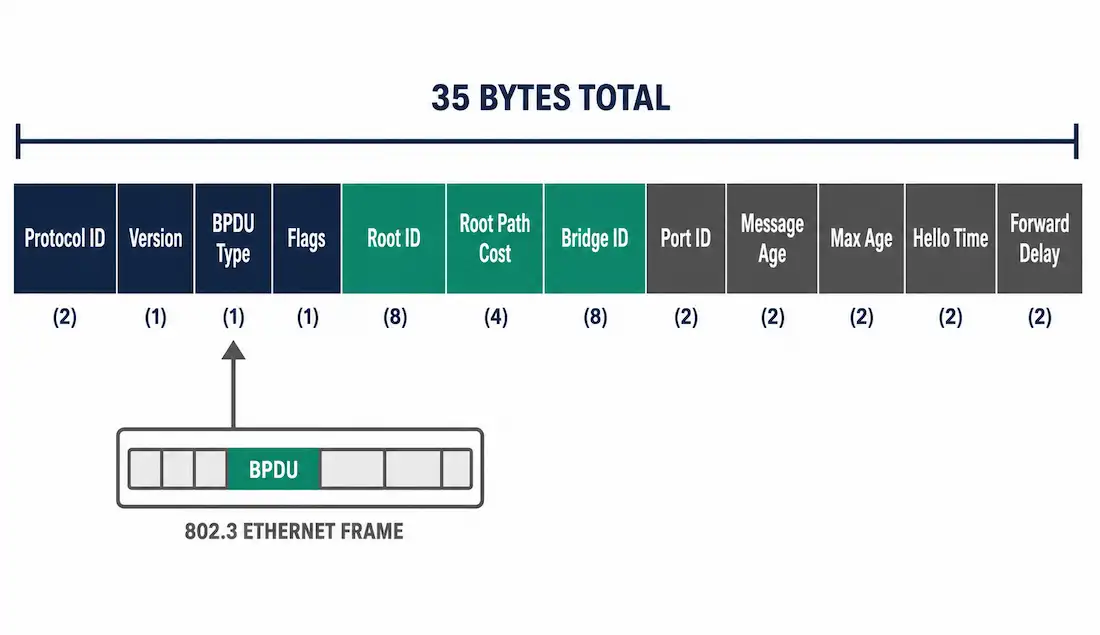
Every root bridge election, every port role assignment, and every failover this series has covered so far runs on one underlying mechanism: switches exchanging Bridge Protocol Data Units, or BPDUs. This article breaks down the BPDU frame field by field, walks through exactly how cost increments as a BPDU propagates through a topology, and clears up two details that get mixed up constantly — the real byte size of the Bridge ID, and the difference between BPDU Guard and BPDU filtering.
This continues the series topology used in the core STP guide and the port roles article: SW1 as root bridge, with SW2, SW3, and SW4 forming the redundant paths around it.
What a BPDU Actually Is
A BPDU is a data frame that switches exchange to run the Spanning Tree Algorithm. It carries the information needed to elect a root bridge, calculate path cost, and assign port roles — everything covered in the previous two articles depends on this frame existing and being compared correctly between neighbors.
There are two BPDU types under classic 802.1D:
- Configuration BPDU. Sent by the root bridge every hello interval (2 seconds by default) and relayed by every other switch. This is the steady-state BPDU carrying root ID, path cost, and timer values.
- Topology Change Notification (TCN) BPDU. Sent by a switch that detects a topology change — a port going up or down — to alert the root bridge that recalculation may be needed.
RSTP (802.1w) and MSTP fold both functions into a single unified BPDU type and version number, since RSTP’s active handshake model doesn’t need a separate notification frame the way classic STP does.
A BPDU is encapsulated inside an 802.3 Ethernet frame and sent to the destination multicast MAC address 01:80:C2:00:00:00. This is the reserved address for the spanning tree group. Every switch participating in spanning tree on that segment reads frames sent to this address; every other device on the network ignores them, since it’s a multicast address rather than a broadcast.
The BPDU Frame Field by Field
A Configuration BPDU contains 12 fields totaling 35 bytes. They break down into three logical groups: identification, root-bridge information, and timers.
| Field | Size (Bytes) | Example Value | What It Does |
|---|---|---|---|
| Protocol ID | 2 | 0x0000 | Always zero — identifies the frame as part of the STP protocol family |
| Protocol Version | 1 | 0 (STP), 2 (RSTP), 3 (MSTP) | Tells the receiving switch which spanning tree variant is in use |
| BPDU Type | 1 | 0x00 = Configuration, 0x80 = TCN | Distinguishes a routine Configuration BPDU from a Topology Change Notification |
| Flags | 1 | Bit 0 = TC, Bit 7 = TCA | Signals a topology change or acknowledges one |
| Root Identifier | 8 | Priority + MAC, e.g. 32768.000c.29ab.cdef | The Bridge ID of the switch currently believed to be root |
| Root Path Cost | 4 | Cumulative value, e.g. 4 after one Gigabit hop | Total cost accumulated from the sending switch back to the root |
| Bridge Identifier | 8 | Priority + MAC of the sending switch | Used as a tiebreaker when two switches report equal root path cost |
| Port Identifier | 2 | Priority.Port number, e.g. 128.5 | Identifies which port sent this BPDU; lower value wins ties |
| Message Age | 2 | Seconds since the root generated this information | Increments with each hop; used to detect stale information |
| Max Age | 2 | Default 20 seconds | How long a switch waits before discarding aged BPDU information |
| Hello Time | 2 | Default 2 seconds | Interval between Configuration BPDUs sent by the root |
| Forward Delay | 2 | Default 15 seconds | Duration of the listening and learning states (30 seconds combined) |
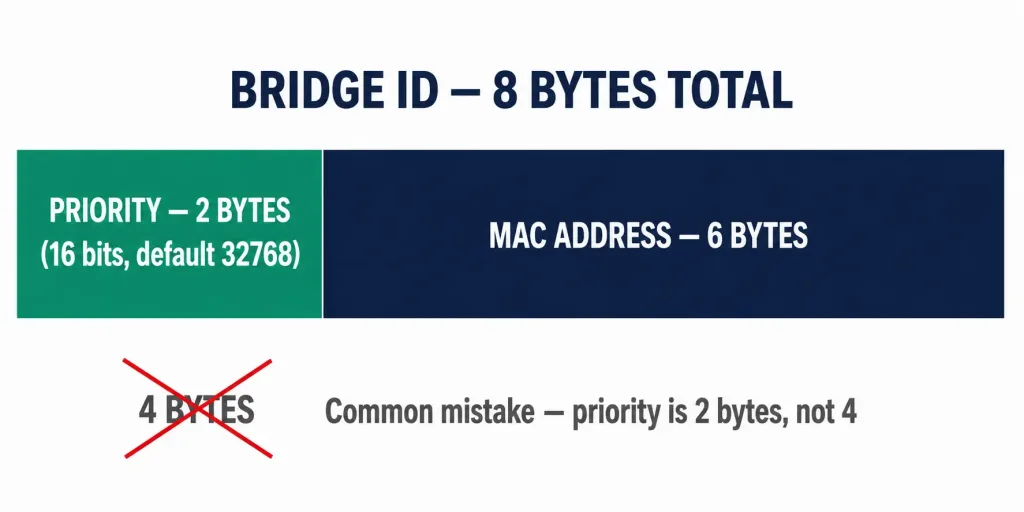
The Root Identifier and Bridge Identifier fields are each 8 bytes, and that number matters: it’s 2 bytes of priority (a 16-bit field, default value 32768) plus 6 bytes of MAC address. A Bridge ID is not built from a 4-byte priority value — the priority field is exactly 16 bits, split further in PVST+ into a 4-bit priority multiplier and a 12-bit extended system ID carrying the VLAN number, as covered in the port roles article. Getting this byte count right matters because it’s the same field structure used every time a root bridge election happens.
How Root Path Cost Actually Increments
This is the part worth getting exactly right, since it’s easy to transpose the numbers. Cisco’s legacy (short) cost method assigns these values by link speed:
- 10 Mbps: cost 100
- 100 Mbps: cost 19
- 1 Gbps: cost 4
- 10 Gbps: cost 2
So if a Configuration BPDU arrives on a switch’s Gigabit Ethernet port, that switch adds 4 to the Root Path Cost value already carried in the BPDU — not 19. The cost of 19 belongs to Fast Ethernet (100 Mbps) links. Mixing these up is a common source of confusion when reading show spanning-tree output and trying to reconcile the displayed cost with the physical link speeds in the topology.
Walking through the SW1–SW4 topology: SW1, the root, sends Configuration BPDUs out its designated ports with Root Path Cost set to 0, since it has no path cost to itself. SW2 receives this on its Gigabit link to SW1, adds the Gigabit cost of 4, and now advertises a Root Path Cost of 4 in the BPDUs it relays onward. If SW3 then receives a BPDU from SW2 on their shared link, SW3 compares that path (cost 4 plus its own link cost to SW2) against its own direct path to SW1 through its root port. Whichever total is lower wins, and that comparison is exactly how STP decided to block one end of the SW2–SW3 link in the first place.
Superior vs. Inferior BPDUs
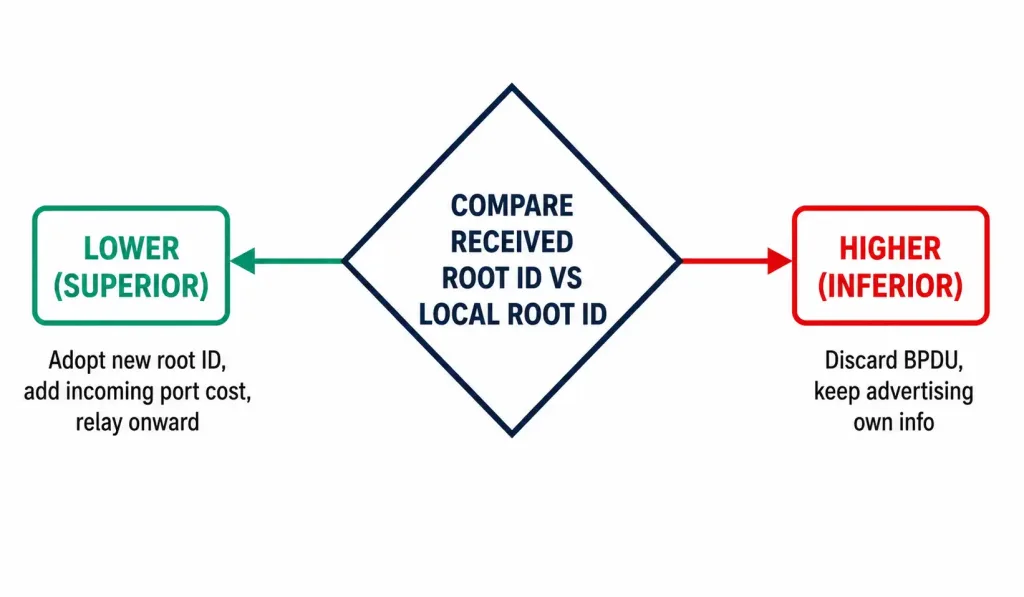
When a switch receives a BPDU, it compares the root ID inside against its own locally stored root ID:
- If the received root ID is lower (superior), the switch adopts it, updates its own BPDUs to advertise the new root, and increases the path cost by its incoming port’s cost.
- If the received root ID is higher (inferior), the switch discards the BPDU and continues advertising its own, better information.
This comparison is what lets a new, lower-priority switch propagate its root claim across an entire topology within a few hello intervals — every switch that hears the superior BPDU adopts it and passes it along, and every switch that already has better information simply ignores the inferior claim.
BPDU Guard vs. BPDU Filtering
These two features are often confused, and getting the distinction backward leads to misconfigured access ports.
- BPDU Guard does not prevent a port from receiving BPDUs. It monitors for them. If an access port configured with BPDU Guard receives a BPDU at all, the guard treats that as a sign something unexpected — usually another switch or hub — was plugged into what should be an end-device port, and it puts the port into an err-disabled state immediately.
- BPDU Filtering actually suppresses BPDU transmission and processing on a port. A port with BPDU filtering enabled neither sends BPDUs out nor acts on any it receives, effectively removing that port from spanning tree’s awareness entirely.
The practical difference: BPDU Guard reacts to an unexpected BPDU by shutting the port down, a safety measure. BPDU filtering ignores BPDUs altogether, which is riskier, since it removes STP’s ability to detect a loop on that port at all. BPDU Guard is the standard recommendation for access ports; filtering is a narrower tool for specific edge cases where BPDUs should never be exchanged at all.
Enable BPDU Guard on an access port with:
Switch(config-if)# spanning-tree bpduguard enableOr globally on every PortFast-enabled port:
Switch(config)# spanning-tree portfast bpduguard defaultVerify BPDU activity and confirm the root bridge with:
Switch# show spanning-tree detailThis output shows the BPDUs sent and received per port, which is useful for confirming a switch is actually hearing from its expected neighbor and not silently isolated from the rest of the topology.
Reading a Captured BPDU
When capturing BPDUs in Packet Tracer or Wireshark, the quickest sanity check is comparing the Root Identifier field against the Bridge Identifier field in the same frame. If they match, the capture was taken from the root bridge itself — its own Bridge ID is, by definition, the lowest in the network, so it reports itself as root. If they differ, the capture is from a non-root switch relaying information about a root bridge elsewhere in the topology, and the Root Path Cost field will be non-zero, reflecting the accumulated cost back to that root.
Frequently Asked Questions
What is a Bridge Protocol Data Unit (BPDU)?
A BPDU is the frame switches exchange to run the Spanning Tree Algorithm. It carries the sending switch’s Bridge ID, the current root bridge’s ID, accumulated path cost, and STP’s timer values, and it’s the mechanism behind every root bridge election and port role assignment.
How much does path cost increase when a BPDU crosses a Gigabit Ethernet link?
By 4, using Cisco’s legacy short-cost method. A cost of 19 applies to 100 Mbps Fast Ethernet links, not Gigabit — mixing up these two values is a common error when reading show spanning-tree cost fields against known link speeds.
How many bytes make up a Bridge ID, and how are they split?
Eight bytes total: 2 bytes of priority (a 16-bit field, default 32768) plus 6 bytes of MAC address. In PVST+, that same 16-bit priority field is further split into a 4-bit priority multiplier and a 12-bit extended system ID carrying the VLAN number — the VLAN ID isn’t a separate field appended afterward.
What’s the actual difference between BPDU Guard and BPDU filtering?
BPDU Guard monitors a port and shuts it down (err-disabled) if it ever receives a BPDU, which is a safety response to an unexpected switch or hub appearing on an access port. BPDU filtering suppresses BPDU sending and processing on a port entirely, which removes that port from STP’s loop-detection awareness altogether — a riskier, more narrowly-scoped tool.
How does a switch decide whether to accept or discard a received BPDU?
It compares the root ID inside the BPDU against its own stored root ID. A lower (superior) root ID gets adopted, and the switch updates its own advertised information and adds its incoming port’s cost to the path cost. A higher (inferior) root ID gets discarded, since the switch already has better information to advertise.
How can you tell if a captured BPDU came from the root bridge?
Compare the Root Identifier field against the Bridge Identifier field in the same frame. If they’re identical, the capture is from the root bridge itself, since a root bridge always reports its own ID as both root and sender.
BPDU-Based Attacks and Why Hardening Matters
Because BPDUs are trusted implicitly by default, they’re also a known attack surface. An attacker with access to a switch port can craft and send a BPDU claiming an artificially low Bridge ID, tricking the network into electing a rogue device as root bridge. Once that succeeds, the attacker’s device sits in the path of traffic that would otherwise have flowed directly between legitimate switches, enabling interception or a deliberate denial-of-service by mishandling forwarded frames.
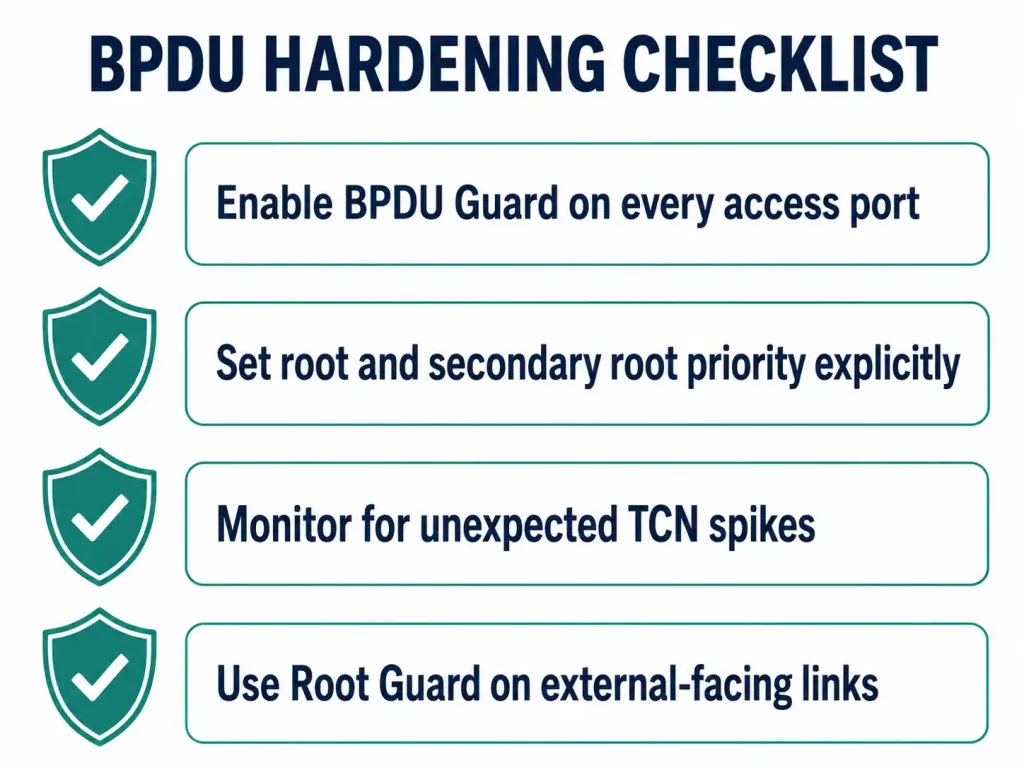
This is precisely the scenario BPDU Guard is designed to prevent on access ports, and it’s why root bridge placement shouldn’t be left to chance. A few practical hardening steps:
- Enable BPDU Guard on every access port, not just the ones currently connected to end devices — ports get repurposed, and a forgotten configuration is a common gap.
- Set root and secondary root priority explicitly on core switches using
spanning-tree vlan [id] root primaryandroot secondary, so an attacker’s low-priority BPDU has less of a mathematical chance of winning outright against a deliberately-set low value. - Monitor for unexpected topology change notifications. A sudden spike in TCN BPDUs across the network, especially from a port that shouldn’t be experiencing physical changes, is worth investigating before assuming it’s benign.
- Use Root Guard on ports facing other administrative domains, such as links to a different organization’s network, to prevent an external switch from ever becoming root even if it advertises a superior BPDU.
Where BPDUs Fit in Troubleshooting
Most STP problems trace back to a BPDU either not being where it should be or containing information a switch is misinterpreting. A port that never transitions out of blocking, a root bridge in an unexpected location, or a sudden topology-wide reconvergence almost always shows up first in show spanning-tree detail output as an anomaly in BPDU timing, cost, or origin — which is exactly why understanding this frame format pays off well beyond passing a certification exam.



