
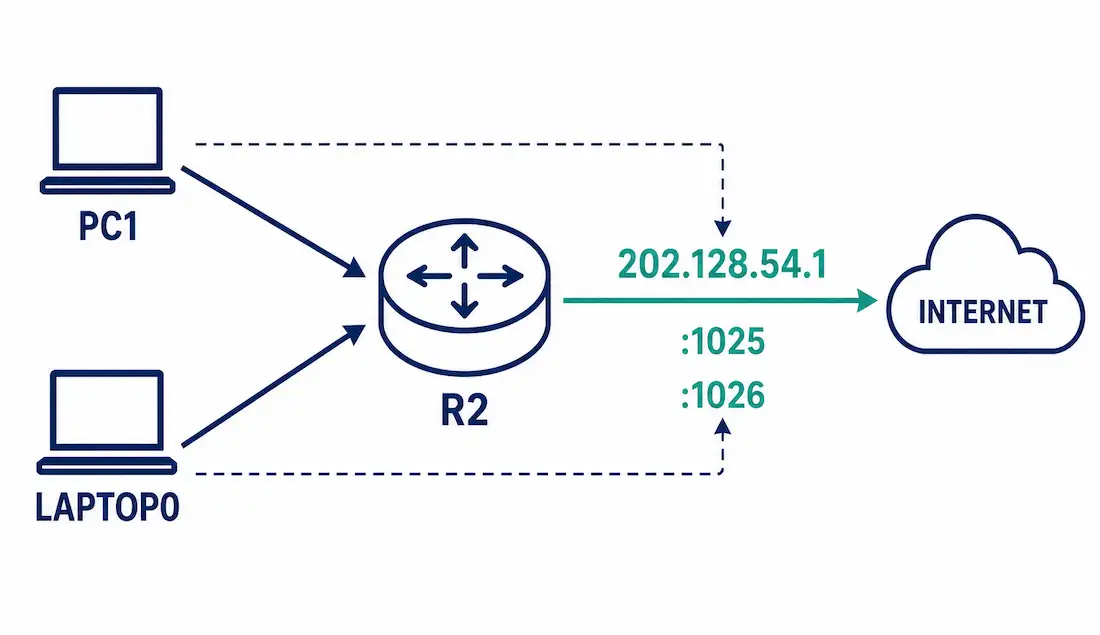
Port Address Translation (PAT), also called NAT overload, lets many internal devices share a single public address, distinguished from each other by port number rather than needing a separate address for each device. This is the guide that completes our shared NAT lab — if you’ve worked through Static NAT and Dynamic NAT already, PAT reuses the exact same router and interfaces, with one key difference: it needs no dedicated address pool at all.
Example Topology (Shared with This NAT Series)
- R2 — the same NAT gateway used throughout this series
- PC1 — 192.168.11.100, on R2’s G0/0
- Laptop0 — 192.168.10.101, on R2’s G0/1
- Outside destination — the web server at 201.128.35.2, reached via R2’s Serial0/0/0.100 (202.128.54.1)
Why this configuration needs no new addresses: static NAT already reserved 202.128.54.3–.4, and dynamic NAT already reserved 202.128.54.5–.14 from this lab’s shared /28 block. PAT via the single-IP overload method doesn’t need a slice of that block at all — it simply reuses R2’s own outside interface address, 202.128.54.1, for every single translation. This is also how PAT is most commonly deployed in the real world: a home router or small office typically has exactly one public address to work with, and PAT is precisely what makes that one address usable for an entire network at once.
Configuring PAT with a Single Public IP (Interface Overload)
This is the standard method, and it’s nearly identical to dynamic NAT’s configuration — the difference is the overload keyword plus using interface instead of pool:
R2> enable
R2# configure terminal
R2(config)# access-list 1 permit 192.168.11.0 0.0.0.255
R2(config)# access-list 1 permit 192.168.10.0 0.0.0.255
R2(config)# ip nat inside source list 1 interface Serial0/0/0.100 overload
R2(config)# interface GigabitEthernet0/0
R2(config-if)# ip nat inside
R2(config-if)# exit
R2(config)# interface GigabitEthernet0/1
R2(config-if)# ip nat inside
R2(config-if)# exit
R2(config)# interface Serial0/0/0.100
R2(config-subif)# ip nat outside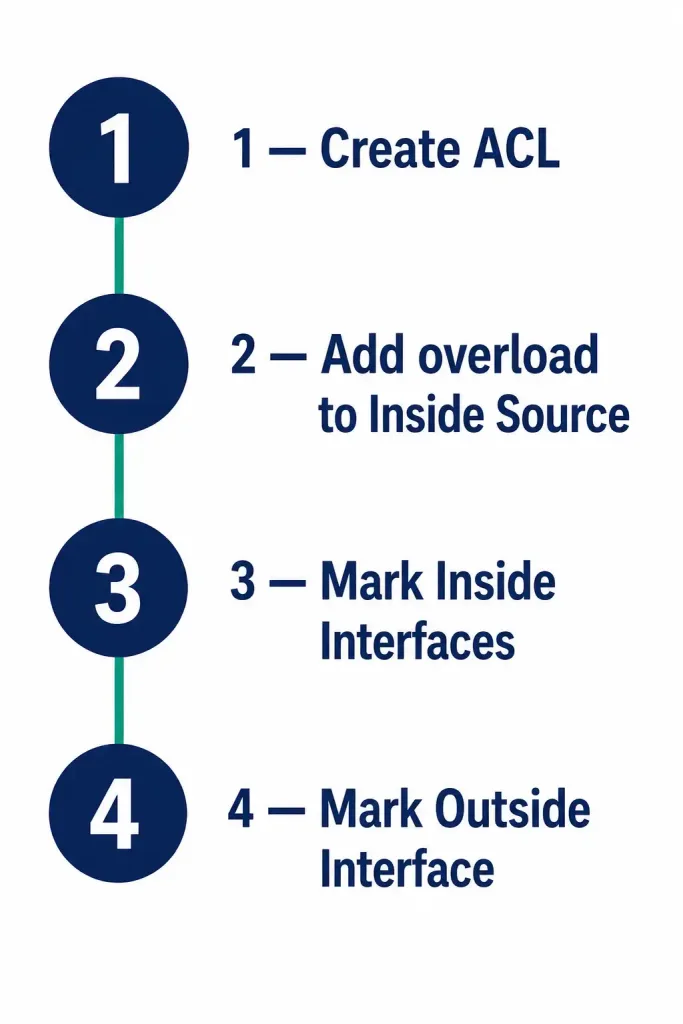
The interface keyword tells R2 to use whatever address is currently configured on Serial0/0/0.100 (202.128.54.1) as the single translation address for every inside device on the network — no pool needed at all, and the address automatically follows if the interface’s own address ever changes later (common on a DHCP-assigned ISP connection).
Configuring PAT with a Pool (A Different, Hypothetical Scenario)
Note: this uses a separate, hypothetical address block — not the same 202.128.54.0/28 range already fully committed by static and dynamic NAT in this lab. A pool-based PAT setup only makes real sense when an organization has been assigned more than one public address and wants overload translation to draw from several of them for extra capacity — imagine R2 additionally had a second ISP-assigned block, 203.0.113.0/29, available for this purpose:
R2(config)# ip nat pool PAT_POOL 203.0.113.1 203.0.113.6 netmask 255.255.255.248
R2(config)# ip nat inside source list 1 pool PAT_POOL overload
Everything else — the ACL, the inside interface designations — stays exactly the same as the single-IP method described above. The only functional difference overload makes here is that PAT now spreads sessions across all six addresses in the pool instead of just the one, giving significantly more combined port capacity before exhaustion becomes any kind of realistic concern.
How Port Conflicts Are Resolved
Here’s a clean, single worked example — one consistent set of port numbers throughout, unlike scattered examples elsewhere.
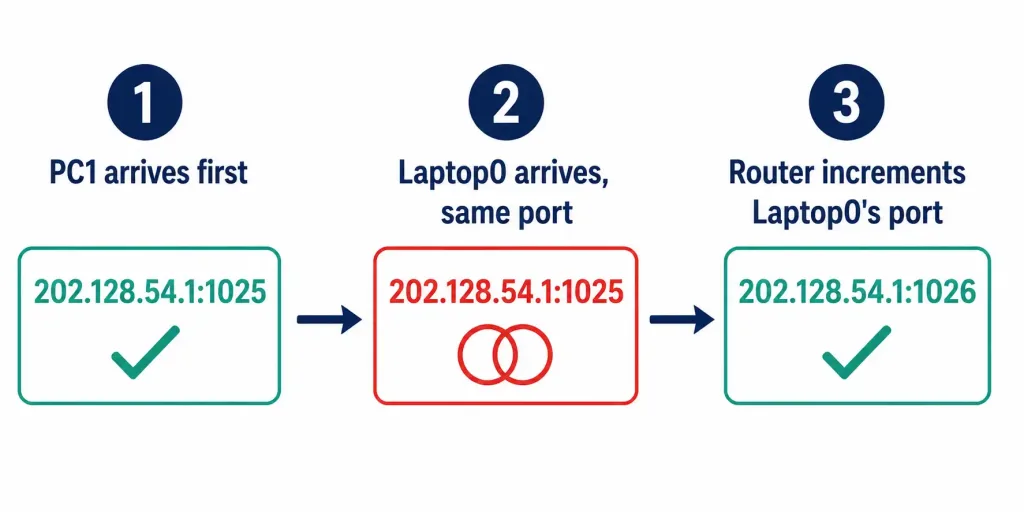
PC1 (192.168.11.100) and Laptop0 (192.168.10.101) both happen to generate source port 1025 at nearly the same moment, each starting a session to the web server at 201.128.35.2:
- PC1’s packet reaches R2 first. R2 translates the source to 202.128.54.1:1025 — since nothing else in the table is currently using port 1025, it’s preserved completely unchanged.
- Laptop0’s packet arrives next, also using port 1025 by pure coincidence. R2 checks its translation table and finds 202.128.54.1:1025 is already taken by PC1’s active session.
- R2 increments the port for Laptop0’s translation instead — landing on 202.128.54.1:1026 — and records this as a new, distinct mapping in the table.
[See Infographic: Resolving a Port Conflict Step by Step]
When the web server replies, it sends its response for PC1’s session to 202.128.54.1:1025, and its response for Laptop0’s session to 202.128.54.1:1026. R2 uses the destination port on each incoming reply to look up the correct entry — port 1025 maps back to PC1 (192.168.11.100), port 1026 maps back to Laptop0 (192.168.10.101) — and forwards each packet to the correct device accordingly based on that lookup. The web server never actually knows two separate devices are involved in any of this; from its own perspective, it’s simply talking to one address with two different, unrelated conversations happening on two different ports simultaneously.
Verifying PAT
R2# show ip nat translations
Pro  Inside global       Inside local         Outside local       Outside global
tcp  202.128.54.1:1025   192.168.11.100:1025  201.128.35.2:80     201.128.35.2:80
tcp  202.128.54.1:1026   192.168.10.101:1025  201.128.35.2:80     201.128.35.2:80
Notice both Inside local entries show port 1025 — that’s each device’s own original source port, unchanged. It’s the Inside global column where the conflict resolution actually shows up: both share the same address (202.128.54.1), but the ports differ (1025 vs. 1026) — that’s PAT working exactly as intended.
R2# show ip nat statistics
Total translations: 2 (0 static, 2 dynamic, 2 extended)
Outside Interfaces: Serial0/0/0.100
Inside Interfaces: GigabitEthernet0/0, GigabitEthernet0/1
Hits: 14  Misses: 2
With interface overload, there’s no pool section to check the way dynamic NAT has — a single address is either currently handling the present session load successfully or it isn’t. Port exhaustion, not address exhaustion, is what to actually watch for on a heavily-loaded PAT deployment.
PAT Capacity: One Clear Figure
A single public address has 65,536 total port numbers (0–65,535) theoretically available for PAT to use. In practice, Cisco’s PAT allocation avoids the well-known port range (0–511) when possible, leaving closer to ~65,000 usable sessions per address as a realistic ceiling — not a precise guarantee, since actual platform-specific limits and the mix of TCP/UDP/ICMP traffic affect real-world capacity too. This is one consistent figure worth remembering rather than treating capacity claims that vary wildly between sources as equally reliable.
For context on why this ceiling rarely becomes a real problem: a typical office device might have a handful of simultaneous sessions open at once — a few browser tabs, an email client, maybe a video call. Even a fairly large office of 200 devices, each averaging 10 concurrent sessions, is using only about 2,000 of the roughly 65,000 available ports on a single PAT address — nowhere near exhaustion. Port exhaustion in practice tends to show up in specific high-session-count scenarios: large NAT gateways serving thousands of users at once (carrier-grade NAT), or applications that open unusually large numbers of simultaneous connections, like certain P2P or IoT traffic patterns.
Troubleshooting PAT
| Symptom | Command to Check | Likely Cause |
|---|---|---|
| No translations appear at all | show ip nat translations | ACL doesn’t match the actual inside subnet, or overload keyword is missing entirely |
| Devices on one LAN work, the other doesn’t | show access-lists 1 | ACL only permits one of the two inside networks, not both |
| Sessions dropping under heavy load | show ip nat statistics | Port exhaustion on the single shared address — consider a pool-based PAT setup if a second public block is actually available |
| Inbound connection to an internal device fails | N/A — expected behavior | PAT only supports outbound-initiated sessions by design; use static NAT for anything needing reliable inbound reachability from outside |
The Complete Picture: All Three NAT Types on One Router
With PAT configured, this lab now demonstrates all three NAT types running on the same router simultaneously — a realistic setup, since real networks commonly combine them:
| Addresses Used | Purpose in This Lab | |
|---|---|---|
| Static NAT | 202.128.54.3, .4 | Permanent mappings for two internal servers, reachable from outside |
| Dynamic NAT | 202.128.54.5–.14 | Pool-based outbound access, one-to-one per session |
| PAT | 202.128.54.1 (R2’s own interface) | Shared outbound access for PC1 and Laptop0, differentiated by port |
Static NAT’s translations are checked first, before dynamic NAT or PAT — a device with a static entry always uses that mapping, never falling through to the pool or the shared PAT address instead. This priority order matters most if a device is ever accidentally covered by more than one NAT rule at once, since it determines which translation actually takes effect rather than leaving the outcome ambiguous.
Watching PAT with Debug
debug ip nat shows each translation as it happens — genuinely useful for confirming port allocation behavior in a lab, though worth using sparingly on a production device given the added CPU load:
R2# debug ip nat
R2#
*NAT: s=192.168.11.100->202.128.54.1, d=201.128.35.2 [1025]
*NAT: s=192.168.10.101->202.128.54.1, d=201.128.35.2 [1026]
The bracketed number at the end is the translated port — watching this in real time while generating traffic from both PC1 and Laptop0 simultaneously is by far the clearest way to actually see the port-increment behavior happen for yourself, rather than just reading about it secondhand. no debug ip nat turns it back off once you’re done testing.
Advantages and Disadvantages of PAT
Advantages: conserves IPv4 addresses far more efficiently than static or dynamic NAT could ever manage, requires minimal configuration to get running, and — as a side effect, not a genuine security feature — hides internal addressing from outside observers looking in.
Disadvantages: not suitable for hosting anything needing inbound connections initiated from outside (static NAT handles that instead), port exhaustion is a real if uncommon risk under very heavy simultaneous session load, and PAT shares NAT’s general end-to-end connectivity issues with protocols like IPsec and FTP that embed addresses directly in their payload — covered in far more depth in our dedicated NAT Advantages and Disadvantages guide.
FAQs
What is Port Address Translation (PAT)?
PAT, also called NAT overload, maps many private inside addresses to a single public address, differentiating each device’s traffic using unique port numbers rather than needing a separate address per device or session.
How does PAT differ from dynamic NAT?
Dynamic NAT assigns each device its own address from a pool, one-to-one — the pool needs as many addresses as simultaneous sessions. PAT shares a single address across every device at once, distinguished only by port, which is what lets an entire network share one public IP.
How do you configure PAT with a single public IP?
ip nat inside source list <acl-number> interface <outside-interface> overload — this reuses whatever address is already configured on the outside interface, with no separate pool needed. Mark the inside interfaces with ip nat inside and the outside interface with ip nat outside as usual.
What happens when two devices generate the same source port?
The router preserves the first device’s port unchanged, then increments the second device’s port until it finds one that’s free — for example, 1025 for the first device and 1026 for the second, both sharing the same translated public address.
How many sessions can one public IP support with PAT?
Roughly 65,000 usable sessions in practice, out of 65,536 theoretically available ports — the exact figure varies by platform and traffic type, but this is a reasonable ceiling to reference rather than the very different numbers sometimes cited elsewhere.
Can PAT be used to host a server that needs inbound connections?
No — PAT only tracks sessions that were initiated from the inside network out. An internal server needing reliable inbound reachability from outside needs static NAT instead, which supports connections initiated from either direction.
Why does this guide’s PAT configuration reuse R2’s own outside interface address instead of a pool?
Because it needs zero additional addresses from the lab’s already-committed 202.128.54.0/28 block — static NAT and dynamic NAT have already reserved .3 through .14 between them. Reusing the interface’s own address (.1) via the overload keyword is also how PAT is most commonly deployed in real single-public-IP scenarios, like a typical home or small office router.



