
When a loop occurs in the switched network, STP uses path cost to resolve which ports forward and which block. Path cost is derived from a port’s speed. If two connected ports end up with equal path cost, spanning tree falls back to the lowest port ID as the final tiebreaker. For CCNA students, understanding path cost is key to mastering STP root port election and loop prevention; for CCNP, it ties directly into rapid convergence with RSTP.
The path cost to the root bridge is the sum of the individual port costs along the path, from the local switch to the root bridge. The port’s speed defines this default port cost.
Two Cost Standards, Not Two Eras
It’s worth getting the history straight here, since it’s easy to mislabel. The very first spanning tree cost formula, from the original 802.1D standard, was simply 1000 divided by the link’s bandwidth in Mbps. That gave 10 Mbps a cost of 100, 100 Mbps a cost of 10, and both 1 Gbps and anything faster a cost of 1 — coarse enough that it couldn’t tell a 1 Gbps link apart from a 10 Gbps one.
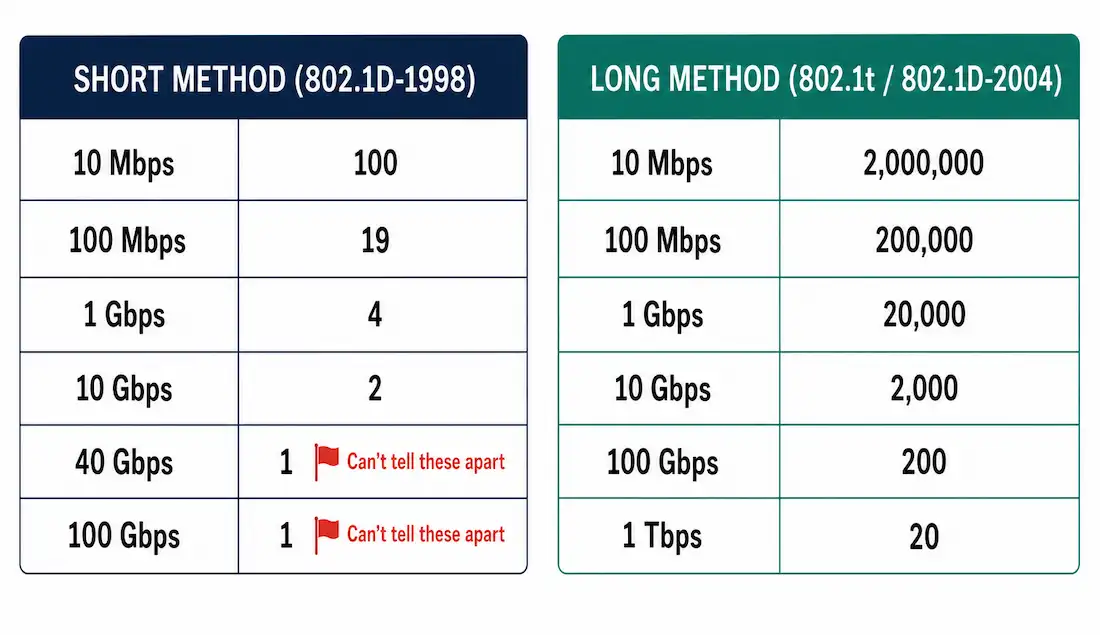
The fix came with the 16-bit “short” cost method, standardized in 802.1D-1998, which is the table still used as the Cisco default today:
| Link Speed | Short Method Cost (802.1D-1998) |
|---|---|
| 10 Mbps | 100 |
| 100 Mbps | 19 |
| 1 Gbps | 4 |
| 10 Gbps | 2 |
| 40 Gbps | 1 |
| 100 Gbps | 1 |
Notice that resolution runs out again at the top end — both 40 Gbps and 100 Gbps still land on cost 1, since the 16-bit field can’t represent the difference precisely enough at that scale. That’s what the 32-bit “long” cost method, introduced by 802.1t and folded into 802.1D-2004, actually solves:
| Link Speed | Long Method Cost (802.1t / 802.1D-2004) |
|---|---|
| 10 Mbps | 2,000,000 |
| 100 Mbps | 200,000 |
| 1 Gbps | 20,000 |
| 10 Gbps | 2,000 |
| 100 Gbps | 200 |
| 1 Tbps | 20 |
This worked example uses the short method values (19 for 100 Mbps, 100 for 10 Mbps), which is what you’ll see by default on most Cisco switches unless spanning-tree pathcost method long has been configured. As shown in the table, 100 Gbps and 40 Gbps ports have a port cost of 1 under the short method, 10 Gbps ports have a cost of 2, 1 Gbps ports have a cost of 4, 100 Mbps ports have a cost of 19, and 10 Mbps ports have a cost of 100. The slower the link, the higher the cost — STP actively avoids slow links in favor of fast ones wherever a choice exists.
Path Cost Formula: Total Path Cost = the sum of individual port costs along the path to the root bridge. The lowest total wins and becomes the preferred, forwarding path; every other path to the root is blocked.
Example Topology
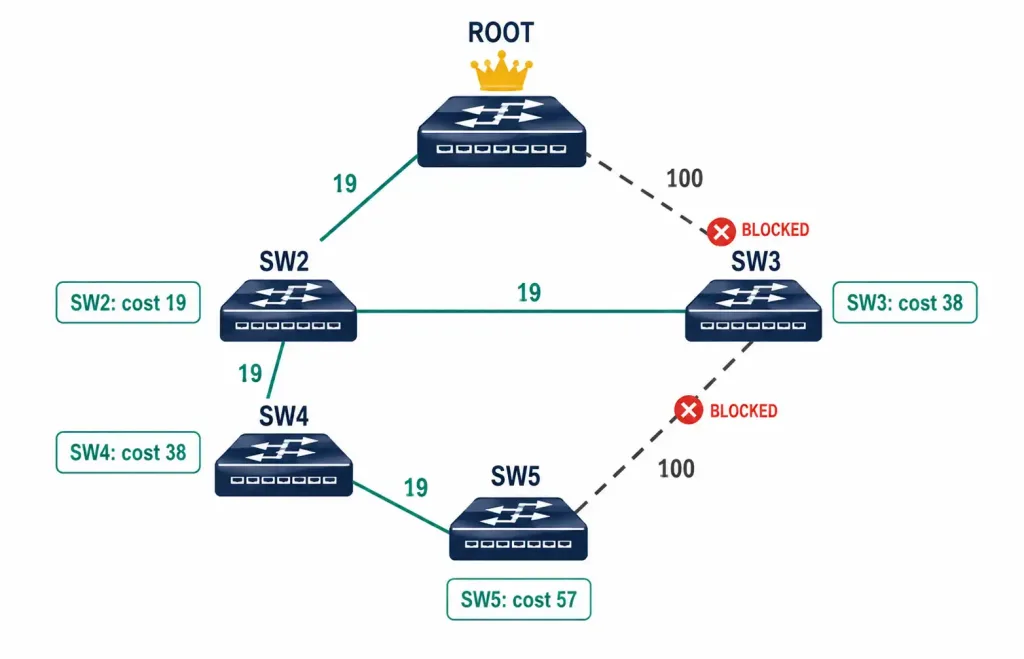
The example below uses a five-switch topology: a Root Bridge connected to Switch-2 and Switch-3, with Switch-2, Switch-3, Switch-4, and Switch-5 also interconnected, forming two overlapping loops.
| Link | Speed | Cost |
|---|---|---|
| Root — Switch-2 | 100 Mbps | 19 |
| Root — Switch-3 (direct) | 10 Mbps | 100 |
| Switch-2 — Switch-3 | 100 Mbps | 19 |
| Switch-2 — Switch-4 | 100 Mbps | 19 |
| Switch-4 — Switch-5 | 100 Mbps | 19 |
| Switch-3 — Switch-5 | 10 Mbps | 100 |
This creates two loops: a triangle formed by the Root, Switch-2, and Switch-3, and a rectangle formed by Switch-2, Switch-4, Switch-5, and Switch-3, sharing the Switch-2–Switch-3 link as a common connection between both loops.
Path Cost Calculation
Paths with the lowest cost become the preferred path; every other path to the root bridge is blocked. Walking through each non-root switch’s available paths — every total below has been independently recalculated and confirmed:
Switch-2
Switch-2 has three ways to reach the root bridge:
- Fa0/3 direct to the root’s Fa0/1 at 100 Mbps: cost 19.
- Via Switch-3: the Switch-2-to-Switch-3 link costs 19, plus Switch-3’s direct 10 Mbps link to the root at cost 100, for a total of 19 + 100 = 119.
- Via Switch-4, Switch-5, and Switch-3: 19 (to Switch-4) + 19 (to Switch-5) + 100 (Switch-5 to Switch-3, the 10 Mbps link) + 100 (Switch-3 direct to root) = 238.
The lowest-cost path is 19, via Fa0/3. Fa0/3 becomes Switch-2’s root port.
Switch-3
Switch-3 has three ways to reach the root bridge:
- Direct connection to the root, 10 Mbps: cost 100.
- Via Switch-2: 19 (Switch-3 to Switch-2) + 19 (Switch-2 to root) = 38.
- Via Switch-5, Switch-4, and Switch-2: 100 (Switch-3 to Switch-5) + 19 (Switch-5 to Switch-4) + 19 (Switch-4 to Switch-2) + 19 (Switch-2 to root) = 157.
The lowest-cost path is 38, via Fa0/1 to Switch-2. Fa0/1 becomes Switch-3’s root port, and its direct 10 Mbps link to the root (Eth2/1) is blocked, since 100 loses to 38.
Switch-4
Switch-4 has four ways to reach the root bridge:
- Via Switch-2 directly: 19 (to Switch-2) + 19 (Switch-2 to root) = 38.
- Via Switch-2, then Switch-3: 19 + 19 + 100 = 138.
- Via Switch-5, then Switch-3: 19 (to Switch-5) + 100 (Switch-5 to Switch-3) + 100 (Switch-3 to root) = 219.
- Via Switch-5, Switch-3, then Switch-2: 19 + 100 + 19 + 19 = 157.
The lowest-cost path is 38, via Gig1/0/1 to Switch-2. Gig1/0/1 becomes Switch-4’s root port.
Switch-5
Switch-5 has four ways to reach the root bridge:
- Via Switch-3 directly: 100 (to Switch-3) + 100 (Switch-3 to root) = 200.
- Via Switch-3, then Switch-2: 100 + 19 + 19 = 138.
- Via Switch-4, then Switch-2: 19 (to Switch-4) + 19 (Switch-4 to Switch-2) + 19 (Switch-2 to root) = 57.
- Via Switch-4, Switch-2, then Switch-3: 19 + 19 + 19 + 100 = 157.
The lowest-cost path is 57, via Fa0/1 to Switch-4. Fa0/1 becomes Switch-5’s root port, and its direct 10 Mbps link to Switch-3 (Fa0/4) is blocked, since 200 loses to 57.
Loop Resolution Summary
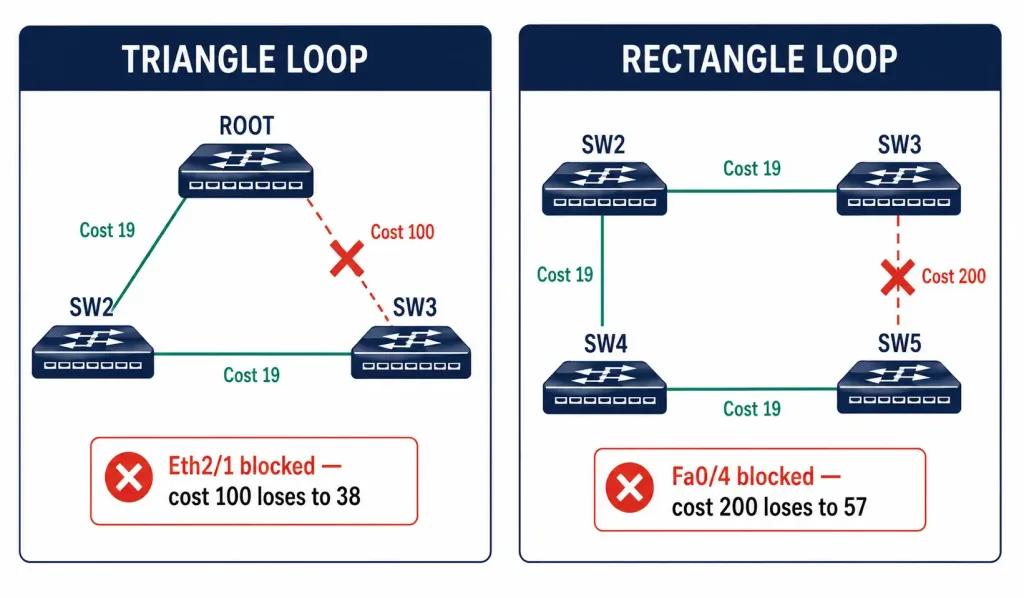
The topology has two physical loops: the triangle between the root bridge, Switch-2, and Switch-3, and the rectangle between Switch-2, Switch-3, Switch-4, and Switch-5. The spanning tree algorithm resolves both by blocking exactly one port in each loop — the one representing the higher-cost redundant path:
| Loop | Blocked Port | Reason |
|---|---|---|
| Root–Switch-2–Switch-3 (triangle) | Eth2/1 on Switch-3 | Switch-3’s direct 10 Mbps path to root (cost 100) loses to its path via Switch-2 (cost 38) |
| Switch-2–Switch-3–Switch-5–Switch-4 (rectangle) | Fa0/4 on Switch-5 | Switch-5’s direct 10 Mbps path to Switch-3 (cost 200 to root) loses to its path via Switch-4 (cost 57) |
Both blocked links are the two 10 Mbps connections in the topology, illustrating the core principle of this entire calculation: STP consistently routes around slower links whenever a faster alternate path exists, even one requiring more hops.
Configure the Path Cost
The default cost is tied automatically to a port’s negotiated speed, but it can be manually overridden to control path selection — useful when you want to influence root port election without changing physical link speeds or bridge priority.
Switch(config)# interface FastEthernet0/1
Switch(config-if)# spanning-tree cost 10
This sets a custom path cost of 10 on the interface, overriding whatever the port’s speed would normally produce (19, in the case of a 100 Mbps Fast Ethernet port). The valid cost range is 1 to 200,000,000. To restore the automatic, speed-derived default, use no spanning-tree cost in interface configuration mode.
To switch the entire device from the default short method to the long method:
Switch(config)# spanning-tree pathcost method longTo verify the currently active cost and role for a port:
Switch# show spanning-tree interface FastEthernet0/1This confirms the port’s role (root, designated, or blocking) and its current path cost to the root bridge, whether that value is the default or a manually configured override.
Why the Cost Method Matters in Mixed Topologies
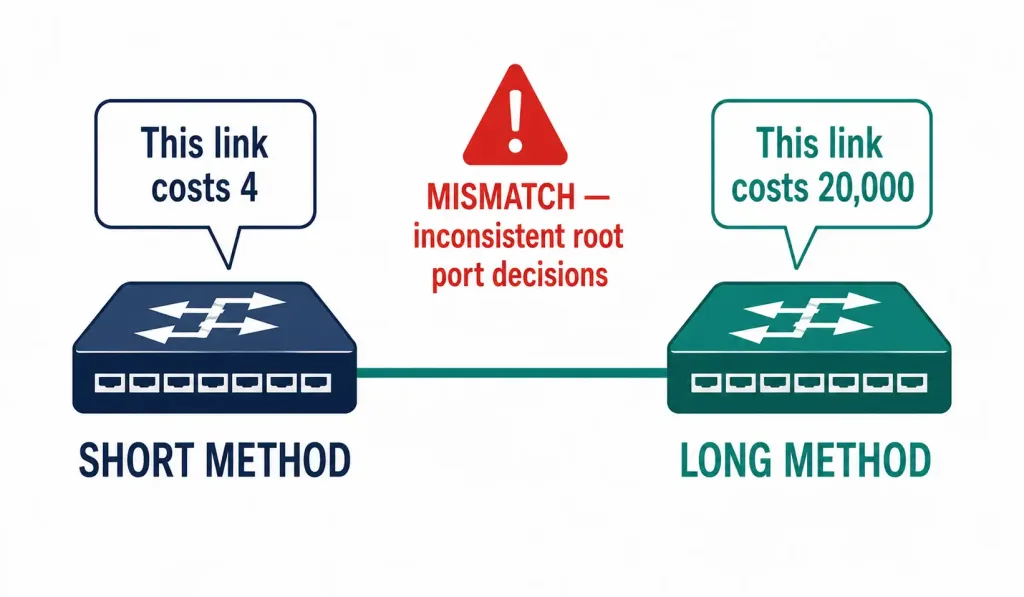
If one switch in a topology uses the short method while its neighbor uses the long method, the two ends will calculate different costs for the same physical link, which can produce inconsistent root port decisions across the network.
This becomes a real concern in data centers mixing older access-layer switches with newer 40/100 Gbps aggregation switches, since the short method flattens everything above 10 Gbps down to a cost of 1 — meaning STP literally cannot distinguish a 40 Gbps uplink from a 100 Gbps one without switching to the long method. Confirming the pathcost method is consistent across every switch in the topology, using show spanning-tree summary, is worth doing before troubleshooting an unexpected root port selection in a high-speed environment.
CCNA Exam Pointers
- Path cost is derived from link speed. Short method (802.1D-1998, the Cisco default): 10 Mbps = 100, 100 Mbps = 19, 1 Gbps = 4, 10 Gbps = 2, 40/100 Gbps = 1
- Long method (802.1t / 802.1D-2004): 10 Mbps = 2,000,000, 100 Mbps = 200,000, 1 Gbps = 20,000, 10 Gbps = 2,000, 100 Gbps = 200
- Total path cost = sum of individual port costs along the path to the root bridge; lowest total wins
- The port with the lowest total cost to the root becomes the root port; all other candidate paths on that switch are blocked
- If costs are tied, STP falls back to lowest port ID as the tiebreaker
spanning-tree cost [1-200000000]— manually overrides the default, speed-derived cost on an interfaceno spanning-tree cost— restores the automatic defaultspanning-tree pathcost method long— switches the device to the 32-bit long cost methodshow spanning-tree interface [id]— verifies the current role and cost for a specific port
Conclusion
STP path cost is a straightforward but essential calculation: sum the individual port costs along every possible path to the root bridge, and the lowest total wins as the root port, with every other redundant path blocked. In a network with mixed link speeds, this consistently means STP will favor a longer path over faster links rather than a shorter path over a slow one — exactly the behavior demonstrated across every switch in the example topology above. Manually overriding cost with spanning-tree cost, or switching to the long method entirely in high-speed environments, gives administrators direct control when the automatic, speed-derived outcome isn’t the path they actually want.
FAQs
What is path cost in the Spanning Tree Protocol?
Path cost in STP is a numerical value assigned to each port based on link speed, used by the spanning tree algorithm to select the lowest-cost path to the root bridge. Slower links, like 10 Mbps, carry a higher cost (100) than faster links like 1 Gbps (cost 4), ensuring STP prioritizes faster paths whenever a choice exists. Total path cost is the sum of individual port costs along the entire path.
How is the root port determined using path costs?
The root port on a non-root switch is the interface with the lowest cumulative path cost to the root bridge, calculated by summing the cost of every link along each candidate path and comparing the totals. In a mixed-speed topology, a longer path over fast links can beat a shorter path over a single slow link, exactly what happens with Switch-3 and Switch-5 in the example above, where each ends up routing through an extra hop over 100 Mbps links rather than using a direct but much slower 10 Mbps connection.
What’s the actual difference between the short and long path cost methods?
The short method (802.1D-1998, the current Cisco default) uses a 16-bit field and assigns 19 to 100 Mbps, 4 to 1 Gbps, 2 to 10 Gbps, and 1 to both 40 Gbps and 100 Gbps — running out of resolution at the top end. The long method (802.1t, folded into 802.1D-2004) uses a 32-bit field with much larger values, distinguishing 100 Gbps (200) from 1 Tbps (20) where the short method would call both of them a flat 1.
How do you manually configure path costs on Cisco switches?
Enter interface configuration mode, then use spanning-tree cost [1-200000000] to set a custom cost value, overriding what the port would otherwise derive automatically from its negotiated speed. Verify the applied cost and the port’s current role with show spanning-tree interface [id], and use no spanning-tree cost to revert to the automatic default. To switch the whole device to the long method, use spanning-tree pathcost method long.
Why does mixing cost methods across switches cause problems?
If one switch uses the short method and its neighbor uses the long method, they calculate different costs for the same link, which can lead to an inconsistent view of which port should be root across the topology. This is especially relevant above 10 Gbps, where the short method can’t distinguish between speeds that the long method resolves clearly — keeping the method consistent across every switch avoids this entirly.



