
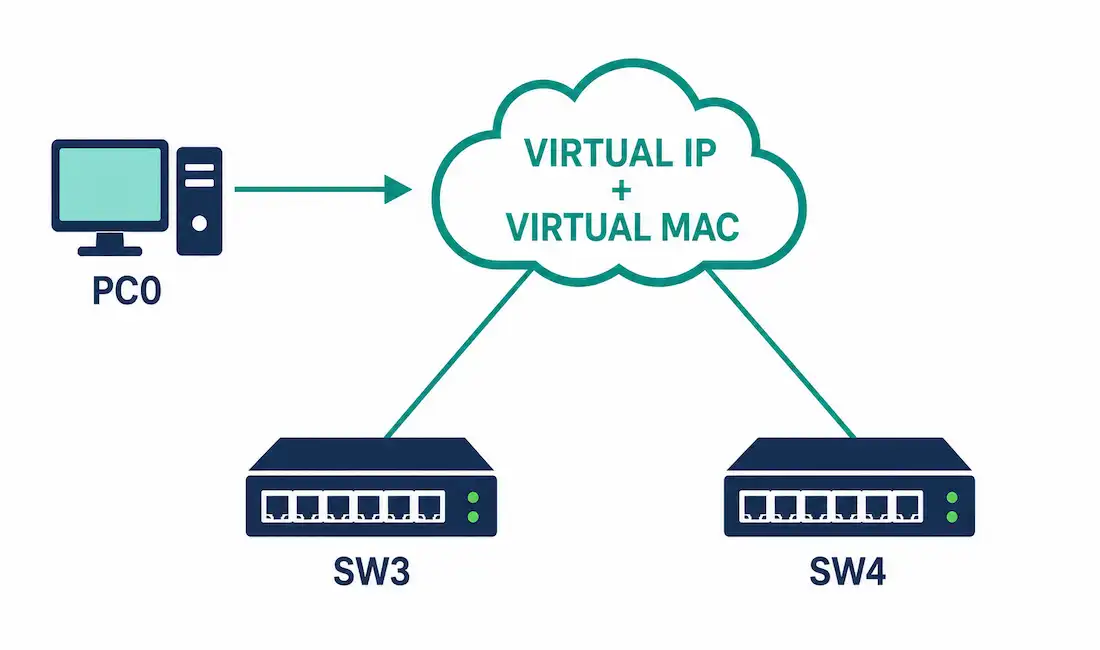
The previous article in this series covered why a single static default gateway is a network’s hidden single point of failure. This one covers the mechanism that actually fixes it: the virtual router.
A virtual router isn’t a separate physical device. It’s a shared identity — one IP address and one MAC address — that two or more physical routers or Layer 3 switches present jointly to hosts on a LAN segment. Hosts are configured with that shared address as their one default gateway, and a redundancy protocol running between the physical devices decides, continuously and transparently, which of them actually forwards the traffic at any given moment.
How Hosts Actually Reach the Virtual Router
The mechanism relies entirely on ARP, and it’s worth walking through exactly what happens:
- A host on the LAN needs to send traffic off its local subnet, so it looks up its configured default gateway IP address.
- Since that’s an IP address, not a MAC address, the host sends an ARP request asking who owns it.
- The ARP reply returns the virtual MAC address — not the physical MAC address of whichever router happens to be active right now.
- The host caches that virtual MAC address and sends all off-subnet traffic to it, exactly as it would for any other default gateway.
- Whichever physical router is currently in the active role receives and forwards that traffic. The host never sees, and never needs to see, which physical device that actually is.
This is what makes the failover transparent. The host’s ARP cache entry — virtual IP mapped to virtual MAC — never needs to change, because that mapping never actually changes. What changes, invisibly to the host, is which physical router answers to that virtual MAC address.
What Happens During a Failover
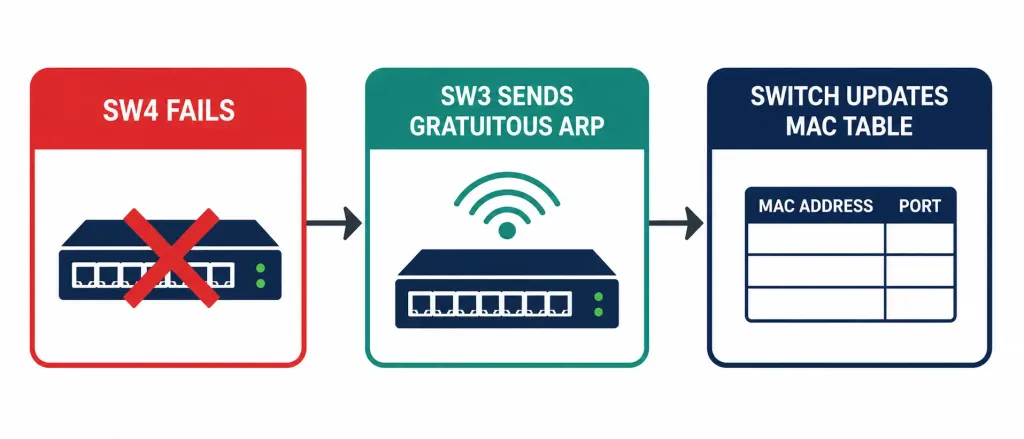
When the active router fails, the standby (or backup) router needs to take over the forwarding role, and it needs the rest of the network to actually start sending it traffic immediately — not wait for ARP entries to expire naturally, which could take minutes.
The redundancy protocol solves this with a Gratuitous ARP (GARP): the moment a standby router transitions to active, it sends an unsolicited ARP announcement claiming the virtual MAC address. Switches on the segment update their MAC address tables immediately based on this announcement, and hosts that happen to process it update their ARP caches too — meaning traffic starts flowing to the new active router’s physical port within the protocol’s failover window, not whenever each host’s ARP cache would have otherwise expired.
Active/Standby Election and Priority
The redundancy protocol elects which router is active using a priority value, with a higher number winning. Both HSRP and VRRP use a default priority of 100 on every participating router, meaning the election falls back to a secondary tiebreaker — typically the highest configured or physical IP address — unless an administrator sets priority deliberately, exactly the same principle covered for STP root bridge election elsewhere in this series.
Preemption controls what happens after a failed router recovers. With preemption disabled — the default on HSRP — a recovered router does not automatically reclaim the active role, even if its priority is higher than the currently active router’s. It simply becomes a standby again, and the current active router keeps forwarding until something else changes. With preemption enabled, a recovered higher-priority router will actively take back the role as soon as it comes back online. Both behaviors are legitimate choices: preemption disabled avoids an unnecessary second failover event right after recovery, while preemption enabled guarantees traffic always flows through the intended primary device.
Worked Example
Reusing the SW3/SW4 topology from the previous article: both SW3 and SW4 are Layer 3 switches on the same VLAN, and instead of PC0 being configured with SW4’s physical interface IP as its gateway, both switches are configured into an HSRP group sharing virtual IP 192.168.1.1 and virtual MAC 0000.0C07.AC01 (HSRP’s virtual MAC format uses the group number, here 01, as the final byte).
PC0 is configured with 192.168.1.1 as its default gateway — the virtual IP, not either switch’s physical interface address. SW4, with the higher configured priority, is active; SW3 is standby.
When SW4 fails, SW3 detects the missing hello packets, transitions to active, and immediately sends a Gratuitous ARP claiming 0000.0C07.AC01. The access switch updates its MAC table, PC0’s traffic — still addressed to the same virtual MAC it always used — now physically arrives at SW3’s port instead, and PC0’s configuration never had to change at all.
Timer Behavior: HSRP vs. VRRP
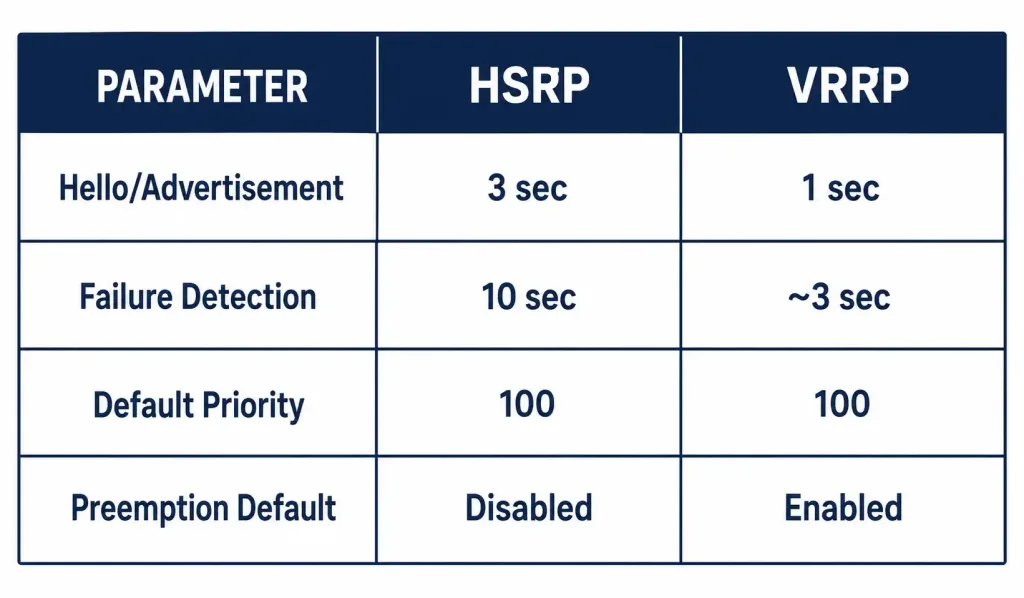
| Parameter | HSRP (Cisco) | VRRP (Open standard) |
|---|---|---|
| Hello/advertisement interval | 3 seconds (default) | 1 second (default) |
| Failure detection time | 10 seconds (default hold timer) | Roughly 3 seconds (3x advertisement interval, plus a small priority-based skew) |
| Default priority | 100 | 100 |
| Preemption default | Disabled | Enabled |
VRRP’s faster default timers mean noticeably quicker failure detection out of the box, though HSRP’s timers can be tuned down to sub-second values if faster convergence is needed — the trade-off is more frequent hello traffic and, at very aggressive settings, a real risk of false failover if hellos are occasionally delayed under load. Cisco generally recommends not going below roughly 1 second for hello and 4 seconds for hold when tuning HSRP manually.
GLBP: Beyond Active/Standby
Both HSRP and VRRP use a strict active/standby model — only one physical router forwards traffic at a time, and every other participating router sits completely idle until a failure occurs. GLBP, Cisco’s own extension, changes this: an elected Active Virtual Gateway (AVG) hands out different virtual MAC addresses to different hosts in response to their ARP requests, effectively spreading the forwarding role across up to four physical routers simultaneously. Every router in the group is still doing useful work under normal conditions, not just waiting for something to fail — covered at a comparison level in the default gateway article.
Verifying Redundancy Protocol Status
Switch# show standby briefShows HSRP group status across all interfaces — which router is active, which is standby, and the current priority.
Switch# show vrrp briefThe VRRP equivalent, showing master/backup role and state per group.
Switch# show glbp briefShows GLBP group status including the AVG and each Active Virtual Forwarder’s assigned virtual MAC.
Common Router Redundancy Problems
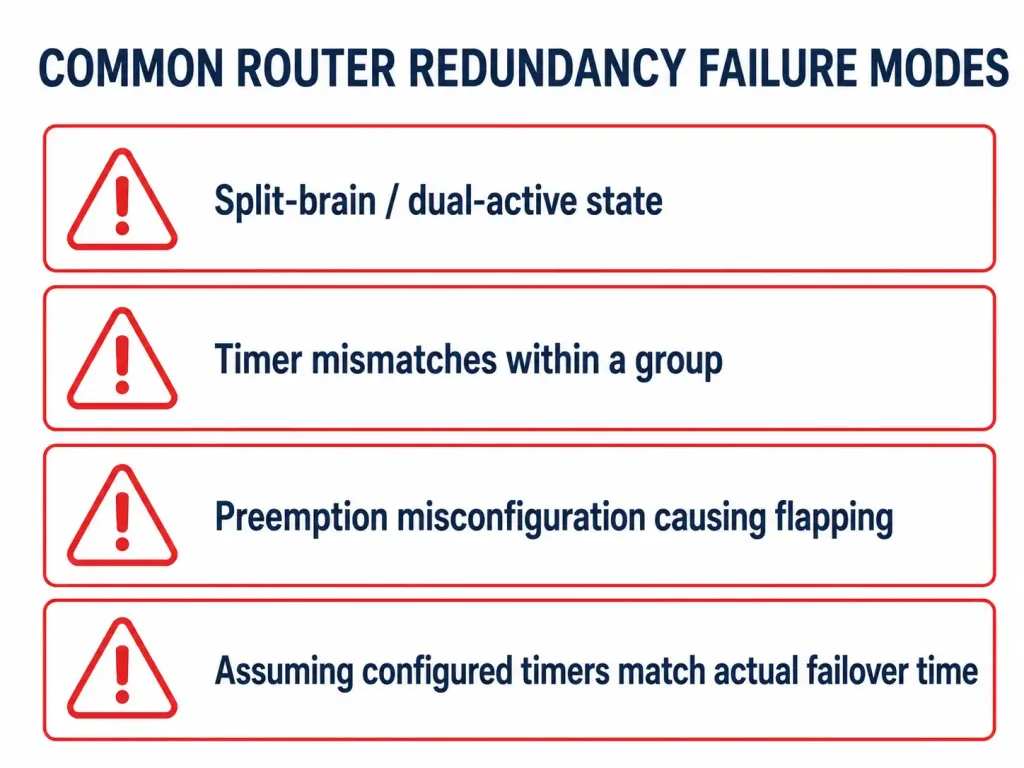
Split-brain / dual-active state. If the two routers lose connectivity to each other but both remain able to reach the LAN segment independently, each can end up believing it’s active simultaneously. Both then answer ARP requests and send Gratuitous ARPs claiming the same virtual MAC, causing intermittent, hard-to-diagnose connectivity issues as hosts’ traffic bounces between two different physical devices unpredictably.
This is why the link carrying hello/advertisement packets between the redundancy group members matters as much as the links to the LAN itself — if that specific path fails while both routers otherwise remain healthy and reachable from the LAN side, split-brain is exactly the failure mode that results, and it can be considerably harder to diagnose than a simple single-router failure, since neither device individually looks broken.
Timer mismatches within a group. All routers in the same HSRP or VRRP group should run matching timer values. A router configured with a much longer hold timer than its peers will take longer than expected to detect a failure, effectively negating the benefit of faster timers configured elsewhere in the group.
Preemption misconfiguration causing unexpected role changes. If preemption is enabled and priority is tied to an interface tracking feature, a flapping uplink can cause the active role to bounce back and forth between routers repeatedly, each transition triggering a brief traffic interruption. Tracking with a delay or a priority decrement large enough to avoid marginal flapping helps prevent this.
Verifying the actual failover time in practice. Configured timers describe the theoretical detection window, but actual observed failover can differ due to CPU load, the specific trigger (a clean interface shutdown versus a total device crash), and how quickly Gratuitous ARP updates propagate through the switched topology. Testing failover deliberately, rather than assuming the configured timer values, is the only way to know the actual number for a given deployment.
Frequently Asked Questions
What exactly is a virtual router?
It’s a shared IP address and MAC address that two or more physical routers or Layer 3 switches jointly answer to. Hosts are configured with the virtual IP as their default gateway and resolve it via ARP to the virtual MAC, never a physical device’s own address — which is what allows the physical device doing the actual forwarding to change without any host ever needing reconfiguration.
How does a host’s traffic actually reach the currently active router?
The host ARPs for its gateway IP and receives the virtual MAC address in response, regardless of which physical router is active. It sends all off-subnet traffic to that virtual MAC. Whichever physical router currently holds the active role is the one actually connected to that MAC address at the switch level, so traffic naturally arrives there.
What is Gratuitous ARP used for in router redundancy?
When a standby router becomes active, it immediately sends a Gratuitous ARP announcing the virtual MAC address. This forces surrounding switches to update their MAC address tables right away, so traffic starts reaching the new active router within the protocol’s failure detection window rather than waiting for stale ARP or MAC table entries to expire naturally.
What’s the difference between HSRP and VRRP timers?
HSRP defaults to a 3-second hello timer and a 10-second hold timer. VRRP defaults to a 1-second advertisement interval with failure detection around 3 seconds. VRRP’s faster defaults mean quicker out-of-the-box failure detection, though HSRP’s timers can be manually tuned to sub-second values if needed, with Cisco recommending against going below roughly 1 second hello / 4 seconds hold to avoid false failovers.
What does preemption control?
Whether a recovered router with higher priority automatically reclaims the active role from whichever router took over during its outage. HSRP disables preemption by default, meaning a recovered router simply rejoins as standby. VRRP enables it by default. Neither behavior is universally correct — it depends on whether you want to guarantee traffic always flows through a specific primary device, or avoid a second disruptive failover right after recovery.
How is GLBP different from HSRP and VRRP?
HSRP and VRRP both use strict active/standby — one router forwards, the rest sit idle. GLBP elects an Active Virtual Gateway that assigns different virtual MAC addresses to different hosts, allowing up to four physical routers to actively forward traffic simultaneously instead of leaving redundant routers unused until a failure occurs.
Conclusion
The virtual router concept is what turns physical Layer 3 redundancy into redundancy that hosts actually benefit from. By having two or more routers jointly answer to one shared IP and MAC address, the failover that matters — which physical device is actually forwarding traffic — happens entirely behind the scenes, without a single host ever needing its configuration touched. Whether that’s implemented with HSRP’s simplicity, VRRP’s multi-vendor compatibility, or GLBP’s active-active load distribution, the underlying mechanism is the same ARP-based trick: the address a host trusts never changes, even when the physical hardware behind it does, and that single design decision is what makes decades-old FHRP protocols still the standard solution to this problem today.



