The router command in global configuration mode is the starting point for configuring any dynamic routing protocol on Cisco IOS. This guide covers exactly what router eigrp does, its argument’s valid range, what it does and doesn’t accomplish on its own, the modern EIGRP Named Mode alternative worth knowing alongside it, and the small set of scenarios where running more than one EIGRP instance actually makes sense.
Basic Syntax
To enable EIGRP, enter the following command in global configuration mode:
Router(config)# router eigrp <autonomous-system>Running router ? at the global configuration prompt lists every dynamic routing protocol the current IOS release actively supports — EIGRP will appear alongside others like OSPF and RIP in that list, confirming it’s available before attempting to configure it.
The Autonomous System Argument
The <autonomous-system> argument is a 16-bit value, valid from 1 to 65,535 — note that unlike the general ASN address space (which technically starts at 0), this specific command argument does not accept 0 as a valid value. This number has nothing to do with IANA or any public registry; it’s purely a locally significant identifier that lets routers confirm they belong to the same EIGRP routing domain, as covered in more depth in Introduction to Autonomous System Numbers (ASNs).
Any value within the valid range works equally well functionally — there’s no performance or feature difference between a low number like 1 and a high number like 65000, so the choice usually comes down to organizational convention or simply picking something memorable.
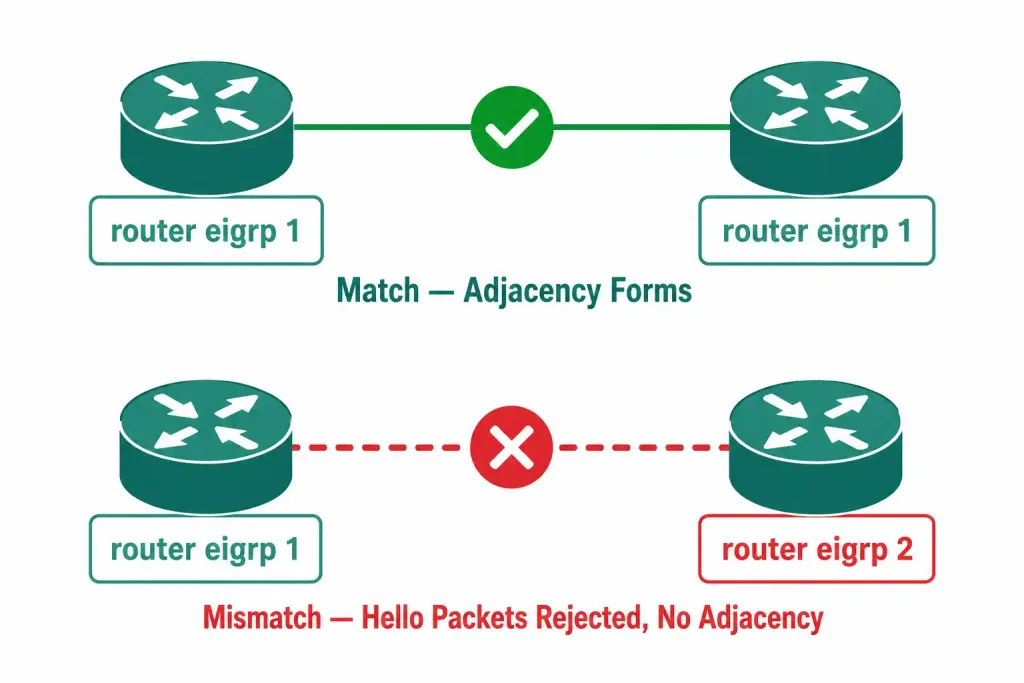
Every router meant to form EIGRP adjacencies with each other must use the identical autonomous system number. A mismatch here is one of the most common reasons two routers running EIGRP fail to become neighbors at all — since the Hello packets exchanged between them carry this number, and a mismatch causes the packet to be silently rejected rather than accepted, with no explicit error message pointing directly at the mismatched value.
A three-router example, all configured to participate in the same EIGRP domain:
R1(config)# router eigrp 1
R1(config-router)#

R2(config)# router eigrp 1
R2(config-router)#

R3(config)# router eigrp 1
R3(config-router)#
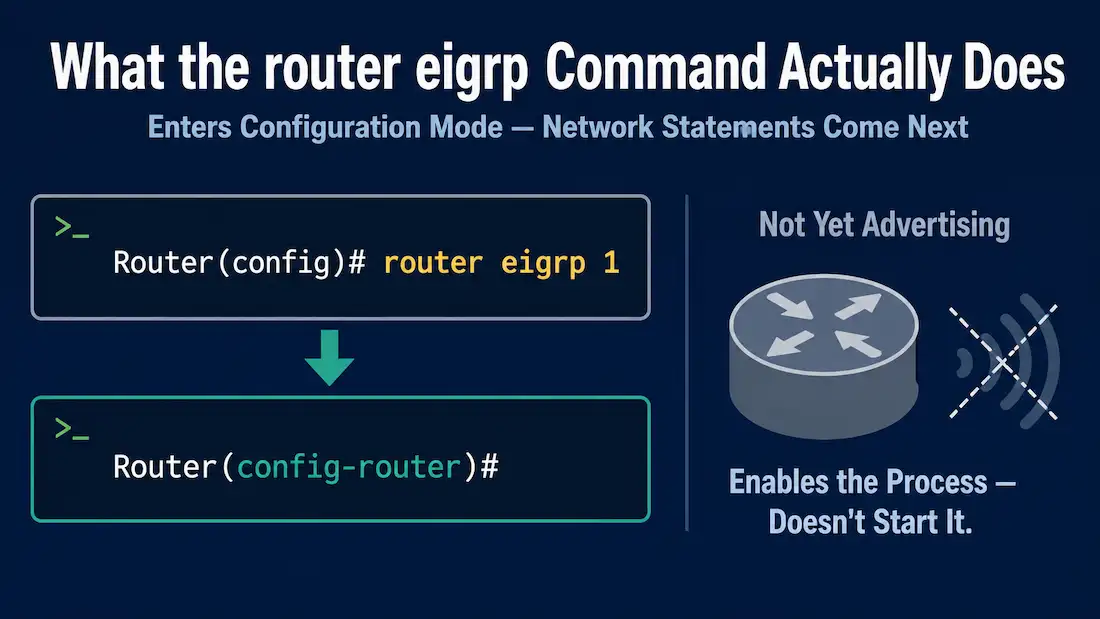
Notice that in each case, the prompt changes from the global configuration prompt (Router(config)#) to router configuration mode (Router(config-router)#), where EIGRP-specific settings — network statements, metric weights, timers, and authentication — are configured next.
What This Command Does — and Doesn’t — Do
router eigrp <autonomous-system> enables the EIGRP process and grants access to router configuration mode, but it does not, by itself, start EIGRP actually running on any interface. Entering this command alone does not cause the router to send Hello packets or attempt to form neighbor relationships on any of its interfaces. Additional configuration — most commonly network statements identifying which interfaces should participate — is required before EIGRP does anything observable on the network.
This is a deliberate design choice, not an oversight: it lets an administrator enable the process and configure its settings (timers, authentication, metric weights) in a controlled sequence before EIGRP actually starts advertising anything, rather than having the router immediately begin sending traffic the moment the process is created.
This is a common point of confusion for anyone new to EIGRP: the router configuration mode prompt appearing after router eigrp 1 can look like EIGRP is “on,” but no actual routing activity happens until the process is told which networks to advertise and which interfaces to run on.
Removing an EIGRP Process
To remove EIGRP from a router entirely:
Router(config)# no router eigrp <autonomous-system>This stops the EIGRP process and removes every existing EIGRP-related configuration associated with that autonomous system number — network statements, authentication settings, timers, and any other router-configuration-mode settings tied to that process. If a router is running multiple EIGRP instances (each with a different AS number), this command only removes the specific instance whose AS number is given; other instances continue running unaffected, which is a useful property when troubleshooting or reconfiguring one instance without wanting to disturb any others coexisting on the same router.
EIGRP Named Mode: A Modern Alternative
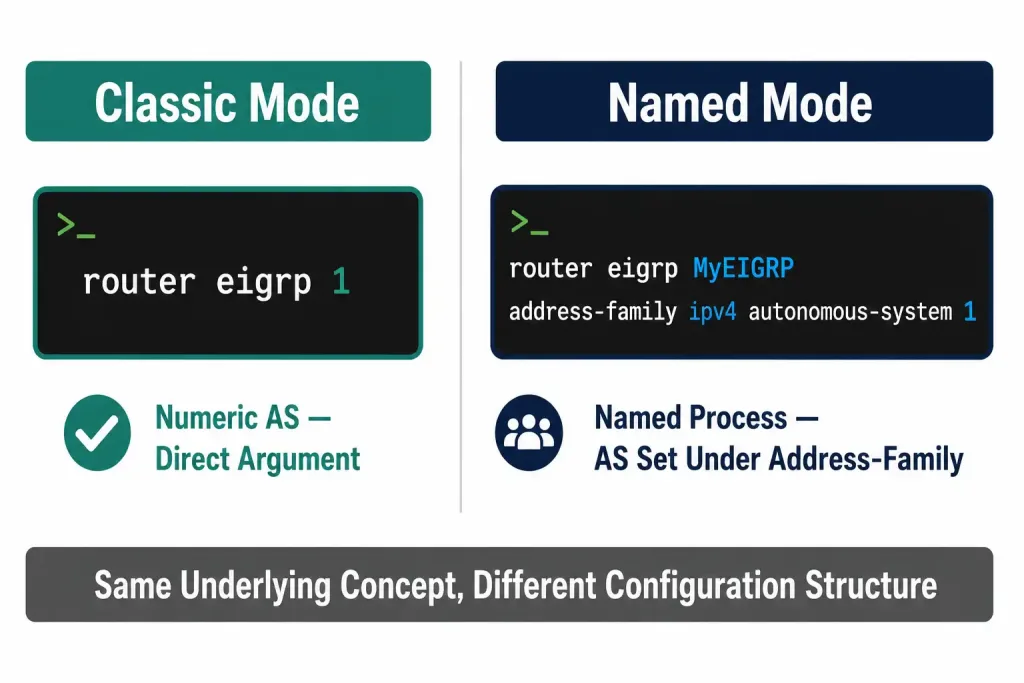
Everything above describes EIGRP classic mode (sometimes also called EIGRP Autonomous System mode) — the traditional, numeric-AS-based configuration style, and still the most common way EIGRP is taught and encountered. Current CCNP-level material also covers EIGRP Named Mode, which uses a descriptive name instead of a bare AS number in the initial command:
Router(config)# router eigrp <virtual-instance-name>
Router(config-router)# address-family ipv4 autonomous-system <as-number>
Named Mode organizes configuration hierarchically under address-family blocks (supporting both IPv4 and IPv6 within a single named process) and consolidates settings that classic mode spreads across multiple separate configuration contexts. The underlying autonomous system number concept still exists in Named Mode — it’s just configured explicitly under the address-family block rather than being the direct argument to router eigrp itself. Named Mode has become the more commonly recommended approach for new deployments, but classic mode remains extremely widely deployed and is still the version most introductory material, including this guide, covers first, largely because the numeric AS argument maps directly onto a single, easy-to-grasp concept without needing to explain the address-family hierarchy up front.
Verifying the EIGRP Process
After configuring router eigrp, a few commands confirm the process actually exists and is doing something, which is especially useful for confirming the “enabled but not yet advertising anything” state described above rather than assuming a problem exists:
Router# show ip protocolsShows the configured AS number, along with which networks are being advertised, if any network statements have been added yet.
Router# show ip eigrp neighborsShows any active neighbor adjacencies — an empty result here, even after configuring router eigrp, is completely expected until network statements have been added and matching interfaces exist.
Router# show running-config | section eigrpDisplays the exact EIGRP-related configuration currently active on the router, useful for confirming the AS number and any other settings match what was intended.
When Multiple EIGRP Instances Actually Make Sense
While running more than one EIGRP process on a single router is rarely necessary, a few legitimate scenarios do call for it:
Network mergers or acquisitions. If two organizations with independently running EIGRP networks (each using a different AS number) need to be connected, running both processes temporarily on a boundary router — often paired with mutual redistribution between them — can bridge the two domains during a migration period without requiring an immediate, disruptive renumbering of one side, buying time to plan a more permanent consolidation.
Deliberate routing domain separation. Some designs intentionally keep certain parts of a network (for example, a segment carrying sensitive traffic, or a segment with very different stability characteristics) in a separate EIGRP AS specifically so that instability or a large-scale change in one domain doesn’t directly propagate Query and Update traffic into the other, at the cost of needing explicit redistribution to share reachability between the two segments.
Multi-tenant or VRF environments. EIGRP Named Mode’s address-family structure, in particular, is often used specifically to support multiple independent routing tables (VRFs) on a single router, each potentially using its own AS number, which is a common real-world driver for legitimately running more than one EIGRP instance rather than an edge case to avoid.
Outside of scenarios like these, a single EIGRP AS number covering the entire routing domain remains the simpler, more maintainable default, and most CCNA-level material assumes exactly that single-instance model.
Common Mistakes
Assuming EIGRP is fully configured after router eigrp alone. As covered above, this is the most frequent point of confusion for anyone new to EIGRP — the prompt change signals success entering router configuration mode, not that EIGRP is actually advertising anything yet.
Copy-pasting a different AS number onto one router by accident. Especially in larger labs or networks with many routers, it’s easy to type or paste a slightly different AS number on one router during initial setup. Since the failure mode (no adjacency forms) looks identical to several other possible misconfigurations, checking show ip protocols for the actual configured AS number on both sides of a suspected mismatch is usually the fastest way to rule this out specifically, before spending time investigating cabling, addressing, or other unrelated possibilities.
Forgetting that no router eigrp <autonomous-system> removes everything for that instance. This command doesn’t offer a partial-removal option — it tears down the entire EIGRP configuration tied to that specific AS number, including any authentication, timers, or summarization settings. On a production router, this is disruptive enough that it should generally be treated as a deliberate, planned action rather than something typed casually while troubleshooting.
Mixing up classic mode and Named Mode syntax. Since classic mode takes a bare number directly as the argument to router eigrp, while Named Mode takes a descriptive name and configures the actual AS number separately under address-family, attempting to mix syntax from the two modes in the same configuration attempt typically produces command errors rather than a working hybrid configuration, since IOS treats them as genuinely distinct configuration paths rather than interchangeable syntax variants.
Frequently Asked Questions
Does entering router eigrp 1 alone start routing with EIGRP?
No. It enables the EIGRP process and enters router configuration mode, but no actual Hello packets are sent or neighbor relationships attempted until at least one network statement is added, identifying which interfaces should participate.
What happens if two directly connected routers use different EIGRP AS numbers?
They will not form a neighbor adjacency. The AS number is carried in Hello packets, and a mismatch causes the receiving router to reject them, exactly as if the two routers weren’t running EIGRP at all from each other’s perspective.
Can a router run more than one EIGRP process at once?
Yes — a router can run multiple EIGRP instances, each identified by its own distinct AS number, each maintaining independent neighbor and topology tables. This is supported but not commonly needed or recommended, since it adds configuration complexity without a benefit for most network designs.
Is 0 a valid EIGRP autonomous system number?
No. While the general ASN address space technically starts at 0, the specific <autonomous-system> argument on the router eigrp command only accepts values from 1 to 65,535.
Should I use EIGRP classic mode or Named Mode for a new deployment?
Named Mode is generally the more modern, recommended choice for new deployments, particularly ones needing IPv4 and IPv6 configured together under one process, but classic mode remains extremely common in existing networks and in most introductory training material, since it maps more directly onto the simpler, single-AS-number mental model most people learn first.
Are there legitimate reasons to run more than one EIGRP process on the same router?
Yes, though it’s uncommon. Network mergers, deliberate routing domain separation for stability isolation, and multi-tenant VRF environments are the main real-world scenarios where multiple EIGRP instances genuinely make sense, usually paired with explicit redistribution between the separate processes to share reachability where needed, rather than something worth reaching for by default.
Conclusion
The router eigrp <autonomous-system> command is the entry point into EIGRP configuration, but it’s only the first of several steps — enabling the process and granting access to router configuration mode, not actually starting EIGRP’s operation on any interface until network statements are added. Getting the AS number right (1–65535, matching across every router in the domain) is essential for adjacencies to form at all, and knowing that EIGRP Named Mode exists as a more modern alternative, along with the handful of legitimate scenarios for running multiple instances, rounds out the practical picture beyond the classic-mode syntax this guide focuses on.