
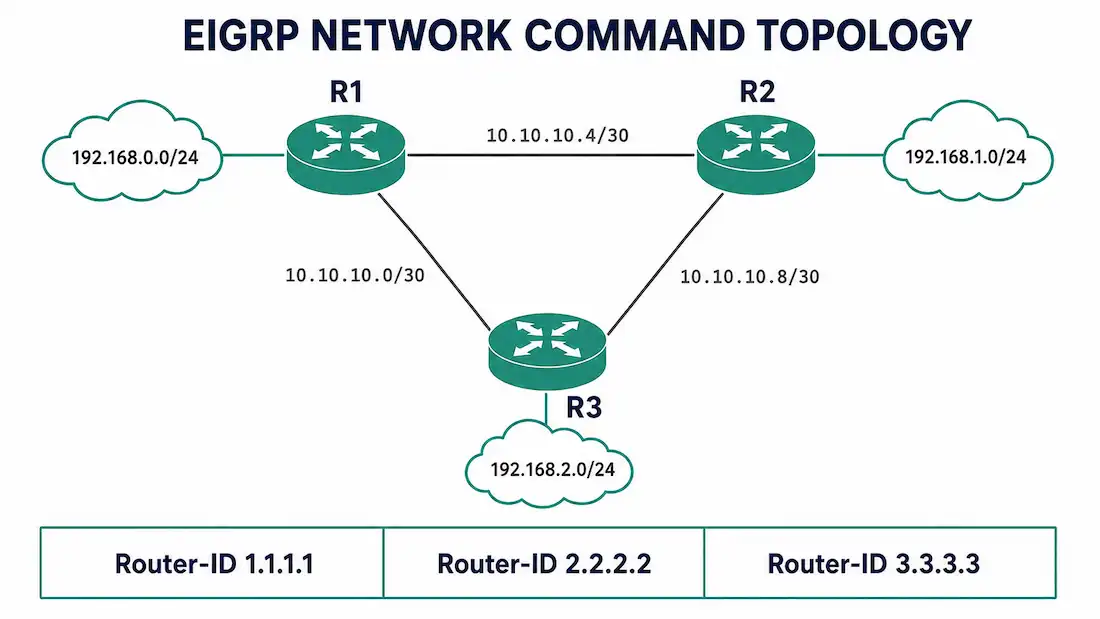
The network command is what actually turns EIGRP on. Configuring router eigrp <AS> only starts the EIGRP process — it does nothing on its own. Until you issue a network statement, EIGRP is not running on a single interface, and your router will not form a single neighbor adjacency.
This article covers both ways to use the command: the classful (default) form, and the wildcard-mask form that gives you interface-level control. Both are core CCNA material, and both show up constantly in real production configs.
What the Network Command Actually Does
When you enter the network command under router eigrp, you are telling the EIGRP process two things:
- Which interfaces to activate EIGRP on. Any interface whose IP address falls inside the range you specify becomes an EIGRP interface — it starts sending/listening for EIGRP hellos and can form adjacencies.
- Which connected networks to advertise. Once an interface is enabled, the subnet on that interface becomes eligible to be advertised to neighbors.
It’s worth being precise here, because a lot of study material blurs this together with OSPF’s network command. They’re similar in spirit — both use a network statement to activate a protocol on an interface — but they’re not identical. OSPF’s network command also assigns the interface to an area, which EIGRP has no concept of. RIP’s network command works close to how EIGRP’s classic-mode command works. BGP’s network command is different again — it advertises a route rather than “activating” the protocol on an interface. If you’re studying multiple IGPs at once, don’t assume the same command does the same job everywhere; check each protocol on its own terms.
The Classful (Default) Syntax
In classic EIGRP configuration mode, the basic syntax is:
Router(config-router)# network <classful-network-address>You supply a classful network address — no mask. EIGRP then enables every locally connected interface whose address falls inside that classful range. This is the simplest way to configure EIGRP, but it’s also the least precise: if a router has five interfaces in the 10.0.0.0/8 space, one network 10.0.0.0 statement turns EIGRP on for all five, whether you wanted that or not.
Worked Example: Classful Configuration
Take a three-router topology arranged in a triangle: R1–R2, R2–R3, and R1–R3 are each connected by a point-to-point link. R1 also connects out to a LAN on 192.168.0.0, R2 to 192.168.1.0, and R3 to 192.168.2.0. All three routers sit inside the 10.0.0.0/8 address space on their point-to-point links.
Router R1
R1(config)# router eigrp 1
R1(config-router)# eigrp router-id 1.1.1.1
R1(config-router)# network 10.0.0.0
R1(config-router)# network 192.168.0.0
Router R2
R2(config)# router eigrp 1
R2(config-router)# eigrp router-id 2.2.2.2
R2(config-router)# network 10.0.0.0
R2(config-router)# network 192.168.1.0
Router R3
R3(config)# router eigrp 1
R3(config-router)# eigrp router-id 3.3.3.3
R3(config-router)# network 10.0.0.0
R3(config-router)# network 192.168.2.0
Note that every network line needs the keyword network in front of it. A line like R1(config-router)# 192.168.0.0 with no keyword is not valid router-configuration syntax — IOS will reject it. This sounds obvious, but it’s a genuinely common copy-paste mistake when people are working from notes, so double-check it if you’re pasting configs from anywhere, including this article.
With this configuration, EIGRP activates on the 10.0.0.0/8-numbered links between all three routers and on each router’s LAN interface. As long as all three routers use the same autonomous system number (eigrp 1 here), and their interfaces can reach each other, they’ll form neighbor adjacencies automatically — you don’t need to manually specify neighbors in classic EIGRP.
What Actually Makes an Adjacency Form
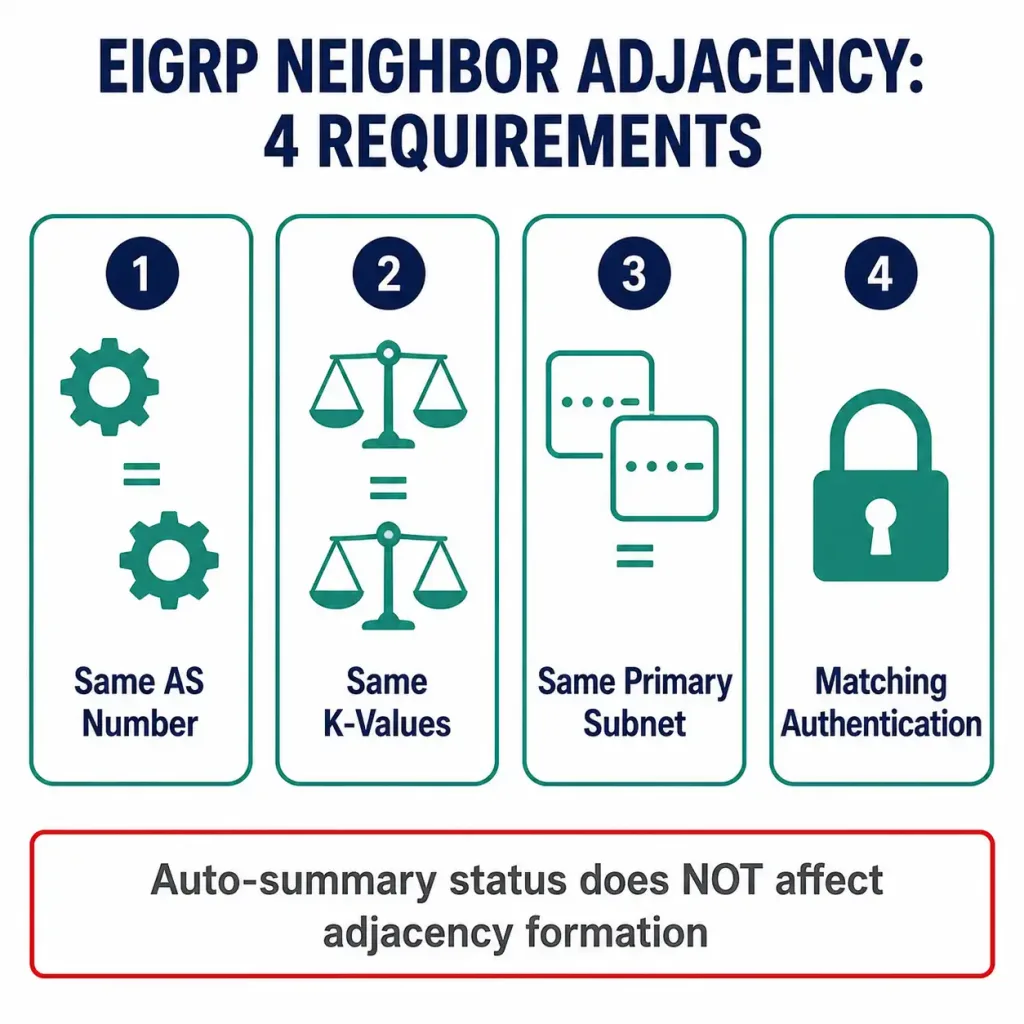
It’s a common misconception that auto-summary or some other unrelated setting is what allows the adjacency to come up. It isn’t. For two EIGRP routers to become neighbors, four things have to match:
- Same autonomous system number (the number after
router eigrp) - Same K-values (the metric weighting values EIGRP uses — these default to matching, but can be changed with
metric weights) - Same primary subnet on the connecting link (unless you’re doing something unusual with secondary addressing)
- Matching authentication, if authentication is configured on either side
None of that has anything to do with whether auto-summary is on or off. Auto-summary only affects which routes get advertised once the adjacency already exists — it has no role in adjacency formation. If you see EIGRP failing to come up, check the four items above with show ip eigrp neighbors and show ip protocols before looking anywhere else.
Auto-Summary: A Setting That Changed Its Default
Older EIGRP guides — and older IOS — will tell you that automatic summarization is on by default. That was true once, but it stopped being true a while back. Verified default behavior:
- Before Cisco IOS 15.0(1)M / 12.2(33): auto-summary is enabled by default. EIGRP automatically summarizes advertised routes to their classful boundary whenever a route crosses into a different major network.
- From IOS 15.0(1)M / 12.2(33) onward: auto-summary is disabled by default. Subnets are advertised as-is, without being rolled up to a classful boundary.
If you’re studying for CCNA on current material, or running current IOS in a lab, assume auto-summary is off unless you’ve explicitly turned it on with the auto-summary command. If you’re working with legacy 12.x gear, assume it’s on unless no auto-summary appears in the running config. Either way, check show ip protocols — it will tell you directly.
For a full walkthrough of what auto-summary does to your routing table when it’s enabled, see the companion article on EIGRP automatic summarization, linked below.
The Wildcard-Mask Syntax
The classful form is fast, but it’s blunt. If you only want EIGRP enabled on specific interfaces — not every interface inside a classful range — add a wildcard mask:
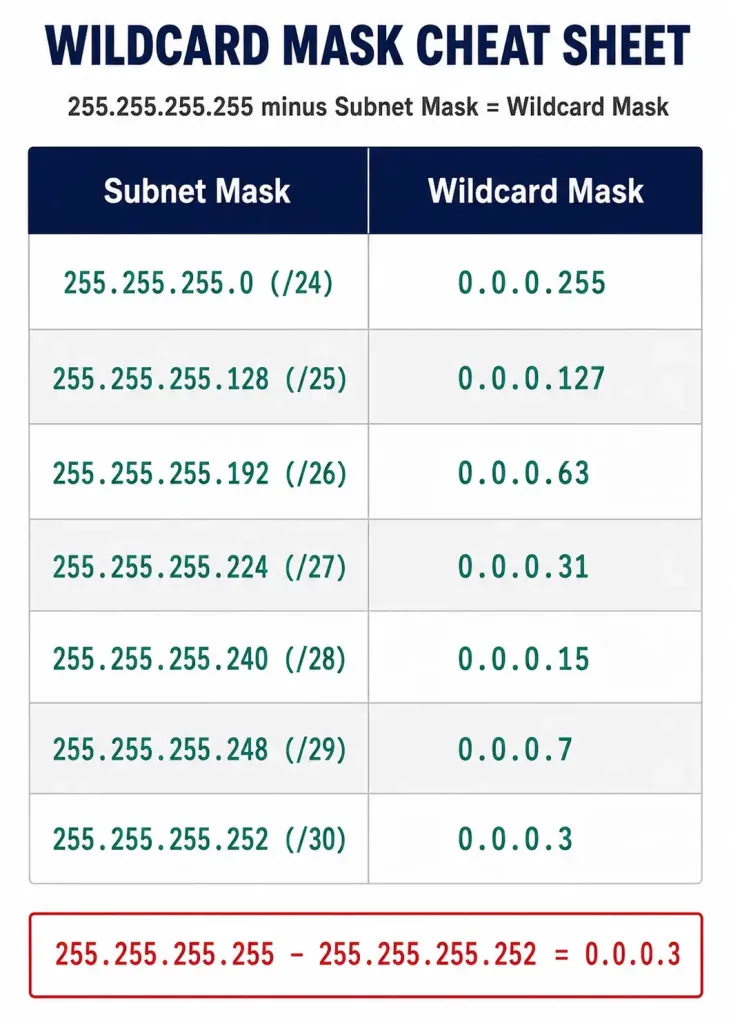
Router(config-router)# network <network-address> <wildcard-mask>A wildcard mask is the inverse of a subnet mask. To calculate it, subtract each octet of the subnet mask from 255. For example, the subnet mask 255.255.255.252 (a /30, two usable host addresses — typical for a point-to-point link) inverts to a wildcard mask of 0.0.0.3:
Worked Example: Wildcard-Mask Configuration
Reusing the triangle topology: R1 connects to R3 over 10.10.10.0/30, R1 connects to R2 over 10.10.10.4/30, and R2 connects to R3 over 10.10.10.8/30.
Say you want EIGRP enabled on R2 only for its point-to-point link to R1 — subnet 10.10.10.4/30 — and not on any other R2 interface yet. You’d match that /30 with a wildcard mask of 0.0.0.3:
R2(config-router)# network 10.10.10.4 0.0.0.3Here is the full configuration for all three routers using wildcard masks throughout, including their LAN interfaces:
Router R1
R1(config)# router eigrp 1
R1(config-router)# eigrp router-id 1.1.1.1
R1(config-router)# network 10.10.10.0 0.0.0.3
R1(config-router)# network 10.10.10.4 0.0.0.3
R1(config-router)# network 192.168.0.0 0.0.0.255
Router R2
R2(config)# router eigrp 1
R2(config-router)# eigrp router-id 2.2.2.2
R2(config-router)# network 10.10.10.4 0.0.0.3
R2(config-router)# network 10.10.10.8 0.0.0.3
R2(config-router)# network 192.168.1.0 0.0.0.255
Router R3
R3(config)# router eigrp 1
R3(config-router)# eigrp router-id 3.3.3.3
R3(config-router)# network 10.10.10.8 0.0.0.3
R3(config-router)# network 10.10.10.0 0.0.0.3
R3(config-router)# network 192.168.2.0 0.0.0.255
Each network statement here matches exactly one /30 or /24, rather than the whole 10.0.0.0/8 or 192.168.0.0/16 classful range. This is the version you want in production, because it makes it explicit exactly which interfaces are running EIGRP — useful both for security (you don’t accidentally enable EIGRP on an interface facing an untrusted network) and for troubleshooting.
Subnet Mask Instead of Wildcard Mask
Some IOS versions will let you type a normal subnet mask in place of the wildcard mask, and silently convert it. For example, typing:
R1(config-router)# network 10.10.10.0 255.255.255.252may be accepted and stored internally as network 10.10.10.0 0.0.0.3. Don’t rely on this across every platform — confirm with show running-config after entering it, and if the router didn’t convert it the way you expected, re-enter it with the correct wildcard mask directly.
The Network Command in EIGRP Named Mode
Everything above uses classic EIGRP configuration mode (router eigrp <AS-number>), which is still the most common way you’ll see EIGRP configured, especially in study material and legacy production networks. Named mode EIGRP (router eigrp <name>, followed by an address-family block) uses the same underlying concept but a different command structure.
In named mode, the network command moves inside the address-family configuration:
Router(config)# router eigrp COMPANY-NET
Router(config-router)# address-family ipv4 unicast autonomous-system 1
Router(config-router-af)# network 10.10.10.4 0.0.0.3
Router(config-router-af)# network 192.168.1.0 0.0.0.255
The wildcard-mask logic is identical — you’re still matching interfaces against a network address and wildcard mask. The difference is purely structural: named mode groups everything for a given autonomous system under one address-family block, which matters more once you’re running multiple EIGRP processes or need IPv4/IPv6 in the same configuration. If you’re only running one classic EIGRP process in a lab or a small network, the classic syntax covers everything you need.
Troubleshooting the Network Command
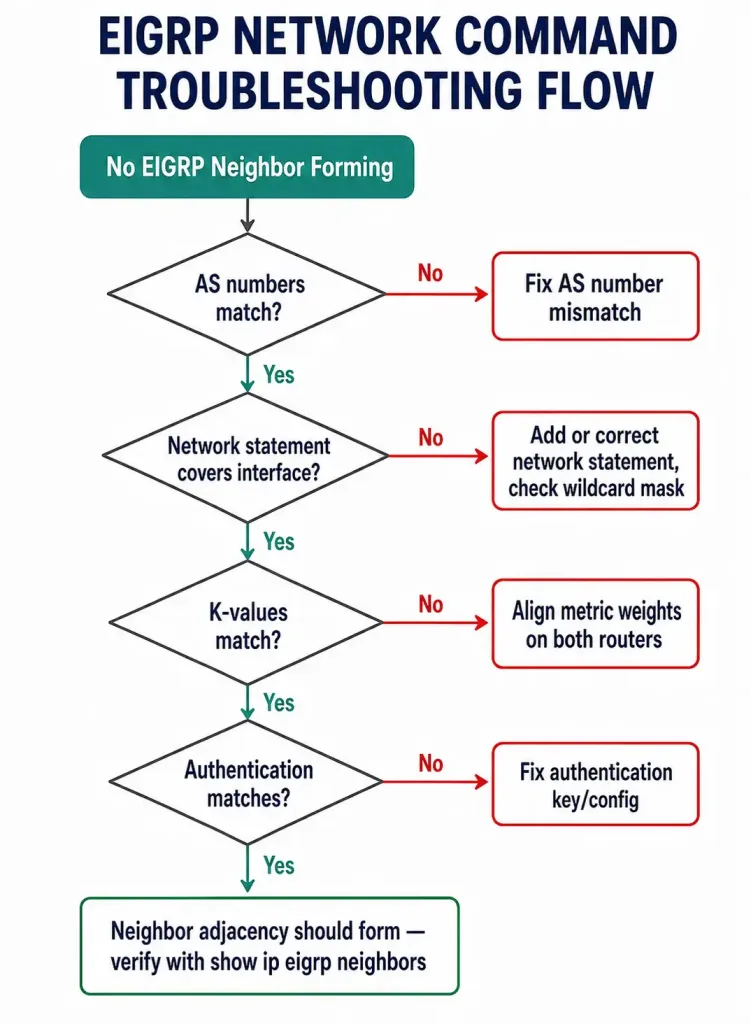
| Symptom | Likely cause | Check |
|---|---|---|
| No neighbors form at all | AS number mismatch between routers | show ip protocols on both routers |
| Neighbor forms on one interface, not another | network statement doesn’t cover that interface’s subnet | show ip eigrp interfaces |
| EIGRP running on more interfaces than expected | Classful network statement without a wildcard mask | show ip protocols, tighten with wildcard mask |
network command rejected / syntax error | Missing the network keyword before the address, or malformed wildcard mask | Re-check the command against this article’s examples |
| Routes missing from a neighbor’s table | Auto-summary is rolling subnets up unexpectedly | show ip route eigrp, check auto-summary status |
| Adjacency flaps intermittently | K-value or authentication mismatch | show ip eigrp neighbors detail |
Network Command Behavior by Protocol (Quick Comparison)
| Protocol | What network does | Uses a mask? |
|---|---|---|
| EIGRP (classic) | Enables EIGRP on matching interfaces; classful by default, wildcard mask for precision | Wildcard mask, optional |
| OSPF | Enables OSPF on matching interfaces AND assigns them to an area | Wildcard mask, required |
| RIP | Enables RIP on matching interfaces; classful only, no mask support | No mask supported |
| BGP | Advertises an existing route from the routing table; does not enable BGP on an interface | Optional mask, different purpose entirely |
FAQ
Does the order of network statements matter?
No. EIGRP evaluates all network statements together against each interface’s address; order doesn’t affect the outcome.
Can I mix classful and wildcard-mask network statements under the same EIGRP process?
Yes. It’s legal, though it can get confusing to read later. In production, pick one style per process and stay consistent.
What happens if two network statements overlap?
No conflict — an interface just needs to match at least one of them to be enabled. Overlap doesn’t cause an error.
Does removing a network statement drop the adjacency on that interface?
Yes. Removing the network statement that covers an interface disables EIGRP on that interface immediately, and any adjacency formed over it is torn down.
Is the wildcard-mask form required for CCNA, or just the classful form?
Both. Current CCNA exam topics expect you to configure EIGRP with a wildcard mask for interface-level control, not just the classful shortcut.
Do I need a network statement for a loopback interface too?
Yes. Loopbacks are treated like any other interface — if you want EIGRP to advertise a loopback’s address, it needs to fall inside a configured network range just like a physical interface would. A common mistake is enabling EIGRP on physical links and forgetting the loopback, then wondering why the loopback address never shows up in a neighboring router’s routing table.
Why does my adjacency form and then immediately tear down?
This usually points to a K-value mismatch rather than a network-statement problem. If the network statements are correct and hellos are visible on both sides but the neighbor relationship won’t stabilize, compare show ip protocols output on both routers — specifically the metric weight (K1–K5) values — before looking anywhere else.



