
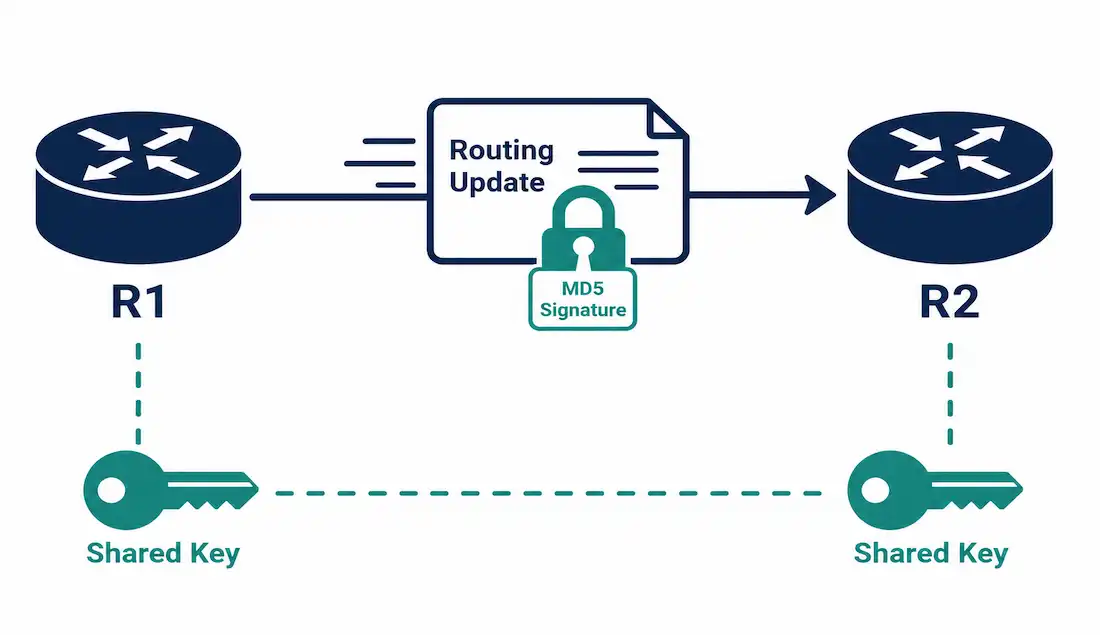
An unauthenticated routing protocol will accept updates from anything claiming to be a legitimate neighbor, which is exactly the gap an attacker needs to inject false routing information, redirect traffic, or trigger a denial-of-service condition. Authentication closes this gap by requiring routers to prove they possess a shared secret before their updates are trusted, and MD5-based authentication has been the traditional way to do it for routing protocols — though it’s worth understanding both how it works and where it now falls short of current best practice.
This guide covers how MD5 routing authentication actually works, complete EIGRP configuration, a brief OSPF example, verification and troubleshooting, and an honest look at MD5’s known limitations alongside its modern alternatives.
Routers configured with EIGRP message authentication only accept routing messages from other routers that know the same pre-shared key. Without this, an unauthorized individual could introduce an additional router with different or inconsistent route information onto the network, potentially damaging routing tables on legitimate routers and causing a denial-of-service condition.
Why Routing Protocol Authentication Matters
An attacker able to interrupt a legitimate router is a real but comparatively minor problem — routing protocols are specifically designed to recover automatically once a disrupted neighbor comes back online. Falsifying routing information is the more dangerous threat, since it doesn’t necessarily announce itself as a failure at all: an attacker introducing false routes can redirect traffic through a device they control (enabling eavesdropping), create routing loops, or silently discard traffic sent toward a route that never actually leads anywhere.
Authentication defends specifically against this second, more dangerous category — it doesn’t stop an attacker from disrupting a link, but it does stop them from having their fabricated routing updates accepted as legitimate by neighboring routers.
How MD5 Authentication Works
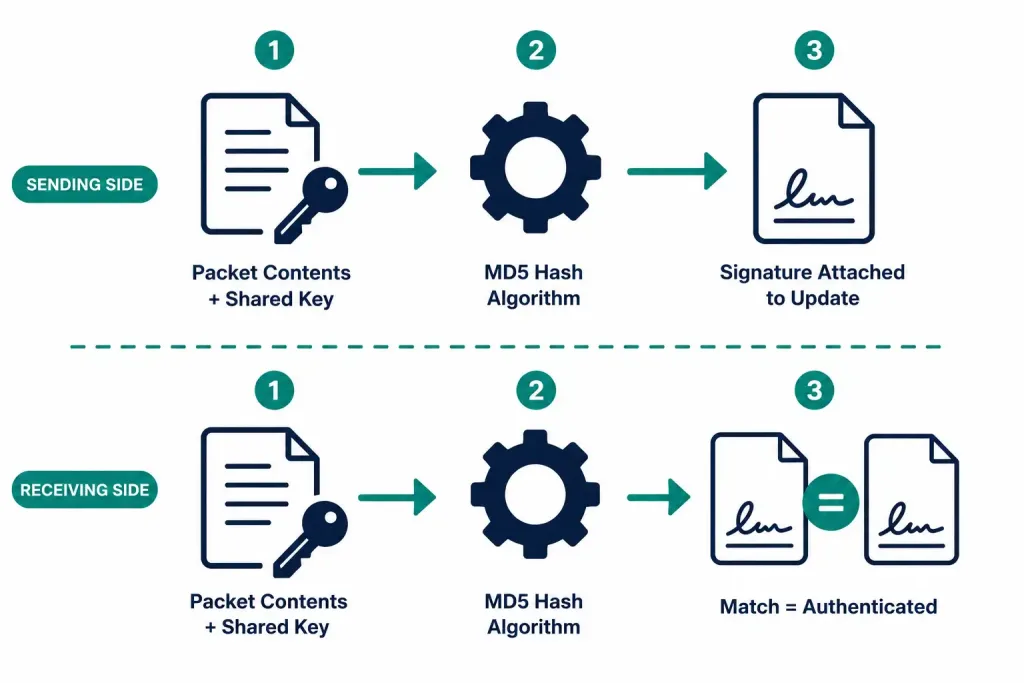
MD5-based routing protocol authentication relies on three components:
- A hashing algorithm — MD5 itself.
- A shared secret key, configured identically on both routers.
- The actual contents of the routing update packet.
The sending router combines the packet’s contents with the shared key and runs both through the MD5 algorithm, producing a signature that gets attached to the update. The receiving router performs the identical calculation using its own copy of the same key against the received packet contents. If the two signatures match, the update is considered authentic and trustworthy; if they don’t match — whether due to a wrong key or genuinely tampered content — the update is rejected.
RIPv2, EIGRP, OSPF, IS-IS, and BGP all support some form of MD5 authentication, though the exact configuration commands differ by protocol.
Configuring EIGRP MD5 Authentication
EIGRP MD5 authentication configuration happens in two steps: creating a key chain, then applying it to the interface.
Step 1: Create a Key Chain and Key
Router(config)# key chain <name-of-chain>
Router(config-keychain)# key <key-id>
Router(config-keychain-key)# key-string <key-string-text>
The key ID identifies a specific key within the chain, ranging from 0 to 2,147,483,647 — it’s good practice to use the same key number across every router in the configuration, even though it isn’t strictly required to match. The key string works like a password and must be identical on every router exchanging authenticated updates.
Step 2: Apply Authentication to the Interface
Router(config-if)# ip authentication mode eigrp <as-number> md5
Router(config-if)# ip authentication key-chain eigrp <as-number> <name-of-chain>
Every EIGRP-enabled interface that should participate in authenticated exchanges needs both commands applied.
A Complete Worked Example
Consider two routers, R1 and R2, already running EIGRP with a fully converged network. Applying authentication to R1 first, before R2 is configured to match:
Router R1:
R1> enable
R1# configure terminal
R1(config)# key chain KEY_EIGRP
R1(config-keychain)# key 1
R1(config-keychain-key)# key-string cisco_cisco
R1(config-keychain-key)# exit
R1(config-keychain)# exit
R1(config)# interface serial 0/0/0
R1(config-if)# ip authentication mode eigrp 100 md5
R1(config-if)# ip authentication key-chain eigrp 100 KEY_EIGRP
R1(config-if)# exit
At this point, since R2 hasn’t been configured yet, the adjacency drops, and both routers display:
%DUAL-5-NBRCHANGE: IP-EIGRP 100: Neighbor 192.168.0.2 (Serial0/0/0) is down: authentication mode changedRouter R2, configured to match:
R2> enable
R2# configure terminal
R2(config)# key chain KEY_EIGRP
R2(config-keychain)# key 1
R2(config-keychain-key)# key-string cisco_cisco
R2(config-keychain-key)# exit
R2(config-keychain)# exit
R2(config)# interface serial 0/0/0
R2(config-if)# ip authentication mode eigrp 100 md5
R2(config-if)# ip authentication key-chain eigrp 100 KEY_EIGRP
R2(config-if)# exit
Once both sides match, the adjacency re-establishes, and both routers display:
%DUAL-5-NBRCHANGE: IP-EIGRP 100: Neighbor 192.168.0.1 (Serial0/0/0) is up: new adjacency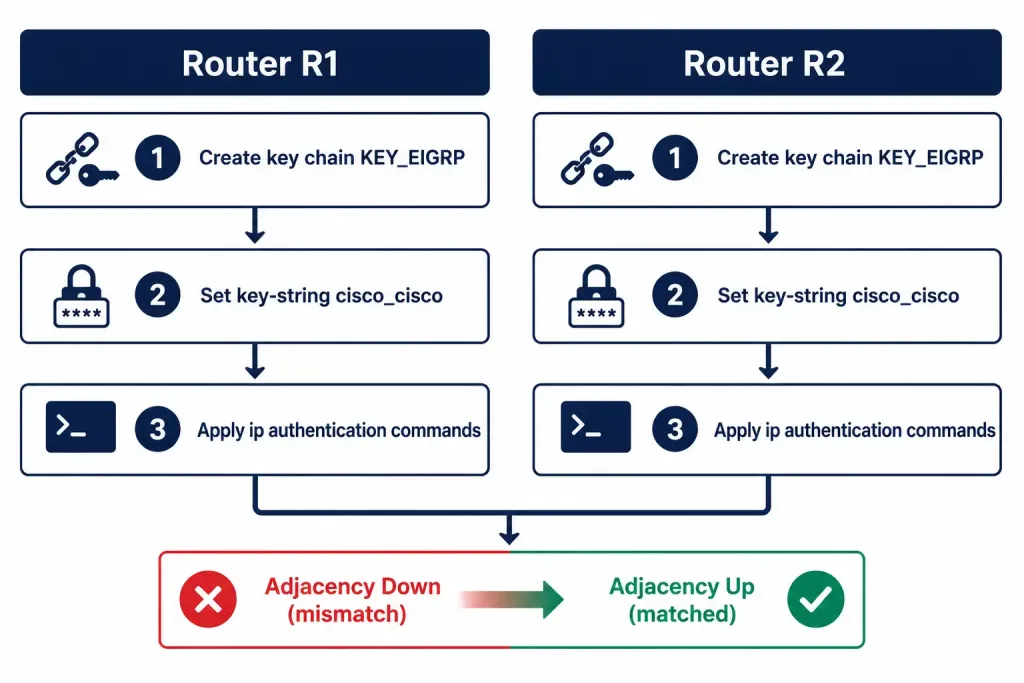
A Brief OSPF Example
Since OSPF also supports MD5 authentication, it’s worth seeing the parallel syntax, even briefly, to confirm the concept genuinely applies across protocols and not just EIGRP:
Router(config-if)# ip ospf message-digest-key 1 md5 <key-string>
Router(config-if)# ip ospf authentication message-digest
The underlying principle is identical to EIGRP’s — a shared key, applied per interface, verified against every received update — even though the specific command names differ between protocols.
Configuring EIGRP for IPv6 Authentication
The IPv6 equivalent uses parallel commands, replacing ip with ipv6:
Router(config-if)# ipv6 authentication mode eigrp <as-number> md5
Router(config-if)# ipv6 authentication key-chain eigrp <as-number> <name-of-chain>
The key chain itself is configured identically to the IPv4 example above — the key chain configuration isn’t IP-version-specific.
Key Management Best Practices
Configuring authentication correctly is only half the picture — how the keys themselves are managed over time matters just as much for actual security.
Rotate keys periodically, not just once at initial setup. A key chain can hold multiple keys with different valid time ranges, using the accept-lifetime and send-lifetime sub-commands under each key, allowing a scheduled transition from an old key to a new one without a hard cutover that risks dropping adjacencies mid-rotation.
Never reuse the same key string across unrelated authentication purposes. A key shared between routing protocol authentication and some other system multiplies the impact if that key is ever exposed, turning a single compromise into multiple simultaneous problems.
Store key strings with the same care as any other credential. A key-string entered directly into a router’s running configuration is visible to anyone with read access to that configuration, which is exactly why configuration backups (as covered in other guides in this series) need to be secured with real access controls, not treated as routine, low-sensitivity files.
Document which key is active on which device, particularly once key rotation is in use — a rotation plan that isn’t clearly documented is a common source of unplanned adjacency drops when a key expires without every affected router having been updated in time.
Verifying Authentication
Check EIGRP neighbor status directly:
R1# show ip eigrp neighborsA neighbor that should be authenticated but isn’t showing up here — despite otherwise correct connectivity — is the clearest sign of an authentication mismatch, since mismatched authentication prevents adjacency formation entirely rather than allowing a degraded connection.
For EIGRP over IPv6:
R1# show ipv6 eigrp neighborsConfirm the key chain configuration itself:
R1# show key chainTroubleshooting Authentication Issues
Neighbor adjacency won’t form after configuring authentication on both sides: double-check that the key ID, key string, and authentication mode all match exactly on both routers — a single mismatched character in the key string prevents authentication from succeeding, with no more specific error than the adjacency simply failing to form.
R1# show key chain
R1# show running-config interface serial 0/0/0
Adjacency was working, then dropped after a configuration change: check for a recent change to the key chain or authentication mode on either router — the DUAL neighbor-change message explicitly naming “authentication mode changed” is a strong, specific signal pointing directly at this cause rather than a general connectivity issue. This is one of the more genuinely helpful error messages in IOS specifically because it names the likely cause directly, rather than requiring you to infer it from a generic adjacency failure.
Authentication works on one interface but not another on the same router: confirm both authentication commands (ip authentication mode and ip authentication key-chain) were actually applied to the correct interface — it’s a common mistake to configure the key chain globally but forget to apply the interface-level commands on every EIGRP-enabled interface that needs them.
MD5’s Known Limitations and Modern Alternatives
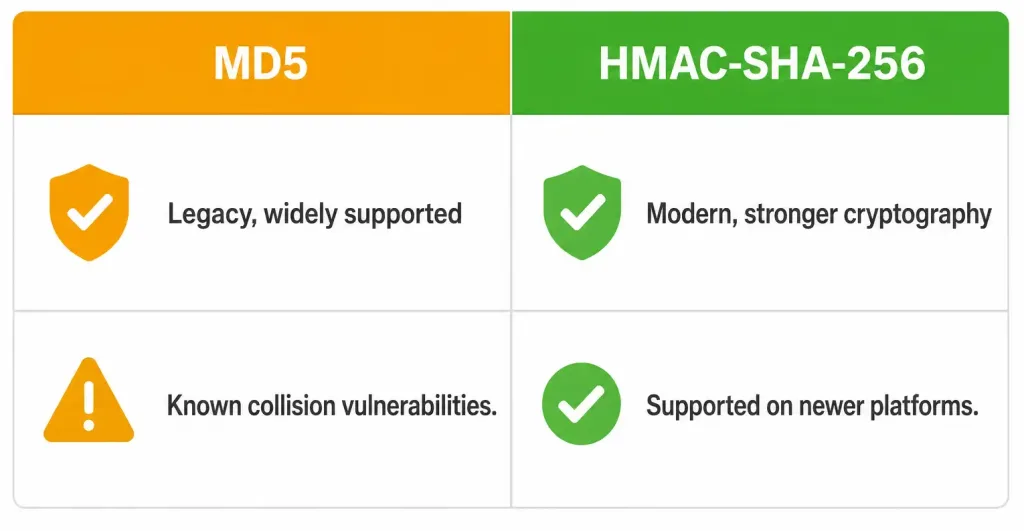
It’s worth being direct about this: MD5 is a cryptographically weak hashing algorithm by current standards. Collision vulnerabilities have been publicly demonstrated since the mid-2000s, meaning it’s theoretically possible to craft different inputs that produce the same MD5 hash — a real, if specialized, concern for any security-sensitive use of the algorithm.
For routing protocol authentication specifically, this risk is somewhat mitigated by the fact that it’s protecting a specific known network segment against a determined, capable attacker rather than defending against generic internet-facing threats — but “somewhat mitigated” isn’t the same as “not a real consideration.” Where the option exists, modern deployments should prefer stronger alternatives:
- HMAC-SHA-256 authentication, supported on EIGRP’s newer named mode configuration and current IOS-XE releases, offers meaningfully stronger cryptographic guarantees than MD5 while using a similar underlying configuration model.
- OSPFv3 authentication on modern platforms has moved toward IPsec-based authentication rather than the older cleartext or MD5 mechanisms used historically.
MD5 remains genuinely relevant to know for CCNA study and for maintaining legacy equipment that doesn’t support newer authentication methods, but it shouldn’t be treated as the current best-practice recommendation for a new deployment where stronger options are actually available. Understanding this distinction — what’s still commonly taught and tested versus what a genuinely current, security-conscious deployment should actually run — matters for anyone moving from certification study into real operational responsibility.
FAQs
Why is routing protocol authentication necessary?
Without authentication, a router will accept routing updates from anything claiming to be a legitimate neighbor, letting an attacker inject false routes, redirect traffic, or cause a denial-of-service condition. Authentication ensures only routers possessing the correct shared key can have their updates accepted as trustworthy.
How does MD5 authentication actually verify a routing update?
The sending router combines the packet’s contents with a shared secret key and hashes both together using MD5, producing a signature attached to the update. The receiving router performs the identical calculation with its own copy of the key, and if the resulting signatures match, the update is accepted as authentic.
What happens if only one router in an EIGRP adjacency is configured for MD5 authentication?
The adjacency drops, and both routers display a DUAL neighbor-change message specifically citing “authentication mode changed” as the cause. The adjacency only re-establishes once both routers are configured with matching authentication settings — a mismatch doesn’t produce a degraded connection, it prevents the adjacency from forming at all.
Is MD5 still considered secure for routing protocol authentication?
Not by current cryptographic standards — MD5 has well-documented collision vulnerabilities dating back to the mid-2000s, and modern deployments should prefer stronger alternatives like HMAC-SHA-256 where the platform and protocol support it. MD5 remains relevant for CCNA study and legacy equipment, but it isn’t the current best-practice recommendation for a new deployment with better options available.
Do RIPv2, OSPF, IS-IS, and BGP all use the same MD5 configuration commands as EIGRP?
The underlying concept — a shared key, applied per interface or per session, verified against every received update — is consistent across protocols, but the specific command syntax differs by protocol. OSPF, for instance, uses ip ospf message-digest-key and ip ospf authentication message-digest rather than EIGRP’s ip authentication mode/key-chain eigrp commands.
How can I verify that routing protocol authentication is actually working?
Use show ip eigrp neighbors (or show ipv6 eigrp neighbors for IPv6) to confirm the expected neighbor adjacency is actually up, and show key chain to confirm the key chain configuration itself is correct. A neighbor that should be present but isn’t showing up, despite otherwise normal connectivity, is the clearest sign of an authentication mismatch specifically.



