
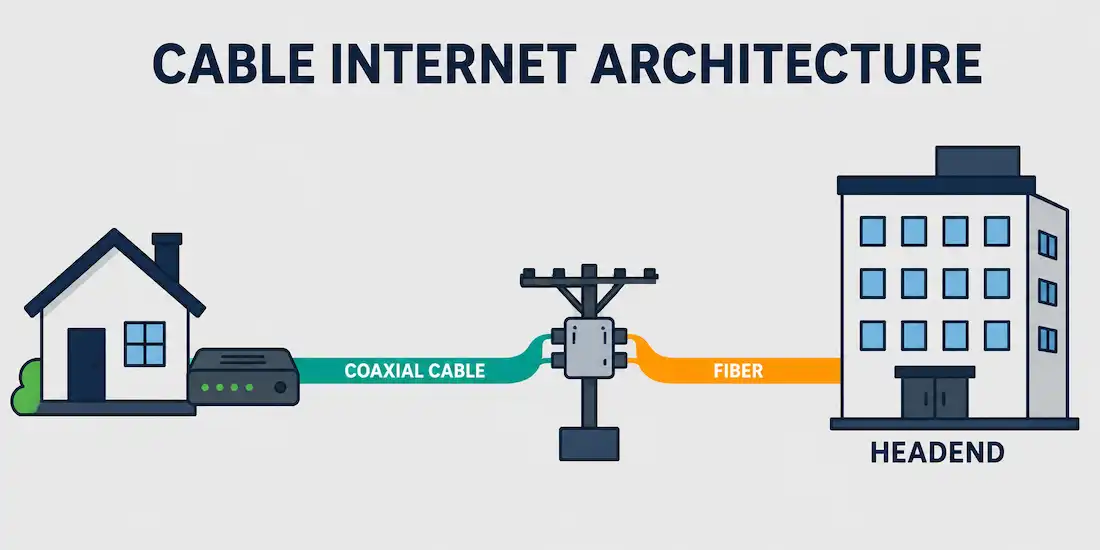
Network and Internet access through cable TV is a type of broadband Internet access that uses the existing infrastructure of the television cable system. It provides network edge connectivity from an Internet Service Provider (ISP) to an end user in much the same way DSL and Fiber to the Home (FTTH) do, but riding on cable TV infrastructure instead of telephone lines or dedicated fiber.
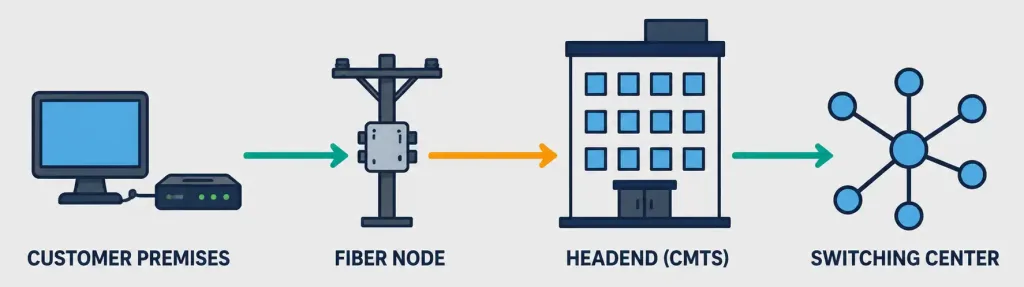
Cable Internet requires a cable modem at the customer’s own premises and a Cable Modem Termination System (CMTS) at the cable operator’s facility, known as the headend. The two are typically connected using either a plain coaxial cable or, more commonly today, a Hybrid Fiber Coaxial (HFC) network. The headend itself connects to a broader switching center using high-bandwidth fiber trunks for long-haul connectivity back to the wider Internet.
How Hybrid Fiber Coaxial (HFC) Networks Work
Modern cable Internet almost always runs over an HFC network rather than pure coaxial cable end to end. In an HFC architecture, fiber optic cable carries signals from the headend to a neighborhood fiber node, and coaxial cable then carries the signal the rest of the way from that node to individual homes and businesses. This hybrid design lets cable operators push fiber’s higher capacity and reach deep into their networks while reusing the existing coaxial cabling already installed at customer premises, avoiding the cost of running fiber directly to every home.
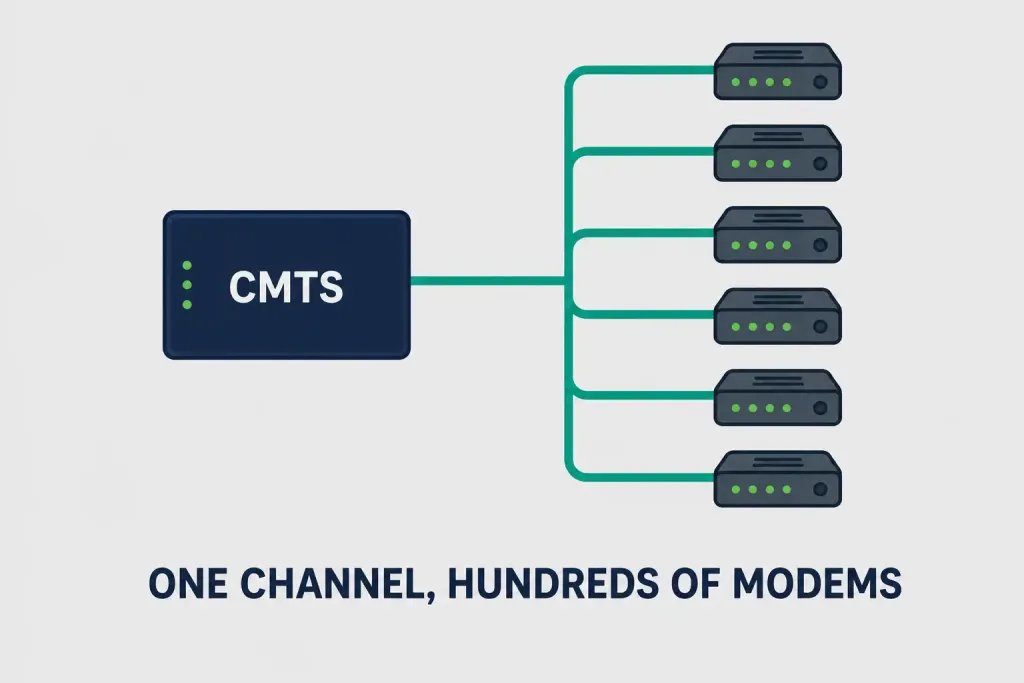
A user connects a computer and router or switch to the cable modem, which translates digital signals into the broadband frequencies used for transmission over the cable TV system. At the headend, the CMTS is the system responsible for managing this traffic: it modulates and demodulates signals to and from potentially thousands of cable modems, and one downstream channel alone can handle hundreds of cable modems simultaneously. As a cable operator’s subscriber base grows, the CMTS can be upgraded with additional downstream and upstream ports to keep pace with demand.
Cable Internet Speeds: DOCSIS Versions Matter
Actual cable Internet speed depends heavily on which DOCSIS (Data Over Cable Service Interface Specification) version a cable operator’s network and the customer’s modem both support. This is a critical detail often left out of older explanations of cable Internet, since speeds have increased dramatically across DOCSIS generations:
| DOCSIS Version | Max Downstream | Max Upstream |
|---|---|---|
| DOCSIS 3.0 | Up to ~1 Gbps | Up to ~200 Mbps |
| DOCSIS 3.1 | Up to 10 Gbps | Up to 1-2 Gbps |
| DOCSIS 4.0 | Up to 10 Gbps | Up to 6 Gbps |
DOCSIS 3.0, once the standard benchmark for cable Internet, is now considered dated technology, with its roughly 1 Gbps downstream ceiling representing the low end of what modern cable networks can deliver rather than the high end it once was. DOCSIS 3.1 introduced Orthogonal Frequency-Division Multiplexing (OFDM), packing more data into the same amount of cable spectrum and enabling multi-gigabit downstream speeds. DOCSIS 4.0 goes further still, introducing Full Duplex DOCSIS technology that dramatically closes the historical gap between cable’s fast downstream and comparatively weak upstream speeds — a gap that has long been one of cable’s biggest disadvantages relative to fiber.
[See Infographic: DOCSIS Version Speed Comparison]
Worked Example: Why Advertised Speed Isn’t Guaranteed Speed
An ISP advertising a “1 Gbps” cable plan is describing the plan’s ceiling under DOCSIS 3.0-era channel bonding — for example, a 32-channel downstream bond at roughly 38 Mbps per channel yields a theoretical maximum near 1.2 Gbps. In practice, real-world speeds on such a plan often land meaningfully lower, commonly in the 300-600 Mbps range, because of factors like shared neighborhood node capacity, signal quality over aging coaxial infrastructure, and how many channels the operator has actually allocated to a given customer. This is exactly why upgrading only the customer’s modem to a newer DOCSIS standard doesn’t guarantee faster real-world speeds — the ISP’s network and provisioned plan tier have to support that higher standard too.
Why Cable’s Downstream and Upstream Speeds Differ
Cable Internet has historically been asymmetric, meaning downstream (download) speeds are significantly higher than upstream (upload) speeds. This asymmetry traces back to the cable system’s original design purpose: broadcasting television content downstream to subscribers, with only a narrow slice of spectrum ever reserved for upstream signals like remote controls or, later, cable modem traffic. As cable Internet has matured, providers have gradually reallocated more spectrum to upstream use, and DOCSIS 4.0’s Full Duplex technology represents the biggest step yet toward closing this gap, since it allows the same frequencies to be used for both directions simultaneously rather than splitting the available spectrum permanently between them.
Cable Internet vs. Fiber and DSL
Understanding where cable fits relative to its two main broadband competitors clarifies its practical tradeoffs:
| Factor | Cable Internet | Fiber (FTTH) | DSL |
|---|---|---|---|
| Typical downstream | Up to 10 Gbps (DOCSIS 3.1/4.0) | Up to 10 Gbps+ | Up to 100 Mbps |
| Typical upstream | Up to 1-6 Gbps (version-dependent) | Often symmetric with downstream | Much lower than downstream |
| Shared bandwidth | Yes, per node | No, dedicated per home | No, dedicated per line |
| Infrastructure reuse | Existing cable TV plant | Requires new fiber construction | Existing telephone lines |
| Typical availability | Widespread in developed areas | Growing but less widespread | Very widespread, older technology |
Fiber’s biggest structural advantage over cable is that each home gets a dedicated fiber connection rather than sharing a node with neighbors, which eliminates the peak-hour congestion cable can experience. Cable’s biggest structural advantage over fiber is deployment cost and speed, since it reuses infrastructure already installed for television service rather than requiring new construction to every home. DSL, by contrast, generally lags both cable and fiber in raw speed, though it remains widely available precisely because it reuses existing telephone infrastructure.
Real-World Deployment Context
Consider a residential neighborhood served by a single fiber node feeding 200 homes over shared coaxial cable. During a weekday afternoon, only a modest fraction of those homes are actively streaming or downloading, so each connected household experiences close to its full provisioned speed.
But during peak evening hours — when most households are simultaneously streaming video, gaming, or video conferencing — that same shared node capacity gets divided across far more simultaneous active connections, and individual speeds can noticeably dip below their advertised maximum. This is precisely the shared-bandwidth tradeoff inherent to cable’s architecture, and it’s a major reason cable operators continue investing in “node splits” — dividing a single overloaded fiber node into two or more smaller nodes, each serving fewer homes, to restore per-household bandwidth as usage grows.
This same architecture explains why cable Internet performance can vary so much by neighborhood even within a single provider’s footprint: an older, more crowded node with dated coaxial infrastructure will perform noticeably worse during peak hours than a newer, less crowded node in a different part of the same city, even though both areas nominally subscribe to the same speed tier.
Advantages of Cable Internet
- Low cost relative to speed: Cable Internet is widely regarded as a cost-effective broadband option for home users, especially compared to newer fiber deployments in areas where both are available.
- Wide existing infrastructure: Because cable TV infrastructure was already deployed to most residential areas for television service, cable Internet reaches many homes without new construction.
- High downstream speeds: Modern DOCSIS 3.1 and 4.0 networks can deliver multi-gigabit downstream speeds, competitive with many fiber offerings.
- Mature, well-understood technology: Decades of cable Internet deployment mean troubleshooting knowledge and equipment support are widely available.
Disadvantages of Cable Internet
- Shared bandwidth: Because a downstream channel serves many cable modems in the same neighborhood simultaneously, heavy usage by neighbors can reduce available bandwidth during peak hours — a limitation fiber-to-the-home connections generally don’t share.
- Asymmetric speeds: Upload speeds remain considerably lower than download speeds on most cable plans, even with DOCSIS 3.1, which can matter for video calls, cloud backups, and remote work.
- Aging infrastructure variability: Actual achievable speeds can vary significantly by neighborhood depending on how much of the coaxial plant has been upgraded and how many subscribers currently share a given node.
Troubleshooting and Exam Tips
- Remember the core architecture: cable modem at the customer premises, CMTS at the headend, connected via coaxial cable or (more commonly today) an HFC network.
- Don’t cite a single “maximum” cable speed without specifying the DOCSIS version — DOCSIS 3.0, 3.1, and 4.0 have dramatically different ceilings.
- Remember that HFC networks use fiber from the headend to a neighborhood node, then coaxial cable for the final stretch to the customer — this hybrid design is the “HFC” in Hybrid Fiber Coaxial.
- If a question describes asymmetric speeds (fast download, slow upload) as a defining characteristic of a broadband technology, cable Internet (especially pre-DOCSIS 4.0) is a strong candidate answer.
- Remember that one downstream channel can serve hundreds of cable modems — this shared-bandwidth model is central to understanding both cable’s cost efficiency and its peak-hour congestion risk.
Conclusion
Cable Internet delivers broadband connectivity by repurposing television cable infrastructure, using a cable modem at the customer’s end and a CMTS at the provider’s headend, typically connected through a Hybrid Fiber Coaxial network. Its maximum achievable speed depends heavily on the DOCSIS standard in use, ranging from roughly 1 Gbps downstream under older DOCSIS 3.0 networks to 10 Gbps downstream and multi-gigabit upstream under DOCSIS 4.0. While cable’s historically asymmetric speeds and shared-bandwidth model remain real tradeoffs compared to fiber, its wide existing infrastructure and continually improving DOCSIS standards keep it a genuinely competitive broadband option for home users and small businesses alike.
Frequently Asked Questions
What is cable Internet?
Cable Internet is a type of broadband Internet access delivered over television cable infrastructure, using a cable modem at the customer’s premises and a Cable Modem Termination System (CMTS) at the provider’s headend.
What is the maximum speed of cable Internet?
It depends on the DOCSIS version. DOCSIS 3.0 tops out around 1 Gbps downstream, DOCSIS 3.1 reaches up to 10 Gbps downstream and 1-2 Gbps upstream, and DOCSIS 4.0 pushes to 10 Gbps downstream and up to 6 Gbps upstream.
What is an HFC network?
Hybrid Fiber Coaxial (HFC) is a network architecture that uses fiber optic cable between the headend and a neighborhood node, then coaxial cable for the final connection to individual homes and businesses, combining fiber’s higher capacity with the existing coaxial infrastructure already installed at customer premises.
Why is cable Internet upload speed slower than download speed?
Cable systems were originally designed to broadcast television downstream to subscribers, with only a narrow slice of spectrum reserved for upstream signals. This asymmetric design has persisted through most DOCSIS versions, though DOCSIS 4.0’s Full Duplex technology is closing the gap significantly.
Does upgrading my cable modem guarantee faster speeds?
Not by itself. A newer DOCSIS-standard modem can only deliver higher speeds if the ISP’s network and your subscribed plan tier also support that same DOCSIS version — the modem, network, and plan all need to align for the higher speed to actually be available.
Why does my cable Internet slow down in the evening?
Because a single fiber node’s coaxial capacity is shared across every home connected to it, peak-hour usage from neighbors simultaneously streaming, gaming, or video conferencing reduces the bandwidth available to each household, an effect fiber connections generally avoid since each home has a dedicated line.



