

Cloud computing services for business have moved well past the early-adopter phase. Most companies now run at least part of their operations on cloud infrastructure, not because it’s trendy, but because the economics and flexibility genuinely work out better than running everything in-house. That said, cloud isn’t a magic fix for every IT problem, and it’s worth separating what cloud computing services for business actually deliver from the vaguer marketing claims that tend to surround the topic.
1. Lower, More Predictable Costs
The core cost argument for cloud computing services for business is straightforward: you pay for what you use, instead of buying and maintaining hardware sized for peak demand that sits underused most of the time. That shift from capital spending to operating spending changes how a business budgets for IT. It’s genuinely useful for companies with variable workloads, since capacity can scale up during busy periods and back down afterward.
It’s worth being honest about a real counterpoint here, though. Flexera’s 2026 State of the Cloud Report found organizations waste an estimated 29% of their cloud spend — the first increase in wasted spend after five years of improvement. Cost savings from cloud computing aren’t automatic. They depend on actually managing usage, right-sizing resources, and avoiding the common trap of leaving unused cloud capacity running. A business that treats cloud migration as a one-time move, rather than an ongoing cost-management practice, can end up paying more than it would have on-premises.
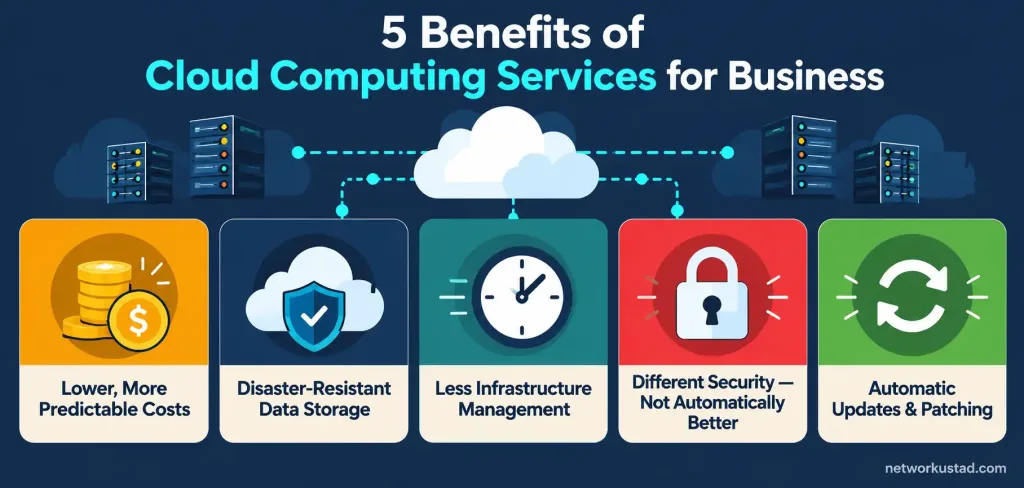
2. Real Protection Against Data Loss From Physical Disasters
This benefit holds up well under scrutiny. If a business keeps its only copies of critical data on local servers, a fire, flood, theft, or hardware failure at that one location can mean permanent data loss. Cloud storage keeps copies across geographically distributed data centers, so a disaster at one physical location doesn’t take your data down with it.
This isn’t a reason to skip backups entirely, though. A sound approach still includes clear data-recovery procedures and regular testing of those procedures — not just an assumption that “it’s in the cloud, so it’s safe.” Cloud storage protects against physical disaster. It doesn’t automatically protect against accidental deletion, ransomware, or a misconfigured access setting, which is where the next point matters.
3. Less Time and Staff Spent on Infrastructure Management
Running an in-house data center well takes dedicated IT staff, hardware refresh cycles, and ongoing maintenance that smaller businesses especially can’t easily support. Cloud computing services for business shift most of that burden onto the provider. According to Flexera’s 2026 report, SMB workloads running in public cloud grew from 55% to 63% year over year — a meaningfully faster adoption pace than enterprises saw over the same period, which tracks with smaller companies having less appetite for running their own infrastructure from scratch.
That freed-up time matters most for businesses whose core work isn’t IT. A retail company or a consulting firm doesn’t need to become an expert in server maintenance, and cloud computing services for business let those companies redirect staff time toward work that’s actually central to what they do.
4. Security That’s Genuinely Different, Not Simply “Better”
This is the point where the original marketing pitch for cloud computing usually overstates things, and it’s worth correcting directly. Cloud isn’t automatically more secure than a well-run on-premises setup — the comparison is more nuanced than that. Thales’s 2025 Cloud Security Study found 55% of organizations now say cloud is harder to secure than on-premises environments, up from 51% the year before. That’s a rising number, not a shrinking one, and it cuts against the simple “cloud is safer” claim.
What cloud providers genuinely do well is infrastructure-level security: physical data center protection, network-level monitoring, and automatic patching of the underlying systems. What they don’t automatically fix is misconfiguration on the customer’s side, which is where a large share of real-world cloud security incidents actually originate. The same Thales report found 68% of cloud attacks are access-based — stolen or compromised credentials — rather than attacks on the provider’s core infrastructure. Strong password policies, multi-factor authentication, and careful access permissions matter as much in the cloud as they ever did on-premises, arguably more, since a misconfigured cloud storage bucket can be exposed to the entire internet in a way a physical server in a locked room never was.
5. Automatic Updates Without the Manual Maintenance Burden
Cloud providers patch and update the underlying infrastructure and, often, the software running on it, without requiring manual intervention from the business using the service. That removes a genuinely tedious maintenance task — tracking patch schedules, testing updates, and applying them to in-house servers — that otherwise falls on internal IT staff. It also closes security gaps faster than many in-house teams can manage on their own, since a cloud provider typically has dedicated teams whose entire job is keeping the underlying platform current.
The tradeoff worth knowing about: automatic updates mean less control over exactly when a change happens. For most businesses this is a reasonable trade, but any company running specialized software that’s sensitive to underlying platform changes should understand what’s being updated automatically and what, if anything, requires its own testing before an update rolls out.
What the Current Adoption Numbers Actually Show
The scale of cloud adoption today is substantial enough that “should my business use cloud computing” is largely the wrong question for most companies — the more relevant question is how to use it well. Gartner reported global public cloud end-user spending reached $723.4 billion in 2025, up 21.5% from the year before, and forecasts spending to keep growing at a similar pace through the rest of the decade. That’s not a niche trend; it’s the default way a large share of business computing now runs.
None of that means cloud is automatically the right call for every workload. Some specialized or highly regulated workloads still make sense to keep on-premises or in a private cloud, and the 29% wasted-spend figure from Flexera is a real reminder that adopting cloud without a cost-management plan can erase much of the savings it’s supposed to provide.
Questions Worth Asking Before Choosing a Cloud Provider
Rather than picking a provider based on marketing claims alone, a few concrete questions are more useful:
- What’s the actual pricing model, and how does it scale with our usage patterns? A workload with predictable, steady demand has different cost math than one with sharp seasonal spikes.
- What security certifications and compliance frameworks does the provider support? This matters more for regulated industries — healthcare, finance, and similar — than for a typical small business.
- How is data backed up, and what’s the actual disaster-recovery process? “It’s in the cloud” is not itself a backup strategy; ask specifically how recovery works and how often it’s tested.
- What happens if we need to leave? Understanding data portability and exit costs before signing on avoids an unpleasant surprise later if the provider relationship doesn’t work out.
- Who’s responsible for what, specifically, on security? Cloud security is a shared responsibility between provider and customer, and knowing exactly where that line falls prevents gaps nobody’s actually covering.
Common Mistakes Businesses Make When Adopting Cloud Computing
A few patterns show up often enough in failed or disappointing cloud migrations to name directly. Moving everything to the cloud at once, without a clear plan for which workloads actually benefit, is one of the most common. Not every application gains something from cloud computing services for business — a legacy system with no real scaling needs might simply move its existing costs to a different line item, without the flexibility benefits that make the switch worthwhile elsewhere. A phased migration, starting with workloads that have clear, variable demand, tends to produce better results than an all-at-once switch driven mainly by a deadline or a vendor’s sales pitch.
Underestimating the ongoing cost-management work is another frequent mistake. Teams sometimes assume that migrating to cloud computing services for business is a one-time project rather than an ongoing discipline. Left unmonitored, unused instances, oversized resources, and forgotten test environments quietly accumulate cost — which connects directly back to the 29% wasted-spend figure cited earlier. Scheduling a regular cloud cost review, rather than treating the migration as finished once it’s live, catches this drift before it becomes expensive.
A third mistake is skipping staff training on the shared-responsibility security model. Moving to the cloud doesn’t remove the need for an organization’s own security practices — it changes what those practices need to cover. Teams that assume the provider “handles security” entirely, without updating their own access-control and credential practices, are the ones most likely to show up in the access-based attack statistics mentioned above.
The Bottom Line
Cloud computing services for business deliver real, measurable advantages: lower and more flexible costs when managed well, genuine protection against physical data-loss events, less time spent on infrastructure upkeep, and automatic updates that close security gaps faster than most in-house teams can manage alone. The honest caveat is that cloud isn’t simply “more secure” by default, and the cost savings depend on active management, not just migration. Going in with realistic expectations on both fronts gets a business further than treating cloud adoption as an automatic win.
Public, Private, and Hybrid: Which Setup Actually Fits
Cloud computing services for business aren’t a single, uniform offering. Public cloud — the model most of the statistics above describe — means sharing infrastructure with other customers on a provider’s platform, which is usually the cheapest and fastest way to get started. Private cloud keeps infrastructure dedicated to one organization, often for compliance or security reasons specific to that business’s industry, at a higher cost than public cloud. Hybrid setups combine both, running sensitive or regulated workloads on private infrastructure while using public cloud for everything else that doesn’t carry the same constraints.
For most small and mid-size businesses, public cloud alone covers the vast majority of real needs, and the added cost and complexity of a hybrid setup usually isn’t justified without a specific regulatory or security driver. Larger organizations in healthcare, finance, or government work are more likely to need the hybrid approach, simply because parts of their data are subject to rules that public cloud alone can’t satisfy without extra configuration. Knowing which category your business actually falls into, before signing a contract, avoids paying for complexity that wasn’t necessary.
Frequently Asked Questions
Does cloud computing actually save businesses money?
It can, but not automatically. Flexera’s 2026 report found organizations waste an estimated 29% of their cloud spend, so savings depend on active cost management — right-sizing resources and avoiding unused capacity — not just the act of migrating.
Is cloud computing more secure than on-premises servers?
Not simply “more secure” — the comparison is more nuanced. Thales’s 2025 Cloud Security Study found 55% of organizations now say cloud is harder to secure than on-premises setups. Providers handle infrastructure-level security well, but most real-world incidents come from access-based attacks (68%, per Thales) rather than provider-side failures.
How many businesses actually use cloud computing today?
Adoption is substantial and growing. Flexera’s 2026 report found SMB workloads in public cloud grew from 55% to 63% year over year, and Gartner reported global public cloud spending reached $723.4 billion in 2025.
What’s the biggest risk of moving to the cloud?
Misconfiguration and poor access controls, not provider-side security failures. Most cloud security incidents trace back to compromised credentials or misconfigured permissions on the customer’s side, which is why access management matters as much in the cloud as it ever did on-premises.
Should every business move its IT infrastructure to the cloud?
Not necessarily. Highly regulated workloads or specialized systems sometimes make more sense on-premises or in a private cloud. Most general business workloads benefit from public cloud, but the decision should be based on the specific workload, not a blanket assumption that cloud is always better.



