Opening an online store is the easy part. Getting people to find it, trust it, and actually finish checking out is where most new eCommerce businesses lose the game before they realize they’re playing it. A marketing strategy isn’t a single tactic — it’s the combination of several that each fix a different point where shoppers drop off. Here’s a grounded look at what actually moves the needle, with real numbers behind the claims that deserve them.
Start With Measurable Goals, Not Vague Ambition
“Grow the business” isn’t a strategy — it’s a wish. A usable eCommerce marketing plan starts with specific, trackable targets: a traffic number for the quarter, a conversion-rate target, an average order value you’re trying to hit, or a customer acquisition cost ceiling you won’t exceed. Pick metrics that map to revenue, not just vanity numbers like social media followers, and revisit them monthly rather than setting them once and forgetting them. Without a number to aim at, you can’t tell whether a given marketing effort is actually working or just feels like it is.
Write Product Descriptions That Do Real Work
A product description has two jobs at once: it needs to answer the practical questions a buyer actually has (size, material, compatibility, what’s included), and it needs to contain the search terms people actually type when looking for that product, so it can be found in the first place. Generic manufacturer copy, pasted unchanged across dozens of competing stores, does neither job well — it’s thin on buyer-specific detail and it’s not unique enough to rank distinctly in search results. Pair the written description with multiple real product photos (and video, where it’s practical) shot from angles that answer “what does this actually look like in use,” since product imagery consistently affects purchase confidence more than copy alone.
Use Upselling and Cross-Selling Deliberately, Not Everywhere
Upselling (offering a higher-tier version of what someone’s already buying) and cross-selling (offering a complementary product) both genuinely increase average order value when done at the right moment — typically on the product page or right before checkout, where the suggestion feels relevant rather than like noise. The failure mode is applying this everywhere indiscriminately: a pop-up cross-sell interrupting someone mid-checkout does more to raise cart abandonment than it does to raise order value. Keep these suggestions contextual (genuinely related items, not random ones) and limited in number — two or three well-chosen suggestions outperform a wall of “customers also bought.”
Run Retargeting Campaigns, But Know What They’re Actually Recovering
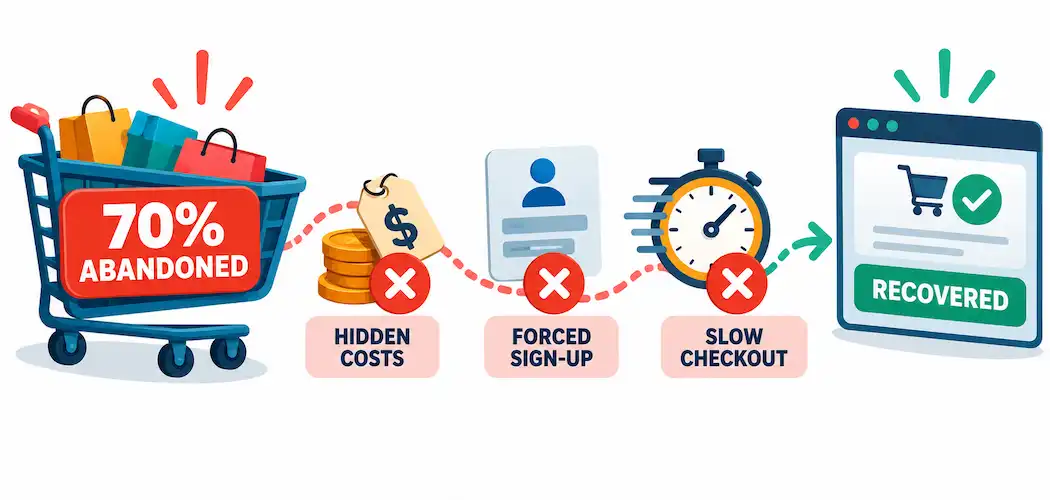
The average documented cart abandonment rate across published studies is 70% (Baymard Institute), so recovering even a modest slice of abandoned carts is one of the highest-leverage things an eCommerce marketer can do — it’s cheaper to bring back someone who already showed intent than to acquire a brand-new visitor. Retargeting typically works through two channels: paid ads (via Google Ads or Meta Ads) that follow a visitor across the web after they leave your site, and abandoned-cart email sequences sent to anyone who left items in a cart while logged in or using a captured email address.
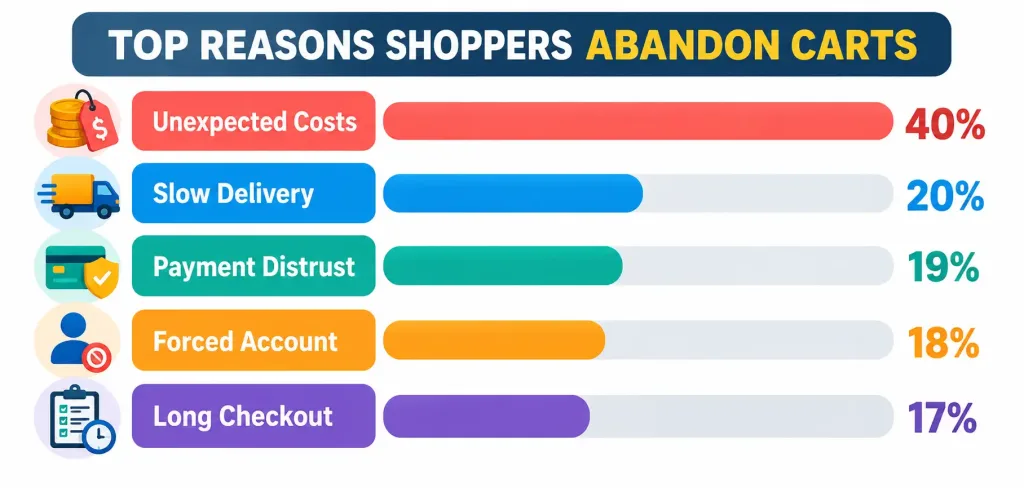
It’s worth being honest about why people actually abandon carts before assuming retargeting alone fixes it: Baymard’s research finds the single largest non-“just browsing” reason is unexpected costs at checkout (shipping, tax, fees), followed by slow delivery estimates, distrust around entering payment information, forced account creation, and checkout steps that are simply too long. Retargeting can bring someone back, but if the underlying checkout friction that drove them away in the first place hasn’t been fixed, you’re just paying to re-attract someone who’ll likely abandon again for the same reason.
Optimize for Mobile as the Default, Not an Afterthought
Mobile devices account for a majority share of global eCommerce traffic and a large and growing share of actual transactions, which makes “mobile-friendly” the wrong framing entirely — mobile should be the primary design target, with desktop treated as the secondary experience to check rather than the other way around. That means genuinely responsive layouts, tap targets sized for fingers rather than cursors, forms that trigger the right mobile keyboard (numeric keypad for phone numbers, email keyboard for email fields), and page load speed that doesn’t crawl on a mobile connection — speed specifically, since slow mobile load times are one of the more reliable predictors of mobile cart abandonment.
Use Content to Build Findability and Trust, Not Just Fill Space
Blog posts, buying guides, size charts, and comparison pages serve two purposes simultaneously: they give search engines more relevant pages to index and rank (capturing search traffic for questions your potential customers are already asking), and they give undecided shoppers the information they need to commit to a purchase rather than abandoning to “research it more” on another site. The content that actually performs is specific and useful — a genuine buying guide or FAQ, not thin filler written to hit a word count. If a content page doesn’t answer a real question a shopper has, it’s not doing either job.
Make the Checkout Process as Short as the Order Actually Requires
Checkout length is one of the few points in this entire list with crisp data behind it: checkout abandonment climbs noticeably when the process requires more fields and steps than the purchase genuinely needs. Concretely:
- Offer guest checkout as an option — forcing account creation before purchase is one of Baymard’s top-cited abandonment reasons, and you can always invite account creation after the order completes.
- Show all costs (shipping, tax, fees) before the final checkout step, not as a surprise at the end — unexpected costs are the single largest documented driver of cart abandonment after simple browsing.
- Minimize the number of form fields and steps to the minimum the transaction actually needs, and auto-fill what you can (address lookup, saved payment methods for returning customers).
- Display security and trust signals (SSL indicators, recognizable payment logos) near the payment fields specifically, since distrust around entering card details is itself a top-cited abandonment reason.
Putting It Together
None of these seven levers work in isolation — mobile optimization without a fast checkout just gets someone to the finish line faster before they hit the same wall, and retargeting without fixing checkout friction just pays to re-attract people who’ll leave again for the same reason. Treat this as a connected system: set a measurable goal, write descriptions and content that actually answer buyer questions, suggest upsells where they’re genuinely relevant, recover abandoned carts with retargeting while also fixing why they were abandoned in the first place, and build the whole experience mobile-first with a checkout that doesn’t ask for more than the transaction requires. That combination, not any single tactic, is what an eCommerce marketing strategy actually is.
Frequently Asked Questions
What’s the average cart abandonment rate for online stores?
Around 70%, based on an aggregate of 50 published studies tracked by Baymard Institute. A meaningful share of that is shoppers who were just browsing and never intended to buy, but the remainder is driven by fixable issues like surprise costs, slow delivery estimates, and overly long checkouts.
Is retargeting worth the ad spend for a small eCommerce store?
Generally yes, since it targets people who already showed purchase intent rather than cold traffic — but it works best alongside checkout fixes. Retargeting someone back to the same friction that made them leave the first time wastes the ad spend on a repeat abandonment.
Do I really need guest checkout, or can I require an account?
Forced account creation before purchase is one of the most commonly cited reasons for cart abandonment. Offering guest checkout and inviting account creation afterward (once the sale is secured) captures more completed orders than requiring it upfront.
How important is mobile optimization specifically, versus just having a responsive site?
Very important, and it’s more than just “does it resize” — mobile accounts for the majority of eCommerce traffic and a large share of transactions, so page speed, tap-target sizing, and mobile-appropriate form inputs deserve to be designed first, not adapted afterward from a desktop-first layout.
What single checkout change has the biggest impact on abandonment?
Showing total costs — shipping, tax, and fees — before the final step rather than at the end. Unexpected costs are the leading documented reason for abandonment after simple browsing, ahead of account-creation requirements or checkout length alone.